
Introduction
This manual provides essential instructions for the proper use and care of your Master Lock 1500D Combination Padlock. Please read this guide thoroughly to ensure optimal performance and security.

This image displays the Master Lock 1500D combination padlock, featuring its black dial with white numbers and a silver shackle. The word 'HARDENED' is visible on the shackle, indicating its durability.
Setup
Finding Your Preset Combination
The Master Lock 1500D combination padlock comes with a factory-preset three-digit combination. This combination cannot be changed. To find your lock's combination:
- Locate the sticker on the back of your padlock.
- The three-digit number printed on this sticker is your unique combination.
- It is recommended to record this combination in a secure place for future reference.
Important Note: This lock's combination is permanent and cannot be reset or changed by the user.
Operating Instructions
Opening the Padlock
Follow these steps to open your Master Lock 1500D combination padlock:
- Turn the dial three or more full turns to the right (clockwise) and stop at the first number of your combination.
- Turn the dial to the left (counter-clockwise), passing the first number of your combination once, and stop at the second number.
- Turn the dial to the right (clockwise) and stop at the third number of your combination.
- Pull up on the shackle to open the lock.

A user's hands are shown manipulating the dial of the Master Lock 1500D combination padlock, illustrating the process of entering the combination to open the lock.
Securing the Padlock
To secure the padlock:
- Close the shackle firmly into the lock body.
- Scramble the dial numbers to prevent unauthorized opening.

The Master Lock 1500D combination padlock is shown attached to a grey locker, demonstrating its typical use for securing personal belongings.
Maintenance
Your Master Lock 1500D padlock is designed for durability and requires minimal maintenance. To ensure its longevity:
- Keep the lock clean and free from dirt and debris. Wipe with a soft, dry cloth as needed.
- For optimal performance, especially in harsh environments, apply a small amount of graphite lubricant or a silicone-based spray to the shackle and locking mechanism periodically. Avoid oil-based lubricants as they can attract dirt.
- Store the lock in a dry place when not in use to prevent corrosion.
Troubleshooting
- Lock will not open: Ensure you are entering the combination correctly, following the three-step opening procedure precisely. Make sure the dial is turned three or more full turns clockwise before stopping at the first number.
- Forgotten Combination: The Master Lock 1500D has a permanent, factory-preset combination that cannot be changed or reset. If you have forgotten your combination and no longer have the sticker, you will need to contact Master Lock customer support with proof of ownership for assistance.
- Stiff Dial/Shackle: Apply a graphite or silicone-based lubricant to the moving parts. Ensure no foreign objects are obstructing the mechanism.
Specifications
Key specifications for the Master Lock 1500D Combination Padlock:
| Feature | Detail |
|---|---|
| Model Number | 1500D (P43004) |
| Lock Type | 3-Digit Combination Padlock |
| Body Width | 1-7/8 in (48 mm) |
| Shackle Diameter | 9/32 in (7 mm) |
| Shackle Length | 3/4 in (19 mm) |
| Shackle Width | 13/16 in (21 mm) |
| Material | Metal body, hardened steel shackle, stainless steel cover |
| Color | Black (dial) / Silver (body) |
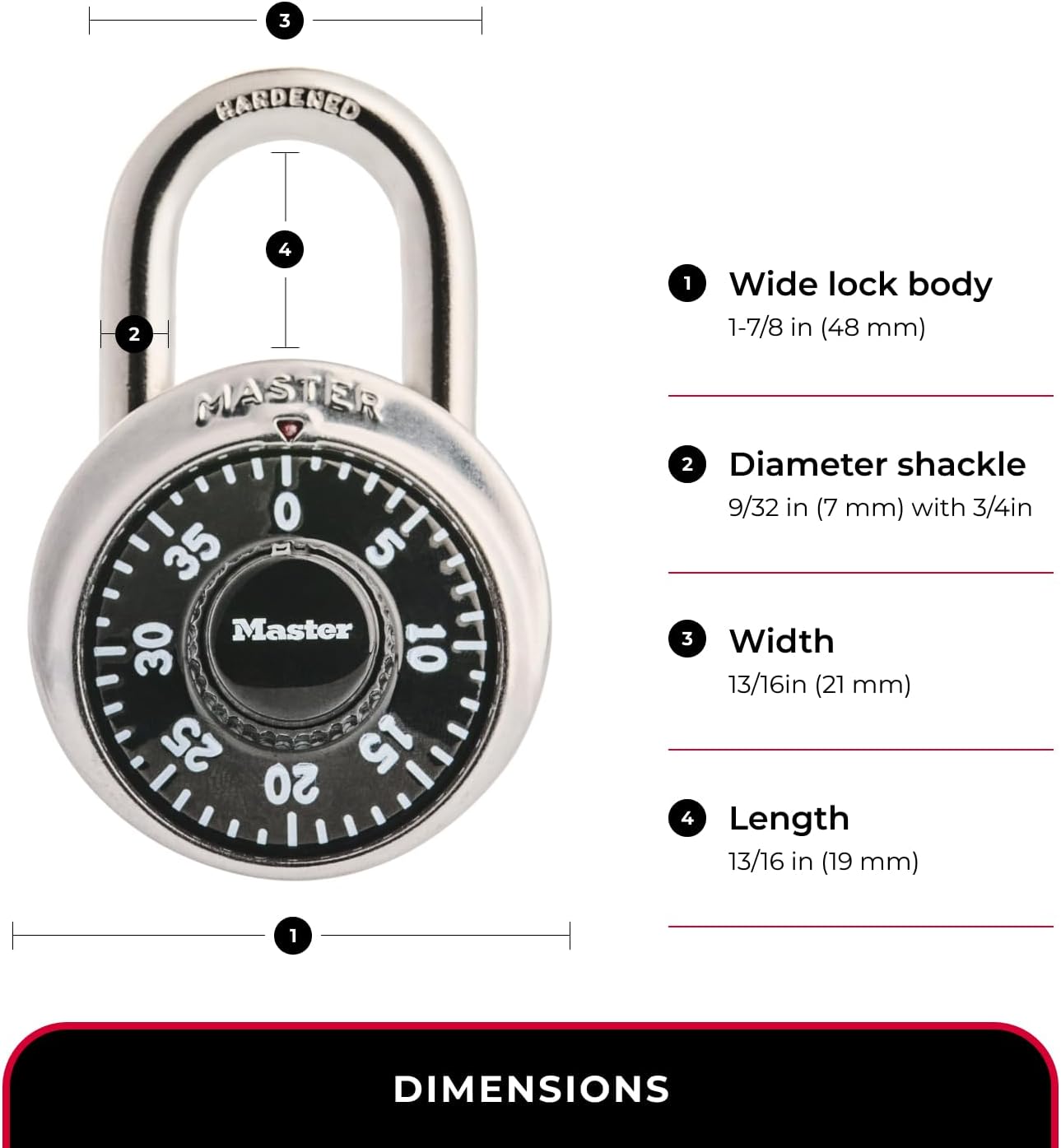
This diagram provides detailed measurements of the Master Lock 1500D padlock, including its wide lock body (1-7/8 inches or 48 mm), shackle diameter (9/32 inches or 7 mm), shackle length (3/4 inches or 19 mm), and shackle width (13/16 inches or 21 mm).
Warranty and Support
Limited Lifetime Warranty
The Master Lock 1500D Combination Padlock is backed by a Limited Lifetime Warranty, providing assurance against defects in material and workmanship. For full details regarding warranty coverage and claims, please refer to the official Master Lock website or contact customer service.
Customer Support
For further assistance, product inquiries, or to report a forgotten combination (with proof of ownership), please visit the official Master Lock website at www.masterlock.com or contact their customer support directly.