
Toastmaster 1148X
Toastmaster 1148X Fast Bake 2-Pound Horizontal Bread Machine User Manual
Model: 1148X
Introduction
Welcome to the user manual for your Toastmaster 1148X Fast Bake 2-Pound Horizontal Bread Machine. This appliance is designed to simplify the bread-making process, allowing you to enjoy fresh, homemade bread with minimal effort. It features a 13-hour programmable timer, eight distinct settings including options for whole wheat, sweet, and French breads, and a Fast Bake setting for quick results. The nonstick loaf pan ensures easy cleanup. Please read this manual thoroughly before operating your bread machine to ensure safe and efficient use.
Setup and First Use
Unpacking
Carefully remove the bread machine and all accessories from the packaging. Retain the packaging for future storage or shipping. Verify that all components are present: the bread machine unit, nonstick loaf pan, and kneading paddle.
Initial Cleaning
Before first use, wipe the exterior of the bread machine with a damp cloth. Wash the nonstick loaf pan and kneading paddle with warm, soapy water. Rinse thoroughly and dry completely. Do not immerse the main unit in water.
Placement
Place the bread machine on a stable, flat, heat-resistant surface, away from direct sunlight and heat sources. Ensure there is adequate ventilation around the unit. Do not place it near flammable materials.

This image shows the Toastmaster 1148X bread machine from the front, highlighting its compact, vertical design and the control panel located on the top surface.
Operating Instructions
Control Panel Overview
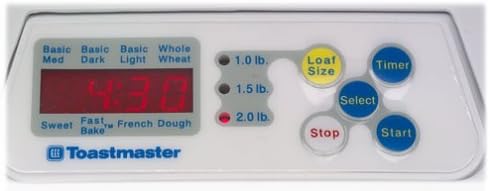
This image provides a detailed view of the bread machine's control panel, showing the digital display, loaf size indicators (1.0 lb, 1.5 lb, 2.0 lb), and buttons for Loaf Size, Timer, Select, Stop, and Start. Program names like Basic, Sweet, Fast Bake, French, and Dough are also visible.
The control panel features a digital display, loaf size indicators, and several buttons:
- Display: Shows program number, time remaining, and other indicators.
- Loaf Size: Selects the desired loaf weight (1.0 lb, 1.5 lb, or 2.0 lb).
- Timer: Used to set the delay start time for baking.
- Select: Cycles through the available bread programs.
- Stop: Cancels the current program or stops operation.
- Start: Begins the selected program.
Adding Ingredients
Always add ingredients in the order specified by your recipe (typically liquids first, then dry ingredients, with yeast last). Ensure the kneading paddle is correctly installed in the loaf pan before adding ingredients. Place the loaf pan securely into the bread machine.
Program Selection
Use the 'Select' button to choose from the eight available programs:
- Basic: For white and mixed breads.
- Whole Wheat: For whole wheat flour recipes.
- Sweet: For breads with high sugar content.
- French: For light breads with a crispy crust.
- Fast Bake: For quick bread recipes, baking in under one hour.
- Dough: Prepares dough for baking in a conventional oven (e.g., pizza, bagels).
- Additional Basic options for Light, Medium, and Dark crusts.
Crust Color Selection
For Basic breads, you can choose between light, medium, and dark crusts. This option is typically selected after choosing the Basic program and before pressing 'Start'.
Timer Function (Delay Start)
The 13-hour timer allows you to preprogram baking up to 13 hours in advance. After selecting your program and loaf size, use the 'Timer' button to adjust the delay time. The machine will start automatically at the set time.
Baking Process and Keep Warm
Once the program starts, the machine will automatically knead, rise, and bake the bread. After baking is complete, the machine will automatically switch to a 3-hour 'Keep Warm' cycle to maintain the bread's temperature.
Maintenance and Cleaning
Cleaning
Always unplug the bread machine and allow it to cool completely before cleaning.
- Loaf Pan and Kneading Paddle: Wash with warm, soapy water. The nonstick coating allows for easy cleanup. Do not use abrasive cleaners or scouring pads.
- Exterior: Wipe the exterior of the bread machine with a soft, damp cloth. Do not immerse the unit in water or any other liquid.
- Interior: Use a soft, dry cloth to clean the interior of the baking chamber. Remove any crumbs or flour residue.
Storage
Ensure the bread machine is clean and dry before storing. Store it in a cool, dry place, away from direct sunlight. You may use the original packaging for storage.
Troubleshooting
If you encounter issues with your bread machine, refer to the following common problems and solutions:
- Bread does not rise: Check yeast freshness, ensure proper water temperature (not too hot or cold), and verify ingredient measurements.
- Bread is too dense: Too much flour or not enough liquid. Ensure accurate measurements.
- Crust is too dark/light: Adjust the crust color setting (Light, Medium, Dark) if available for your selected program.
- Machine stops unexpectedly: Check power connection. If the machine overheats, it may shut off automatically; allow it to cool before restarting.
- Ingredients not mixing: Ensure the kneading paddle is correctly installed in the loaf pan.
For persistent issues, please contact customer support.
Specifications
| Feature | Specification |
|---|---|
| Model Number | 1148X |
| Brand | Toastmaster |
| Loaf Capacity | 2-pound (horizontal loaves) |
| Programs | 8 (Basic, Whole Wheat, Sweet, French, Fast Bake, Dough, etc.) |
| Timer | 13-hour programmable delay timer |
| Crust Settings | Light, Medium, Dark |
| Keep Warm Function | 3 hours |
| Loaf Pan | Nonstick |
| Dimensions (approx.) | 14 x 10.5 x 12 inches |
| Weight (approx.) | 16.7 pounds |
| Color | White |
Warranty and Support
Warranty Information
This Toastmaster 1148X Fast Bake 2-Pound Horizontal Bread Machine comes with a 1-year limited warranty from the date of purchase. This warranty covers defects in materials and workmanship under normal household use. Please retain your proof of purchase for warranty claims.
Customer Support
For technical assistance, troubleshooting beyond this manual, or warranty service, please contact Toastmaster customer support. Refer to the contact information provided with your product packaging or visit the official Toastmaster website for the most current support details.
Related documents1148X


Ask a question about this manual
Ask about setup, troubleshooting, compatibility, parts, safety, or missing instructions. Manuals+ will review the question and use this page’s manual context to help answer it.