
1. Introduction
The Heath Zenith SL-5412-WH-D is a 300-watt motion-sensing twin security light designed for outdoor illumination. It features a 180-degree motion detection range of up to 70 feet, providing reliable security lighting. This unit incorporates "pulse count" technology to minimize false triggers from environmental factors like wind and rain. The light includes adjustable lamp heads and a selectable timer for customized operation.
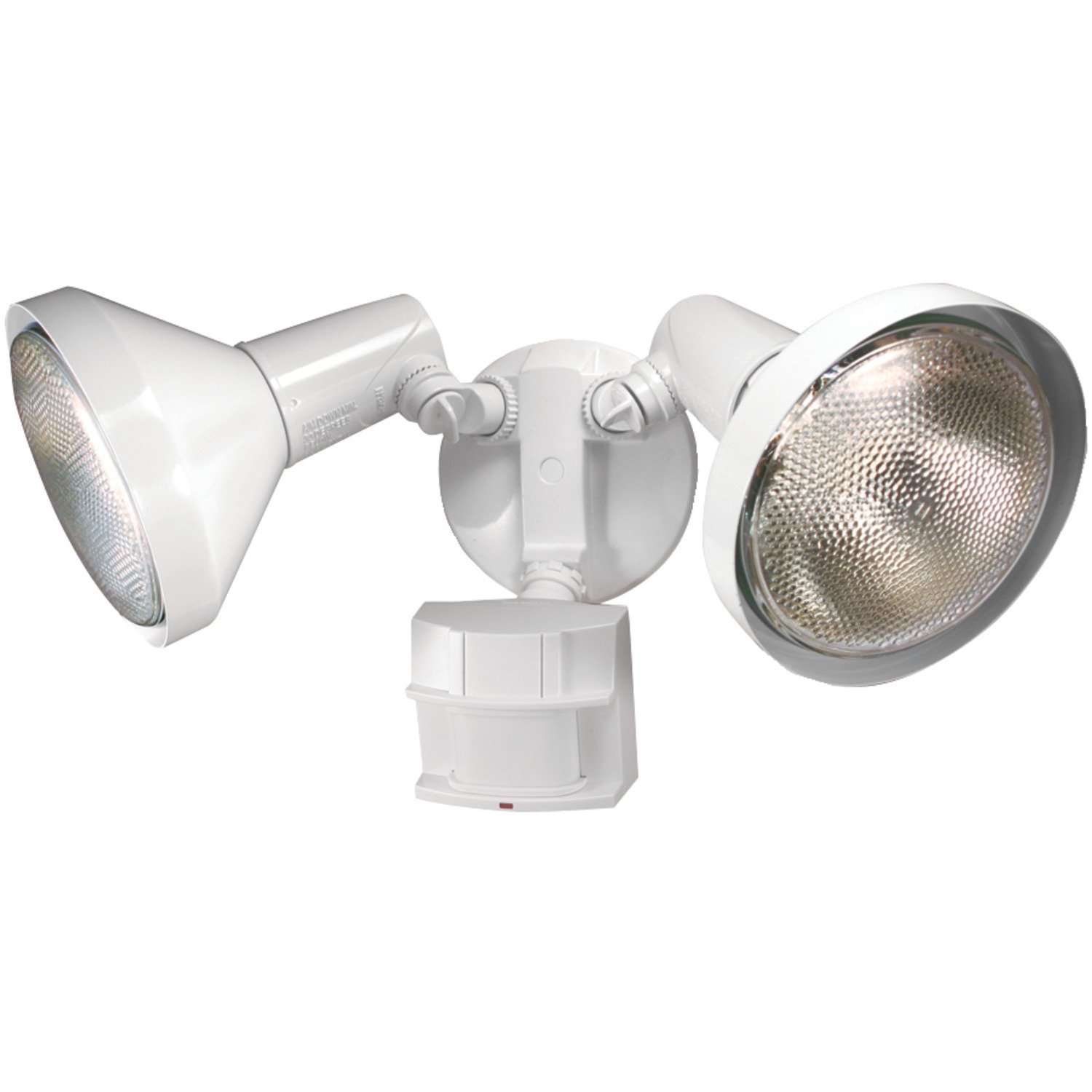
Image of the Heath Zenith SL-5412-WH-D motion-sensing twin security light in white, showing its two adjustable lamp heads and integrated motion sensor.
2. Safety Information
- WARNING: Disconnect power at the fuse or circuit breaker before installing or servicing.
- This product must be installed in accordance with the National Electrical Code and all applicable local codes. If you are unsure about wiring, consult a qualified electrician.
- Do not install this product on a dimmer switch.
- Ensure the fixture is properly grounded.
- For outdoor use only.
- Use only PAR38 flood bulbs as specified. Do not exceed the maximum wattage.
3. Package Contents
Verify that all components are present before beginning installation:
- Lamp holders (2)
- Light control (motion sensor unit)
- Bulb shells (2)
- Hardware kit, including:
- Plastic hanger
- Mounting bolt
- Rubber plug
- Gasket
- Mounting strap
- Wire connectors (2)
- Screws (6)
Note: Two 120W Max PAR38 flood bulbs are required but not included.
4. Installation Instructions
- Prepare for Installation: Turn off power at the circuit breaker or fuse box before starting.
- Mounting Location: Select a suitable wall-mount location that provides the desired detection coverage and is within reach of electrical wiring.
- Attach Mounting Strap: Secure the mounting strap to the electrical junction box using the provided screws.
- Wiring: Connect the fixture's wires to your household wiring. Connect the black wire from the fixture to the black (hot) wire from the junction box, the white wire from the fixture to the white (neutral) wire from the junction box, and the ground wire from the fixture to the ground wire from the junction box. Use the provided wire connectors and ensure all connections are secure.
- Secure Fixture: Carefully push the wired fixture onto the mounting strap, aligning the mounting bolt. Secure the fixture to the mounting strap using the mounting bolt and gasket.
- Install Bulbs: Screw two PAR38 flood bulbs (up to 120W each, not included) into the lamp holders.
- Adjust Lamp Heads: Use the patented swivel arms and easy thumb screw adjustments to direct the light beams as desired.
- Restore Power: Turn the power back on at the circuit breaker or fuse box.
5. Operating Instructions
- Motion Detection: The sensor detects motion within a 180-degree field up to 70 feet away. The detection sensitivity can be adjusted to suit your environment.
- Selectable Light Timer: The light features a selectable timer to control how long the lights remain on after motion stops. Options typically include:
- Test: For initial setup and aiming.
- 1 Minute: Lights stay on for approximately 1 minute.
- 5 Minutes: Lights stay on for approximately 5 minutes.
- 20 Minutes: Lights stay on for approximately 20 minutes.
- Manual Override: To keep the lights on continuously or turn them off for an extended period, use an existing indoor wall switch connected to the fixture. Flipping the switch on and off in quick succession typically activates or deactivates the manual override function. Refer to the specific instructions on the sensor for exact override procedures.
- Pulse Count Technology: This feature helps prevent false activations by wind, rain, or small animals, ensuring the light only triggers when significant motion is detected.
6. Maintenance
- Bulb Replacement: To replace bulbs, ensure power is off at the circuit breaker. Allow bulbs to cool completely before handling. Unscrew old bulbs and replace with new PAR38 flood bulbs (up to 120W each).
- Cleaning: Periodically clean the fixture and sensor lens with a soft, damp cloth. Do not use abrasive cleaners or solvents, as these can damage the finish or sensor.
- Inspection: Regularly inspect the wiring and mounting for any signs of wear or damage.
7. Troubleshooting
- Light does not turn on:
- Check if power is supplied to the fixture.
- Ensure bulbs are properly seated and not burnt out.
- Verify the sensor is aimed correctly and not obstructed.
- Adjust sensor sensitivity.
- Check the timer setting; ensure it's not in 'Test' mode indefinitely.
- Light stays on continuously:
- Check if the manual override function is active. Turn the wall switch off for a few seconds, then back on to reset.
- Ensure the sensor is not detecting constant motion (e.g., tree branches, traffic). Adjust sensor aim or sensitivity.
- Verify the timer setting is not set to a very long duration or stuck.
- Light triggers too often (false triggers):
- Reduce sensor sensitivity.
- Adjust the sensor's angle to avoid detecting unwanted areas (e.g., public sidewalks, moving foliage).
- Ensure the sensor is not aimed at heat sources or reflective surfaces.
8. Specifications
| Brand | Heath Zenith |
| Model Number | HZ-5412-WH-D |
| Color | White |
| Wattage | 300-watt (uses two 120W Max PAR38 flood bulbs, not included) |
| Motion Detection Range | Up to 70 feet |
| Motion Detection Angle | 180 degrees |
| Mounting Type | Wall Mount |
| Frequency | 60 hertz |
| Item Weight | 1.8 pounds |
9. Warranty and Support
This Heath Zenith product is covered by a 2-year manufacturer warranty. For warranty claims or technical support, please contact Heath Zenith customer service directly. Keep your proof of purchase for warranty validation.


