
1. Introduction
This manual provides essential information for the proper setup, operation, and maintenance of your GPX C3302RS Sports Cassette Player. Please read these instructions thoroughly before using the device to ensure optimal performance and longevity.
2. Setup
2.1 Unpacking
Carefully remove the cassette player from its packaging. Ensure all components are present. Retain the packaging for future transport or storage.
2.2 Power Source: Battery Installation
The GPX C3302RS requires two (2) AA batteries for operation. Follow these steps to install the batteries:
- Locate the battery compartment cover, typically on the back or side of the unit.
- Slide or lift the cover to open the compartment.
- Insert two fresh AA batteries, ensuring the positive (+) and negative (-) terminals align with the markings inside the compartment.
- Close the battery compartment cover securely.
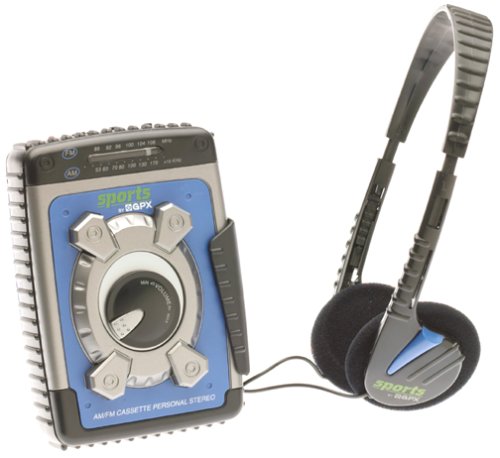
Image: The GPX C3302RS Sports Cassette Player with its cassette compartment open, revealing the internal mechanism. This view also indicates the general location for battery access, often adjacent to or within the main body of the player.
2.3 Connecting Headphones
Locate the headphone jack, usually marked with a headphone symbol. Insert your 3.5mm stereo headphones firmly into this jack. Ensure the connection is secure for optimal audio output.
3. Operating Instructions
3.1 Loading a Cassette Tape
- Press the STOP/EJECT button to open the cassette compartment door.
- Insert a cassette tape with the exposed tape side facing upwards and the desired side (A or B) facing the playback head.
- Gently close the cassette compartment door until it clicks shut. Do not force the door.
3.2 Cassette Playback Controls
- PLAY (►): Press this button to start playing the cassette tape.
- STOP/EJECT (■/▲): Press once to stop playback. Press again to open the cassette compartment.
- FAST FORWARD (FFWD ►►): Press and hold to rapidly advance the tape. Release to stop.
- REWIND (REW ◄◄): Press and hold to rapidly rewind the tape. Release to stop.
- PAUSE (▐▐): Press to temporarily stop playback without disengaging the tape. Press again to resume.
3.3 Volume Control
Rotate the VOLUME dial, typically located on the side or front of the unit, to adjust the audio output level through your headphones.
3.4 AM/FM Radio Operation
Your GPX C3302RS includes an integrated AM/FM radio tuner.
- Slide the FUNCTION switch to either AM or FM.
- Rotate the TUNING dial to scan for radio stations.
- Adjust the VOLUME dial to your desired listening level.
- For optimal FM reception, extend the telescopic antenna. For AM reception, rotate the unit for best signal.
3.5 Bass Boost Function
Engage the BASS BOOST switch (if present) to enhance low-frequency audio output for a richer sound experience.
4. Maintenance
4.1 Cleaning the Unit
- Exterior: Wipe the exterior of the player with a soft, slightly damp cloth. Do not use abrasive cleaners or solvents.
- Tape Heads: Periodically clean the tape heads, pinch roller, and capstan using a cotton swab lightly moistened with isopropyl alcohol. This helps maintain sound quality and prevents tape damage.
4.2 Battery Care and Replacement
- Replace batteries when the sound becomes distorted or the unit stops functioning.
- Always replace both batteries at the same time with new ones.
- Remove batteries if the unit will not be used for an extended period to prevent leakage and damage.
- Dispose of used batteries responsibly according to local regulations.
4.3 Storage
When not in use, store the cassette player in a cool, dry place away from direct sunlight, extreme temperatures, and excessive dust.
5. Troubleshooting
| Problem | Possible Cause | Solution |
|---|---|---|
| No power | Dead or incorrectly installed batteries. | Replace batteries with fresh ones, ensuring correct polarity. |
| No sound | Headphones not connected properly; Volume too low; Dirty tape heads. | Ensure headphones are fully plugged in. Increase volume. Clean tape heads. |
| Tape not playing/moving | Tape jammed; PLAY button not fully engaged; Batteries low. | Check tape for damage. Press PLAY firmly. Replace batteries. |
| Poor radio reception | Antenna not extended (FM); Unit orientation (AM); Weak signal area. | Extend FM antenna. Rotate unit for AM. Try moving to a different location. |
6. Specifications
- Model Number: C3302RS
- Power Source: 2 x 'AA' size batteries (not included)
- Product Dimensions: 4.2 x 2 x 5.1 inches (approximate)
- Item Weight: 1.6 ounces (without batteries)
- Manufacturer: GPX
7. Warranty and Support
For warranty information or technical support regarding your GPX C3302RS Sports Cassette Player, please refer to the warranty card included with your purchase or visit the official GPX website. Keep your purchase receipt as proof of purchase.
