
Introduction
Welcome to the Hasbro Star Wars Episode 1 Electronic Lightsaber Duel Game. This manual provides essential information for setting up, operating, and maintaining your game. Please read these instructions carefully before use to ensure proper function and enjoyment.
This electronic game allows players to recreate iconic lightsaber duels from Star Wars Episode 1, featuring characters like Qui-Gon Jinn and Darth Maul. The game unit includes two lightsaber controllers that interact with the figures on the playing surface.
Safety Information
- Battery Safety: This product requires batteries. Always follow battery manufacturer's instructions. Do not mix old and new batteries, or different types of batteries. Remove batteries if the product is not used for an extended period.
- Small Parts: This game may contain small parts and is not suitable for children under 3 years of age due to choking hazards.
- Adult Supervision: Adult supervision is recommended during play, especially during initial setup.
Package Contents
Ensure all components are present before beginning setup:
- 1 x Electronic Lightsaber Duel Game Base Unit
- 2 x Character Figures (e.g., Qui-Gon Jinn, Darth Maul)
- 2 x Lightsaber Controllers
- 1 x Instruction Manual (this document)
Setup
1. Battery Installation
- Locate the battery compartment on the underside of the game base unit.
- Using a Phillips head screwdriver, open the battery compartment cover.
- Insert 3 x "AA" (LR6) alkaline batteries, ensuring correct polarity (+/-) as indicated inside the compartment. Batteries are not included.
- Replace the battery compartment cover and secure it with the screw.
2. Game Unit Assembly
The main game unit is largely pre-assembled. Attach the lightsaber controllers to the designated ports on the sides of the game base unit. Ensure they click securely into place.
Place the character figures onto their respective platforms on the game base. The figures are designed to rotate and interact with the lightsaber controllers.
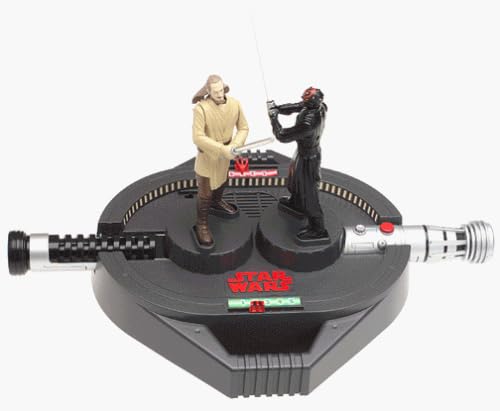
Image: The assembled Hasbro Star Wars Episode 1 Electronic Lightsaber Duel Game, showing the central base unit with two character figures (Qui-Gon Jinn and Darth Maul) engaged in a duel, and the two lightsaber-shaped controllers extending from the sides.
Operating Instructions
1. Powering On
Locate the ON/OFF switch, typically found on the side or back of the game base unit. Slide the switch to the "ON" position. You should hear a startup sound effect.
2. Starting a Duel
Each player takes one lightsaber controller. Press the designated "Start" or "Duel" button on the game base or one of the controllers to begin a game. The figures will likely reset to a starting position.
3. Gameplay
- Use your lightsaber controller to manipulate your character figure on the game base. The controllers typically allow for movement and attack actions.
- The objective is to outmaneuver your opponent and land successful "hits" with your character's lightsaber.
- The game unit will provide electronic sound effects and possibly light indicators to signify hits, blocks, and other game events.
- Refer to the specific game rules printed on the packaging or a separate quick-start guide for detailed scoring and winning conditions.
4. Sound Effects
The game features authentic Star Wars lightsaber sounds and character phrases. Volume control may be available on the game base unit.
Maintenance
Cleaning
Wipe the game unit and figures with a soft, dry cloth. Do not use abrasive cleaners or immerse the unit in water. Keep the electronic components dry.
Storage
Store the game in a cool, dry place away from direct sunlight. If storing for an extended period, remove the batteries to prevent leakage.
Troubleshooting
| Problem | Possible Cause | Solution |
|---|---|---|
| Game does not turn on. | Batteries are dead or incorrectly installed. | Check battery polarity. Replace with fresh "AA" alkaline batteries. |
| Figures do not move or respond. | Lightsaber controllers not properly connected or game unit malfunction. | Ensure lightsaber controllers are securely attached. Turn the unit off and on again. |
| No sound or distorted sound. | Low batteries or speaker malfunction. | Replace batteries. Check if volume control (if present) is turned up. |
If troubleshooting steps do not resolve the issue, please refer to the Warranty & Support section.
Specifications
| Brand | Hasbro |
| Model Name | Star Wars Episode 1 Electronic Lightsaber Duel Game |
| ASIN | B00000IWFO |
| Batteries Required | Yes (3 x "AA" alkaline batteries) |
| Batteries Included | No |
| Assembly Required | No (Minor attachment of controllers) |
| Parcel Dimensions | 40.89 x 27.69 x 8.64 cm |
| Weight | 884.51 g |
| Manufacturer | Hasbro |
Warranty & Support
This product is covered by Hasbro's standard manufacturer warranty. For specific warranty details, please refer to the packaging or contact Hasbro customer service directly.
For technical support, replacement parts, or further assistance, please visit the official Hasbro website or contact their customer service department. Contact information can typically be found on the product packaging or their corporate website.


