
Introduction
Thank you for purchasing the OPEN Neon Lights Artistic LED Ornaments. This manual provides essential information for the safe and efficient use of your new neon sign. Please read it thoroughly before installation and operation, and keep it for future reference.
Video showcasing the various colors and display options of the OPEN Neon Light.
Important Safety Information
- ATTENTION: Not suitable for children under 36 months.
- This product is designed for indoor use only. Do not expose to water or high humidity.
- Do not attempt to open or modify the device. This may cause damage and void any implied warranty.
- Use only the specified power source (3 x AA batteries or USB 5V).
- Keep away from heat sources and direct sunlight to prevent damage to materials.
- If the product is damaged, discontinue use immediately.
Package Contents
Please check the package for the following items:
- 1 x OPEN LED Neon Sign
- 1 x Battery Box with USB Cable (batteries not included)

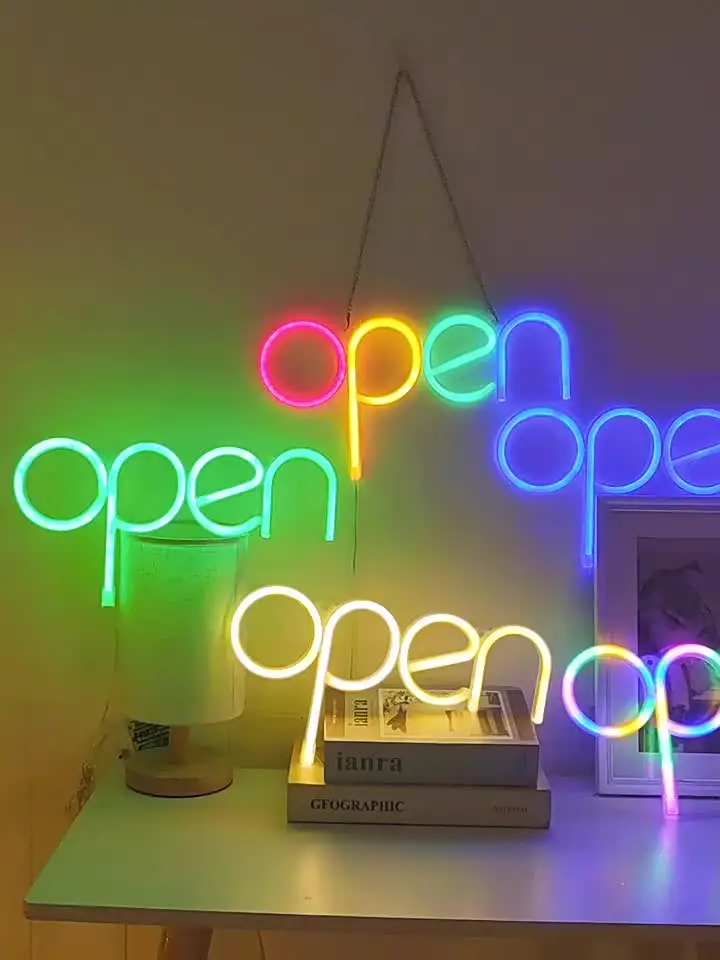
OPEN Neon Light in various colors, suitable for room decoration.
Setup Instructions
Your OPEN Neon Light can be powered by 3 x AA batteries or via a USB connection.
- Power Source Connection:
- Using Batteries: Open the battery compartment on the back of the sign. Insert 3 x AA batteries (not included), ensuring correct polarity (+/-). Close the battery compartment securely.
- Using USB: Connect the USB cable from the battery box to any standard USB power adapter (e.g., phone charger, computer USB port, power bank).
- Placement: Position your neon sign on a flat surface or hang it on a wall using appropriate hooks (not included). Ensure it is stable and secure.

Rear view of the OPEN Neon Light, showing the battery compartment and USB power input.
Operating Instructions
To operate your OPEN Neon Light:
- Power On/Off: Locate the power button on the battery box. Press and hold the power button for 2 seconds to turn the product on or off.

RGB OPEN Neon Light illuminating a room.
Maintenance and Care
- Cleaning: Gently wipe the neon sign with a soft, dry cloth. Do not use abrasive cleaners or solvents.
- Storage: When not in use for extended periods, remove the batteries to prevent leakage. Store the sign in a cool, dry place.
- Battery Replacement: If the light dims or flickers, replace the AA batteries.
Troubleshooting
| Problem | Possible Cause | Solution |
|---|---|---|
| Light does not turn on | No power, dead batteries, or loose USB connection. | Check if batteries are inserted correctly and are not depleted. Ensure USB cable is securely connected to a working power source. |
| Light is dim or flickers | Low battery power. | Replace batteries with new ones or switch to USB power. |
Specifications
| Feature | Detail |
|---|---|
| Product Type | LED Neon Sign Nightlight |
| Model | 304 |
| Material | PVC + LED |
| Power Source | 3 x AA Dry Batteries (not included) or USB 5V |
| Voltage | 6 V |
| Luminous Flux | <60 Lumens |
| Color Temperature | <2700K (Warm White, Red, Blue, RGB, etc. depending on variant) |
| Dimensions (approx.) | 36 x 2.3 x 15 cm |
| Application | Indoor |
| Certifications | CE, FC, RoHS, UKCA, NOM |
| Origin | Made in China |

Warm White OPEN Neon Light providing a cozy ambiance.
User Tips
- For best visual effect, place the neon sign against a plain background.
- Consider using rechargeable AA batteries for an eco-friendly and cost-effective power solution.
- When using USB power, ensure the adapter provides stable 5V output.
Warranty and Support
For any questions, technical support, or warranty inquiries, please contact your retailer or the manufacturer directly. Please have your product model number (304) and purchase details ready.