
Introduction
The Anker Soundcore Sleep A20 Sleep Earbuds (Model A6611) are designed to provide a comfortable and undisturbed sleep experience. These Bluetooth wireless earphones feature advanced noise-blocking technology, a lightweight ergonomic design, and long battery life, making them an ideal companion for achieving deep sleep. This manual provides detailed instructions on how to set up, operate, maintain, and troubleshoot your Sleep A20 earbuds.
Setup
Package Contents
- Charging Case x1
- Sleep A20 Earbuds x1 (pair)
- Earwings x4 (pairs of different sizes)
- Eartips x3 (pairs of different sizes)
- USB-C Charging Cable x1
Charging the Earbuds and Case
Before first use, fully charge the earbuds and the charging case.
- Place the earbuds into the charging case.
- Connect the USB-C charging cable to the charging port on the case and a power source.
- The LED indicators on the case will show the charging status.
Wearing the Earbuds
Proper fit is crucial for comfort and effective noise blocking.
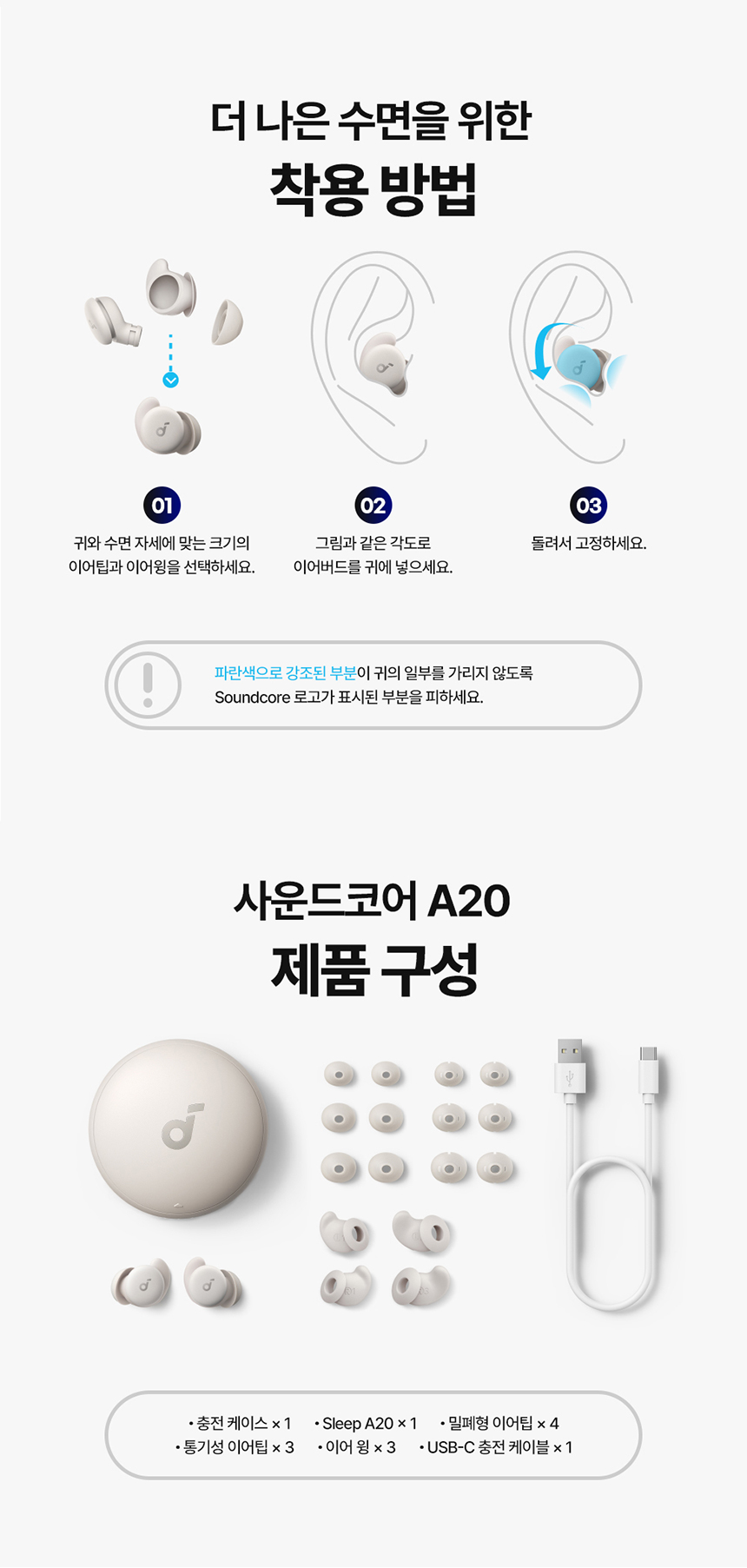
- Select the Right Fit: Choose the eartips and earwings that best fit your ear canal and preferred sleeping posture.
- Insert: Gently insert the earbud into your ear at an angle, as shown in the diagram.
- Rotate to Fix: Rotate the earbud slightly to secure it comfortably in your ear. Ensure the part with the Soundcore logo is not covered by your ear to avoid interference.
Pairing with Your Device
- Open the charging case. The earbuds will automatically enter pairing mode.
- On your device (smartphone, tablet, etc.), go to Bluetooth settings.
- Select "Soundcore Sleep A20" from the list of available devices.
- Once connected, you will hear a confirmation tone.
Operating Instructions
Modes of Operation
The Sleep A20 earbuds offer two primary modes:
- Sleep Mode: Designed for maximum noise blocking and playing soothing sounds from the Soundcore app.
- Bluetooth Mode: Allows you to stream audio from any Bluetooth-enabled device.
Soundcore App Features
Enhance your sleep experience by utilizing the Soundcore app.
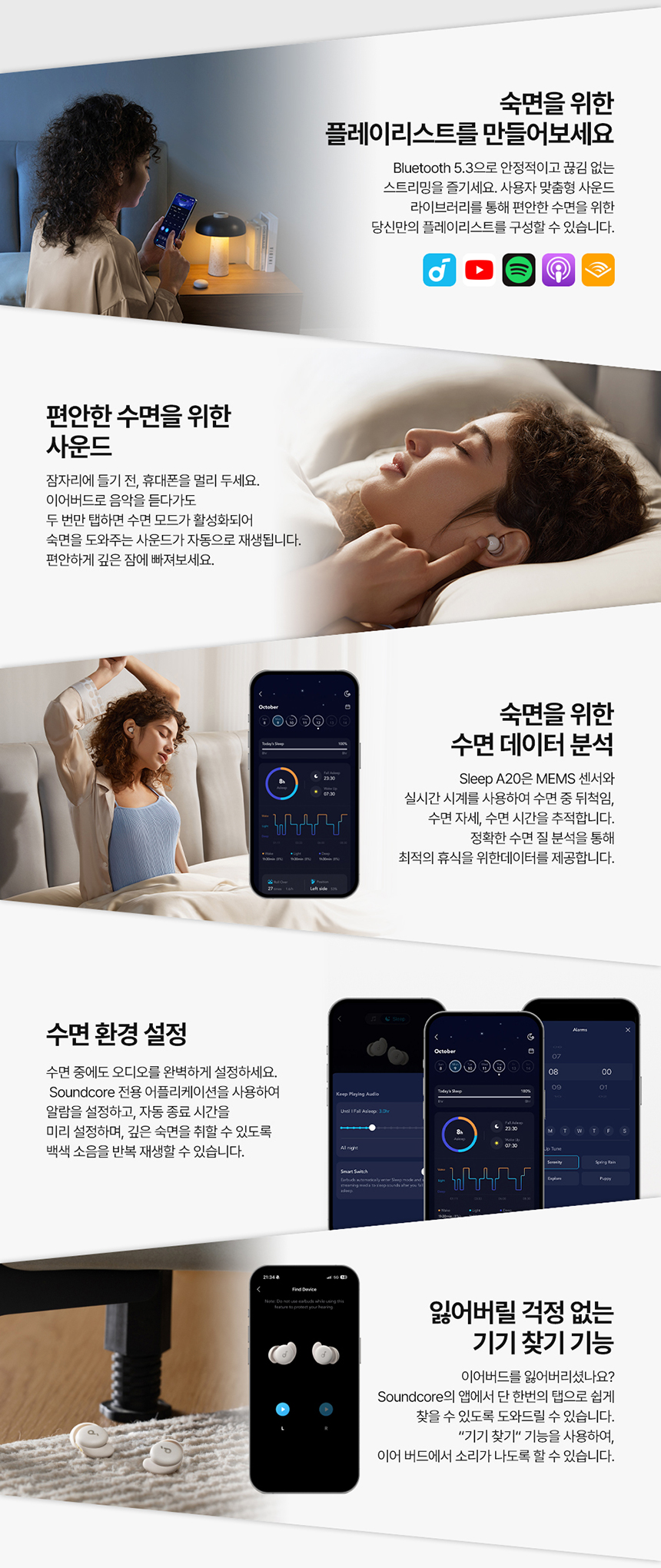
- Curate Your Sleep Playlist: Create personalized playlists of white noise, nature sounds, or other calming audio.
- Sound for Comfortable Sleep: Access a library of soothing sounds to mask disturbances.
- Sleep Data Analysis: The earbuds use a MEMS sensor and real-time clock to analyze your sleep patterns, providing insights for better rest.
- Sleep Environment Settings: Customize audio settings to create your ideal sleep environment.
- Find Lost Earbuds: If you misplace your earbuds, use the app to make them play a sound, helping you locate them.
Controls
The earbuds feature touch controls for basic functions. Refer to the app for customizable controls.
- Play/Pause: Single tap on either earbud.
- Next Track: Double tap on the right earbud (in Bluetooth mode).
- Previous Track: Double tap on the left earbud (in Bluetooth mode).
- Volume Control: Customizable via the Soundcore app.
- Switch Modes: Customizable via the Soundcore app.
Maintenance
Cleaning
- Regularly clean the earbuds and charging case with a soft, dry, lint-free cloth.
- Remove eartips and earwings periodically and clean them with mild soap and water. Ensure they are completely dry before reattaching.
- Do not use harsh chemicals or abrasive materials for cleaning.
Storage
- When not in use, always store the earbuds in their charging case to protect them and keep them charged.
- Store in a cool, dry place away from extreme temperatures and direct sunlight.
Troubleshooting
Earbuds not pairing/connecting
- Ensure the earbuds are charged and in pairing mode (LEDs flashing).
- Turn off and on your device's Bluetooth.
- Forget "Soundcore Sleep A20" from your device's Bluetooth list and try pairing again.
- Reset the earbuds (refer to the Soundcore app or Anker support for specific reset instructions).
No sound or poor sound quality
- Check the volume level on both your device and the earbuds.
- Ensure the earbuds are properly seated in your ears.
- Clean any debris from the eartips and earbud nozzles.
- Try playing audio from a different source or app.
Charging issues
- Ensure the charging cable is securely connected to both the case and the power source.
- Try a different USB-C cable and power adapter.
- Clean the charging contacts on both the earbuds and the case.
App not recognizing earbuds
- Ensure the Soundcore app is updated to the latest version.
- Check if the earbuds' firmware is updated via the app.
- Restart the Soundcore app and your device.
Specifications

| Feature | Detail |
|---|---|
| Product Name | Soundcore A20 |
| Product Code | A6611 |
| Size (Earbud body) | Approx. 6.6 x 29 mm |
| Weight (Earbud) | Approx. 3g |
| Weight (Charging Case) | Approx. 59g |
| Bluetooth Version | Bluetooth 5.3 |
| Playback Time (Earbud body, Bluetooth Mode) | Max 10 hours |
| Playback Time (with Charging Case, Bluetooth Mode) | Max 55 hours |
| Playback Time (Earbud body, Sleep Mode) | Max 14 hours |
| Playback Time (with Charging Case, Sleep Mode) | Max 80 hours |
| Charging Time (Earbud body) | Approx. 1.5 hours |
| Charging Time (Earbud + Charging Case) | Approx. 3 hours |
| Charging Terminal | USB Type-C |
| Waterproof Standard | IPX4 |
Important Notes:
- Product specifications and packaging may change without prior notice.
- This product is not a medical device. Data provided is for reference only and not for diagnosis, treatment, or prevention of any disease.
- Microphone is not included; call function is not available.
- Active noise canceling (ANC) function is not available.
- DAP (Digital Audio Player) is not supported.
User Tips
- Comfortable Fit: Many users find these earbuds exceptionally comfortable, even when sleeping on their side, as they are designed to be flat and not catch on pillows. Experiment with different earwing and eartip sizes to find your perfect fit.
- Effective Noise Blocking: The 'kernel type' design provides basic passive noise blocking. Activating white noise or other soothing sounds via the Soundcore app significantly enhances the noise-blocking effect, making external sounds barely audible.
- Long-lasting Battery: The extended battery life is a frequently praised feature, ensuring uninterrupted use throughout the night.
- App Integration: Make sure to download and utilize the Soundcore app to unlock all features, including personalized soundscapes, sleep tracking, and the 'Find My Earbuds' function.
Warranty and Support
Anker products are built to high quality standards. The Anker Soundcore Sleep A20 comes with a 24-month warranty from the date of purchase, covering manufacturing defects. For technical support, troubleshooting assistance, or warranty claims, please contact Anker customer service. You can find contact information on the official Anker website or through your retailer.