
1. Introduction
The OBDSTAR iScan for Guzzi is a portable, intelligent motorcycle diagnostic tablet designed specifically for Moto Guzzi motorcycles. It features a robust industrial design and is powered by an RK3128 quad-core processor with a 5.0-inch capacitive touch screen, providing a professional diagnostic experience.
This device offers comprehensive diagnostic functions including fault guidance, technical bulletins, and various data flow display modes to accurately and efficiently diagnose issues. It supports automatic scanning, VIN recognition, control module programming and coding, ECU settings, instrument coding, tire pressure monitoring system functions, maintenance light reset, CO adjustment, idle speed adjustment, A/F value reset, ABS control unit settings, EOL mode, transmission memory reset, and clearing computer memory.
Supported languages include English (EN), Spanish (ES), Russian (RU), Portuguese (PT), Thai (TH), Turkish (TR), Farsi (FA), French (FR), German (DE), Polish (PL), Italian (IT), Indonesian (ID), and Vietnamese (VN).
2. Package Contents
Please verify that all items listed below are included in your package:
- 1 x iScan Tablet
- 1 x M001A Main Cable
- 1 x M002 Power Cable
- 1 x 12V2A Charger
- 1 x N041 OBD-6 Cable
- 1 x N004 GUZZI-3 Cable

3. Device Overview and Setup
3.1 Device Layout


The iScan device features the following ports and components:
- Speaker: For audio feedback.
- TF Card Slot: For inserting a Micro SD (TF) card (up to 32GB supported).
- Charging Port: For connecting the 12V2A charger.
- OFF/ON Button: Power button for the device.
- Type-C Socket: For data transfer or charging.
- Main Cable Port: For connecting the M001A main diagnostic cable.
- USB Port: For connecting USB accessories.
3.2 Initial Setup
- Charge the Device: Connect the 12V2A charger to the Charging Port and a power outlet. Ensure the device is fully charged before first use.
- Insert TF Card: If desired, insert a 32GB micro SD (TF) card into the TF Card Slot for extended memory.
- Power On: Press and hold the OFF/ON button to power on the device.
- Wi-Fi Connection: Navigate to 'Settings' on the main screen and connect to a stable Wi-Fi network for software updates and remote assistance.
- Registration/Activation: Follow the on-screen prompts or refer to the Quick Start Guide included in the package for initial registration and activation.
4. Operating Instructions
4.1 Main Interface
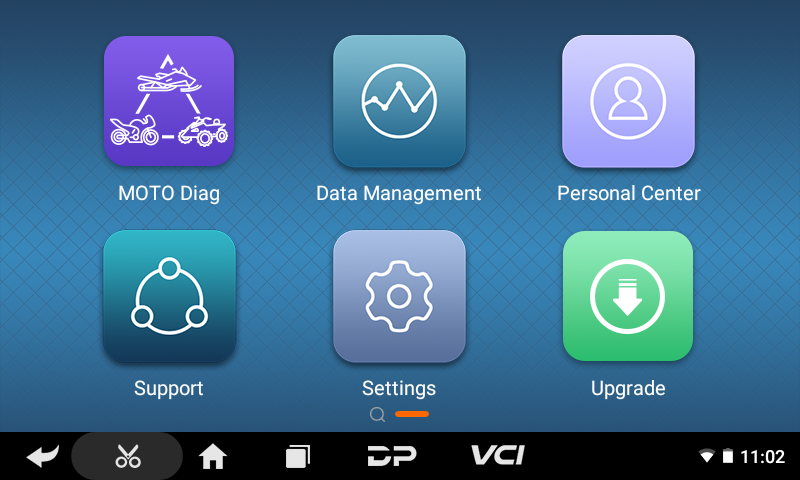
The main interface provides access to key functions:
- MOTO Diag: For initiating motorcycle diagnostics.
- Data Management: To manage saved diagnostic data.
- Personal Center: For user account and profile settings.
- Support: Access to help resources and remote assistance.
- Settings: Device configuration options.
- Upgrade: For software updates via Wi-Fi.
4.2 Performing Diagnostics
- Connect to Motorcycle:
- Identify the diagnostic socket on your Moto Guzzi motorcycle. Refer to Figure 4.2 for a general location guide (L=Left, R=Right).
- Connect the appropriate diagnostic cable (e.g., N004 GUZZI-3 cable) to the motorcycle's diagnostic socket and to the iScan's Main Cable Port.
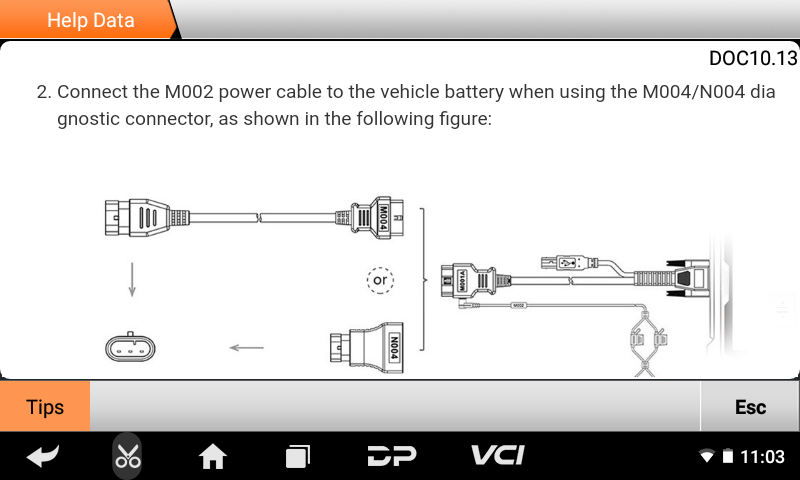
- If using M004/N004 diagnostic connector, connect the M002 power cable to the vehicle battery as shown in Figure 4.3.
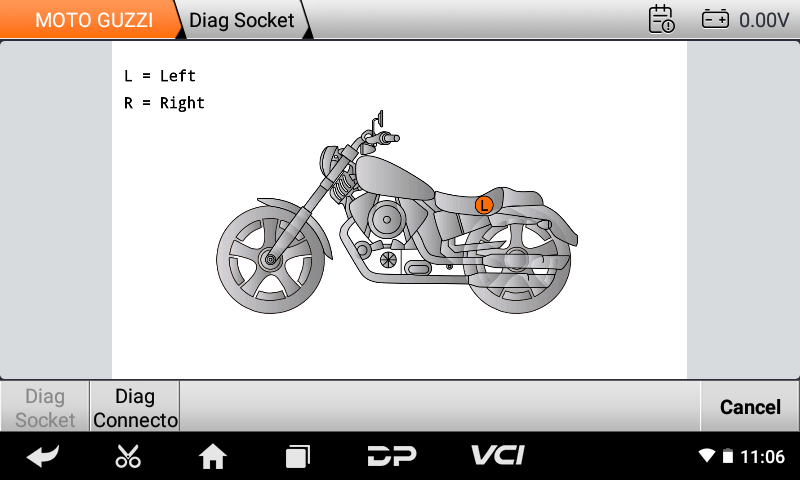
Figure 4.2: Diagnostic Socket Location Guide. 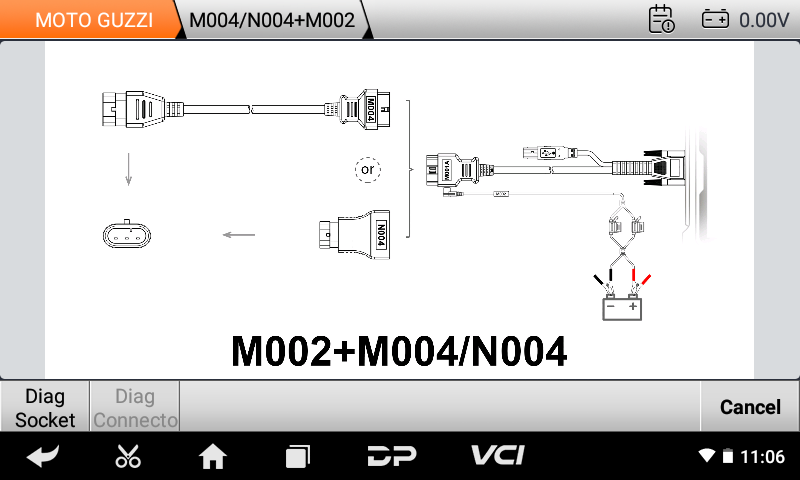
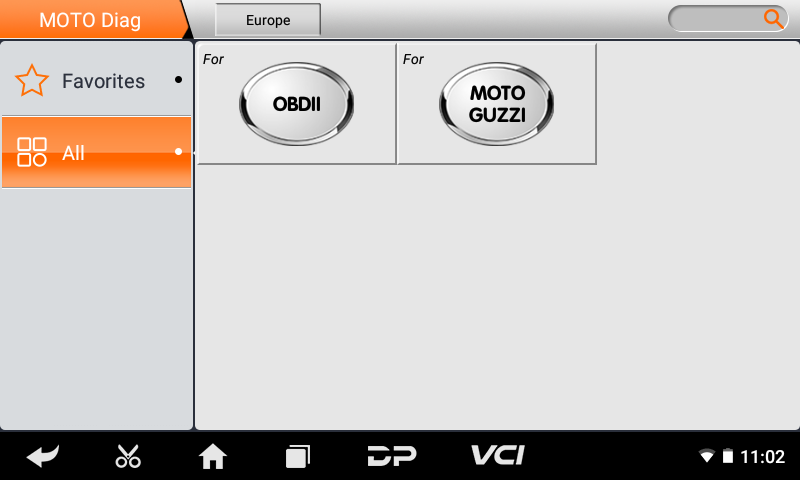
Figure 4.3: M002 Power Cable Connection. - Select 'MOTO Diag': From the main menu, tap on 'MOTO Diag'.
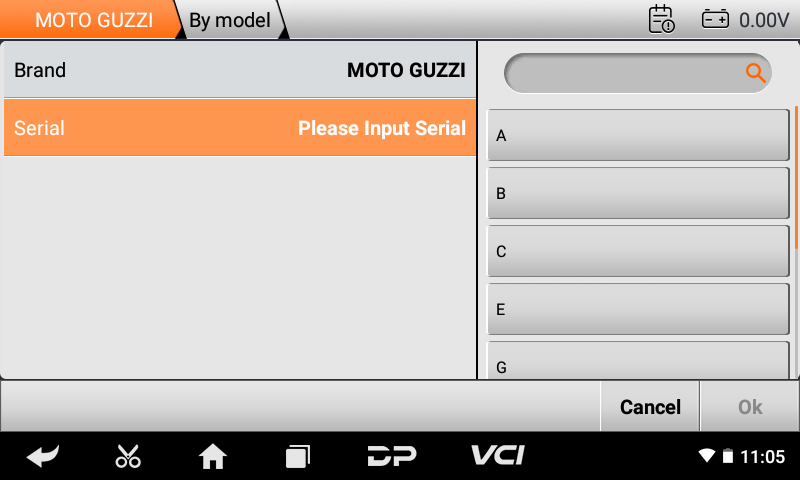
- Select Brand: Choose 'MOTO GUZZI' from the brand list. You may also select 'OBDII' for generic OBD-II diagnostics.
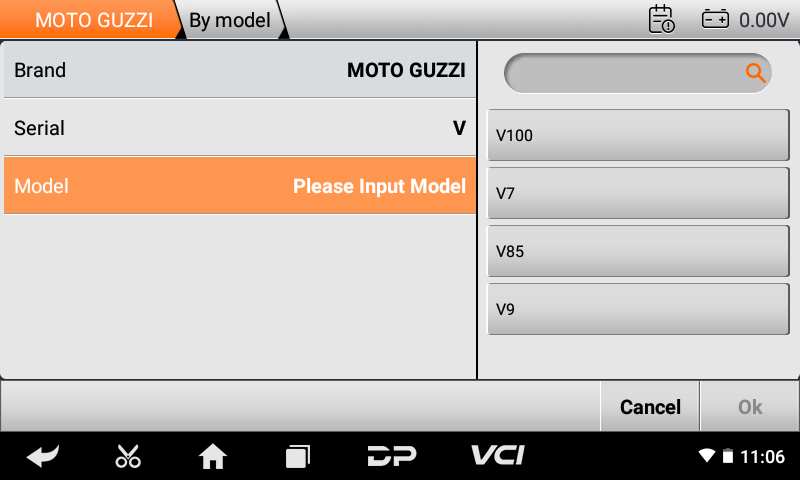
- Select Model/Serial: Input the serial number or select the specific model of your Moto Guzzi motorcycle (e.g., V100, V7, V85, V9).
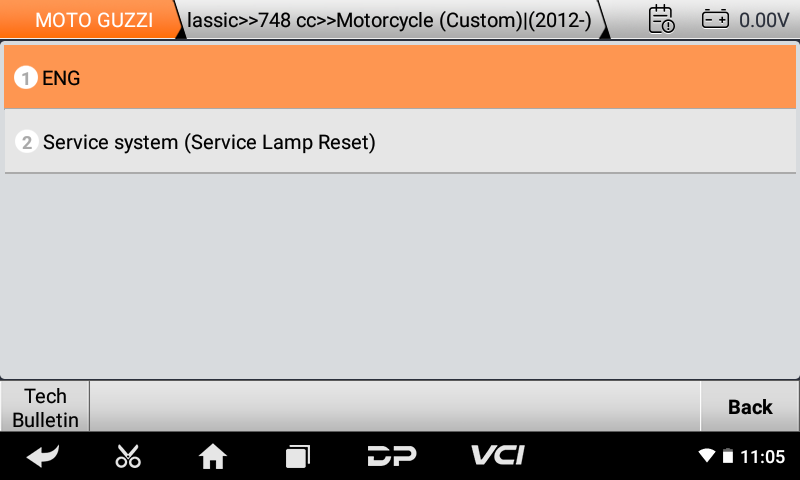
- Choose Diagnostic Function: Select from options like 'ENG' (Engine) or 'Service system (Service Lamp Reset)'.
- Execute Test/Function: Follow the on-screen instructions to perform code reading, clearing, data flow analysis, action tests, settings, coding, or special functions.
4.3 Special Functions
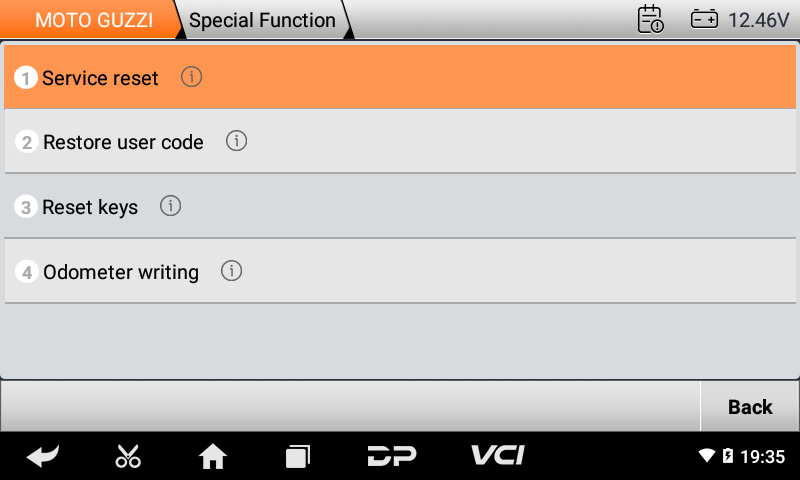
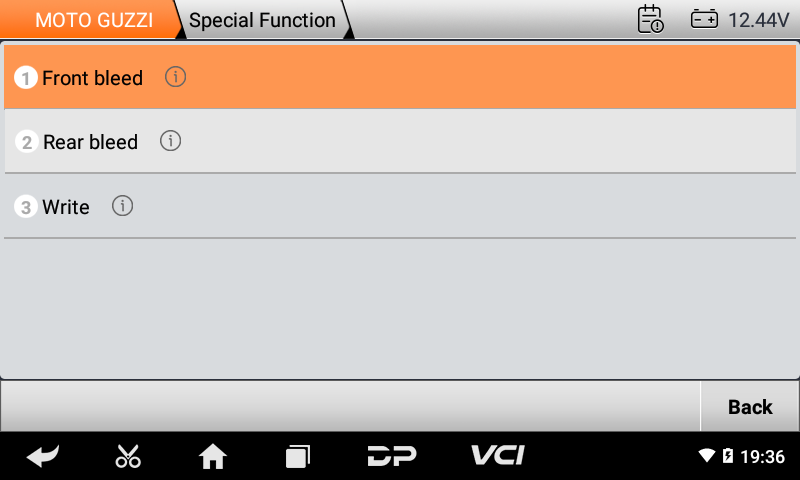
The iScan offers various special functions for advanced maintenance and adjustments:
- Service Reset
- Restore User Code
- Reset Keys
- Odometer Writing
- Front Bleed
- Rear Bleed
- Write
4.4 Help Data and Technical Bulletins
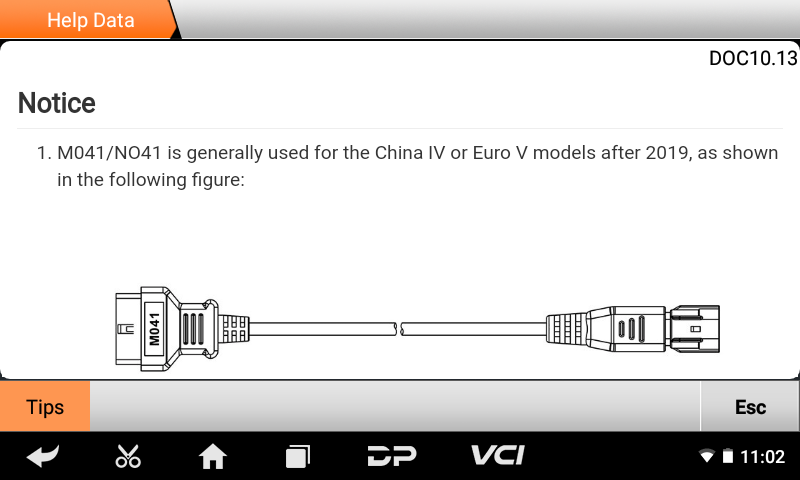
The device provides integrated help data and technical bulletins to assist with diagnosis. These resources can offer guidance on specific error codes or connection procedures.
5. Maintenance
- Cleaning: Use a soft, dry cloth to clean the device. Avoid abrasive cleaners or solvents.
- Storage: Store the device in a cool, dry place within the specified storage temperature range (-20℃ to 70℃ / -4℉ to 158℉).
- Software Updates: Regularly check for software updates via the 'Upgrade' function on the main menu. Connect to Wi-Fi and perform one-click software upgrades to ensure optimal performance and access to the latest features and vehicle coverage.
- Battery Care: To prolong battery life, avoid fully discharging the battery frequently and store the device with a partial charge if not used for extended periods.
6. Troubleshooting
- Device Not Powering On: Ensure the device is fully charged. Connect the charger and try again.
- Connection Issues: Verify that all cables are securely connected to both the iScan device and the motorcycle's diagnostic port. Check for any damage to the cables.
- Diagnostic Errors: If specific error codes like P0611 or P1607 appear, consult the 'Technical Bulletin' section within the device for detailed information and troubleshooting steps.
- Software Freezes/Crashes: Restart the device. If the issue persists, ensure the software is up to date.
- Wi-Fi Connection Problems: Check your Wi-Fi network settings and ensure the device is within range.
7. Specifications
| Feature | Specification |
|---|---|
| Operation System | Android 5.1.1 |
| CPU | RK3128 quad-core ARM cortex A7 |
| Battery | 2600mA, rechargeable polymer lithium battery |
| Extension Memory Card | 32G micro SD (TF) card supported |
| LCD | 5.0 inch |
| LCD Resolution | 800*480 |
| Touch Screen | Capacitive touch screen |
| Wi-Fi | Supported |
| Working Temperature | -20℃~55℃ (14℉~131℉) |
| Storage Temperature | -20℃~70℃ (-4℉~158℉) |
| Weight | About 700g |
| Dimension | 198mm*115mm*31mm |
8. Warranty and Support
The OBDSTAR iScan for Guzzi comes with a one-year free software update period. During this time, you can update the device software via Wi-Fi to ensure you have the latest features and vehicle coverage.
For technical assistance, the device includes a 'One-click remote function' that allows OBDSTAR technical staff to provide remote support. Please use the 'Support' application on the main menu to access this feature or contact your vendor for further assistance.
9. User Tips
- Model Compatibility: The iScan for Guzzi is confirmed to work well with Moto Guzzi V100S Mandello models.
- Cable Identification: Pay close attention to the cable numbers (e.g., M001A, M002, N004, N041) and their corresponding physical maps or pictures to ensure correct connections for different diagnostic tasks.
- Power Supply: Always ensure the device has sufficient power or is connected to the vehicle battery via the M002 power cable when performing diagnostics, especially for functions that require stable power.


