Introduction
Thank you for purchasing the Coby MP-567SP Portable MP3/CD Player. This device combines retro aesthetics with modern functionality, offering a versatile audio experience. It features a built-in mini speaker, supports MP3 and CD-R/RW playback, and includes functions like interval repeat for language learning and Electronic Skip Protection (ESP) for uninterrupted listening. This manual provides essential information for safe and optimal use of your new CD player.

Image: Coby MP-567SP Portable MP3/CD Player (Grey model)
Product Overview
Components
- Coby MP-567SP Main Unit
- Earphones
- USB-A to C Power Cable
- User Manual
Controls and Ports
Familiarize yourself with the buttons and ports on your device:

Image: Top panel controls including MODE, PROG/ALBUM, SPEED+, A-B, POWER, Play/Pause, Stop, Skip Forward, Skip Backward.
- POWER Button: Turns the device on or off.
- MODE Button: Switches between playback modes (e.g., CD, MP3).
- PROG/ALBUM Button: Used for programming tracks or navigating MP3 albums.
- SPEED+ Button: Adjusts playback speed.
- A-B Button: Sets and repeats a specific interval for language learning.
- Play/Pause Button (►/❚❚): Starts or pauses playback.
- Stop Button (■): Stops playback.
- Skip Forward (►►): Skips to the next track or fast forwards.
- Skip Backward (◄◄): Skips to the previous track or fast reverses.
- LCD Display: Shows track number, time, and mode information.

Image: Side panel with USB-C power input, 3.5mm headphone jack, and volume slider.
- USB-C Port: For power input (DC 5V/1A or 5V/2A).
- 3.5mm Headphone Jack: Connect your earphones or external headphones.
- Volume Control: Slider to adjust the audio output level.
- HOLD Switch: Prevents accidental button presses. (Located on the side/bottom edge).
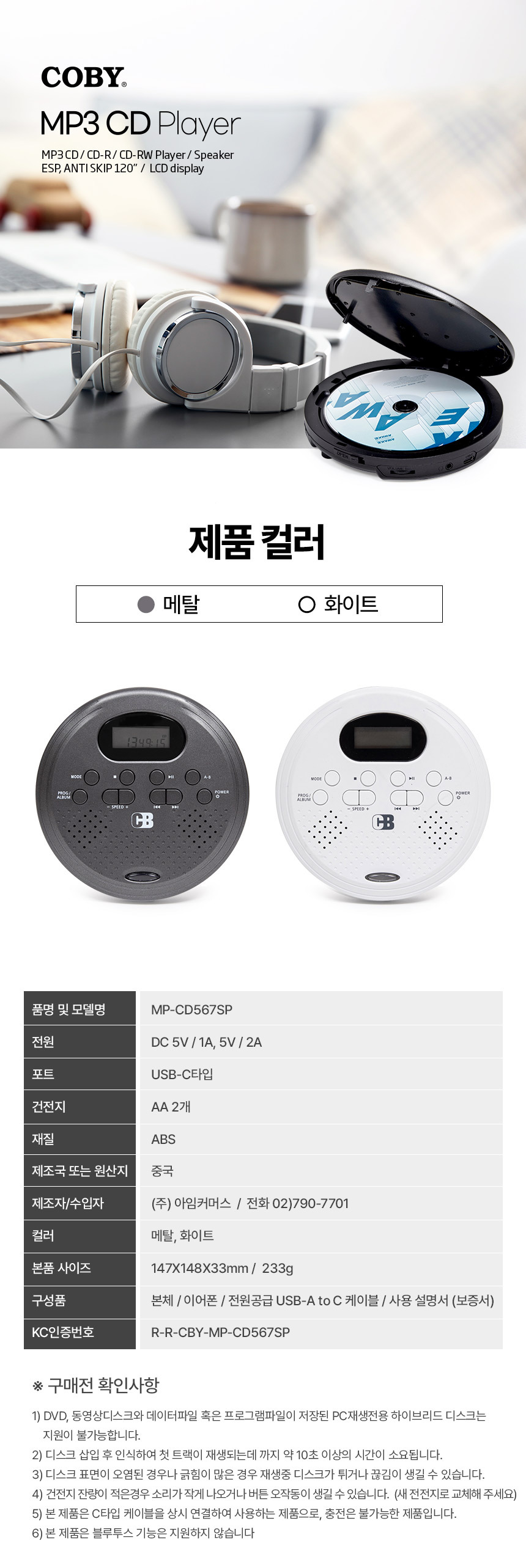
Image: Bottom view, indicating the battery compartment for 2x AA batteries.
Setup
Powering the Device
The Coby MP-567SP can be powered in two ways:
- USB-C Power: Connect the provided USB-A to C cable to the USB-C port on the player and plug the USB-A end into a compatible USB power adapter (DC 5V/1A or 5V/2A, not included) or a computer USB port.
- AA Batteries: Open the battery compartment on the bottom of the player and insert two (2) AA batteries, ensuring correct polarity (+/-).
Important Note: This device is designed to be used with the Type-C cable always connected for power; it is not rechargeable and does not charge AA batteries.
Inserting a CD
- Gently slide the OPEN latch to open the CD compartment lid.
- Place a CD (audio CD, MP3 CD-R/RW) onto the center spindle with the label side facing up.
- Press down gently on the center of the disc until it clicks into place.
- Close the CD compartment lid firmly until it latches.
The player will begin to read the disc, which may take approximately 10 seconds or more.
Connecting Headphones
For private listening, plug the included earphones or your preferred 3.5mm headphones into the headphone jack on the side of the player.
Operating Instructions
Basic Playback
- Press the POWER button to turn on the player.
- Insert a CD as described in the Setup section.
- Press the Play/Pause (►/❚❚) button to start playback.
- Adjust the volume using the Volume Control slider on the side.
- To pause, press Play/Pause (►/❚❚) again. Press it once more to resume.
- To stop playback, press the Stop (■) button.
- To skip to the next track, press the Skip Forward (►►) button.
- To skip to the previous track, press the Skip Backward (◄◄) button.
- To fast forward or rewind, press and hold the Skip Forward (►►) or Skip Backward (◄◄) button.
Using the HOLD Switch
Slide the HOLD switch to the 'ON' position to disable all buttons and prevent accidental operation during transport. Slide it to 'OFF' to enable button functionality.
Mode Selection
Press the MODE button to cycle through available playback modes, such as repeating the current track, repeating all tracks, random play, or intro scan (playing the first few seconds of each track).
Program/Album Function
- For Audio CDs: Use the PROG/ALBUM button to program a sequence of tracks to play.
- For MP3 CDs: Use the PROG/ALBUM button to navigate between different folders/albums on the disc.
Speed Adjustment
Press the SPEED+ button to increase the playback speed. This can be useful for language learning or reviewing content quickly.
A-B Repeat (Interval Repeat)
This feature is ideal for language learning or detailed audio analysis:
- During playback, press the A-B button once to set the starting point (A).
- Press the A-B button a second time to set the ending point (B).
- The player will now repeatedly play the section between point A and point B.
- To cancel A-B repeat, press the A-B button a third time.
Maintenance
Cleaning the Device
- Wipe the exterior of the player with a soft, dry cloth. Do not use abrasive cleaners or solvents.
- To clean the CD lens, use a specialized CD lens cleaning kit. Never touch the lens directly.
- Keep the CD compartment free of dust and debris.
Battery Care
- If using AA batteries, replace them when the power indicator is low or the device stops functioning correctly.
- Remove batteries if the device will not be used for an extended period to prevent leakage.
- Dispose of used batteries responsibly according to local regulations.
Storage
Store the player in a cool, dry place away from direct sunlight, extreme temperatures, and high humidity. Avoid placing heavy objects on top of the player.
Troubleshooting
| Problem | Possible Cause | Solution |
|---|---|---|
| Player does not turn on. | No power or depleted batteries. | Ensure USB-C cable is securely connected to a power source, or replace AA batteries. |
| CD does not play or skips frequently. | Dirty, scratched, or incompatible disc; disc not seated correctly; excessive vibration. | Clean the disc, try another disc, ensure disc is properly seated. Avoid strong impacts during playback. Note that CD-R/RW discs may not play smoothly depending on recording conditions. |
| No sound from speaker/headphones. | Volume too low; headphones not connected properly; faulty headphones. | Increase volume. Ensure headphones are fully plugged in. Test with different headphones. |
| Disc not recognized. | Incompatible disc type; disc inserted incorrectly. | Ensure you are using an audio CD or MP3 CD-R/RW. DVD, video discs, or data files/program library discs for PC playback are not supported. Re-insert the disc correctly. Allow up to 10 seconds for recognition. |
| Buttons are unresponsive. | HOLD switch is engaged. | Slide the HOLD switch to the 'OFF' position. |
Specifications

Image: Detailed specifications table.
| Feature | Detail |
|---|---|
| Model | MP-CD567SP |
| Power Input | DC 5V/1A or 5V/2A (via USB-C) |
| Battery | 2 x AA batteries (not rechargeable) |
| Port | USB-C, 3.5mm Headphone Jack |
| Disc Compatibility | Audio CD, MP3 CD-R/RW |
| Features | Built-in Speaker, Interval Repeat (A-B), Language Learning Function, Electronic Skip Protection (ESP 120s), LCD Display |
| Dimensions (L x W x H) | 14.7 x 14.8 x 3.3 cm |
| Weight | 233g |
| Colors Available | Grey, White |
| Origin | Mainland China |
Warranty and Support
Your Coby MP-567SP Portable MP3/CD Player comes with a standard manufacturer's warranty. For specific warranty terms and conditions, please refer to the documentation provided at the time of purchase or contact the official seller directly.
For technical support, product inquiries, or assistance, please contact the UM2 COBY Official Verified Store where you purchased the product. They can provide guidance and support for any issues you may encounter.
You may also find support resources or contact information on the official Coby website or through the seller's customer service channels.
User Tips
- Power Source: Remember that the device is not rechargeable. Always connect the USB-C cable for continuous power, or ensure you have fresh AA batteries installed.
- Disc Compatibility: For best performance, use clean, unscratched audio CDs or MP3 CD-R/RWs. Avoid using DVDs, video discs, or data discs not formatted for audio playback.
- Disc Recognition Time: Be patient after inserting a disc; it may take up to 10 seconds for the player to read and recognize the content before playback begins.
- Anti-Skip Function: While the player features Electronic Skip Protection (ESP), severe impacts or vibrations can still cause playback interruptions. Handle the device with care during use.
- Language Learning: Utilize the A-B repeat and SPEED+ functions to maximize your language learning experience.


