1. Introduction
The WONDOM JAB4 is a versatile 4-channel Class D audio amplifier board featuring an integrated ADAU1701 Digital Signal Processor (DSP) and Bluetooth 5.0 connectivity. It is designed to provide a comprehensive audio solution for various applications, supporting multiple output configurations including 4.0, 2.1, and 2.0 systems.
This manual provides detailed instructions for setting up, operating, maintaining, and troubleshooting your JAB4 amplifier board.
Key Features:
- Compact PCB Size: 3.6 x 2.7 inches
- Integrated Bluetooth 5.0 with aptX, aptX HD, aptX LL, SBC, and AAC support
- Integrated ADAU1701 DSP for advanced audio processing
- Flexible Output Power: 4x30W, 2x30W+1x60W, or 2x60W
- Supports Audio 4.0 / 2.1 / 2.0 / 0.2 Systems
- Bluetooth & 3.5mm Line Input Supported
- I2S Signal Output for cascading with other I2S audio amplifiers
- Bluetooth Pairing Cancellation function
- Four External Potentiometer ports for hardware control
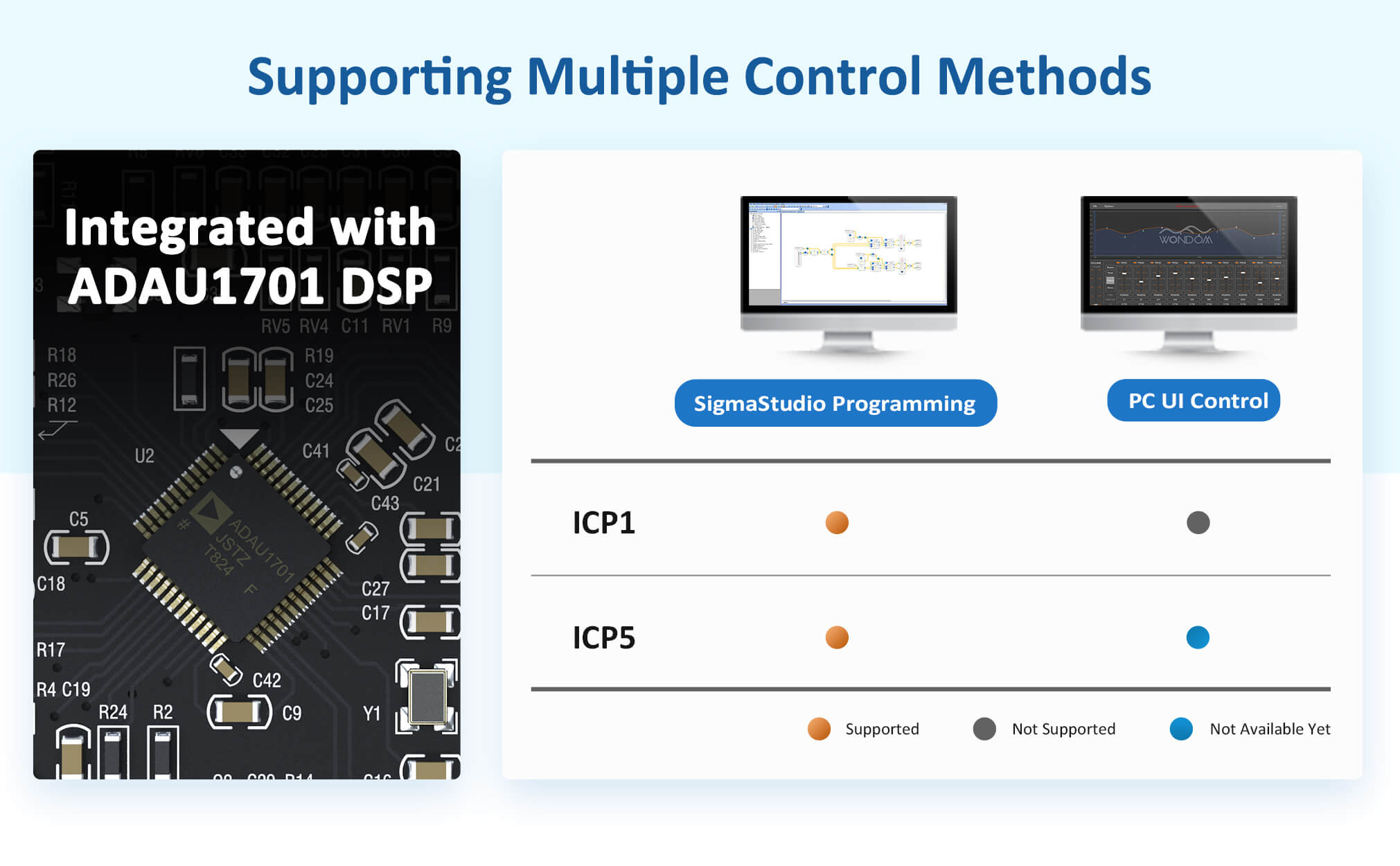
- Supports Programming with SigmaStudio and PC UI Control (via WONDOM ICP programmers)
- Signal Level Sensor System for power management
- Power Management System
2. Specifications
2.1. General Specifications
| Model | Description | Output Power | Bluetooth | DSP | AMP IC | Input | Output | Applicable Audio Systems | SigmaStudio Programming | PC UI Control | THD | SNR | Power Supply |
|---|---|---|---|---|---|---|---|---|---|---|---|---|---|
| JAB4 | 4.0 / 2.1 / 2.0 / 0.2 30W Audio amplifier board with ADAU1701 DSP & BT | 4x30W / 2x30W+1x60W / 2x60W | Bluetooth 5.0 | ADAU1701 | TPA3118 | Bluetooth + 3.5mm Line Input | Speaker Output | 4.0 / 2.1 / 2.0 / 0.2 | Supported (ICP5) | Supported (ICP5) | 0.03% | 97dB | DC 10-26V |
2.2. Electrical Specifications
| Parameter | Conditions | Min. | Typ. | Max. | Units |
|---|---|---|---|---|---|
| Number of Channels | - | - | 4 | - | - |
| Minimum Load Impedance | - | - | 4 | - | Ω |
| Efficiency | 4 x 30W@8Ohm, 1kHz | - | 87 | - | % |
| Nominal Power Requirement | @24V, 1kHz | - | 140 | - | W |
| Operating Voltage | @1kHz, 8Ohm | 10 | 24 | 26 | V |
| Idle Power (Signal detected) | - | - | 3.2 | - | W |
| Idle Power (No Signal detected) | - | - | 1.2 | - | W |
| Switching Frequency | SD Floating@24V | - | 400 | - | kHz |
| Power Consumption (1/4 max output) | @8Ohm, 24V, 1kHz | - | 31 | - | W |
| Power Consumption (1/8 max output) | @8Ohm, 24V, 1kHz | - | 17 | - | W |
| Control Standby (High-level Input Voltage) | - | 3.3 | - | - | V |
| Control Standby (Low-level Input Voltage) | - | - | - | 0.8 | V |
| Control Mute (High-level Output Voltage) | - | 3.3 | - | - | V |
| Control Mute (Low-level Output Voltage) | - | - | - | 0.8 | V |
| Standby Power | SD short to GND, only when low power module available | - | 86 | - | mW |
2.3. Audio Performance
| Parameter | Conditions | Min. | Typ. | Max. | Units |
|---|---|---|---|---|---|
| Amp Gain | @8Ohm, 20Hz - 20kHz | - | 26 | - | dB |
| DSP Gain (SE1 Single Amp) | @8Ohm, 1kHz | -60 | - | 0 | dB |
| DSP Gain (SE2 Line Output) | @8Ohm, 1kHz | -60 | - | 6.5 | dB |
| Input Sensitivity | 2 x 30W@8Ohm, 1kHz, 26dB | - | 770 | - | mV |
| Filter Gain | Butterworth, Q=0.707 | - | 4 | - | dB |
| Cutoff Frequency (HFP) | - | 0.25 | - | 2 | kHz |
| Cutoff Frequency (LFP) | - | - | 20 | - | kHz |
| SNR | 2 x 30W@8Ohm, THD+N=1%, 26dB, A-weighting | - | 97 | - | dB |
| THD+N (5W@8Ohm, 1kHz, 26dB) | - | - | 0.03 | - | % |
| THD+N (10W@8Ohm, 1kHz, 26dB) | - | - | 0.06 | - | % |
| Input Impedance | - | - | 10 | - | kΩ |
| Supported Sampling Rates | - | - | 48 | - | kHz |
| Output Noise Level | A-weighting, Input Connected to GND, 26dB | - | 153 | - | uV |
| DC Offset | - | - | 10 | - | mV |
| Crosstalk Separation | 20Hz-20kHz, Gain=26dB | - | -60 | - | dB |
2.4. Performance Graphs


3. Setup Instructions
3.1. Package Contents
Ensure all items are present in the package:
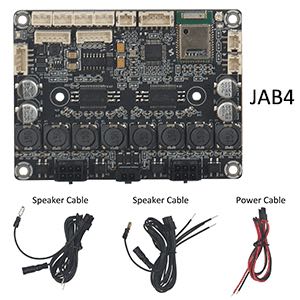
- 1pc AA-JA33285 JAB4 Audio Amplifier Board
- 1pc Molex MicroFit-2Pos power supply cable (50cm / 19.69'')
- 2pc Molex MicroFit-2x3Pos speaker cables (50cm / 19.69'')
3.2. Connection Diagram Overview

3.3. Power Supply Connection
The JAB4 requires a DC10V-26V power supply. The recommended power supply is DC24V, 3A. Ensure the current is higher than 3A. Connecting a power supply outside this range may damage the amplifier board.
- Connect the power supply to the J6 connector (Molex MicroFit-2Pos-3mm).
- For portable applications, the JAB4 supports battery power. It is suggested to use WONDOM BCPB series battery boards connected to J5 (PH-4Pos-2mm) for this purpose.
3.4. Audio Input Connections
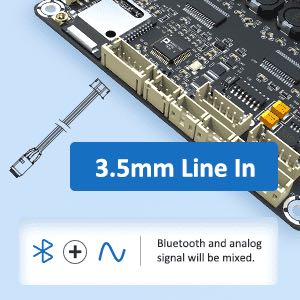
The JAB4 supports both Bluetooth 5.0 and 3.5mm line input. Signals from both inputs will be mixed if used simultaneously.
3.4.1. Bluetooth Input
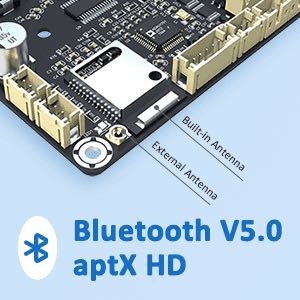
- The board has a built-in Bluetooth antenna for direct pairing.
- For enhanced stability, especially when installed in a cabinet, an external Bluetooth antenna can be connected. An IPX to SMA conversion cable and external antenna are available in the Functional Cables Kit (AA-JA11117).
3.4.2. 3.5mm Line Input
- Connect your audio source to the J13 connector (PH-5Pos-2mm) using a 3.5mm AUX-IN cable. This cable is available in the Functional Cables Kit (AA-JA11117).
3.5. Audio Output Connections
The JAB4 supports various output modes. The switching between modes is automatically achieved by plugging in the correct cables. Ensure the power is OFF when switching output modes to prevent damage.

- 4.0 Mode (4x30W): Connect four speakers, one to each channel output.
- 2.1 Mode (2x30W + 1x60W): Connect two stereo speakers and one subwoofer.
- 2.0 Mode (2x60W): Connect two stereo speakers in a bridged configuration.
- I2S Signal Output: The JAB4 provides an I2S signal output via J9 (PH-6Pos-2mm), allowing it to act as a master for cascading with other I2S audio amplifier boards.
3.6. Control Interface Connections
3.6.1. External Potentiometers
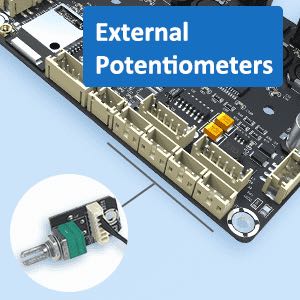
Four ports are provided for external potentiometers (POT1-POT4) for hardware control of gain and frequency. These are available in the Functional Cables Kit (AA-JA11117).
3.6.2. DSP Programming & PC UI Control
The JAB4 can be programmed using SigmaStudio software or controlled via a PC UI application. This requires a WONDOM ICP programmer (e.g., ICP5) connected to J4 (PH-6Pos-2mm).
Refer to the ICP5 User Guide for SigmaStudio Programming and ICP5 PC UI document for detailed instructions on using the ICP programmer.
3.6.3. Bluetooth Pairing Cancellation
Connect a Bluetooth pairing cancellation button to J2 (PH-2Pos-3mm). Pressing this button will cancel the current Bluetooth pairing. This cable is available in the Functional Cables Kit (AA-JA11117).
3.6.4. Standby Control
Short circuit J10 (PH-2Pos-3mm) to enter standby mode. Remove the short circuit for normal operation. A PH-2Pos cable is available in the Functional Cables Kit (AA-JA11117).
4. Operating Instructions
4.1. Powering On/Off
- Connect the power supply as described in Section 3.3.
- The green RUN LED indicator will turn ON when powered.
- The red ERROR LED indicator will turn ON if there is a hardware connection problem or firmware mismatch.
4.2. Bluetooth Operation
- When Bluetooth is searching for a device, the Bluetooth LED (LED1) will blink.
- Once paired, the Bluetooth LED (LED1) will remain ON.
- To cancel pairing, press the button connected to J2.
4.3. Line Input Operation
- Connect your audio source to the 3.5mm line input (J13).
- If both Bluetooth and line input are active, their signals will be mixed.
4.4. Signal Level Sensor System
The JAB4 features a signal level sensor system for power efficiency:
- If no audio signal is detected for 5 minutes, the amplifier will automatically enter standby mode.
- When an audio signal is detected again, the amplifier will resume normal operation.
- The Signal Detection LED (LED2) will be ON when a signal is detected and OFF when no signal is detected for 5 minutes.
4.5. Using External Potentiometers
The functions of the potentiometers (POT1-POT4) automatically adjust based on the selected output mode (4.0/2.1/2.0). Refer to the JAB4 Datasheet for specific functions in each mode.
4.6. DSP Programming and PC UI Control
To utilize the full capabilities of the ADAU1701 DSP, you will need a WONDOM ICP programmer (e.g., ICP5).
- SigmaStudio Programming: Allows for custom audio processing designs.
- PC UI Control: Provides real-time adjustment of parameters like gain, volume, filters, and EQ via a graphical interface.
For detailed steps on programming and PC UI control, please refer to the dedicated ICP5 user guides:
5. Maintenance
- Keep the board clean and free from dust. Use a soft, dry cloth for cleaning.
- Avoid exposing the board to moisture or extreme temperatures.
- Ensure proper ventilation when operating to prevent overheating.
- Do not attempt to modify the board unless you are an experienced electronics professional, as this may void the warranty and cause damage.
6. Troubleshooting
| Problem | Solution |
|---|---|
| JAB4 not recognized by PC (when using ICP5) |
|
| Cannot write program to JAB4 (when using ICP5) |
|
| Target device not working normally (no sound) when connected with ICP5 |
|
| No sound output |
|
| Bluetooth connection issues |
|
7. User Tips
- DSP Control: To adjust crossover settings, volume, or EQ, you must use a WONDOM ICP programmer (like ICP5) connected to a laptop with SigmaStudio or the dedicated PC UI software. Direct connection to a laptop without the ICP programmer will not allow DSP control.
- Firmware Updates: Always ensure your ICP programmer has the latest firmware for compatibility with your JAB4 board and other WONDOM DSP products.
- Initial Setup Volume: When setting up or adjusting parameters via PC UI, it's recommended to set the volume to a minimum level to avoid unexpected loud sounds or speaker damage.
- Output Mode Switching: Always power off the JAB4 board before changing speaker wiring to switch between 4.0, 2.1, or 2.0 output modes. This prevents the amplifier from entering protection mode or being damaged.
8. Warranty and Support
8.1. After-Sales Service
If you encounter any problems or dissatisfaction after receiving the product (e.g., damaged, wrong product, bad sound, missing package, appearance problem, shipping delay), please contact WONDOM customer support before leaving negative feedback or raising a dispute. Opening a dispute without prior negotiation may result in forfeiture of after-sales service.
8.2. Repair Policy
WONDOM offers a one-year free repair service. The buyer is responsible for the shipping cost to send the product for repair. After the repair is complete, WONDOM will cover the shipping cost to return the product to the buyer.
8.3. Contact Information
For support, inquiries, or detailed performance graphs and parameter settings (for authorized distributors and OEM customers), please contact:
- Email: info@wondom.com
- Web: store.sure-electronics.com
- Skype: surewebstore
9. Additional Resources
For more detailed information, please refer to the following official documents:


