1. Introduction
The TZT Wondom JAB3 is an all-in-one stereo Class D audio amplifier board, meticulously designed for high-fidelity audio applications. It integrates a powerful ADAU1701 Digital Signal Processor (DSP) and utilizes the TPA3116 chip to deliver 2 x 50W of power into a 4 Ohm load. This versatile board is ideal for a wide range of DIY audio projects, commercial installations, and industrial applications, including digital crossovers, bass enhancement systems, custom loudspeakers, and interactive kiosks. The integrated DSP allows for advanced audio processing and customization, supporting programming via SigmaStudio and remote control through dedicated mobile applications or PC user interfaces.

Figure 1: TZT Wondom JAB3 DSP Class D Amplifier Board
2. Key Features
- Compact PCB Size: 3.60 x 2.70 inches (91.44mm x 68.58mm)
- Integrated DSP: Features ADAU1701 for advanced audio processing.
- High Output Power: 2 x 50W Class D amplification into 4 Ohm.
- Adjustable Controls: Potentiometers for speaker output gain, high-pass filter, 3.5mm headphone output high-pass filter, and overall volume.
- Power Management: Includes a power management circuit and signal level sensor system for efficient operation.
- Connectivity: External 3.5mm AUX IN Port, 3.5mm Headphone Output, Power Switch Port.
- Programmability: Supports SigmaStudio programming via ICP series programmers.
- Remote Control: Compatible with Miumax APP (Android/iOS) and PC UI for remote adjustments.
- Compatibility: Can be connected with JAB2 for 2.1 or 4.0 audio systems.
3. Specifications
Specifications are typical at +25℃, powered by 24V DC, unless otherwise noted. Subject to change without notice.
3.1. Power Specifications
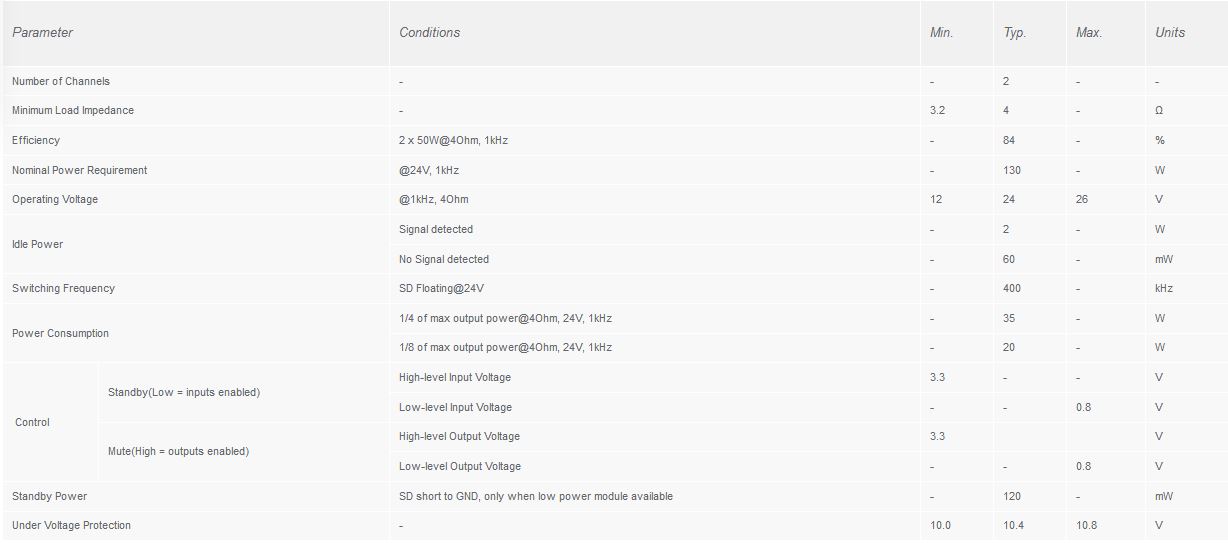
Figure 2: Power Specifications
| Parameter | Conditions | Min. | Typ. | Max. | Units |
|---|---|---|---|---|---|
| Number of Channels | - | - | 2 | - | - |
| Minimum Load Impedance | - | 3.2 | 4 | - | Ω |
| Efficiency | 2 x 50W@4Ohm, 1kHz | - | 84 | - | % |
| Nominal Power Requirement | @24V, 1kHz | - | 130 | - | W |
| Operating Voltage | @1kHz, 4Ohm | 12 | 24 | 26 | V |
| Idle Power | Signal detected | - | 2 | - | W |
| No Signal detected | - | 60 | - | mW | |
| Switching Frequency | SD Floating@24V | - | 400 | - | kHz |
| Power Consumption | 1/4 of max output power@4Ohm, 24V, 1kHz | - | 35 | - | W |
| 1/8 of max output power@4Ohm, 24V, 1kHz | - | 20 | - | W | |
| Control (Standby) | High-level Input Voltage | 3.3 | - | - | V |
| Low-level Input Voltage | - | - | 0.8 | V | |
| Control (Mute) | High-level Output Voltage | 3.3 | - | - | V |
| Low-level Output Voltage | - | - | 0.8 | V | |
| Standby Power | SD short to GND, only when low power module available | - | 120 | - | mW |
| Under Voltage Protection | - | 10.0 | 10.4 | - | V |
3.2. Audio Performance Specifications
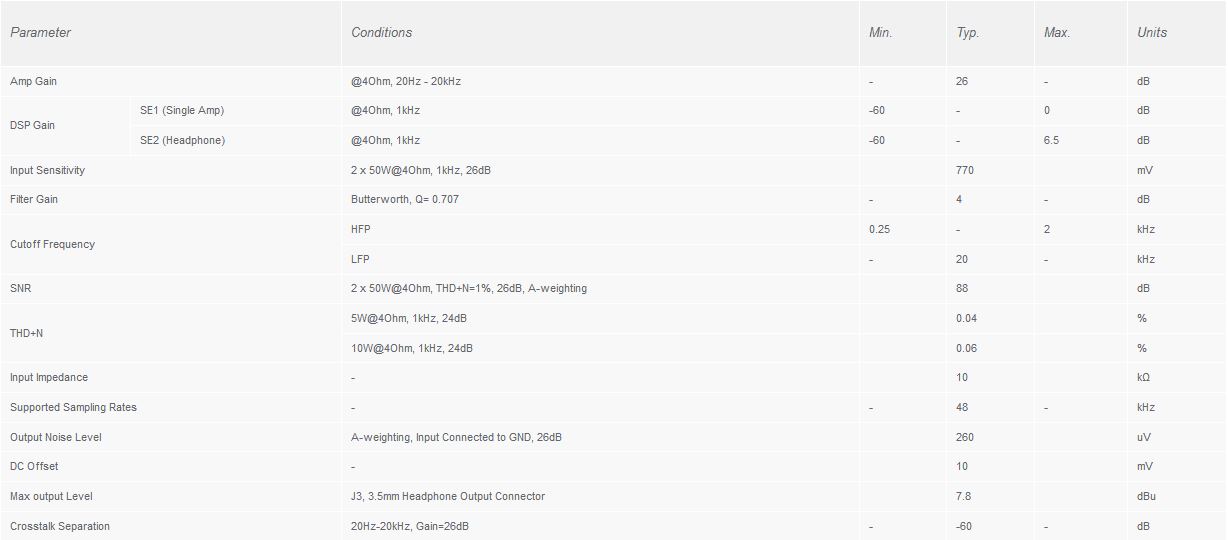
Figure 3: Audio Performance Specifications
| Parameter | Conditions | Min. | Typ. | Max. | Units |
|---|---|---|---|---|---|
| Amp Gain | @4Ohm, 20Hz - 20kHz | - | 26 | - | dB |
| DSP Gain (SE1 Single Amp) | @4Ohm, 1kHz | -60 | - | 0 | dB |
| DSP Gain (SE2 Headphone) | @4Ohm, 1kHz | -60 | - | 6.5 | dB |
| Input Sensitivity | 2 x 50W@4Ohm, 1kHz, 26dB | - | 770 | - | mV |
| Filter Gain | Butterworth, Q=0.707 | - | 4 | - | - |
| Cutoff Frequency (HFP) | - | 0.25 | - | 2 | kHz |
| Cutoff Frequency (LFP) | - | - | - | 20 | kHz |
| SNR | 2 x 50W@4Ohm, THD+N=1%, 26dB, A-weighting | - | 88 | - | dB |
| THD+N | 5W@4Ohm, 1kHz, 24dB | - | 0.04 | - | % |
| 10W@4Ohm, 1kHz, 24dB | - | 0.06 | - | % | |
| Input Impedance | - | - | 10 | - | kΩ |
| Supported Sampling Rates | - | - | 48 | - | kHz |
| Output Noise Level | A-weighting, Input connected to GND, 26dB | - | 260 | - | uV |
| DC Offset | - | - | 10 | - | mV |
| Max output Level | J3, 3.5mm Headphone Output Connector | - | 7.8 | - | dBu |
| Crosstalk Separation | 20Hz-20kHz, Gain=26dB | - | -60 | - | dB |
3.3. Performance Graphs
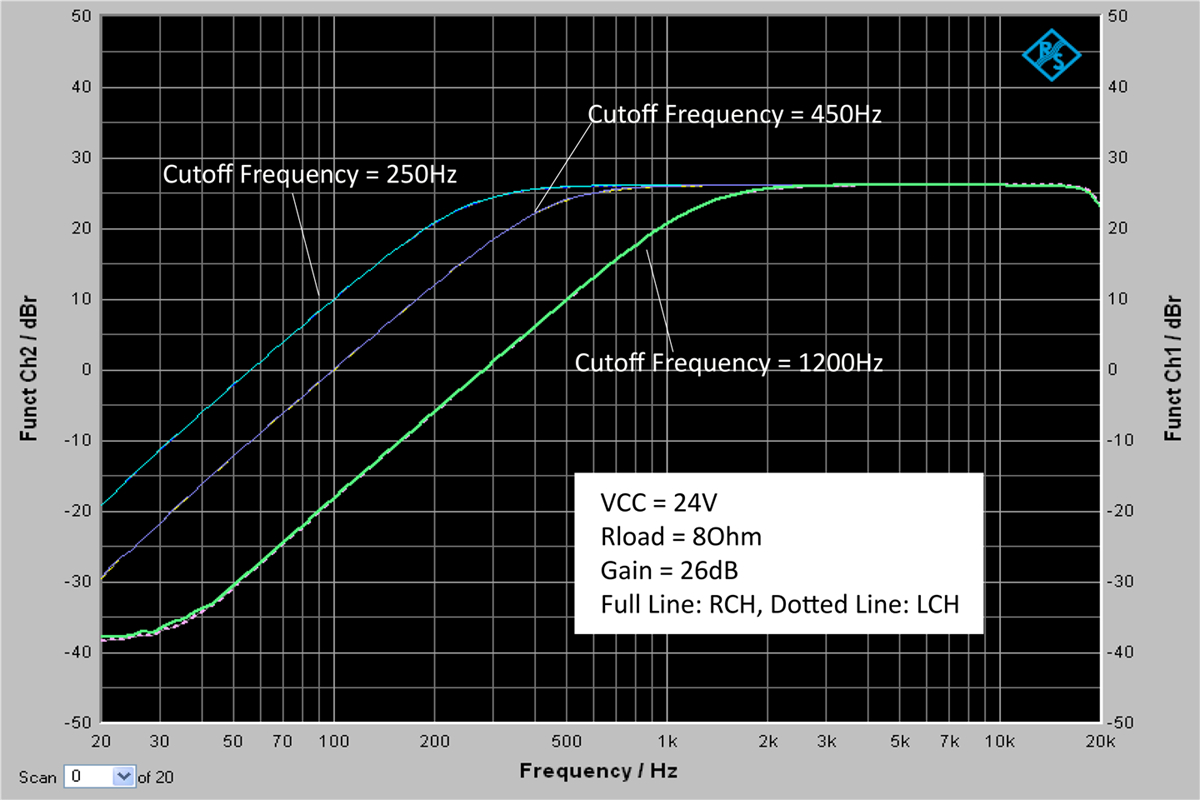
Figure 4: Frequency Response (VCC=24V, Rload=8Ohm, Gain=26dB)
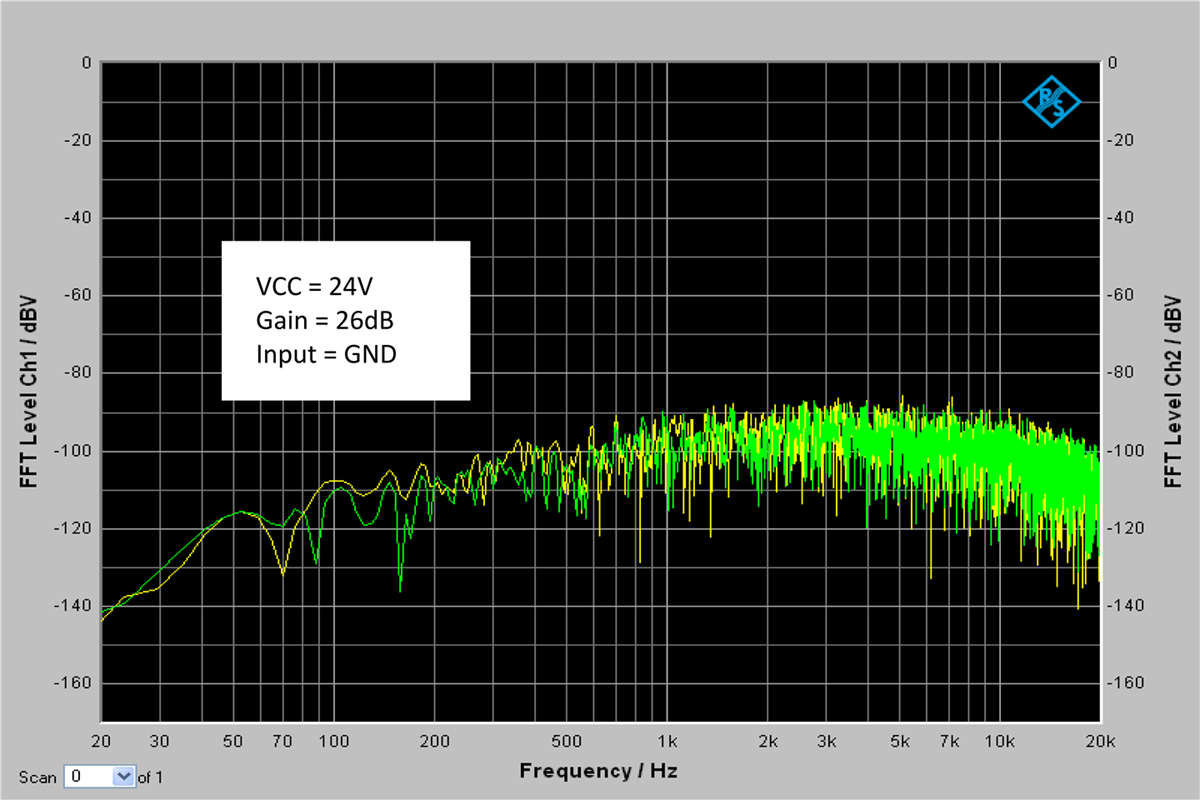
Figure 5: FFT Level (VCC=24V, Gain=26dB, Input=GND)
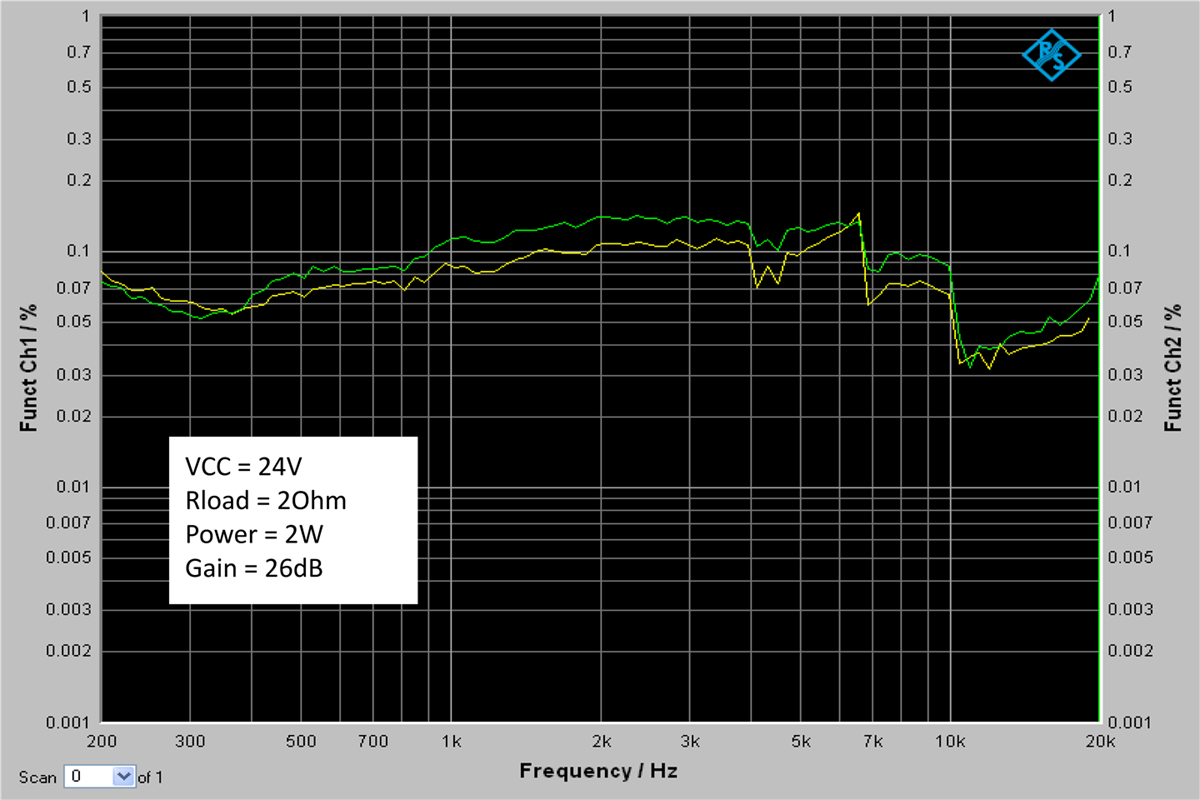
Figure 6: THD+N vs Frequency (VCC=24V, Rload=2Ohm, Power=2W, Gain=26dB)
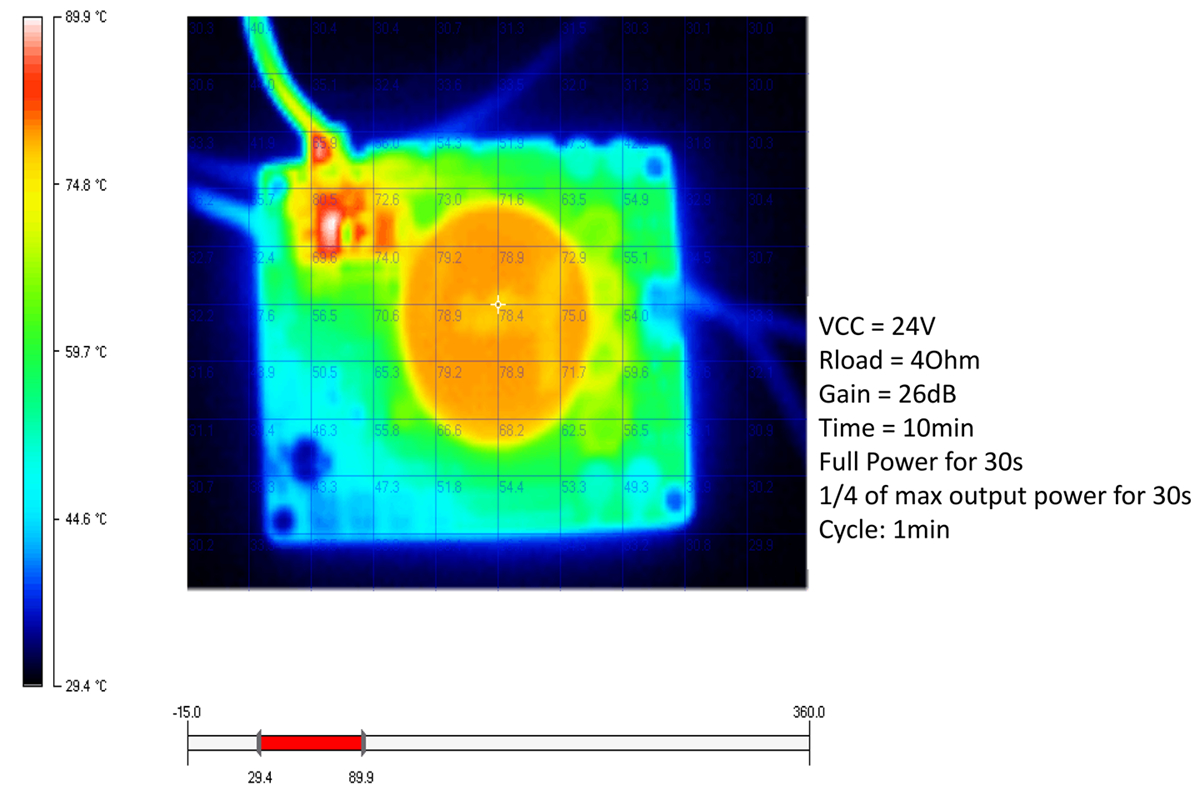
Figure 7: Thermal Performance (VCC=24V, Rload=4Ohm, Gain=26dB, Time=10min, Full Power for 30s, 1/4 of max output power for 30s, Cycle=1min)
4. Setup Instructions
Carefully follow these instructions for proper setup of your JAB3 amplifier board.
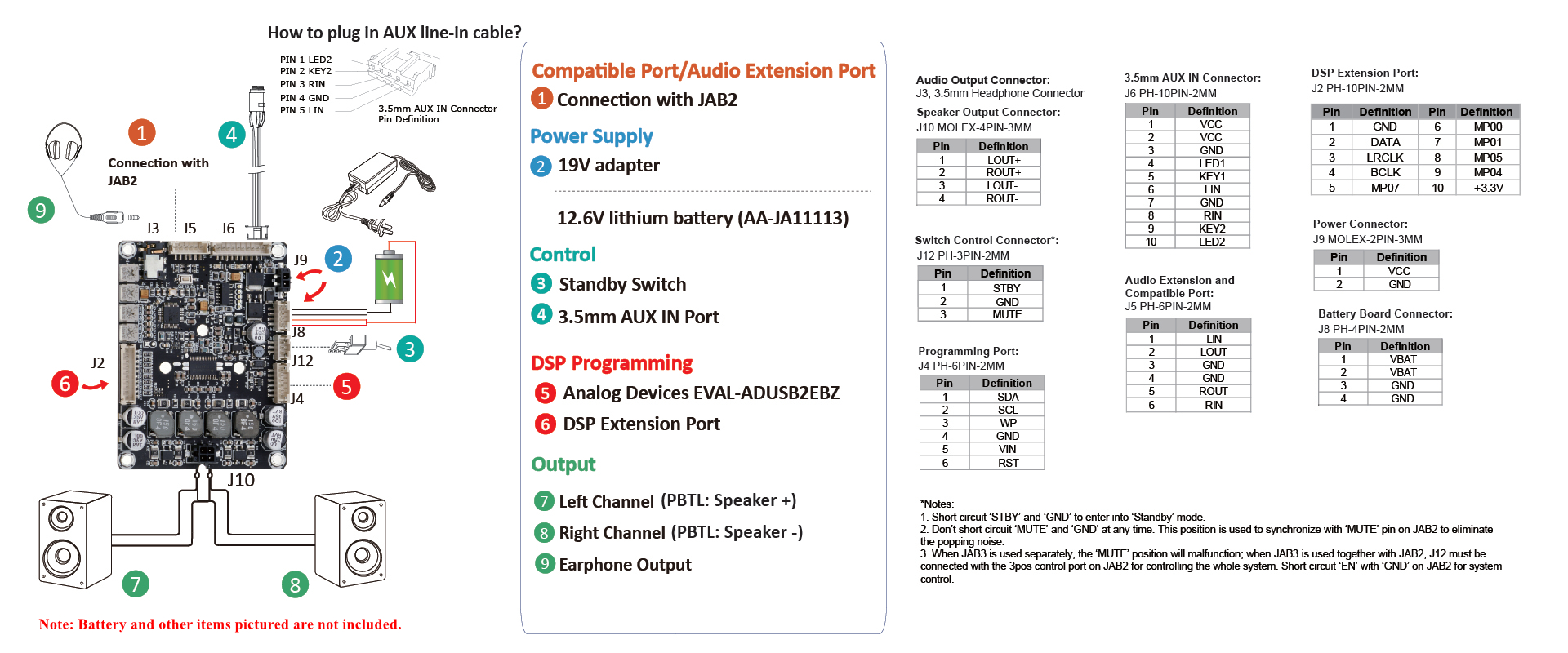
Figure 8: JAB3 Connection Diagram
- Power Supply Connection:
- Connect a DC power supply (10V-26V) to the designated power input. A 19V adapter is recommended.
- Alternatively, the JAB3 supports battery power (e.g., 12.6V lithium battery AA-JA11113). Note that the JAB3 does not include an MPPT circuit, so it cannot recharge batteries. For battery charging, consider using WONDOM BCPB series boards or the JAB – BE (AA-JA11113) board if you have a JAB1/JAB2.
- Audio Input:
- Connect your audio source to the 3.5mm AUX IN Port.
- For I2S input, refer to the specific video tutorial provided by the manufacturer.
- Speaker Output:
- Connect your speakers to the Left Channel (PBTL: Speaker +) and Right Channel (PBTL: Speaker -) terminals. Ensure correct polarity.
- Headphone Output:
- For private listening, connect headphones to the 3.5mm Headphone Output.
- DSP Programming (Optional):
- To program the DSP using SigmaStudio, connect an Analog Devices EVAL-ADUSB2EBZ programmer to the DSP Extension Port.
- Control Connections:
- Connect a standby switch to the designated port if you wish to manually control standby mode.
- The JAB3 can be integrated with JAB2 for multi-channel audio systems (2.1 or 4.0). An optional Functional cables kit (AA-AJ11116) is available for this connection.
- Physical Installation:
- The board features four screw holes for easy mounting into a cabinet or enclosure.
- An optional 3.6" x 2.7" L-style aluminum bracket (JAB-LAB) can be used for secure mounting and wiring.
Important Note:
- A DC10V-26V power supply is required.
- The JAB3 does not include an MPPT circuit and cannot recharge batteries.
- Battery and other items pictured in diagrams are for demonstration only and are not included.
5. Operating Instructions
5.1. Basic Operation
- Power On/Off: Apply power within the specified voltage range (10V-26V DC). The board will power on. Use the connected power switch (if installed) to toggle power.
- Audio Playback: Connect your audio source to the 3.5mm AUX IN port and ensure speakers or headphones are connected to their respective outputs.
- Volume Control: Adjust the overall volume using the dedicated potentiometer on the board.
- Standby Mode: The JAB3 features a signal level sensor system. If no audio signal is detected for 5 minutes, the board will automatically enter a low-power standby mode to conserve energy. It will resume normal operation upon detection of an audio signal.
5.2. Advanced DSP Control
The integrated DSP (ADAU1701) allows for extensive audio customization.
- Hardware Potentiometers: Four potentiometers on the JAB3 board provide real-time hardware control for:
- Overall Volume
- Speaker Output Gain
- Speaker Output High-pass Filter
- 3.5mm Headphone Output High-pass Filter
- SigmaStudio Programming:
- For advanced users, the DSP can be reprogrammed using Analog Devices SigmaStudio software.
- This requires an In-circuit programmer (ICP series) connected to the DSP Extension Port.
- Refer to the manufacturer's provided video tutorial for reprogramming DSP with SigmaStudio:
Video: Reprogramming DSP with SigmaStudio
- Remote Control (Miumax APP / PC UI):
- The JAB3 can be remotely controlled via the Miumax mobile application (available for Android and iOS) or a PC user interface.
- This allows adjustment of volume, gain, frequency, and EQ settings.
- Download Miumax for Android: Miumax_v1.0.1_2020.6.22.apk
- For iOS, search "Miumax" in the App Store.
- Refer to the video for connection with JAB2 and APP control:
Video: Connection with JAB2 and APP Control
6. Maintenance
- Cleaning: Use a dry, soft cloth to clean the board. Avoid using liquids or abrasive cleaners.
- Environment: Operate and store the board in a dry, dust-free environment, away from extreme temperatures and humidity.
- Handling: Handle the board by its edges to avoid touching components, especially the heatsink, which can get warm during operation.
- Power Off: Always disconnect the power supply before making any changes to wiring or connections.
7. Troubleshooting
- No Sound Output:
- Check all power connections and ensure the power supply is within the 10V-26V DC range.
- Verify that audio input cables are securely connected to the 3.5mm AUX IN port.
- Ensure speakers/headphones are correctly connected and functional.
- Check the volume potentiometer on the board and ensure it's not set to minimum.
- If using DSP, ensure the DSP program is correctly loaded and not muting the output.
- Distorted Sound:
- Reduce the input audio level from your source device.
- Adjust the gain potentiometer on the JAB3 board.
- Ensure speaker impedance matches the board's requirements (minimum 3.2 Ohm).
- Check for loose connections or damaged cables.
- Board Enters Standby Unexpectedly:
- This is normal behavior if no audio signal is detected for 5 minutes.
- Ensure your audio source is playing and providing a sufficient signal level.
- DSP Programming Issues:
- Ensure the ICP series programmer is correctly connected and recognized by your PC.
- Verify that SigmaStudio software is correctly installed and configured.
- Consult SigmaStudio documentation and manufacturer's DSP programming guides.
8. User Tips
No specific user tips were available from reviews or Q&A in the provided data. However, based on the product's features, here are some general tips:
- Start Simple: If you're new to DSP, begin with basic configurations in SigmaStudio or use the Miumax app for initial adjustments before diving into complex programming.
- Proper Power Supply: Always use a stable DC power supply within the recommended 10V-26V range to ensure optimal performance and longevity of the board.
- Speaker Matching: Ensure your speakers have an impedance of 4 Ohms for optimal power delivery. While 3.2 Ohms is the minimum, 4 Ohms is typical.
- Thermal Management: Although the board includes a heatsink, ensure adequate airflow around the board, especially in enclosed setups, to prevent overheating during prolonged high-power operation.
- Experiment with DSP: The DSP is a powerful tool. Experiment with different filter settings, EQ adjustments, and crossovers to tailor the sound to your specific speakers and listening environment.
9. Warranty and Support
For technical support, warranty claims, or further assistance, please contact the seller or manufacturer directly. Keep your purchase records handy when seeking support.


