1. Umhlahlandlela wokusetha
This section provides instructions for the initial setup of your XIAOMI Poco M8 5G smartphone.
1.1 Ukukhipha ibhokisi kanye nokuqukethwe kwephakheji
Carefully unpack your device and verify all contents. The standard package includes:
- XIAOMI Poco M8 5G Smartphone
- Ikhebula le-USB (Uhlobo-C)
- Ikesi lefoni
- I-SIM Tray Ejector
- Incwadi Yomsebenzisi (le dokhumenti)
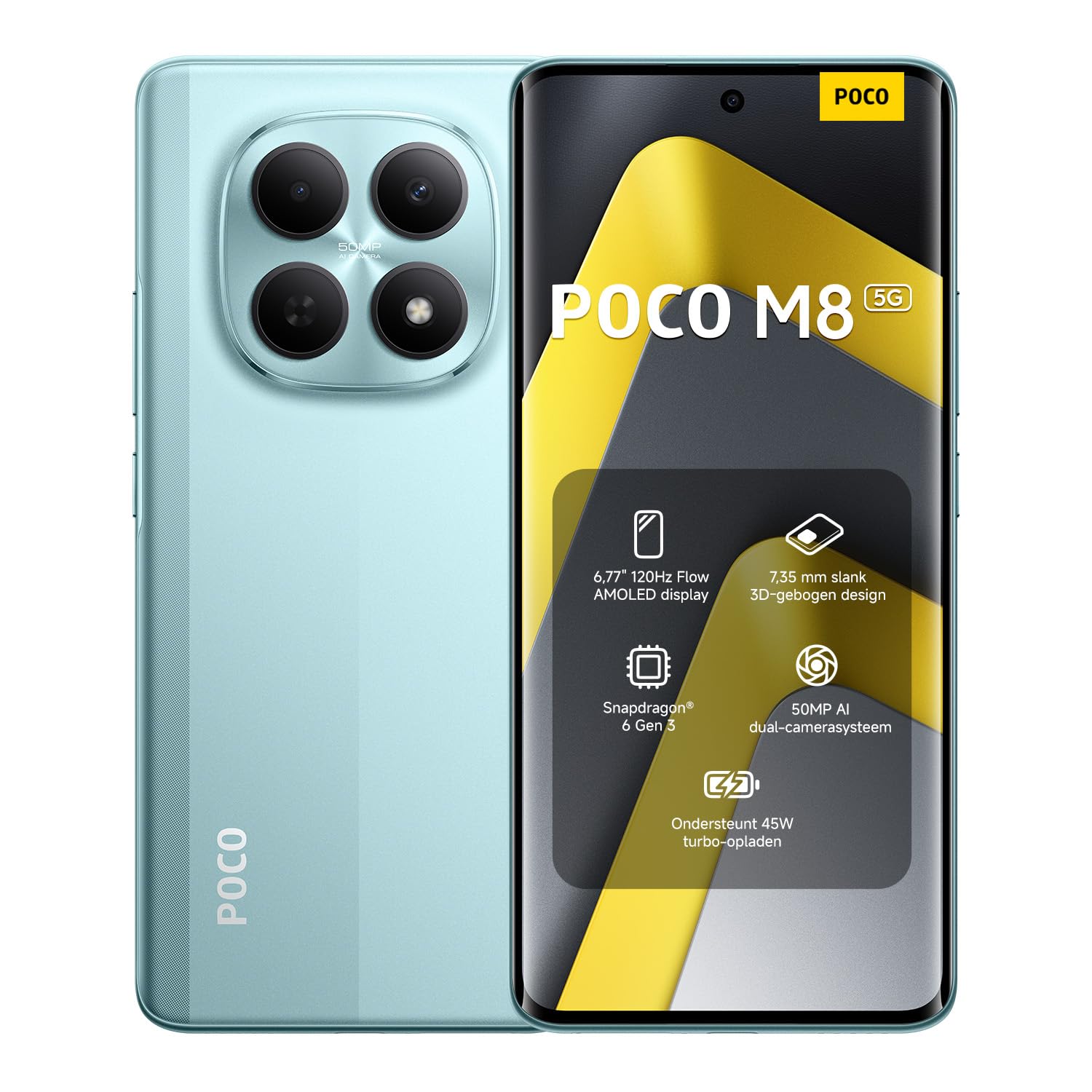
Image: The XIAOMI Poco M8 5G smartphone, USB-C cable, phone case, and SIM tray ejector pin, as typically found in the product box.
1.2 Ukufaka i-SIM Card
Your Poco M8 5G supports a nano SIM 1 and a hybrid slot for either a second nano SIM or a microSD card. eSIM is not supported.
- Thola ithreyi ye-SIM eceleni kwedivayisi yakho.
- Faka ithuluzi le-SIM ejector yethreyi embotsheni encane eduze kwethreyi bese ucindezela ngobumnene kuze kuvele ithreyi.
- Place your nano SIM card(s) and/or microSD card into the tray with the gold contacts facing down, ensuring they are correctly oriented.
- Faka kabusha ngokucophelela ithreyi ye-SIM ocingweni ize ichofoze endaweni.
1.3 Ukuvula Ukuqala Nokuhambisana Nenethiwekhi
Press and hold the power button until the XIAOMI logo appears. Follow the on-screen instructions to complete the initial setup, including language selection, Wi-Fi connection, and account setup.
Ukuhambelana Kwenethiwekhi:
- USA Market: This device is compatible with T-Mobile, Mint, Tello, or any carrier operating on the T-Mobile network. A pre-activated SIM card is required.
- Ngaphandle kwe-USA: The device works with any GSM carrier worldwide.
- Amabhendi Asekelwe:
- 5G: 1/2/3/5/7/8/20/28/38/40/41/48/66/71/77/78
- I-4G LTE FDD: B1/2/3/4/5/7/8/18/19/20/26/28/66/71
- I-4G LTE TDD: B38/40/41/42/48
- I-3G WCDMA: B1/2/4/5/6/8/19
- 2G: I-Quad Band
2. Iziqondiso Zokusebenza
Learn how to use the key features of your XIAOMI Poco M8 5G smartphone.
2.1 Display and User Interface
The Poco M8 5G features a 6.77-inch Flow AMOLED display with a resolution of 2392 x 1080 pixels. Key display features include:
- Isilinganiso Sokuvuselela: Up to 120Hz (adjustable for supported apps).
- Thinta SampLing Ling: 240Hz, with an instant touch sampling rate of 2560Hz activated under Game Turbo Mode.
- Ukukhanya: Up to 3200 nits peak brightness, 800 nits typical.
- Ukujula Kombala: 12-bit (68.7 billion colors) with DCI-P3 wide color gamut.
- Ukucwilisa: 3840 PWM dimming and 16,000 (Hardware Solution) for eye comfort.
- Isistimu esebenzayo: The device runs on Hyper OS 2.
2.2 Imisebenzi yekhamera
Capture high-quality photos and videos with the integrated camera system.
- Ikhamera yangemuva:
- Ikhamera Eyinhloko: 50MP with Light Fusion 400 sensor (1/2.88", 1.22µm 4-in-1 Super Pixel, f/1.8 aperture, 5P lens).
- Ikhamera yokujula: 2MP.
- Ukuqoshwa kwevidiyo: Supports 4K at 30fps, 1080p at 30fps, and 720p at 30fps.
- Ikhamera yangaphambili:
- 20MP sensor (1/4", f/2.2 aperture, 4P lens).
- Ukuqoshwa kwevidiyo: Supports 1080p at 30fps and 720p at 30fps.
2.3 Umsindo nokuxhumana
Experience immersive audio and seamless connectivity.
- Umsindo: Dual speakers with Dolby Atmos certification and Hi-Res Audio certification. Features a 3.5mm headphone jack.
- Ukuxhumana: Supports 5G, Wi-Fi, Bluetooth, NFC, and GPS (L1 | GLONASS: G1 | BDS: B1I+B1C | Galileo E1).
- Izinzwa: Virtual proximity sensor, ambient light sensor, accelerometer, electronic compass, IR blaster, gyroscope, in-screen fingerprint sensor, and AI face unlock.
2.4 Wet Touch Technology 2.0
The device features Wet Touch Technology 2.0, which intelligently detects water, oil, foam, sweat, and more, ensuring responsive and accurate screen operation even with wet or oily fingers.
3. Isondlo
Proper care and maintenance will extend the lifespan of your XIAOMI Poco M8 5G.
3.1 Ukunakekelwa Kwebhethri
- The device is equipped with a 5520mAh (typical) battery and supports 45W turbo charging.
- To optimize battery longevity, avoid extreme temperatures and fully discharging the battery frequently.
- The silicon-carbon battery technology is designed to retain over 80% capacity after 1,600 charge cycles.
- Sebenzisa kuphela amashaja namakhebuli agunyaziwe.
3.2 Screen and Device Cleaning
- The display features high-durability glass. To clean the screen, gently wipe it with a soft, lint-free cloth.
- Kuma-smudge anenkani, kancane dampzu indwangu enamanzi noma isicoci sesikrini esiklanyelwe ngokukhethekile izinto zikagesi.
- Gwema ukusebenzisa amakhemikhali anokhahlo, izinto ezilumayo, noma umswakama owedlulele.
- Keep the device free from dust and debris, especially around ports and speaker grilles.
4. Ukuxazulula izinkinga
Lesi sigaba sikhuluma ngezinkinga ezijwayelekile ongahlangabezana nazo ngedivayisi yakho.
4.1 Izinkinga Ezivamile Nezixazululo
- Idivayisi ayivuliwe: Ensure the battery is charged. Connect the device to its charger for at least 15 minutes before attempting to power it on again.
- Isikrini asiphenduli: If the screen is unresponsive, try a forced restart by holding the power button for approximately 10-15 seconds.
- Izinkinga zokuxhumeka kwenethiwekhi:
- Hlola ukuthi i-SIM khadi yakho ifakwe kahle yini.
- Verify that mobile data is enabled in your settings.
- Qinisekisa ukuthi ungaphakathi kwenethiwekhi.
- Qala kabusha idivayisi.
- Ibhethri liyaphela ngokushesha:
- Vala izinhlelo zokusebenza ezingasetshenzisiwe ezisebenza ngemuva.
- Yehlisa ukukhanya kwesikrini.
- Disable features like Wi-Fi, Bluetooth, or GPS when not in use.
- Check for app updates, as outdated apps can sometimes consume more power.
- Izinhlelo zokusebenza ziyaphahlazeka noma ziyaqandisa:
- Clear the cache and data for the problematic app in settings.
- Update the app to its latest version.
- Uma inkinga iqhubeka, khipha futhi ufake kabusha uhlelo lokusebenza.
If you encounter issues not covered here or require further assistance, please refer to the Warranty & Support section.
5. Imininingwane
Detailed technical specifications for the XIAOMI Poco M8 5G smartphone.
| Igama Lemodeli | Poco M8 5G |
| Inombolo Yemodeli Yento | MZB0NF7EU |
| Usayizi Wokubonisa | 6.77 Inches Flow AMOLED |
| Isixazululo | 2392 x 1080 |
| Isilinganiso Sokuvuselela | Kufika ku-120Hz |
| Iphrosesa | Snapdragon 6 Gen 3 Mobile Platform (4nm, Octa-core up to 2.4GHz) |
| RAM | 8 GB |
| Isitoreji | 256 GB (Expandable up to 1TB via microSD in hybrid slot) |
| Isistimu esebenzayo | Hyper OS 2 |
| Ikhamera yangemuva | 50MP Main + 2MP Depth |
| Ikhamera yangaphambili | 20MP |
| Amandla ebhethri | 5520 mAh (okujwayelekile) |
| Iyashaja | 45W Turbo Charge |
| Ukuxhumana | 5G, Wi-Fi, Bluetooth, NFC, GPS |
| I-Audio Jack | 3.5 mm |
| Ubukhulu | 7.05 x 3.54 x 1.65 amayintshi (Iphakheji) |
| Isisindo sento | 13 amakhilogremu |
| Umbala | Green (as per current product variant) |
6. Iwaranti & Ukusekela
For warranty information and customer support, please refer to the official XIAOMI resources.
6.1 Iwaranti Yomkhiqizo
Your XIAOMI Poco M8 5G smartphone is covered by a limited manufacturer's warranty. Details regarding the warranty period and terms can typically be found on the official XIAOMI website or within the warranty card included in your product packaging. Please retain your proof of purchase for warranty claims.
6.2 Ukwesekwa Kwamakhasimende
If you require technical assistance, have questions about your device, or need to report an issue, please contact XIAOMI customer support through their official channels. This may include their website, dedicated support hotlines, or authorized service centers.
For the most up-to-date support information, visit the official XIAOMI webindawo: www.mi.com/global/support


