1. Umkhiqizo Uphelileview
The XIAOMI Redmi 15 4G LTE is a feature-rich smartphone designed for reliable performance and user comfort. It boasts a quad-curved design, IP64 dust and water resistance, and a powerful 50MP AI dual camera system. The device is equipped with a massive 7000mAh battery and supports 33W turbo charging for extended use.
Izici Eziyinhloko:
- Bonisa: 6.9" FHD+ DotDisplay with up to 144Hz refresh rate.
- Ikhamera: 50MP AI Dual Camera system.
- Ibhethri: 7000mAh (typical) with 33W Turbo Charging.
- Iphrosesa: Snapdragon 685.
- Isistimu esebenzayo: Xiaomi HyperOS based on Android 15.
- Ukuqina: Ukumelana Nothuli Namanzi nge-IP64.
2. Setha
2.1 I-Unboxing kanye Nenkokhelo Yokuqala
Upon unboxing your XIAOMI Redmi 15, ensure all components are present:
- I-smartphone ye-XIAOMI Redmi 15
- 33W Ishaja Yasebonda
- Cable Type-C Cable
- Ikesi lefoni
- I-adaptha
Before first use, it is recommended to fully charge your device using the provided 33W wall charger and USB Type-C cable. The 33W turbo charging feature allows for rapid charging.
2.2 Ukufakwa kwe-SIM Card kanye neMicro SD Card
The device supports Dual Nano SIM cards and one Micro SD card. Locate the SIM tray on the side of the phone. Use the provided SIM ejector tool to open the tray. Carefully place your Nano SIM cards and Micro SD card into their respective slots, ensuring correct orientation. Close the tray securely.
2.3 Ukuhambisana Kwenethiwekhi
For users in the USA, this device is compatible with T-Mobile, Mint, and Tello networks (requires a previously activated SIM card). Outside the USA, it supports 4G VoLTE worldwide unlocked Dual Nano SIM. Please verify your carrier's compatibility before use. The FCC ID for this device is 2AFZZRN2DL.

Isithombe 1: Carrier Compatibility Chart. This image displays a green 'Compatible' section listing T-Mobile, Mint, Tello, Ultra, and 'Outside USA / Fuera de USA'. A red 'Not Compatible' section lists Verizon, AT&T, Xfinity, Boost, Virgin, Visible, Cricket, and 'Other CDMA Carrier'.
3. Ukusebenzisa Idivayisi Yakho
3.1 Vula/Cima kanye Nokubonisa
To power on your device, press and hold the power button located on the side until the XIAOMI logo appears. To power off, press and hold the power button, then select 'Power off' from the options. The 6.9" FHD+ DotDisplay offers a smooth visual experience with a refresh rate of up to 144Hz and a touch sampling rate of up to 288Hz. Brightness levels can reach 700 nits (typical) and 850 nits (HBM) for clear visibility in various lighting conditions. The display is TÜV Rheinland certified for Low Blue Light, Circadian Friendly, and Flicker Free to reduce eye strain.
3.2 Imisebenzi yekhamera
The XIAOMI Redmi 15 features a 50MP AI dual camera system. Open the Camera app to access various modes:
- Isithombe: Standard mode for capturing still images.
- Ukuma ngobude: Utilizes AI for depth effects and enhanced portraits.
- Ividiyo: Records videos at 1080p or 720p at 30 frames per second.
- Imodi ye-HDR: Improves dynamic range in photos.
- FilmCamera: Offers creative filters and effects.
- Isikhathi seqile: Captures a series of images over time to create a sped-up video.
The 8MP front camera also supports various modes including HDR, Soft-light ring, Portrait, and Time-lapse, with video recording capabilities up to 1080p at 30 fps.
3.3 Izici zokuphepha
Idivayisi yakho inikeza izinketho eziningi zokuphepha:
- Inzwa Yeminwe Yangemuva: Bhalisa izigxivizo zakho zeminwe ukuze uvuleke ngokushesha nangokuphephile.
- I-AI Face Unlock: Sebenzisa ukubonwa kobuso ukuze uvule idivayisi yakho.
- I-PIN/Iphethini/Iphasiwedi: Standard security methods for device access.
3.4 Ukuxhumana nokuhamba
The device supports Wi-Fi (2.4GHz and 5GHz) and Bluetooth 5.1 for wireless connectivity. For navigation, it integrates GPS, AGPS, GLONASS, Beidou, and Galileo systems, ensuring accurate location services.
4. Isondlo
4.1 Dust and Water Resistance
The XIAOMI Redmi 15 features an IP64 rating for dust and water resistance. This means it is protected against dust ingress and splashing water from any direction. However, it is not designed for submersion in water. Avoid exposing the device to high-pressure water, extreme temperatures, or corrosive liquids. Damage caused by liquid ingress is not covered under warranty.
4.2 Ukunakekelwa Kwebhethri
Ukwandisa ubude bempilo yebhethri lakho elingu-7000mAh:
- Use only the original 33W charger and USB Type-C cable.
- Avoid extreme temperatures when charging or using the device.
- Ungavumeli ibhethri liphele njalo.
4.3 Ukuvuselelwa Kwesoftware
Keep your device's software updated to the latest Xiaomi HyperOS based on Android 15 for optimal performance, security, and new features. You can check for updates in the device settings.
5. Ukuxazulula izinkinga
5.1 Izinkinga Zokuxhumaniseka Kwenethiwekhi
If you experience issues with network connectivity:
- Qinisekisa ukuthi i-SIM khadi yakho ifakwe kahle futhi yenziwe yasebenza.
- Verify that your carrier is compatible with the device (T-Mobile, Mint, Tello in USA; Global 4G VoLTE outside USA).
- Qala kabusha idivayisi yakho.
- Check network settings and ensure mobile data is enabled.
5.2 Performance Lags
While the Snapdragon 685 processor and 8GB RAM are designed for smooth performance, occasional lags may occur:
- Vala izinhlelo zokusebenza ezingemuva ezingadingekile.
- Sula inqolobane yezinhlelo zokusebenza ezisetshenziswa njalo.
- Ensure sufficient storage space (256GB internal storage).
- Qala kabusha idivayisi yakho ngezikhathi ezithile.
6. Imininingwane
| Isici | Ukucaciswa |
|---|---|
| Igama Lemodeli | 25062RN2DL |
| Ibhrendi | XIAOMI |
| Isistimu esebenzayo | I-Xiaomi HyperOS isekelwe ku-Android 15 |
| Imodeli ye-CPU | I-Snapdragon 685 |
| Usayizi Ofakiwe Wememori Ye-RAM | 8 GB |
| Amandla Okugcina Inkumbulo | 256 GB |
| Usayizi Wesikrini | 6.9 Inches FHD+ DotDisplay |
| Isixazululo | 2340 x 1080 |
| Isilinganiso Sokuvuselela | Kufika ku-144 Hz |
| Thinta SampLing Ling | Kufika ku-288 Hz |
| Ikhamera Eyinhloko | Ikhamera Ekabili ye-AI engu-50MP |
| Ikhamera yangaphambili | 8MP |
| Amandla ebhethri | 7000 mAh (okujwayelekile) |
| Iyashaja | Ukushaja kwe-Turbo okungu-33W |
| Ukuxhumana Ubuchwepheshe | 4G LTE, Wi-Fi (2.4GHz/5GHz), Bluetooth 5.1 |
| I-Audio Jack | 3.5 mm |
| Izinzwa | Rear Fingerprint, AI Face Unlock, Proximity, Ambient Light, Accelerometer |
| Ukuzulazula | GPS, AGPS, GLONASS, Beidou, Galileo |
| Umbala | Titan Gray |
| Isisindo sento | 6 amakhilogremu |
| Ubukhulu bephakheji | 7 x 4 x 2 amayintshi |
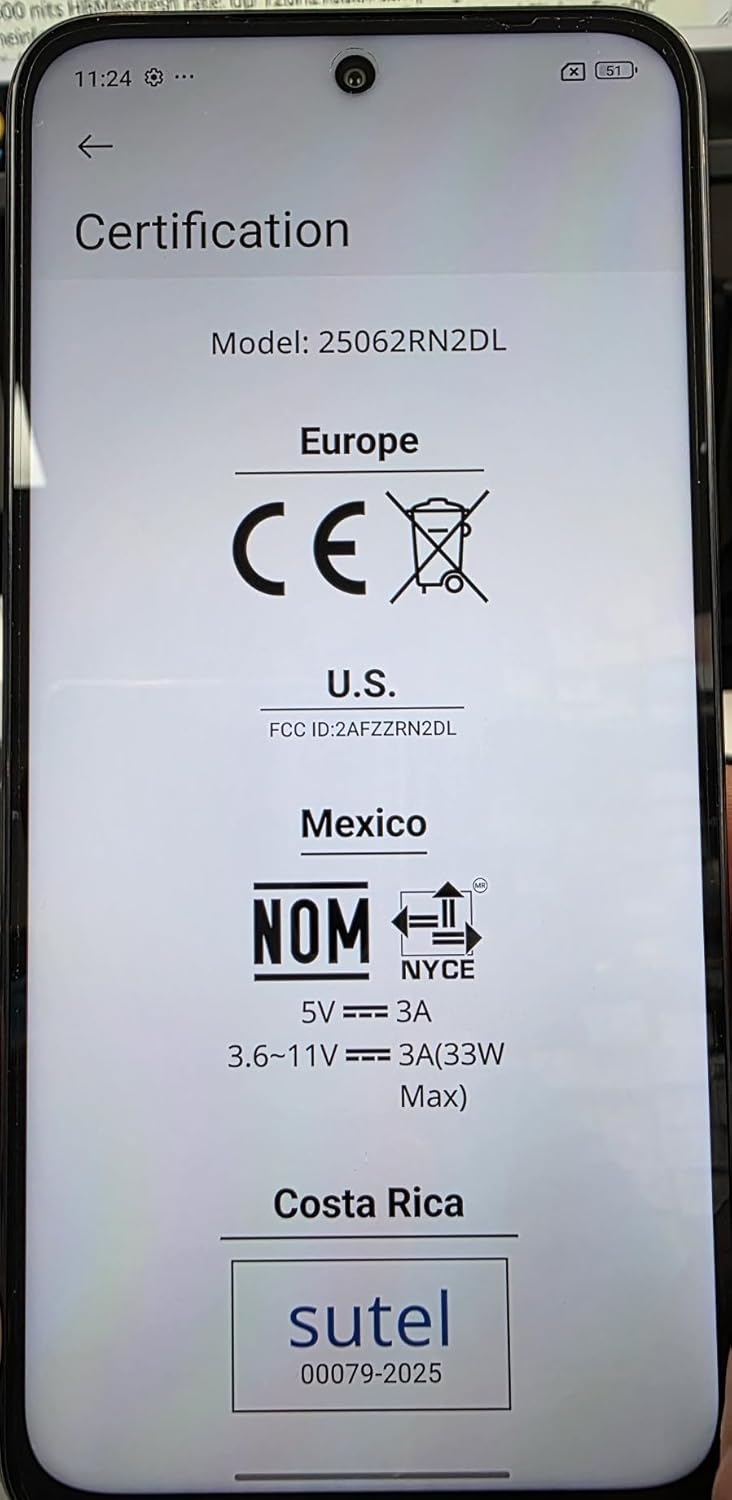
Isithombe 2: Certification Labels. This image shows the phone's screen displaying various certification marks including CE (Europe), FCC ID (U.S.), NOM (Mexico), and SUTEL (Costa Rica), along with power specifications.
7. Iwaranti kanye Nokusekela
Specific warranty details for your XIAOMI Redmi 15 are typically provided with your purchase documentation. Please refer to the warranty card or contact your retailer for precise terms and conditions.
For technical support, software updates, or further assistance, please visit the official XIAOMI support webisayithi noma uxhumane nesevisi yabo yamakhasimende. Ungathola ulwazi olwengeziwe ku- Isitolo se-XIAOMI ku-Amazon.


