1. Isingeniso
This user manual provides detailed instructions for the T&G Portable Bluetooth Speaker, model TG116C. Designed for exceptional audio performance, this compact speaker delivers crystal-clear sound and powerful bass, making it ideal for various indoor and outdoor environments. Please read this manual thoroughly before using the product to ensure proper operation and longevity.
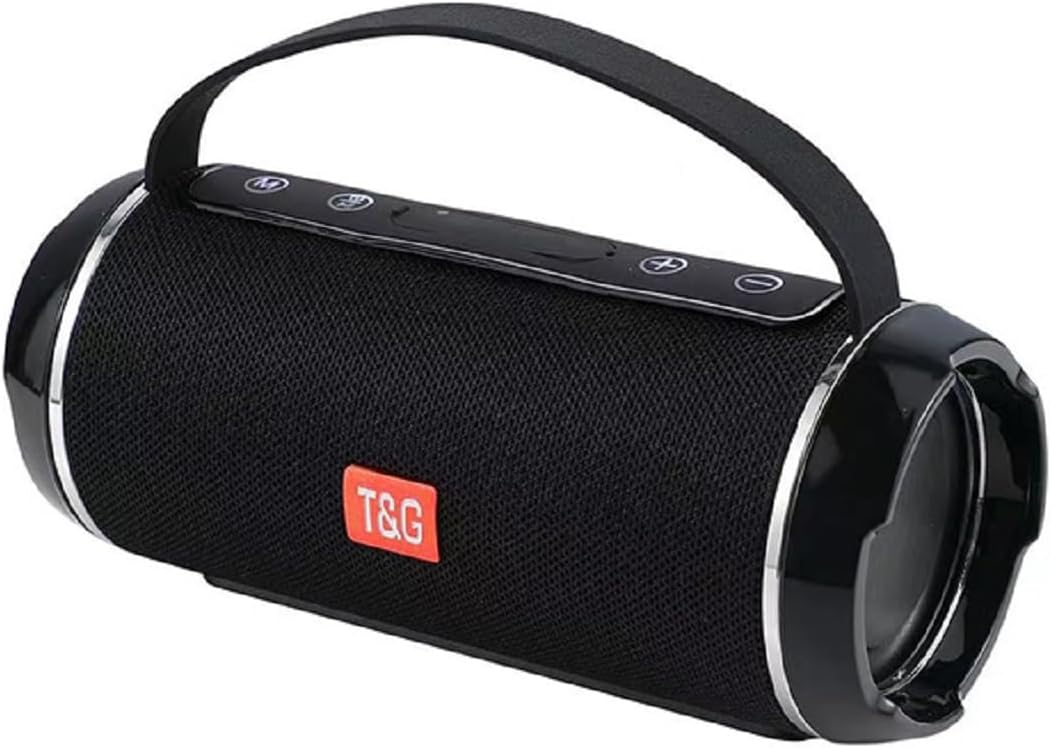
Figure 1: T&G Portable Bluetooth Speaker TG116C
2. Izici Eziyinhloko
- Immersive HD Sound with Deep Bass: Experience crystal-clear audio and powerful, distortion-free bass from this compact Bluetooth speaker. Advanced dual-driver technology and passive radiators deliver rich, balanced sound across all frequencies.
- Umsindo Ozungezile ongu-360°: Designed to fill any room with sound, providing an immersive listening experience.
- Idizayini Ephathekayo Nehlangene: Measuring just 3.2" tall and 7.08" wide, this lightweight speaker fits easily in bags or backpacks. Features a convenient carry lanyard for on-the-go convenience.
- Impilo Yebhethri Ehlala Isikhathi Eside: Enjoy up to 50 hours of nonstop music with a high-capacity lithium battery. Smart power-saving technology auto-adjusts consumption and enables deep sleep when idle.
- Ukushaja Ngokushesha: USB-C fast charging delivers 5 hours of playtime in just 10 minutes.
- Ibanga Lokungangeni Manzi le-IPX4: This speaker is splash-proof, making it suitable for outdoor adventures, beach trips, and poolside use. Note: IPX4 protects against splashes from any direction; it is not designed for full immersion.
- Ukuxhumana Okuhlukahlukene: Supports Bluetooth for wireless freedom, as well as AUX input, USB, and MicroSD card playback.
- Ukumataniswa kwe-True Wireless Stereo (TWS): Connect two TG116C speakers wirelessly for an enhanced stereo sound experience.

Figure 2: IPX4 Waterproof Grade - Splash Resistant

Figure 3: Compact Product Dimensions (7.08" x 3.14" x 3.14")
3. Okuqukethwe Kwephakheji
Sicela uhlole iphakheji ngezinto ezilandelayo:
- T&G Portable Bluetooth Speaker (TG116C)
- Ikhebuli yokushaja ye-USB-C
- Ikhebula Lomsindo elingu-3.5mm (AUX)
- Imaniwali yosebenzisayo
4. Izilawuli namachweba
Zijwayeze nezilawuli zesipikha kanye nezimbobo:
- Inkinobho yamandla (⑂): Long press to power on/off. Short press to play/pause.
- Inkinobho yemodi (M): Short press to switch between Bluetooth, AUX, USB, and MicroSD modes.
- Ivolumu Yehla / Ithrekhi Yangaphambilini (-): Cindezela kafushane ukuze wehlise ivolumu. Cindezela isikhathi eside ukuze uthole ithrekhi yangaphambilini.
- Ivolumu Ephezulu / Ithrekhi Elandelayo (+): Cindezela kafushane ukuze ukhuphule ivolumu. Cindezela isikhathi eside ukuze uthole ithrekhi elandelayo.
- Imbobo yokushaja ye-USB-C: Ukushaja isipikha.
- Imbobo ye-USB-A: Ukuze kudlaleke idrayivu ye-USB.
- Isikhala Sekhadi le-MicroSD: For MicroSD card playback.
- Okokufaka kwe-AUX (3.5mm): Ngoxhumano lomsindo olunentambo.
Umdwebo 4: Ngaphezuluview of Speaker Controls and Ports (refer to product for exact layout)
5. Setha
5.1 Ukushaja uSomlomo
- Xhuma ikhebula lokushaja le-USB-C elinikeziwe echwebeni le-USB-C lesipikha.
- Xhuma enye ingxenye yentambo ku-adaptha yamandla ye-USB (ayifakiwe) noma imbobo ye-USB yekhompyutha.
- The charging indicator light will illuminate. Once fully charged, the light will change or turn off (refer to specific product behavior).
- A full charge provides up to 50 hours of playtime. For quick power, 10 minutes of charging can provide 5 hours of playtime.
5.2 Ukuvula / Ukuvula
- Ukuvula: Long press the Power button (⑂) until you hear a power-on prompt or see the indicator lights illuminate.
- Ukucisha: Long press the Power button (⑂) again until you hear a power-off prompt or the indicator lights turn off.
5.3 Ukumatanisa kwe-Bluetooth
- Ensure the speaker is powered on and in Bluetooth mode (indicated by a flashing blue light or voice prompt "Bluetooth Mode"). If not, short press the Mode (M) button to switch.
- Kudivayisi yakho yeselula (i-smartphone, ithebhulethi, ikhompyutha), vumela i-Bluetooth.
- Cinga available Bluetooth devices. The speaker will appear as "TG116C" or similar.
- Select "TG116C" to connect. Once paired, you will hear a confirmation sound or voice prompt, and the Bluetooth indicator light will become solid.
- Isipikha sizozama ngokuzenzakalela ukuphinda sixhume kudivayisi yokugcina ebhanqiwe lapho sivuliwe.
5.4 Ukubhanqa kwe-True Wireless Stereo (TWS).
To achieve a true stereo sound experience, you can pair two TG116C speakers together:
- Ensure both TG116C speakers are powered on and in Bluetooth mode, but not connected to any device.
- On one of the speakers (this will be your primary speaker), long press the Mode (M) button until you hear a pairing sound, indicating TWS pairing mode.
- Izikhulumi ezimbili zizosesha ngokuzenzakalelayo futhi zixhumane. Uma usuxhunyiwe, uzozwa umsindo wokuqinisekisa.
- Now, connect your mobile device to the primary speaker via Bluetooth as described in Section 5.3. Both speakers will play audio in stereo.

Figure 5: TWS Pairing for 3D Stereo Sound

Figure 6: TWS Pairing for Enhanced Bass
6. Iziqondiso Zokusebenza
6.1 Ukudlala Umculo
- Imodi ye-Bluetooth: After successful pairing, open your music app and start playback. Use the speaker's Power button for play/pause.
- Imodi ye-AUX: Connect one end of the 3.5mm audio cable to the speaker's AUX input and the other end to your audio device's headphone jack. Short press the Mode (M) button to switch to AUX mode.
- USB/MicroSD Mode: Insert a USB drive into the USB-A port or a MicroSD card into its slot. The speaker will automatically switch to the respective mode and begin playing supported audio files. If not, short press the Mode (M) button.
6.2 Volume Control and Track Navigation
- Ivolumu ephezulu: Cindezela kafushane inkinobho ethi '+'.
- Ivolumu Phansi: Cindezela kafushane inkinobho '-'.
- Ithrekhi Elandelayo: Cindezela isikhathi eside inkinobho ethi '+'.
- Ithrekhi yangaphambilini: Cindezela isikhathi eside inkinobho ethi '-'.
6.3 Call Functionality (Bluetooth Mode)
- Phendula Ucingo: Short press the Power button (⑂) when an incoming call rings.
- Qeda ikholi: Short press the Power button (⑂) ngesikhathi socingo.
- Yenqaba Ucingo: Long press the Power button (⑂) when an incoming call rings.
7. Isondlo Nokunakekela
- Ukuhlanza: Use a soft, dry cloth to clean the speaker. Do not use abrasive cleaners, alcohol, or chemical solvents.
- Ukumelana Namanzi: The speaker is IPX4 rated, meaning it is protected against splashing water from any direction. Do not submerge the speaker in water or expose it to strong jets of water. Ensure the port cover is securely closed before exposing to water.
- Isitoreji: Store the speaker in a cool, dry place away from direct sunlight and extreme temperatures. If storing for a long period, charge the battery periodically to maintain its lifespan.
- Gwema Imithelela: Ungawisi isipikha noma usifake emiphumeleni enamandla, njengoba lokhu kungalimaza izingxenye zangaphakathi.
8. Ukuxazulula izinkinga
| Inkinga | Imbangela Engenzeka | Isixazululo |
|---|---|---|
| Isipikha asikhanyisi. | Ibhethri eliphansi; Inkinobho yamandla ayicindezelwanga isikhathi eside ngokwanele. | Charge the speaker for at least 30 minutes. Long press the Power button for 3-5 seconds. |
| Ayikwazi ukubhanqa nedivayisi ye-Bluetooth. | Speaker not in pairing mode; Device Bluetooth off; Too far from speaker; Already connected to another device. | Ensure speaker is in Bluetooth mode (flashing light). Turn device Bluetooth off/on. Move device closer (within 10m). Disconnect from other devices. |
| Awukho umsindo noma ivolumu ephansi. | Volume too low on speaker/device; Incorrect mode selected; Cable not fully inserted (AUX). | Increase volume on both speaker and device. Press Mode (M) button to select correct input. Ensure AUX cable is fully inserted. |
| Ukuhlanekezelwa komsindo. | Volume too high; Device too far from speaker; Interference. | Lower volume. Move device closer. Move away from other electronic devices. |
| Ukubhanqa kwe-TWS kwehlulekile. | Speakers already paired to a device; Not in TWS pairing mode. | Ensure both speakers are disconnected from any Bluetooth devices. Long press the Mode (M) button on one speaker to initiate TWS pairing. |
9. Imininingwane
| Isici | Imininingwane |
|---|---|
| Ibhrendi | I-T&G |
| Igama Lemodeli | I-TG116C |
| Ubuchwepheshe bokuxhumana | Okungenantambo (Bluetooth) |
| I-Wireless Communication Technology | I-Bluetooth |
| Uhlobo lwesipika | Ngaphandle |
| Isici Esikhethekile | Bass Boost, Hi Res Audio, Waterproof, auto speaker setup, dolby trueHD |
| Ukusetshenziswa Okunconyiwe Komkhiqizo | Ngaphakathi/Ngaphandle |
| Umthombo wamandla | Isebenza Ibhethri |
| Ubukhulu bomkhiqizo | 7.09"D x 3.15"W x 3.15"H |
| Isisindo sento | 1.22 amakhilogremu |
| Umbala | Mnyama |
| Ukubala kweyunithi | 1.0 Bala |
| Umkhiqizi | I-T&G |
10. Iwaranti kanye Nokusekela
The T&G Portable Bluetooth Speaker TG116C comes with a standard manufacturer's warranty. Please refer to the product packaging or the official T&G webindawo yemigomo nemibandela ethile yewaranti.
For technical support, troubleshooting assistance, or warranty claims, please contact T&G customer service through their official channels. Contact information can typically be found on the product packaging or the brand's official webindawo.
Qaphela: Gcina irisidi lakho lokuthenga njengobufakazi bokuthenga ngenhloso yewaranti.


