Isingeniso
Thank you for choosing the QCY Crossky C50 Open-Ear Bluetooth Earbuds. These earbuds are designed to provide a comfortable and secure audio experience, ideal for various activities including running and fitness. This manual will guide you through the setup, operation, maintenance, and troubleshooting of your new earbuds.
1. Setha
1.1 Ukushaja Kwasekuqaleni
Before first use, fully charge the earbuds and the charging case. Connect the charging case to a power source using a compatible USB cable. The indicator lights on the case will show the charging status.
1.2 Ukumatanisa Nedivayisi Yakho
- Vula ikesi lokushaja. Ama-earbud azongena ngokuzenzakalelayo kumodi yokumatanisa.
- Edivayisini yakho (i-smartphone, ithebhulethi, njll.), vula i-Bluetooth.
- Cinga "QCY Crossky C50" in the list of available Bluetooth devices and select it to connect.
- The earbuds feature automatic L/R correlation, ensuring they sync correctly without manual adjustment.
The QCY Crossky C50 uses Bluetooth 6.0 for fast and stable connectivity.
1.3 Ukugqoka ama-Earbuds
The earbuds are designed for open-ear comfort with soft silicone ear hooks and flexible titanium memory alloy for a secure fit. Position the earbuds so the sound outlet is directed towards your ear canal, and the ear hook rests comfortably over your ear.

Image: The QCY Crossky C50 earbuds feature a pressure-free open-ear design, highlighting the soft silicone finish and flexible titanium memory alloy for enhanced comfort.

Image: The QCY Crossky C50 earbuds are designed for an anti-drop secure fit, remaining stable during physical activities like yoga or running.
2. Iziqondiso Zokusebenza
2.1 Vula/Vala amandla
- Vula: Open the charging case, or if already out of the case, press and hold the touch area on both earbuds for 1-2 seconds.
- Cisha ugesi: Place the earbuds back into the charging case and close the lid, or press and hold the touch area on both earbuds for approximately 5 seconds.
2.2 Ukudlala Umculo
- Dlala/Misa kancane: Tap the touch area on either earbud once.
- Ithrekhi Elandelayo: Double-tap the touch area on the right earbud.
- Ithrekhi yangaphambilini: Double-tap the touch area on the left earbud.
The earbuds utilize advanced directional audio technology, which reduces sound leakage by 90% compared to traditional open-ear designs, directing audio precisely into your ears for a private listening experience.
Image: Illustration of the QCY Crossky C50's advanced directional audio, which minimizes sound leakage by guiding sound waves directly into the ear.
2.3 Ukuphathwa Kwezingcingo
- Phendula/Phendula ikholi: Tap the touch area on either earbud once.
- Yenqaba Ucingo: Cindezela bese ubamba indawo yokuthinta kunoma iyiphi i-earbud imizuzwana emi-2.
Equipped with 4 AI-powered microphones, the earbuds provide crystal-clear calls by employing multi-dent noise reduction, wind noise suppression, and an AI-based algorithm to refine your voice.

Image: The QCY Crossky C50 features 4 AI-powered microphones for superior call quality, offering wind noise reduction and up to 45dB call noise reduction.
2.4 App Customization & Dual Connection
- Download the QCY app to customize EQ modes and button functions. The app also provides real-time power information and firmware updates.
- The earbuds support dual connection, allowing you to connect to two devices simultaneously. This enables seamless switching between devices, for example, watching a movie on a tablet and answering a call on your phone without re-pairing.
2.5 Impilo Yebhethri
The earbuds offer approximately 7.5 hours of listening time on a single charge. The charging case provides an additional three full charges, extending the total playtime to up to 35 hours.

Image: The QCY Crossky C50 provides 7.5 hours of playback per charge, with the charging case extending total battery life to 35 hours.
3. Isondlo
3.1 Ukuhlanza
- Hlanza njalo ama-earbud nekesi lokushaja ngendwangu ethambile, eyomile, engena-lint.
- Ungasebenzisi izinto zokuhlanza abrasive, utshwala, noma izincibilikisi zamakhemikhali.
- Ensure charging contacts are free of dust and debris.
3.2 Ukumelana Namanzi
The QCY Crossky C50 earbuds are IPX5 water-resistant, meaning they can withstand sweat and splashes. They are not designed for submersion in water. Avoid exposing them to heavy rain or swimming.
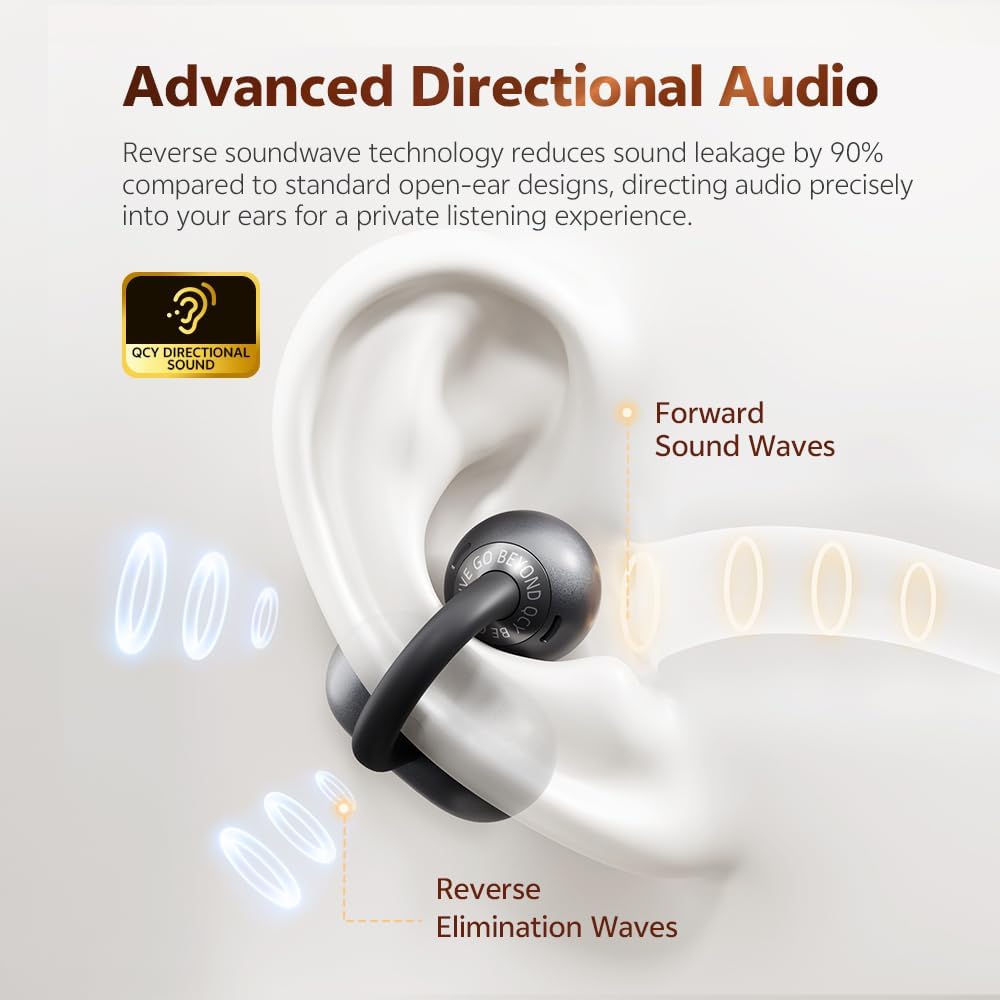
Image: The QCY Crossky C50 earbuds are IPX5 rated, offering resistance against sweat and splashes, making them suitable for workouts.
3.3 Isitoreji
Uma ingasetshenziswa, gcina ama-earbud kukesi lawo lokushaja ukuze uwavikele futhi uqinisekise ukuthi ahlala eshajiwe.
4. Ukuxazulula izinkinga
- Ama-earbud awamataniswa: Ensure both earbuds are charged and out of the case. Turn off and on your device's Bluetooth. If issues persist, try resetting the earbuds (refer to the QCY app or online support for specific reset instructions).
- Awukho umsindo ovela ku-earbud eyodwa: Place both earbuds back into the charging case, close the lid, wait a few seconds, then take them out again. Check your device's audio settings.
- Izinkinga zokushaja: Ensure the charging cable is securely connected to both the case and the power source. Clean the charging contacts on both the earbuds and the case.
- Ikhwalithi yocingo embi: Ensure the microphones are not obstructed. Check for strong wind or excessive background noise.
5. Imininingwane
| Isici | Incazelo |
|---|---|
| Inombolo Yemodeli | I-CT06 |
| Ukuxhumana | I-Bluetooth 6.0 |
| Uhlobo Lwebhethri | I-Lithium-ion engu-1 (ifakiwe) |
| Isikhathi sokudlala se-Earbud | Kuze kube ngamahora angu-7.5 ngokukhokhiswa ngakunye |
| Isikhathi sokudlala esiphelele (kanye nekesi) | Kufika emahoreni angu-35 |
| Imakrofoni | 4 AI-powered microphones with noise reduction |
| Ukumelana Namanzi | IPX5 (ayikwazi ukumelana nokujuluka nokuchaphaza) |
| Induduzo | Open-ear design, soft silicone ear hooks, flexible titanium memory alloy |
| Ubuchwepheshe bomsindo | Directional audio, dual-magnetic driver, carbon-fiber diaphragms for enhanced bass |
| Izici ezikhethekile | Automatic L/R correlation, dual device connection, QCY app support |
| Ubukhulu bephakheji | 12.6 x 8.5 x 3.9 cm |
| Isisindo | 1 gram (earbuds only, approximate) |
| Umkhiqizi | QCY |

Image: Internal components of the QCY Crossky C50 earbud, showcasing the dual-magnetic driver and carbon-fiber diaphragms for improved bass performance.
6. Iwaranti kanye Nokusekela
QCY products are covered by a limited warranty. For detailed warranty information, product support, or to contact customer service, please visit the official QCY website or refer to the warranty card included with your purchase. Please retain your proof of purchase for warranty claims.


