Isingeniso
This manual provides essential instructions for setting up, operating, and maintaining your AOLON Tetra R4 Smart Watch. Please read it carefully to ensure proper use and to maximize the device's features.
Ukuqalisa
1. Unboxing
Your AOLON Tetra R4 Smart Watch package includes the following items:
- AOLON Tetra R4 Smart Watch
- Ikhebula lokushaja
- Imaniwali yosebenzisayo
- Bukela iBhendi

Image: Product Size And Packaging List
2. Ukushaja Idivayisi
Before first use, fully charge your smart watch. The device features a 350 mAh battery, providing up to 7 days of typical use and up to 30 days of standby time. A full charge takes approximately 2.5 hours.
- Xhuma ikhebula lokushaja elinozibuthe ezindaweni zokushaja ezingemuva kwewashi.
- Xhuma isiphetho sekhebula se-USB ku-adaptha yamandla ye-USB evamile (ayifakiwe) noma imbobo ye-USB yekhompyutha.
- Isibonisi sewashi sizobonisa isimo sokushaja.
Video: This video demonstrates the unboxing and initial setup of the Tetra R4 Smart Watch, including charging and basic UI navigation.
3. Ukufakwa kohlelo lokusebenza nokumatanisa
To unlock the full potential of your smart watch, download and install the I-GloryFitPro uhlelo lokusebenza ku-smartphone yakho.
- Scan the QR code in the included user manual or search for "GloryFitPro" in your smartphone's app store (App Store for iOS, Google Play for Android).
- Nika amandla i-Bluetooth ku-smartphone yakho.
- Open the GloryFitPro app and follow the on-screen instructions to add your device.
- Select "Aolon Tetra R4" from the list of available devices to connect.

Image: Connect the Smart Watch Via APP GloryFitPro "Aolon Tetra R4"
Isebenzisa iwashi lakho elihlakaniphile
1. Ukuhamba Okuyisisekelo
The AOLON Tetra R4 features a 1.43-inch AMOLED full touch screen, a rotating crown, and two physical buttons for intuitive control.
- Isikrini sokuthinta: Swipe left, right, up, or down to navigate through menus and functions. Tap to select.
- Umqhele Ozungezayo: Rotate to scroll through lists or adjust settings. Press to confirm or return to the watch face.
- Izinkinobho Zomzimba: Use for quick access to specific functions or to power on/off the device.
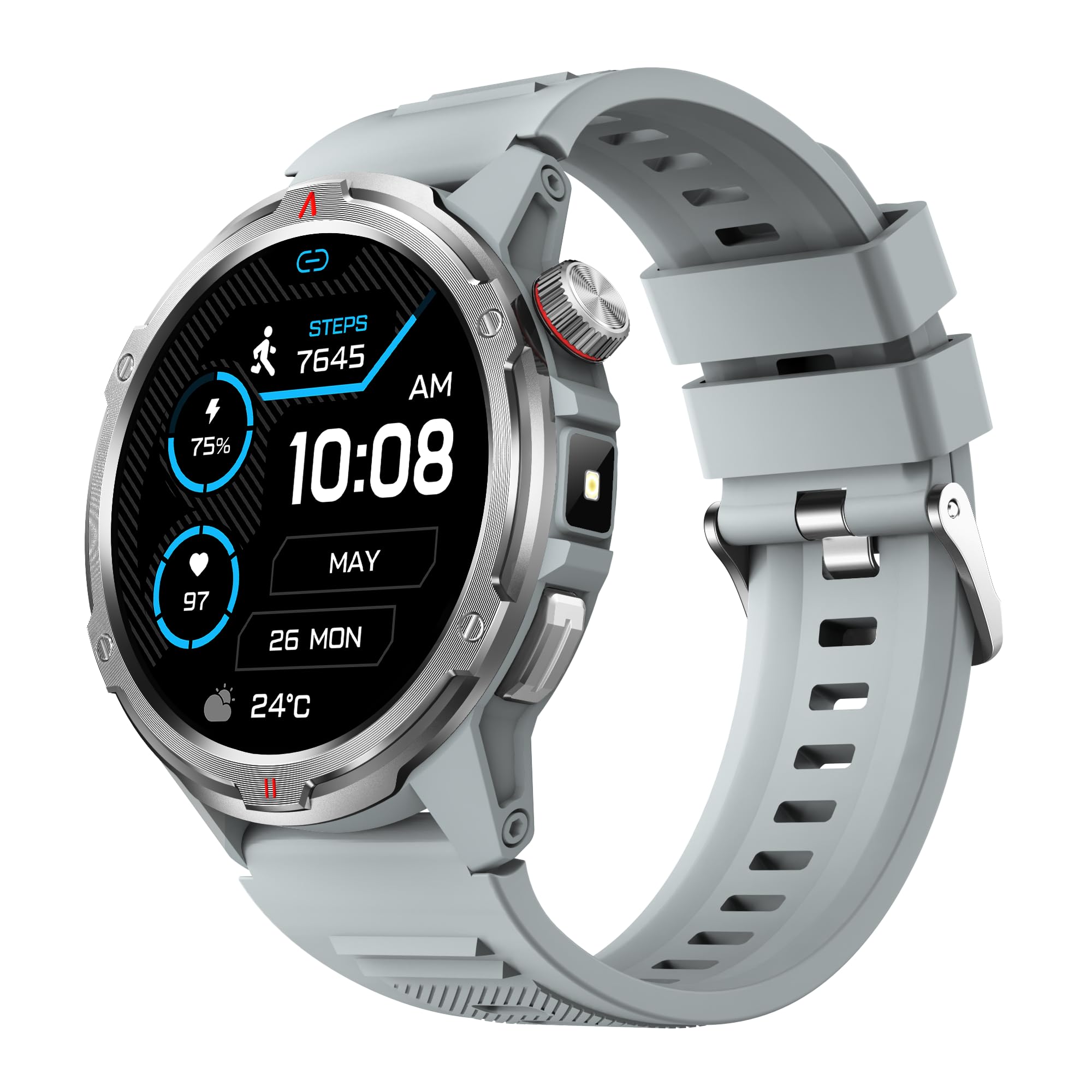
Image: Main product view showing the 1.43" AMOLED HD Full Touch Screen and physical buttons.
2. Izici Zokuxhumana
Stay connected directly from your wrist with Bluetooth calling and smart notifications.
- Ukushaya kwe-Bluetooth: With the latest Bluetooth 5.2 chip, a high-quality speaker, and microphone, you can make and receive calls directly from your watch. You can also add up to 100 contacts and view izingodo zokushayela.
- Izaziso Ezihlakaniphile: Receive message alerts, alarms, and other daily essentials from your paired smartphone. (Note: Message reply is not supported).

Image: BT Call & Message Sync Watch
Video: This video highlights the stylish design and various features of the smartwatch, including communication capabilities.
3. Ukuqapha Impilo
The AOLON Tetra R4 utilizes Cywee Professional Algorithms for accurate health tracking, providing insights into your well-being.
- Ukuqapha Kwezinhliziyo: Real-time heart rate monitoring throughout the day, whether at rest or during high-intensity exercise.
- I-Blood Oxygen (SpO2) Monitor: Measure your blood oxygen level anytime to regulate your body.
- Ukuqapha Izinga Lokucindezeleka: Built-in PPG, SAR, AFE sensors and advanced algorithms monitor stress levels and provide alerts.
- Isiqapha Sokulala: Combined with advanced algorithm analysis, it tracks deep sleep, light sleep, awake time, and REM sleep to help you understand and improve your sleep quality.
- Ukulandelela umjikelezo wokuya esikhathini: Provides intelligent management and thoughtful reminders for women's health.
- One-Tap Measurement: Check your heart rate, blood oxygen, and stress level simultaneously with a single tap.

Image: Heart Rate Monitoring
Video: This video demonstrates the heart rate and SpO2 monitoring features of the smartwatch.
4. Izindlela Zezemidlalo kanye Nokulandelela Umsebenzi
Track your fitness journey with over 100 sports modes and comprehensive activity tracking.
- 100+ Izindlela Zezemidlalo: Supports a wide range of activities, from running and cycling to swimming and mountaineering.
- I-Tracker Yomsebenzi: Records steps, calories burned, and distance covered.
- AGPS Function: Built-in AGPS provides accurate positioning and trajectory tracking for outdoor activities.

Image: 100+ More Sport Modes
Video: This video showcases the smart health features and the variety of over 100 sports modes available on the watch.
5. Outdoor Tools
Designed for outdoor enthusiasts, the Tetra R4 includes practical tools for navigation and convenience.
- Ikhampasi: Built-in compass for navigation.
- I-Flashlight: A convenient flashlight function for low-light situations.
- AGPS, Altimeter, Barometer: Auxiliary functions to assist with outdoor exploration.

Image: Built-in AGPS Movement
Video: This video demonstrates the IP68 waterproof rating and suitability for daily activities, including outdoor use.
6. Ukwenza ngokwezifiso
Personalize your watch to match your style and preferences.
- Ubuso bewashi: Choose from over 150 pre-designed dials in the app, or customize your watch face with your own photos.

Image: Choose from a variety of watch faces
7. Other Practical Functions
The Tetra R4 offers a range of additional features to enhance your daily life.
- Izibuyekezo zesimo sezulu
- Iwashi eline alamu
- Isitophuwashi kanye nesibali sikhathi
- Ukulawula Umculo
- Remote Shutter for camera control
- Find Mobile Phone function
- Isibali
- Iwashi Lomhlaba
- Ucingo oluphuthumayo
- Umsizi Wezwi

Image: Multiple Practical Functions
Video: This video demonstrates various multi-functional aspects of the Aolon Tetra R4 Smart Watch.
Isondlo
1. Isilinganiso esingangeni manzi
The AOLON Tetra R4 Smart Watch has an Isilinganiso sokungangeni manzi kwe-IP68. This means it is resistant to dust and can withstand immersion in water up to 1.5 meters for up to 30 minutes. It is suitable for daily use, including hand washing, rain, and shallow swimming. However, it is not recommended for hot showers, saunas, or diving, as steam and high water pressure can compromise the seals.

Image: IP68 Level Waterproof
2. Ukuhlanza Nokunakekela
To maintain your watch's performance and appearance:
- Sula iwashi nebhande njalo ngento ethambile, damp indwangu.
- Gwema ukusebenzisa amakhemikhali anokhahlo noma izihlanzi ezilumayo.
- Qinisekisa ukuthi abathintwayo abashajayo bahlanzekile futhi bomile ngaphambi kokushaja.
3. Battery Life Optimization
Ukuze unwebe impilo yebhethri:
- Adjust screen brightness to a lower level.
- Disable the Always-On Display (AOD) feature if not needed.
- Limit background app refresh and notifications.
- Turn off continuous heart rate monitoring if not required for extended periods.
Ukuxazulula inkinga
If you encounter issues with your AOLON Tetra R4 Smart Watch, try the following solutions:
- Iwashi alivuli/alishaji: Ensure the charging cable is securely connected to both the watch and a power source. Try a different USB port or power adapter.
- Izinkinga zokuxhumeka (i-Bluetooth): Make sure Bluetooth is enabled on your smartphone and the watch is within range. Restart both the watch and your phone, then attempt to re-pair via the GloryFitPro app.
- Time synchronization incorrect: Ensure the watch is properly connected to the GloryFitPro app, as time is usually synced automatically from your phone. Reinstalling the app might resolve persistent issues.
- Inaccurate step count or health data: Ensure the watch is worn snugly on your wrist. Calibrate the device through the app if available.
- Isikrini asiphenduli: Restart the watch by pressing and holding the power button. If unresponsive, allow the battery to fully drain and then recharge.
Imininingwane
| Isici | Ukucaciswa |
|---|---|
| Inombolo Yemodeli | Tetra R4 |
| Bonisa | I-AMOLED engu-1.43-intshi, isinqumo esingu-466x466 |
| Amandla ebhethri | 350 mAh |
| Ukusebenzisa Impilo Yebhethri Okujwayelekile | Kufika ezinsukwini ezingama-7 |
| Isikhathi sokulinda | Kufika ezinsukwini ezingama-30 |
| Isikhathi sokushaja | Cishe. Amahora angu-2.5 |
| Isilinganiso Sokungangeni Manzi | IP68 |
| Ukuxhumana | I-Bluetooth 5.2 |
| Ukuhambisana Kwesistimu Esebenzayo | I-Android 4.4+, iOS 9.0+ |
| Ukuqapha Ezempilo | Heart Rate, SpO2, Stress, Sleep, Menstrual Cycle |
| Izindlela Zezemidlalo | 100+ |
| Outdoor Features | Compass, Flashlight, AGPS, Altimeter, Barometer |
| Isisindo | 52 amagremu |
Iwaranti kanye Nokusekela
AOLON provides a Iwaranti yezinyanga eziyi-12 for the Tetra R4 Smart Watch. For any questions or issues, please contact AOLON Customer Support through Amazon. Our support team aims to provide a responsive resolution within 24 hours.


