1. Umkhiqizo Uphelileview
The farexon Electric Standing Desk is an adjustable height workstation designed for home and office environments. It features an electric lifting system, allowing seamless transitions between sitting and standing positions. The desk includes memory presets for convenient height adjustments and is equipped with features to enhance user experience and safety.

Image 1.1: The farexon Electric Standing Desk in a typical office setup, showcasing its spacious black tabletop, dual monitor support, and integrated cable management features. The desk is shown with its included caster wheels and non-slip foot pads.
2. Ulwazi Lokuphepha
Please read all safety instructions carefully before assembly and operation to prevent injury or damage to the product.
- I-Anti-Collision Technology: The desk is equipped with an anti-collision system. If the desk encounters an obstacle during height adjustment, it will automatically reverse direction to prevent damage or injury.
- Ukuphepha Kwezinto: The desk materials meet U.S. federal and state safe air standards, with significant reductions in formaldehyde and other VOC emissions.
- Ukuvikela ukushisa ngokweqile: The motor includes overheating protection to ensure safe operation.
- Ukukhiya Kwengane: The control panel may feature a child lock function to prevent unintended adjustments. Refer to the operating section for details.
- Keep hands and objects clear of the lifting mechanism during operation.
- Ungagcwalisi ideski ngokweqile ngaphezu kwesisindo salo esibekiwe.
- Ensure all cables are properly managed to avoid entanglement during height adjustments.
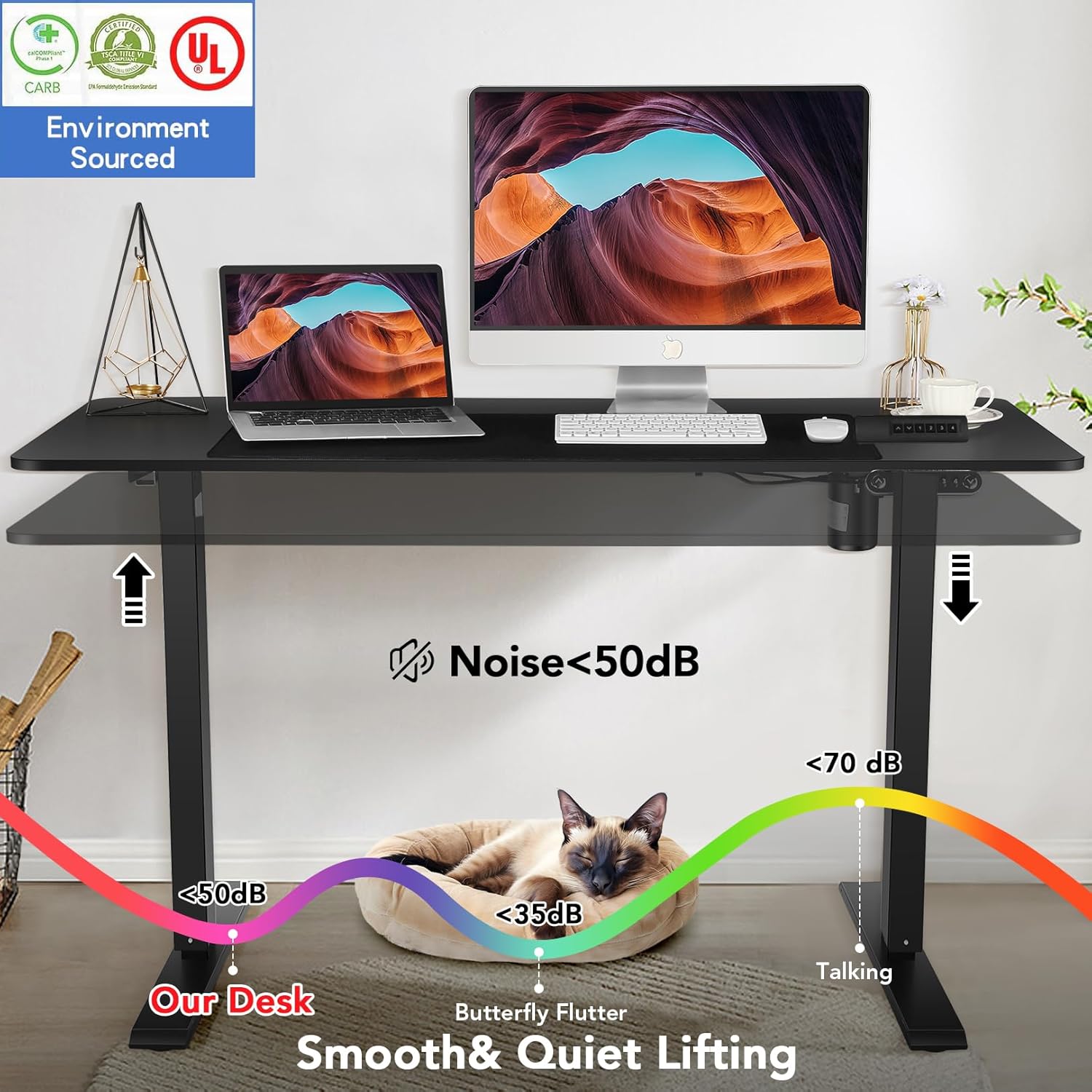
Image 2.1: Illustration demonstrating the low noise level (below 50dB) of the desk's lifting mechanism, ensuring a quiet working environment.
3. Izici
The farexon Electric Standing Desk is designed with several key features for optimal functionality and user comfort:
- Ukuphakama Okuguqukayo: Electric lifting range from 27 inches to 46 inches.
- Ukulungiselelwa Kwememori: Four programmable memory buttons to save preferred sitting and standing heights.
- Ideskithophu Ebanzi: Large 48" x 24" tabletop provides ampindawo yokusebenza.
- Ukwakhiwa Okuqinile: Supported by a sturdy metal frame and a thickened desktop board.
- Mobility Options: Includes 4 caster wheels for easy movement and 4 non-slip heightening foot pads for stationary use.
- Ukuphathwa Kwekhebula: Two cord retraction holes to keep cables organized.
- Izingwegwe zezisetshenziswa: Two metal hooks for hanging headphones or other items.
- Waterproof Tabletop: The desktop surface is water and wear-resistant.
- Protective Edge: Designed with a protective edge for durability and safety.
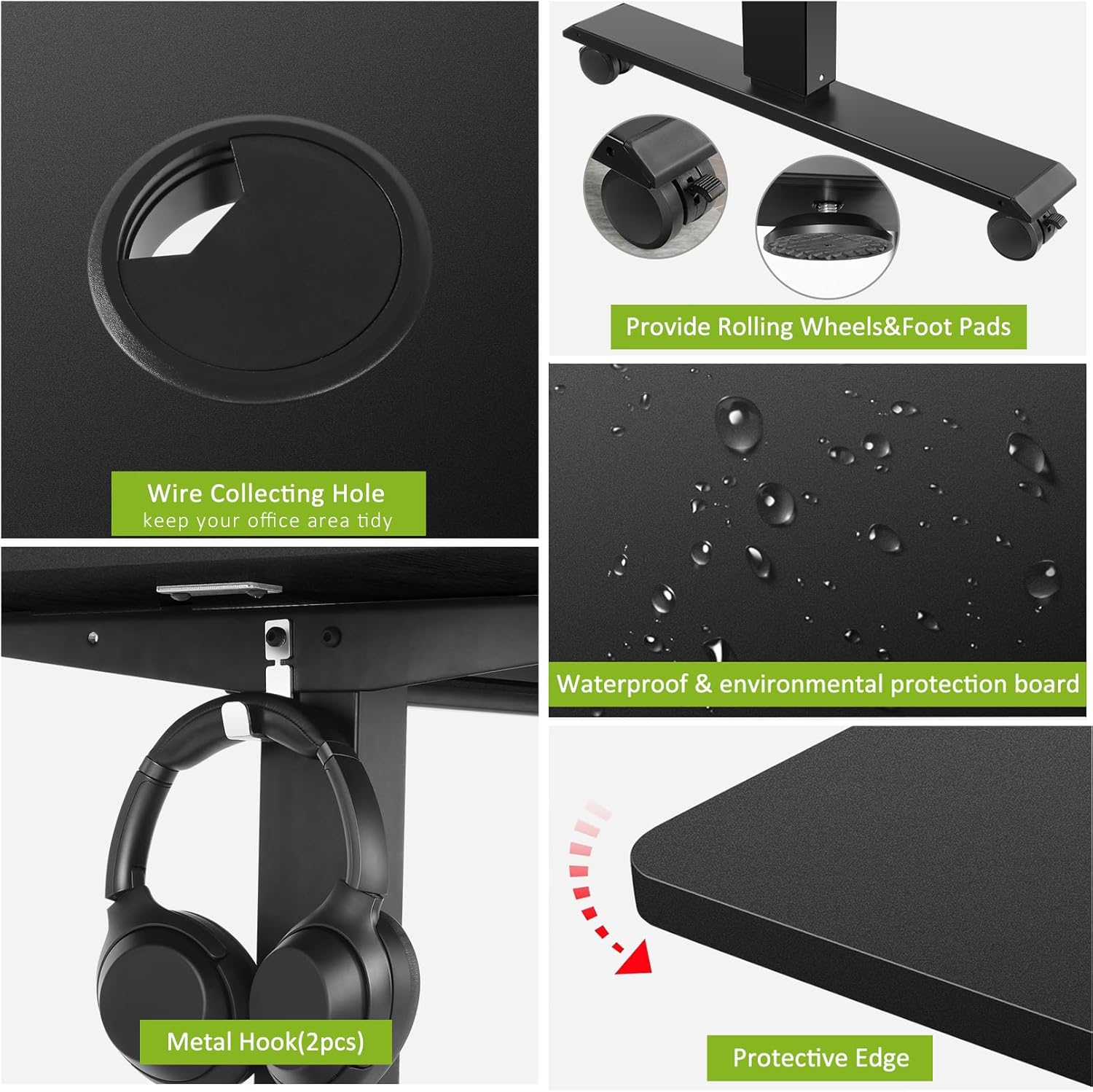
Isithombe 3.1: Okuningiliziwe view of key desk features including the wire collecting hole, interchangeable rolling wheels and non-slip foot pads, the waterproof tabletop surface, and the protective edge design.
4. Ukusetha nokuhlanganisa
Assembly of the farexon Electric Standing Desk is designed to be straightforward. All necessary assembly tools are included with the product.
4.1 Ukuqaqa kanye Nokuhlola
- Khipha ngokucophelela zonke izingxenye zephakheji.
- Verify that all parts listed in the assembly manual are present and undamaged.
- Beka izingxenye endaweni ethambile nehlanzekile ukuze uvimbele ukuklwebheka ngesikhathi sokuhlanganiswa.
4.2 Izinyathelo Zomhlangano
Follow the detailed step-by-step instructions provided in the included assembly manual. Key steps typically include:
- Attaching the lifting columns to the desktop.
- Securing the foot supports to the lifting columns.
- Installing the control box and connecting the motor cables.
- Mounting the control panel.
- Attaching the caster wheels or non-slip foot pads as desired.
- Installing the accessory hooks and cable management grommets.
It is recommended to have assistance during certain assembly steps due to the weight of some components.
5. Iziqondiso Zokusebenza
The farexon Electric Standing Desk features an intuitive control panel for easy height adjustment and memory functions.
5.1 Iphaneli yokulawula iphelileview
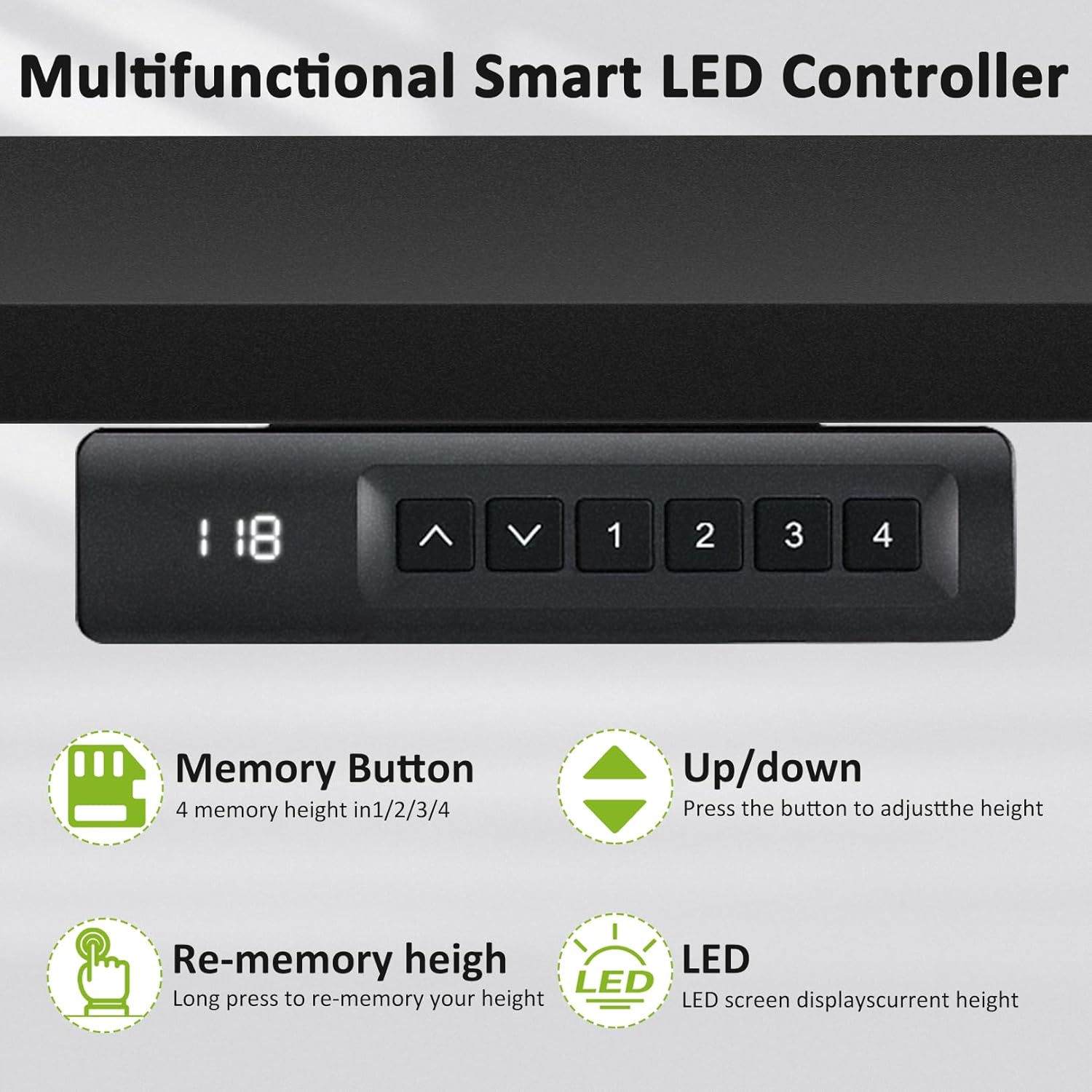
Image 5.1: The multifunctional smart LED controller, showing the LED display for current height, up/down buttons, and four memory preset buttons (1, 2, 3, 4).
- Ukuboniswa kwe-LED: Shows the current height of the desk in inches.
- Izinkinobho Zokubheka Phezulu/Phansi (▲ / ▼): Press to adjust the desk height incrementally.
- Izinkinobho Zememori (1, 2, 3, 4): Used to save and recall preferred height settings.
5.2 Ukulungisa Ubude
- Cindezela bese ubamba i Phezulu (▲) or Phansi (▼) button to move the desk to your desired height.
- Release the button when the desk reaches the desired position. The LED display will show the current height.
5.3 Ukusetha Amasethi Ememori Asethiwe
You can save up to four preferred height settings:
- Lungisa ideski libe ukuphakama okufiselekayo usebenzisa izinkinobho ezithi Phezulu/Phansi.
- Press and hold one of the memory buttons (1, 2, 3, or 4) until the LED display flashes or indicates that the height has been saved.
- To recall a saved height, simply press the corresponding memory button (1, 2, 3, or 4). The desk will automatically move to the saved position.
5.4 Anti-Collision Sensitivity
The anti-collision system is active during height adjustments. If the desk encounters an obstruction, it will stop and reverse slightly. There is no user adjustment for sensitivity.

Image 5.2: A user demonstrating the standing position at the farexon electric desk, highlighting its ergonomic benefits for a healthy lifestyle.
6. Isondlo
Regular maintenance ensures the longevity and optimal performance of your farexon Electric Standing Desk.
- Ukuhlanza: Wipe the desktop surface with a soft, damp cloth. Avoid abrasive cleaners or harsh chemicals that could damage the finish. For the metal frame, use a dry or slightly damp indwangu.
- Ukuphathwa Kwekhebula: Periodically check and reorganize cables to prevent tangling or damage during height adjustments.
- Izibophelelo: Occasionally check all screws and bolts to ensure they are tight. Retighten if necessary.
- Injini kanye Nendlela Yokusebenza: The electric motor and lifting mechanism are designed for maintenance-free operation. Do not attempt to lubricate or disassemble these components.
- Intambo Yamandla: Inspect the power cord for any signs of damage. If damaged, discontinue use and contact support.
7. Ukuxazulula izinkinga
If you encounter issues with your farexon Electric Standing Desk, refer to the following common troubleshooting steps:
| Inkinga | Imbangela Engenzeka | Isixazululo |
|---|---|---|
| Ideski alinyakazi. | Power cord disconnected; Overload; Motor overheating. | Check power connection. Reduce weight on desk. Allow motor to cool down for 20 minutes. |
| Ideski lihamba ngokungalingani noma lenza umsindo ongavamile. | Loose connections; Obstruction; Uneven weight distribution. | Check all assembly connections. Remove any obstructions. Redistribute weight evenly on the desktop. |
| Amasethingi ememori awasebenzi. | Amasethingi awakagcinwa kahle. | Re-save the memory presets by following the operating instructions (Section 5.3). |
| Uhlelo lokulwa nokushayisana luqala kaningi kakhulu. | Obstruction; Desk is too close to a wall/object. | Ensure there are no objects in the path of the desk's movement. Maintain adequate clearance from walls or furniture. |
If the problem persists after attempting these solutions, please contact farexon customer support for further assistance.
8. Imininingwane
| Isibaluli | Imininingwane |
|---|---|
| Ibhrendi | farexon |
| Inombolo Yemodeli | 1 |
| Ubukhulu bomkhiqizo (D x W x H) | 24"D x 48"W x 46"H |
| Umbala | Mnyama |
| Ubuncane Ubude | 27 amayintshi |
| Ukuphakama Okuphezulu | 46 amayintshi |
| Ukuqina Kwethebhulethi | 0.75 amayintshi |
| Izinto eziyisisekelo | Insimbi |
| Uhlobo Lwezinto Eziphezulu | Izinkuni |
| I-Lifting Mechanism | Ugesi |
| Isisindo sento | 46 Amakhilogremu |
| Izingxenye Ezihlanganisiwe | 4 Caster Wheels, 4 non-slip heightening foot pads, 2 Hooks |
| Umhlangano Odingekayo | Yebo |
| Kufaka Wonke Amathuluzi Omhlangano | Yebo |
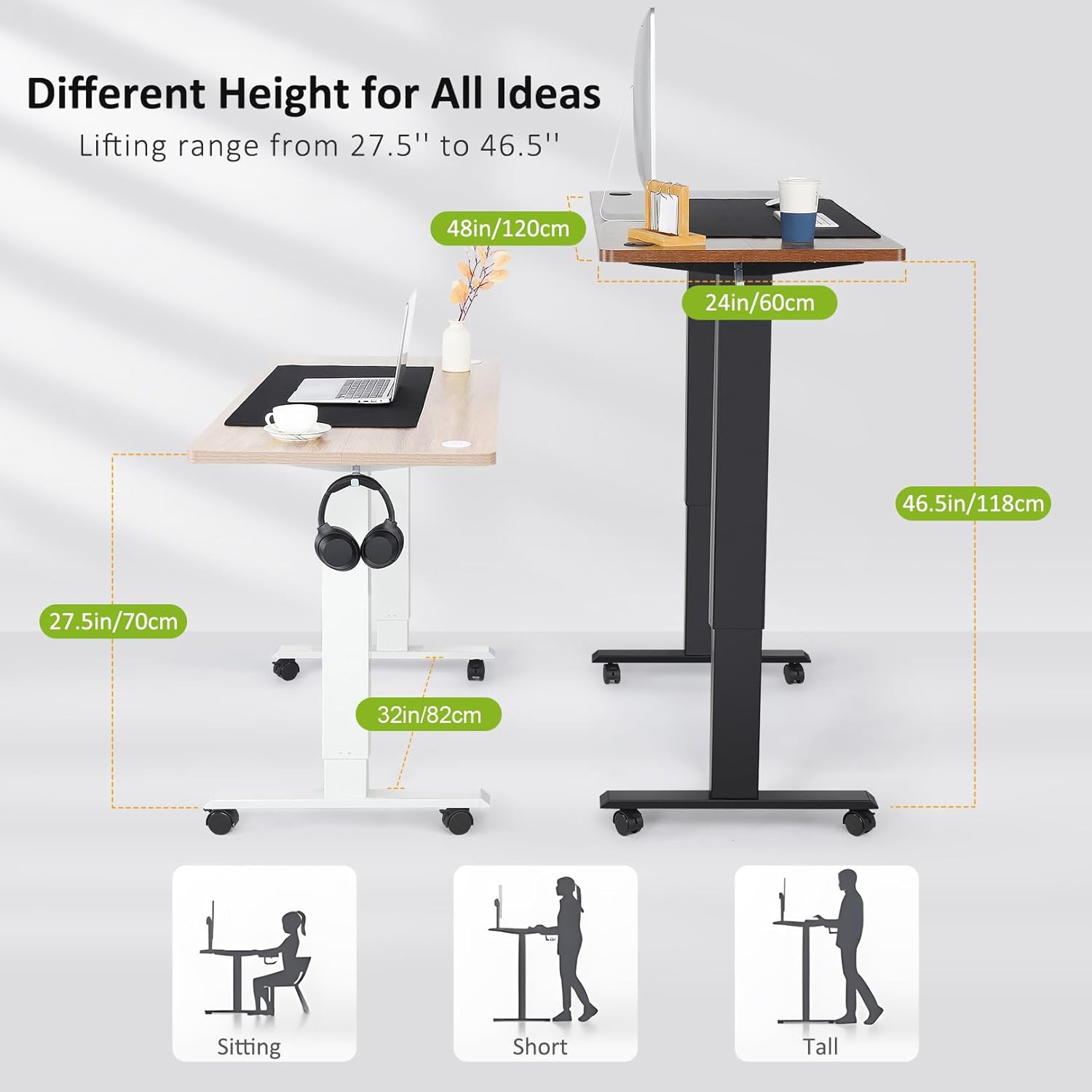
Image 8.1: Visual representation of the desk's adjustable height range from 27.5 inches to 46.5 inches, illustrating suitable heights for sitting, and standing for individuals of various heights.
9. Ulwazi Lwewaranti
The farexon Electric Standing Desk comes with a Iwaranti Egcwele. For specific details regarding the terms, duration, and coverage of your warranty, please refer to the warranty card included in your product packaging or contact farexon customer support.
10. Ukwesekwa Kwamakhasimende
For any questions, concerns, or assistance with your farexon Electric Standing Desk, please do not hesitate to contact our customer support team. Your satisfaction is our top priority.
Contact information can typically be found on the farexon official webindawo noma ezintweni zokupakisha.


