1. Umkhiqizo Uphelileview
The farexon Electric Standing Desk is designed to provide a versatile and ergonomic workspace, allowing users to easily switch between sitting and standing positions. This model features a 55 x 24 inch desktop in Oak Grey, equipped with an electric lifting system, memory presets, and anti-collision technology for safe and convenient operation. It is suitable for various environments including home offices, study rooms, and commercial settings.

Figure 1.1: The farexon Electric Standing Desk in an office setup, showcasing its spacious desktop and integrated features like the mouse pad and headphone hook.
2. Ulwazi Lokuphepha
Please read all safety instructions carefully before assembly and operation to prevent injury or damage to the product. Keep this manual for future reference.
- Ensure anti-collision technology is enabled during operation to prevent injuries or damage. The desk will move approximately 2cm in the opposite direction if an obstacle is detected during height adjustment.
- Verify that the desk meets U.S. federal and state safe air standards for reduced formaldehyde and VOC emissions.
- Do not place excessive weight on the desk. The maximum recommended weight is 178 pounds.
- Gcina izingane nezilwane ezifuywayo kude nedeski ngesikhathi sokusebenza.
- Ensure all cables are properly managed to avoid entanglement or damage during height adjustments.
- Sebenzisa kuphela i-adaptha yamandla nezingxenye ezinikeziwe.
3. Okuqukethwe Kwephakheji
Before beginning assembly, please ensure all components listed below are present and undamaged. If any parts are missing or damaged, contact customer support immediately.
- Desktop (Oak Grey, 55 x 24 inches)
- Electric Lifting Columns (2 pcs)
- Desk Feet/Bases (2 pcs)
- Iphaneli yokulawula ene-LED Display
- I-adaptha yamandla nekhebula
- Large Mouse Pad (36 x 16 inches)
- Rolling Wheels (4 pcs, lockable)
- Foot Pads (4 pcs, non-slip)
- Headphone Hooks (2 pcs)
- Wire Collecting Hole Cover
- I-Hardware Yomhlangano (izikulufu, amabhawudi, njll.)
- Amathuluzi Okuhlanganisa (i-Allen wrench, njll.)
- Incwadi Yomsebenzisi (le dokhumenti)

Figure 3.1: Key components and features of the desk, such as the wire collecting hole, rolling wheels, protective edge, and metal headphone hooks.
4. Iziyalezo Zomhlangano
Assembly typically requires two people. Follow the steps below. A detailed installation video is also available for visual guidance.
- Lungiselela Indawo Yokusebenzela: Clear a spacious area for assembly. Lay down a soft cloth or cardboard to protect the desktop from scratches.
- Attach Lifting Columns to Desktop: Carefully place the desktop upside down. Align the electric lifting columns with the pre-drilled holes on the underside of the desktop and secure them using the provided screws.
- Install Desk Feet/Bases: Attach the desk feet to the bottom of the lifting columns. Decide whether to install the rolling wheels or the non-slip foot pads. The wheels offer mobility, while the foot pads provide stationary stability. Secure your chosen option with the appropriate hardware.
- Connect Control Panel and Motor: Mount the control panel to the underside of the desktop in the designated area. Connect the motor cables from the lifting columns to the control panel, ensuring a secure fit. Connect the power adapter to the control panel.
- Faka Izinsiza: Attach the headphone hooks to the desired location on the underside of the desk. Insert the wire collecting hole cover into the desktop opening.
- Phendula iDeski: With assistance, carefully flip the assembled desk upright.
- Initial Power-Up and Calibration: Plug the power cable into a wall outlet. The desk may perform an initial calibration cycle. Follow any on-screen prompts on the LED display.

Figure 4.1: A fully assembled farexon Electric Standing Desk, ready for use in a home office environment.
5. Iziqondiso Zokusebenza
The farexon Electric Standing Desk features an intuitive control panel for easy height adjustment and memory functions.
5.1. Imisebenzi Yephaneli Yokulawula

Figure 5.1: The smart LED controller with its various buttons and display.
- Ukuboniswa kwe-LED: Shows the current height of the desk in inches.
- Imicibisholo Eyaphezulu/Eyaphansi (^ / v): Press to adjust the desk height incrementally. Hold to continuously move the desk up or down.
- Izinkinobho Zememori (1, 2, 3, 4): Lezi zinkinobho zikuvumela ukuthi ulondoloze futhi ukhumbule izilungiselelo zokuphakama ezine ozikhethile.
5.2. Ukusetha Amasethi Ememori Asethiwe
- Lungisa ideski libe ngobude obufunayo usebenzisa imicibisholo ethi Phezulu/Phansi.
- Press and hold one of the Memory Buttons (1, 2, 3, or 4) until the LED display flashes or beeps, indicating the height has been saved.
- To recall a saved height, simply press the corresponding Memory Button (1, 2, 3, or 4). The desk will automatically move to the saved position.
5.3. Anti-Collision Technology
The desk is equipped with an anti-collision system to prevent damage or injury. If the desk encounters an obstacle during height adjustment, it will automatically stop and reverse approximately 2cm. This feature is designed to protect both the desk and its surroundings.

Figure 5.2: The desk's quiet operation and anti-collision feature ensure smooth and safe height adjustments.
6. Isondlo
Regular maintenance will help prolong the life and performance of your farexon Electric Standing Desk.
- Ukuhlanza: Sula ideskithophu nohlaka nge-soft, damp cloth. Avoid abrasive cleaners or harsh chemicals that could damage the finish. Ensure the desk is unplugged before cleaning electrical components.
- Ukuphathwa Kwekhebula: Periodically check and organize cables to prevent tangling or interference with the lifting mechanism.
- Ukuhlolwa kwezimoto: While the motor is designed for durability (tested for 50,000 cycles), avoid overloading the desk. Listen for unusual noises during operation, which may indicate an issue.
- Wheel/Foot Pad Check: If using wheels, ensure they are clean and roll smoothly. If using foot pads, ensure they are securely attached and provide stable support.
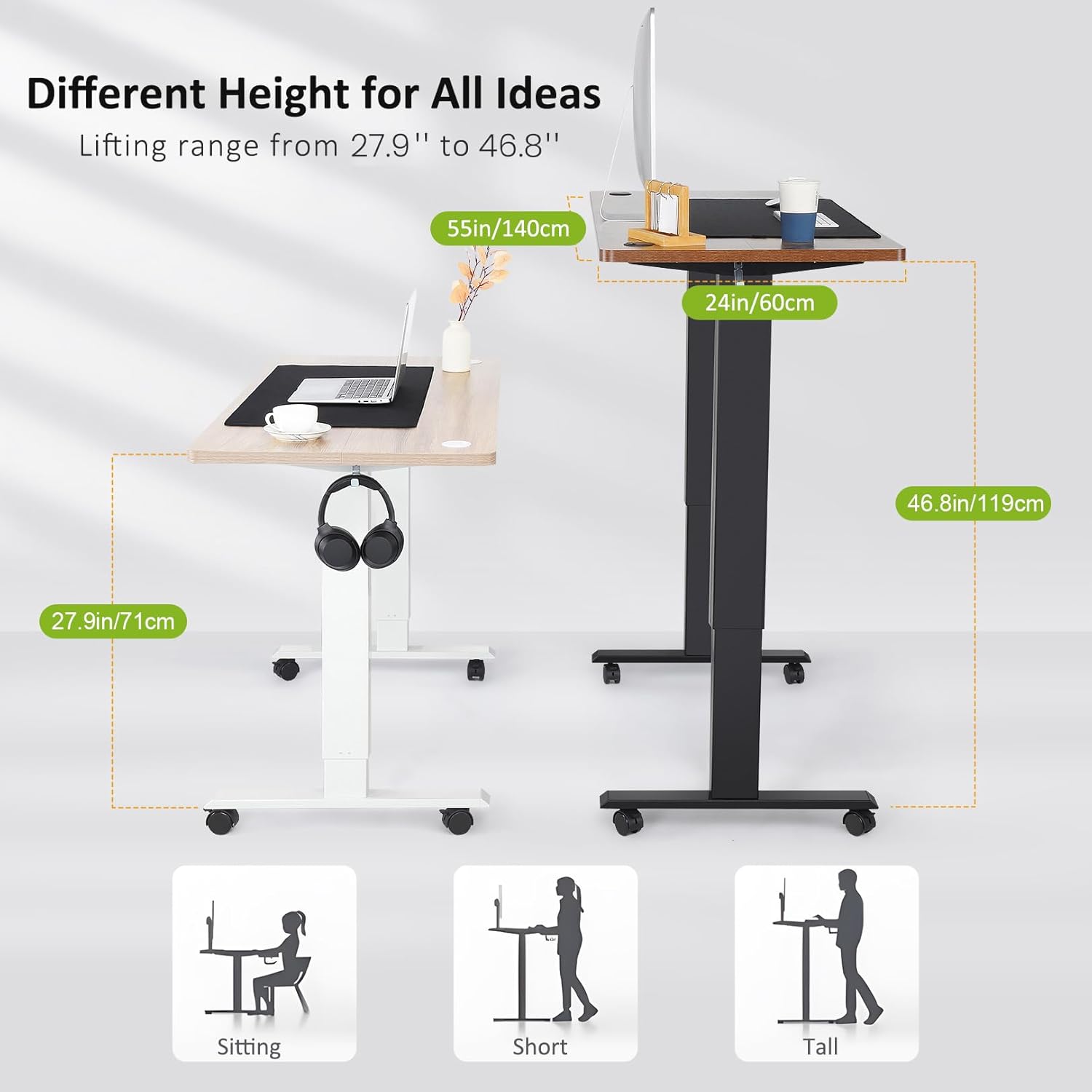
Figure 6.1: The robust motor designed for long-term reliability and safety features.
7. Ukuxazulula izinkinga
If you encounter any issues with your farexon Electric Standing Desk, refer to the following common problems and solutions. If the problem persists, contact customer support.
| Inkinga | Imbangela Engenzeka | Isixazululo |
|---|---|---|
| Ideski alinyakazi. | Power cable unplugged; motor connection loose; overload. | Check power connection. Ensure all motor cables are securely connected. Reduce weight on the desk. |
| Desk moves erratically or stops. | Obstacle detected by anti-collision; uneven weight distribution. | Remove any obstacles. Redistribute weight evenly on the desktop. |
| Amasethingi ememori awasebenzi. | Presets not properly saved. | Re-save the desired height by holding the memory button until it confirms. |
| Umsindo ngesikhathi sokusebenza. | Normal operation sound; loose components. | A slight hum is normal. Check if all screws are tightened. Ensure nothing is obstructing the lifting columns. |
8. Imininingwane Yomkhiqizo
| Isici | Imininingwane |
|---|---|
| Ibhrendi | farexon |
| Igama Lemodeli | ideski elimile |
| Inombolo Yemodeli | 1 |
| Desktop Dimensions (W x D) | 55" x 24" |
| Ububanzi Bokulungisa Ubude | 27" - 46" |
| Maximum Weight Umthamo | 178 Amakhilogremu |
| I-Desktop Material | Wood (Oak Grey finish) |
| I-Frame Material | Metal (Steel finish) |
| Izici ezikhethekile | Adjustable Height, Electric, Ergonomic, Anti-Collision Technology, Memory Presets, Rolling Wheels/Foot Pads, Headphone Hook, Cable Management Hole |
| Kudingeka Umhlangano | Yebo (Kufakiwe namathuluzi) |

Figure 8.1: The adjustable height range of the desk accommodates various user preferences and postures.
9. Iwaranti kanye Nokusekela
farexon is committed to providing high-quality products and excellent customer service.
- Isiqinisekiso: This product comes with a Limited Warranty. Please refer to the warranty card included in your package for specific terms and conditions.
- Iyabuyisela: The product is eligible for 30-day easy returns from the date of purchase.
- Ukwesekwa Kwamakhasimende: For any questions, assistance with assembly, troubleshooting, or warranty claims, please contact the farexon customer service team. Contact information can typically be found on the product packaging or the official farexon webindawo.

Figure 9.1: farexon's dedicated customer support team is available to assist you.


