1. Isingeniso
This manual provides essential instructions for the safe and efficient use of your Xiaomi Mi Portable Bluetooth Speaker. Please read this manual thoroughly before using the product and retain it for future reference. The speaker features high-quality sound, True Wireless Stereo (TWS) capability, Bluetooth 5.0 connectivity, and IPX7 waterproofing, making it suitable for various environments.

Isithombe: Engela view of the Xiaomi Mi Portable Bluetooth Speaker, highlighting its compact design and control panel.
2. Okuqukethwe Kwephakheji
Qinisekisa ukuthi zonke izinto zikhona kuphakheji:
- Xiaomi Mi Portable Bluetooth Speaker x1
- Charging Cable x1 (USB-C)
- Incwadi Yomsebenzisi x1
3. Izici zomkhiqizo
- Umsindo Wekhwalithi Ephezulu: Delivers clear and balanced audio.
- I-True Wireless Stereo (TWS): Connect two speakers for an immersive stereo experience.
- I-Bluetooth 5.0: Ukuxhumana okungenantambo okuzinzile futhi okuphumelelayo.
- I-IPX7 Ingangeni manzi: Protected against immersion in water up to 1 meter for 30 minutes.
- Isikhathi eside sokudlala: Approximately 13 hours of playback at 50% volume.
- Imakrofoni eyakhelwe ngaphakathi: Ngocingo lwe-hands-free.
- Okokufaka kwe-AUX: Ngoxhumano lomsindo olunentambo.
4. Izilawuli kanye Izinkomba
Familiarize yourself with the speaker's control buttons and indicators:
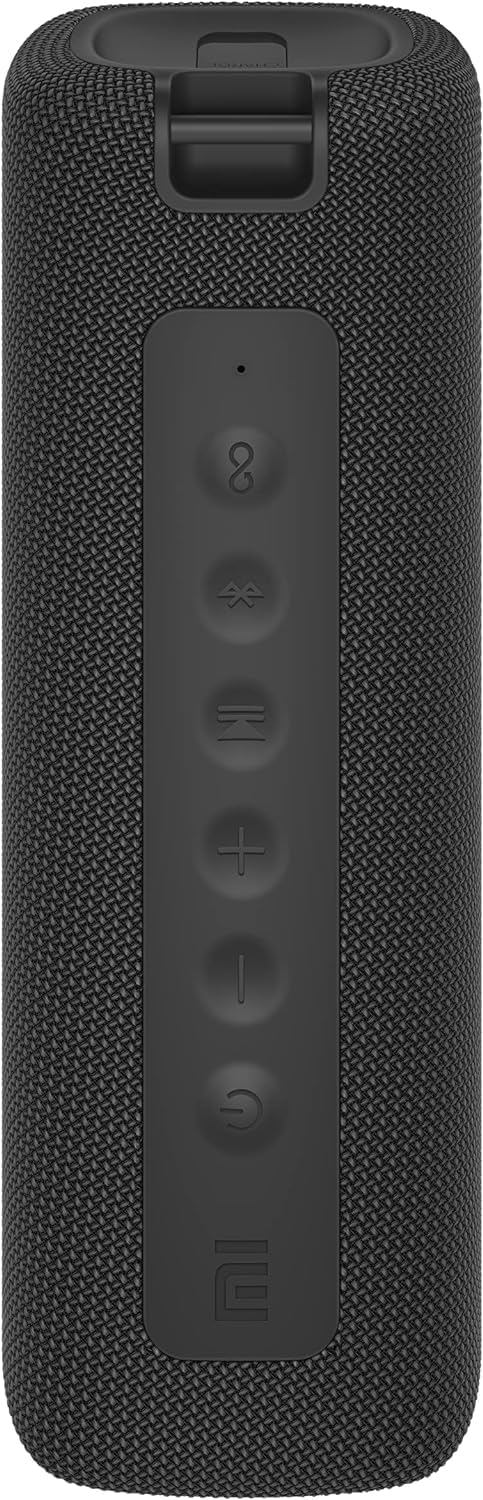
Isithombe: Ngaphambili view of the speaker with clearly visible control buttons.
| Inkinobho / Inkomba | Umsebenzi |
|---|---|
| Inkinobho Yamandla (⏻) | Press and hold for 2 seconds to power on/off. Short press to play/pause music or answer/end calls. |
| Ivolumu Phansi (−) | Cindezela kafushane ukuze wehlise ivolumu. Cindezela bese ubamba ithrekhi yangaphambilini. |
| Ivolumu phezulu (+) | Cindezela kafushane ukuze ukhuphule ivolumu. Cindezela bese ubamba ukuze uthole ithrekhi elandelayo. |
| Inkinobho ye-Bluetooth (Ⓑ) | Cindezela okufushane ukufaka imodi yokumatanisa kwe-Bluetooth. |
| Inkinobho ye-TWS (∞) | Press to initiate True Wireless Stereo pairing with another Mi Portable Bluetooth Speaker. |
| Isibonisi se-LED | Ibonisa isimo samandla, isimo sokushaja, kanye nesimo sokubhanqa i-Bluetooth. |
5. Setha
5.1 Ukushaja uSomlomo
- Xhuma ikhebula lokushaja le-USB-C elinikeziwe embobeni yokushaja yesipikha.
- Connect the other end of the cable to a 5V 1A USB power adapter (not included) or a computer's USB port.
- The LED indicator will show charging status (e.g., red while charging, off when fully charged).
- Ukushaja okuphelele kuthatha cishe amahora angu-4.
5.2 Vula/Vala amandla
- Ukuvula: Press and hold the Power button for 2 seconds. You will hear an audible prompt, and the LED indicator will light up.
- Ukucisha: Press and hold the Power button for 2 seconds. You will hear an audible prompt, and the LED indicator will turn off.
5.3 Ukumatanisa kwe-Bluetooth
- Ensure the speaker is powered on. The LED indicator will flash blue, indicating it's in pairing mode.
- Edivayisini yakho (i-smartphone, ithebhulethi, ikhompuyutha), vula i-Bluetooth bese usesha amadivaysi atholakalayo.
- Select "Mi Portable Bluetooth Speaker" from the list of devices.
- Uma isibhangqiwe, isibonakaliso se-LED sizoba luhlaza okwesibhakabhaka, futhi uzozwa umsindo wokuqinisekisa.
- The speaker will automatically connect to the last paired device when powered on, if within range.
5.4 Ukubhanqa kwe-True Wireless Stereo (TWS).
To pair two Xiaomi Mi Portable Bluetooth Speakers for stereo sound:
- Qinisekisa ukuthi zombili izipikha zivuliwe futhi azixhumekile kunoma iyiphi enye idivayisi ye-Bluetooth.
- On one speaker (this will be the primary speaker), short press the TWS button (∞). The LED indicator will flash.
- On the second speaker, short press the TWS button (∞).
- The two speakers will automatically connect to each other. You will hear a confirmation sound, and the LED indicators on both speakers will turn solid blue.
- Now, connect your device to the primary speaker via Bluetooth as described in section 5.3. The sound will play in stereo through both speakers.
5.5 Uxhumano lwe-AUX
For wired audio playback:
- Connect a 3.5mm audio cable (not included) from your audio source to the AUX IN port on the speaker.
- Isipika sizoshintshela kumodi ye-AUX ngokuzenzakalelayo.
- Control playback and volume from your audio source device.
6. Iziqondiso Zokusebenza
6.1 Ukudlala Umculo
- Dlala/Misa kancane: Cindezela kafushane inkinobho yamandla.
- Ivolumu ephezulu: Short press the Volume Up (+) inkinobho.
- Ivolumu Phansi: Short press the Volume Down (−) inkinobho.
- Ithrekhi Elandelayo: Press and hold the Volume Up (+) inkinobho.
- Ithrekhi yangaphambilini: Press and hold the Volume Down (−) inkinobho.
6.2 Ukuphathwa Kwezingcingo
- Phendula/Phendula ikholi: Short press the Power button when a call comes in or during a call.
- Yenqaba Ucingo: Cindezela bese ubamba inkinobho yamandla imizuzwana emi-2 uma kungena ucingo.
7. Isondlo
- Ukuhlanza: Sula isipikha ngesithambile, damp indwangu. Ungasebenzisi izinto zokuhlanza abrasive noma izincibilikisi.
- Isitoreji: Gcina isipikha endaweni epholile, neyomile kude nelanga eliqondile namazinga okushisa aphezulu.
- Ukumelana Namanzi: The speaker is IPX7 waterproof. Ensure the charging port cover is securely closed before exposure to water. Do not submerge the speaker for extended periods or beyond specified depths.
- Ukunakekelwa kwebhethri: To prolong battery life, avoid fully discharging the speaker frequently. Charge it regularly, even if not in use for long periods.
8. Ukuxazulula izinkinga
| Inkinga | Isixazululo Esingenzeka |
|---|---|
| Isipikha asikhanyisi. | Qinisekisa ukuthi ibhethri ishajiwe. Xhuma kumthombo wamandla bese uzama futhi. |
| Ayikwazi ukubhanqa nge-Bluetooth. |
|
| Awukho umsindo noma ivolumu ephansi. |
|
| Ukumatanisa kwe-TWS kwehlulekile. |
|
| Izinga lomsindo elibi. |
|
9. Imininingwane

Isithombe: Ngezansi view of the speaker, displaying model number and certifications.
| Ipharamitha | Inani |
|---|---|
| Imodeli | I-MDZ-36-DB |
| Ubukhulu bomkhiqizo | W 213 x D 74 x H 74 mm (approx. 8 x 3 x 3 inches) |
| Ukuxhumana | Bluetooth 5.0, 3.5mm AUX IN |
| Okuphumayo okulinganiselwe | 2 x 8W (inani eliphelele le-16W) |
| Ukulinganisa-to-Noise Ratio | ≥ 70dB |
| TWS Connection Range | ≤ 5m |
| Isilinganiso Sokungangeni Manzi | IPX7 |
| Uhlobo Lwebhethri | I-Lithium-ion, i-3.7V |
| Amandla ebhethri | 2600mAh |
| Isikhathi sokushaja ibhethri | Cishe. Amahora angu-4 |
| Isikhathi sokudlala | Cishe. Amahora angu-13 (ngevolumu engu-50%) |
| I-Frequency Range | 80Hz ukuze 20KHz |
| I-Impedans elinganiselwe | 4 Ω |
| Ibanga lokudlulisela | 15m |
| Okokufaka okulinganiselwe | 5V 1A |
| Isisindo sento | 500 Amagremu (1.1 pounds) |
10. Iwaranti kanye Nokusekela
Ukuze uthole ulwazi oluningiliziwe lwewaranti, sicela ubheke ikhadi lewaranti elifakwe nomkhiqizo wakho noma uvakashele i-Xiaomi esemthethweni. webindawo.
If you encounter any issues not covered in this manual, please contact Xiaomi customer support or visit their official support channels for assistance.


