

Zerone Universal Auto Key Programmer
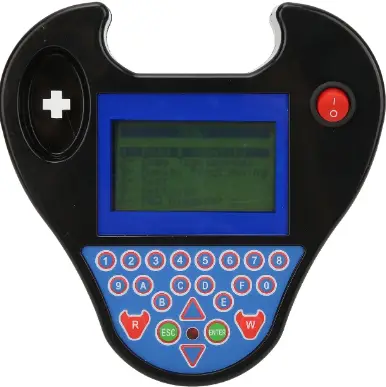
Specifications
- Product Name: Universal Auto Key Programmer
- Model: Auto Key Programmer
Safety & Warnings
Important Safety Information Read all instructions before use. Failure to follow these instructions may result in damage to the product or personal injury.
- Warning: Keep the device and its cord out of reach of children under 3 years old.
- Keep away from children unless supervised by an adult.
- Do not use this product for purposes other than its intended use.
- Inspect the product before each use; do not use if damaged.
- Follow installation and operation guidelines to avoid injury.
- Following the instructions: Each line of text on the device screen is an instruction. Do not skip steps or make assumptions on your own.
- Time is the command: Many operations have strict time limits (such as “within 10 seconds”), and failure occurs if the time limit is exceeded.
- Voltage is life: Make sure to connect an external regulated power supply! Voltage fluctuations during programming can cause the control unit to brick.
- Backup is the savior: Before performing any “write” operation (especially the full dump module), make sure to fully back up the original data first.
- Confirm the type of the chip: Using the wrong chip will result in all efforts being in vain. Use a chip detector or the chip reading function built into the device to confirm.
- Stay updated: Automotive technology is constantly evolving. Regularly update your device software and knowledge base.
Instructions for Use
Step 1: Preparatory Work and Risk Assessment (The Most Important!)
- Vehicle and Authorization Confirmation:
Confirm that you have the legal programming authority for this vehicle (either as the owner or with the appropriate authorization). - Information Collection:
- Precise vehicle information: brand, model, production year, engine displacement. The VIN code is of vital importance.
- Anti-theft type determination: Determine the type of key chip (such as ID46, ID48, 7936, etc.) and the remote control frequency (315/433 MHz). Use a frequency analyzer or consult the database.
- Clarify the current situation:
- Add a key: At least one legal key that can function properly to start the device. All the keys are lost: There are no legal keys available. This operation is high-risk, difficult and has various methods.
- Equipment and Accessories Preparation:
- Programming equipment: Ensure that the devices (such as XTool, VVDI, Abrites, Autel, etc.) have sufficient power and the software is at the latest version.
- Connection cables: Correct OBD cables, dedicated adapters (such as CAN filters, BMW OBD adapters).
Key material: - Blank chips of the correct type and ID.
- An already filed key blank.
- A programmable remote control (or an integrated smart key).
- Power supply guarantee: Connect an external regulated power supply to the vehicle battery to prevent the battery from running out of power during the programming process, which could cause damage to the ECU.
- Risk notification and backup (for complete loss or critical operations):
- Inform the customer that there is a risk of locking the ECU/anti-theft computer.
- If possible, before removing the module to read the data, try to obtain the password through OBD diagnosis or directly program it.
Step 2: Equipment Connection and Software Selection
- Equipment Connection:
- Connect the programming console to the computer (or directly use a tablet device) via a stable USB cable.
- Connect the OBD interface of the device to the diagnostic socket of the vehicle.
- Turn the ignition switch to the “ON” position (the dashboard lights come on, but the engine does not start).
- Start the software and select the path:
- On the device software interface, based on the vehicle information, precisely select according to the tree-like structure of “Brand -> Model -> Year Model -> Anti-theft System/Engine Type”.
- Key selection: Based on your goal, choose the appropriate function menu:
- Add keys / Learn keys / Key programming
- All the keys are lost / Anti-theft matching
- Read anti-theft code / Read PIN code
- Remote control matching
Step 3: Perform programming operations (the most common process is “adding a key”)
This is a standardized interaction process. Please strictly follow the screen prompts!
- Establish communication and identity verification:
- The device will attempt to communicate with the vehicle’s anti-theft system (BCM, ECU, Immobilizer) via OBD.
- For adding a new key, the device usually requires reading the original vehicle’s password. It may:
- Automatically calculate or obtain from the server.
- Please enter the known password (obtained from the 4S store or through other means).
- You are required to authenticate using the original key (for example: insert the original key and turn on the ignition switch).
- Follow the interactive prompts:
- Screen prompts are the core of the operation. A typical prompt sequence is as follows:
- “Please turn off the ignition switch.” -> Just do as I say.
- “Please use the first registered key to turn on the ignition switch.” -> Insert the original vehicle key and switch to ON.
- “Waiting…” (Device is communicating) -> Wait for the progress bar to complete or hear the “beep” sound.
- “Please turn off the ignition switch and insert the new key within 5 seconds to turn on the ignition switch.” -> Take prompt action and use that blank new key.
- “Programming the new key… ” -> Keep the key in the ON position and do not move it until the completion prompt appears.
- “Is it necessary to program a key for each one?” (If more keys need to be added.)
- Completion and Exit:
- When the message “Programming successful” or “Learning completed” appears, turn off the ignition switch and remove the key.
- Wait until the device prompts “Connection can be disconnected”, then unplug the OBD connector.
Step 4: Testing and Verification
- Start the test:
Use each of the programmed keys (both the old and the new) to directly start the vehicle from the OFF position, and ensure that it can start successfully each time. - Remote control test:
Test the remote control functions of each key (lock the car, unlock it, and open the trunk). If the remote control fails to work, you may need to enter the separate “Remote Matching” menu to operate. - Functional integrity test:
- Check whether the functions associated with the key, such as one-touch window operation, sunroof, and seat memory, are functioning properly (applicable to mid-to-high-end models).
Step 5: “All Keys Lost” Special Process Framework
This process is complex and heavily relies on the functions of the equipment and the specific model of the vehicle. There is no unified standard.
- Attempt direct OBD solutions:
- Use advanced equipment (such as VVDI, Autel IM508/608, etc.) and select the “Keys Lost Completely” function.
- The device may attempt: brute-force cracking of the password, reading the password through the gateway, or directly programming.
- Disassembly and data reading plan (in case OBD fails to solve the problem):
- Location module: Locate the anti-theft control unit (such as the engine ECU, vehicle body computer BCM, independent anti-theft box).
- Read data: Remove it, use a programmer (such as XP Pro, Orange5) to read the data stored in its internal EEPROM or Flash chip, and save it as a .bin file.
- Data Editing: Use dedicated software on the computer (such as Tango, PCF7936 calculator, BMW calculator, etc.) to open the data file:
- Calculate the login password.
- Modify the key status bit (change “lost” to “present”).
- Generate a “dealer key” data directly.
Write back data: Write the modified data back to the chip and reinstall the module into the vehicle. - Key learning: By using OBD or a specific process, the new key is learned onto the vehicle.
- Generate emergency startup key:
For some models, one can bypass the anti-theft system and directly generate a key that can temporarily start the vehicle (not recommended as a long-term solution).
FAQs
Q: Is it necessary to program a key for each vehicle?
A: Yes, each vehicle requires key programming for security and functionality purposes. Follow the device instructions for accurate programming.
Documents / Resources
 | Universal Auto Key Programmer |
References
- User Manualmanual.tools
Published: March 12, 2026