Ọrọ Iṣaaju
Thank you for choosing the Anker Zolo Magnetic Wireless Charger. This manual provides essential information for the safe and efficient use of your new wireless charging pad. Please read it thoroughly before operation and retain it for future reference.

Image: Two Anker Zolo Magnetic Wireless Chargers, black, with integrated USB-C cables.
Ohun ti o wa ninu Apoti
- Anker Zolo Magnetic Wireless Charger (Model B25M2) with integrated 5 ft (1.5m) USB-C cable
- Cable tie (for cable management)
- User Guide & Safety Sheet
Note: A USB-C power adapter (wall charger) is not included and must be purchased separately. For optimal 15W fast charging, a 20W or higher USB-C power adapter is recommended.
Ṣeto
- Prepare Power Adapter: Ensure you have a compatible USB-C power adapter. For 15W fast charging, use a 20W or higher output adapter.
- Sopọ Ṣaja: Plug the USB-C connector of the Anker Zolo Magnetic Wireless Charger into your power adapter.
- Sopọ si Ile-iṣẹ Agbara: Pulọọgi ohun ti nmu badọgba agbara sinu iṣan ogiri kan.
- Iṣakoso USB: Use the included cable tie to neatly manage any excess cable length.

Image: The Anker Zolo Magnetic Wireless Charger with its USB-C cable connected to a power adapter, illustrating the setup process.
Awọn ilana Iṣiṣẹ
- Ibamu Ẹrọ: This charger is designed for iPhone 13/14/15/16/17 series and AirPods with wireless charging cases. It is not compatible with Android phones (e.g., Google Pixel series) due to differences in protocols and hardware, which may result in slower charging or no charging.
- Asomọ oofa: Place your compatible iPhone (with a MagSafe-compatible case if applicable) or AirPods case onto the center of the charging pad. The magnetic alignment will ensure proper positioning for efficient charging.
- Itọkasi gbigba agbara: Your device's screen will indicate that charging has begun. For AirPods, the indicator light on the case will show charging status.
- Iṣe Ti o dara julọ: For best results, charge without a phone case. If using a case, ensure it is MagSafe-compatible, non-metallic, and no thicker than 2.5 mm.

Image: An iPhone 16 Pro Max being charged wirelessly on the Anker Zolo Magnetic Wireless Charger, highlighting its 15W fast charging capability.
Awọn imọran gbigba agbara
- Made for iPhone and AirPods: This charger is Qi2-certified and provides up to 15W of wireless charging for iPhone models. Due to differences in protocols and hardware, we do not recommend using it with Android phones, as charging power of non-iPhone devices may be lower than 15W, resulting in slower speeds.
- Choosing the Right Power Adapter: To achieve 15W max wireless fast charging, use a 20W or higher USB-C power adapter. Using an adapter below 20W may lead to slower charging performance.
- Using Your Phone While Charging: Using your phone during charging—for example, while streaming videos or gaming—generates additional heat, which may reduce charging speed. This is normal. The charging pad supports device use while charging, but for optimal speed and temperature control:
- Try to limit high-intensity tasks and charge during lighter-use or idle periods.
- For the best results, charge without a phone case. If using one, make sure it is MagSafe-compatible, non-metallic, and no thicker than 2.5 mm.
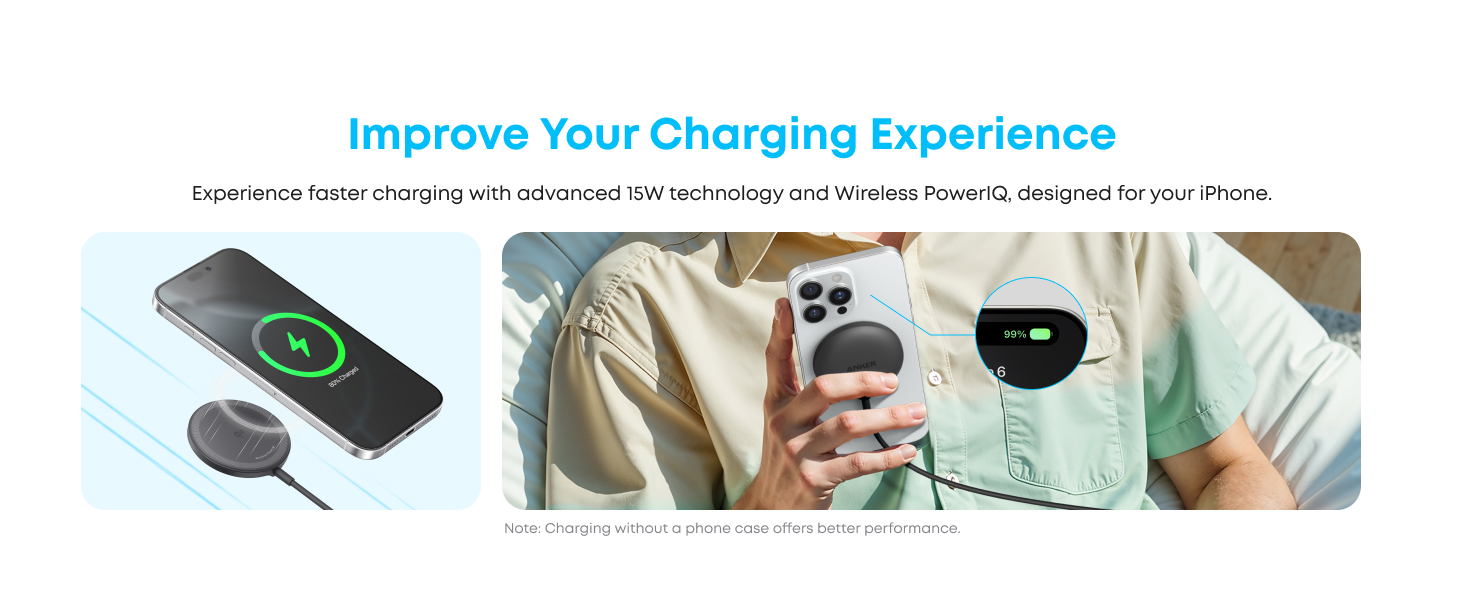
Image: A user holding an iPhone while it charges wirelessly, illustrating the convenience of the long cable and providing key charging tips.
Aabo Awọn ẹya ara ẹrọ
The Anker Zolo Magnetic Wireless Charger incorporates advanced safety features to protect your devices and ensure reliable charging:
- Qi2 Certification: Ensures compliance with the latest wireless charging standards for safe and efficient power delivery.
- Shield Active 2.0: This proprietary technology monitors temperature over 3,000,000 times per day, preventing overheating and extending battery life for your devices.
- Optimal Heat Dissipation: High-quality polycarbonate casing and a customized Qi2 charging module are designed to improve heat dissipation, maintaining optimal temperatures during charging.

Aworan: Ohun exploded view diagram of the Anker Zolo Magnetic Wireless Charger, highlighting its internal structure for optimal heat dissipation.
Awọn pato
| Ẹya ara ẹrọ | Ẹ̀kúnrẹ́rẹ́ |
|---|---|
| Nọmba awoṣe | B25M2 |
| Brand | Anker |
| Wattage | 15W (O pọju) |
| Qi Certification | Ti ni ifọwọsi Qi2 |
| USB Ipari | 5 ẹsẹ (mita 1.5) |
| Asopọmọra Iru | USB Iru-C |
| Awọn ẹrọ ibaramu | iPhone 13/14/15/16/17 Series, AirPods with Wireless Charging Case |
| Aabo Awọn ẹya ara ẹrọ | ActiveShield 2.0 Abojuto iwọn otutu |
| Àwọ̀ | Dudu |
| Iwọn Nkan | 7 iwon |
| Package Mefa | 5.08 x 3.98 x 1.61 inches |
Laasigbotitusita
- Ohun elo Ko Ngba agbara:
- Ensure the charging pad is properly connected to a functional USB-C power adapter and wall outlet.
- Verify your device is compatible (iPhone 13/14/15/16/17 series or AirPods with wireless charging case).
- Remove any non-MagSafe compatible or thick cases (over 2.5mm) that might interfere with charging.
- Ensure the device is centered on the charging pad for proper magnetic alignment.
- Gbigba agbara lọra:
- Use a 20W or higher USB-C power adapter for optimal 15W fast charging. Lower wattagawọn ohun ti nmu badọgba e yoo ja si awọn iyara gbigba agbara ti o lọra.
- Avoid using your device for high-intensity tasks (e.g., gaming, video streaming) while charging, as this can generate heat and reduce charging speed.
- Ensure no foreign objects are between the device and the charging pad.
- Charger or Device Getting Warm:
- It is normal for the charging pad and your device to become slightly warm during wireless charging.
- If excessive heat is observed, ensure proper ventilation around the charger and device.
- The ActiveShield 2.0 technology actively monitors and manages temperature to prevent overheating.
Awọn fidio ọja osise
Anker MagSafe Charger Pad
Description: An official video from AnkerDirect showcasing the Anker MagSafe Charger Pad, demonstrating its features and ease of use with compatible devices.
Atilẹyin ọja ati Support
Anker pese a Atilẹyin ọja laisi wahala osu 24 for this product. For technical support, warranty claims, or further assistance, please visit the official Anker webojula tabi kan si wọn onibara iṣẹ taara.
Fun alaye diẹ sii, ṣabẹwo si Ile itaja Anker lori Amazon.


