1. Ọja Ipariview
The Philips 44W 4200 lm Motion Sensor LED Security Light is designed for outdoor use, providing bright and efficient illumination. This 2-pack floodlight features a Passive Infrared (PIR) motion sensor, 5000K daylight color temperature, and is built to withstand various weather conditions. Its adjustable heads and multiple operating modes offer versatile lighting solutions for your property.
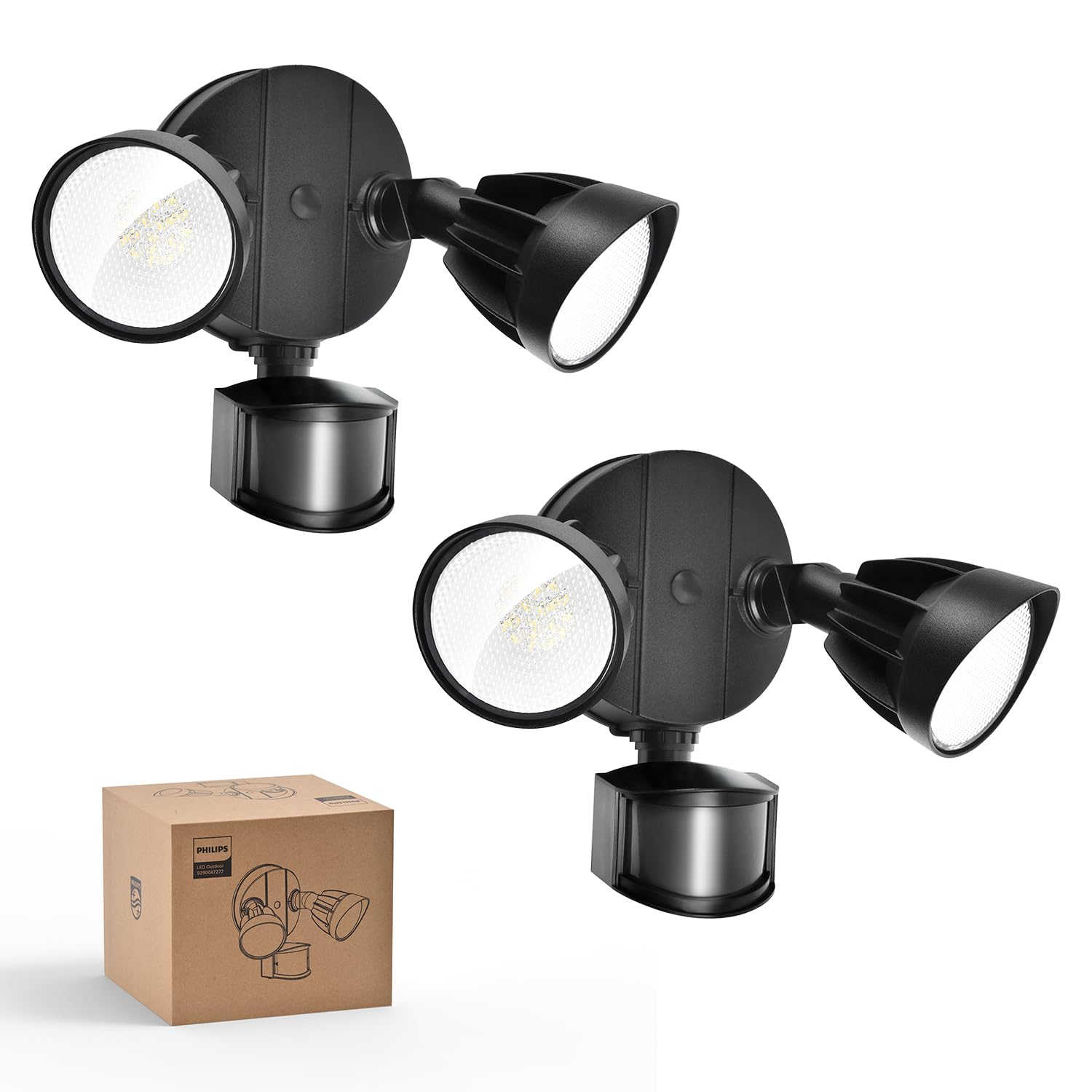
Image: Philips 44W 4200 lm Motion Sensor LED Security Light (2-pack) in black.
2. Alaye Aabo
- Pa agbara ni fifọ Circuit nigbagbogbo ṣaaju fifi sori ẹrọ tabi iṣẹ.
- Kan si alagbawo ina mọnamọna ti o pe ti o ko ba ni idaniloju nipa ilana fifi sori ẹrọ.
- Rii daju pe gbogbo awọn asopọ onirin wa ni aabo ati ni ibamu pẹlu awọn koodu itanna agbegbe.
- Do not attempt to modify the product. Any modifications may void the warranty and create safety hazards.
- Pa awọn ọmọde kuro ni agbegbe fifi sori ẹrọ.
3. Ohun ti o wa ninu Apoti
Each Philips 44W 4200 lm Motion Sensor LED Security Light package includes the following components:
- LED Security Light Fixture (2 units for this pack)
- LED lẹnsi
- Mounting Hardware (screws, wire nuts, mounting plate, rubber plug, gasket)
- Ilana itọnisọna

Image: Included accessories for installation.
4. Awọn ẹya ara ẹrọ
- High Brightness & Wide Beam Angle: Emits 4200 lumens with a 5000K cool daylight color temperature. Two adjustable heads provide customizable coverage.
- High-Sensitivity PIR Sensor: Detects motion within a 0-69ft range and 180° induction angle. Lighting time is adjustable from 1-10 minutes.
- 4 Awọn ọna itanna: Includes Test Mode, Security Mode, Dusk to Dawn Mode, and Manual Override Mode (always-on at 80% brightness for up to 6 hours).
- Ti o tọ & Idaabobo Oju ojo: Constructed with aluminum lamp material, tested for corrosion and rust resistance, and rated IP65 for various weather conditions.
- LED fifipamọ agbara: Integrated LED design eliminates bulb replacement and reduces electricity costs by up to 80% compared to 220W incandescent fixtures.
- Apẹrẹ Ori Atunṣe: Customize each light head's angle to suit specific lighting needs.

Image: Key features of the Philips security light.

Image: Adjustable head design for flexible lighting coverage.

Image: Aluminum construction for durability and heat dissipation.
5. fifi sori
The Philips security light is designed for easy installation. It requires hardwiring; a junction box is not included. Follow these general steps for installation:
- Mura Waya: Ensure power is off at the circuit breaker. Connect the ground wire (green) from the light fixture to the ground wire in the junction box.
- So awọn onirin: Connect the white wire (neutral) from the light fixture to the white wire from the junction box using a wire nut. Connect the black wire (live) from the light fixture to the black wire from the junction box using a wire nut.
- Iṣagbesori Awo: Ṣe aabo awo iṣagbesori si apoti ipade.
- So imuduro: Align the light fixture with the mounting plate and secure it with the provided screws. Ensure a tight seal between the lamp and the wall to enhance water resistance.
- Didi: Apply sealant around the fixture base to prevent water leakage.
- Ṣatunṣe Awọn ori: Adjust the light heads and motion sensor to your desired angles.
Recommended installation height: 8.2 ft.

Image: Easy installation steps for the security light.

Image: Two common mounting methods: eave and wall mounting.
Fidio fifi sori ẹrọ
Fidio: Itọsọna fifi sori ẹrọ alaye fun iwọn didun gigatage products, demonstrating wiring and mounting procedures.
6. Awọn ọna ṣiṣe
The Philips security light offers four distinct operating modes to suit various needs:

Aworan: Pariview of the four available lighting modes.
- Ipo Idanwo: Can be activated in both daytime and nighttime. When motion is detected, the light turns on for 5 seconds. If no motion, it stays off. This mode is useful for verifying sensor functionality and coverage area during installation.
- Ipo Aabo: Operates only at nighttime. When motion is detected, the light automatically turns on for a set duration (1, 3, or 10 minutes). If no motion, it stays off.
- Oru si Ipò Dawn: Operates only at nighttime. The light automatically turns on at dusk and turns off at dawn. When motion is detected, the light brightens to 100% and then dims to 20% when no one is around.
- Ipo Yipada afọwọṣe: Can be activated in both daytime and nighttime. This mode keeps the light on at 80% brightness for a maximum of 6 hours. To activate, switch the light OFF and ON twice within 3 seconds. To deactivate, switch the light OFF and ON for more than 3 seconds, returning it to sensor mode. The brightness automatically dims from 100% to 80% after 12 minutes in this mode.

Image: Test Mode operation.

Image: Security Mode operation.

Image: Dusk to Dawn Mode operation.

Image: Manual Override Mode activation and deactivation.
7. Siṣàtúnṣe Eto
The motion sensor allows for adjustment of both sensing distance and activated lighting time:
- Ijinna oye: Adjust the 'DISTANCE' dial on the sensor to set the detection range:
- L (Lílẹ): 0-20 ft
- M (Alabọde): 0-39 ft
- H (Gíga): 0-69 ft
- Activated Lighting Time: Adjust the 'TIME' dial on the sensor to set how long the light stays on after motion is detected:
- 1 MIN: 1 minute
- 3 MIN: 3 minutes
- 10 MIN: 10 minutes

Image: Dials for adjusting sensing distance and lighting time.

Image: Switch tips for adjusting sensor settings.
8. Itọju
To ensure optimal performance and longevity of your Philips security light, follow these maintenance guidelines:
- Ninu: Máa fọ ohun èlò ìmọ́lẹ̀ àti lẹ́ńsì sensọ̀ ìṣípo lẹ́ẹ̀kọ̀ọ̀kan pẹ̀lú ohun èlò tó rọ, damp Aṣọ. Yẹra fún lílo àwọn ohun ìfọṣọ tàbí àwọn ohun èlò ìfọṣọ tí ó lè ba ìparí tàbí àwọn ohun èlò ẹ̀rọ itanna jẹ́.
- Ayewo: Regularly inspect the fixture for any signs of damage, loose wiring, or wear. Ensure the sealant around the base remains intact to maintain its waterproof rating.
- Ko si rirọpo boolubu: This unit features integrated LED lighting, meaning there are no bulbs to replace.
9. Laasigbotitusita
If you encounter issues with your Philips security light, refer to the following common troubleshooting steps:
- Imọlẹ Ko Tii:
- Ṣàyẹ̀wò ìpèsè agbára ní ẹ̀rọ ìfọ́mọ́ra.
- Ensure the motion sensor is not obstructed.
- Verify the operating mode settings (e.g., if in Security Mode, ensure it's dark enough).
- Adjust the 'DISTANCE' and 'TIME' settings on the sensor.
- Light Stays On Continuously:
- Check if the light is in Manual Override Mode. Refer to Section 6 for deactivation instructions.
- Ensure the 'TIME' setting is not set too high.
- Verify that there is no continuous motion within the sensor's detection range.
- Motion Sensor Not Detecting:
- Ensure the sensor lens is clean and free from obstructions.
- Adjust the 'DISTANCE' setting to a higher sensitivity.
- Verify the sensor's angle and position to cover the desired area.
- Test the sensor in 'Test Mode' to confirm functionality.
Fidio ọja
Fidio: Ipariview of the Philips 44W 4200 lm LED Security Light with motion sensor, highlighting its features and benefits.
10. Awọn pato
| Iwa | Iye |
|---|---|
| Brand | Philips |
| Nọmba awoṣe | 7601909012 |
| UPC | 046677607111 |
| Àwọ̀ | Dudu |
| Ohun elo | Aluminiomu, Ṣiṣu |
| Fọọmu Imuduro Imọlẹ | Ikun omi |
| Ọja Mefa | 6.69"L x 9.05"W x 9.45"H |
| Orisun agbara | Okun Itanna |
| Iru fifi sori ẹrọ | Ògiri Ògiri |
| Pataki Awọn ẹya ara ẹrọ | Anti-Rust, Energy Efficient, Motion Sensor, Waterproof |
| Imọlẹ Orisun Orisun | LED |
| Voltage | 120 Volts |
| Awọ Imọlẹ | Ojumomo |
| Nọmba ti Awọn nkan | 2 |
| Wattage | 44 watt |
| Yipada Iru | Sensọ išipopada |
| Omi Resistance Ipele | Mabomire (IP65) |
| Imọlẹ | 4200 Lumen |
| Iwọn otutu awọ | 5000 Kelvin |
| Iwọn Nkan | 4.2 iwon |
| Apejọ ti a beere | Bẹẹni |
11. Atilẹyin ọja & Atilẹyin
Philips products are manufactured to the highest quality standards. For warranty information, technical support, or service inquiries, please refer to the official Philips webojula tabi kan si wọn onibara iṣẹ taara. Tọju iwe-ẹri rira rẹ bi ẹri rira fun awọn iṣeduro atilẹyin ọja.
Fun alaye diẹ sii, ṣabẹwo si Itaja Philips lori Amazon.


