1. Alaye Aabo pataki
Nigbagbogbo ka ati loye gbogbo awọn ikilọ aabo, awọn itọnisọna, awọn apejuwe, ati awọn pato ti a pese pẹlu ohun elo agbara yii. Ikuna lati tẹle gbogbo awọn ilana ti a ṣe akojọ rẹ si isalẹ le ja si mọnamọna, ina, ati/tabi ipalara nla.
- Aabo Agbegbe Iṣẹ: Jeki agbegbe iṣẹ rẹ mọ ki o si tan daradara. Awọn agbegbe idamu tabi awọn agbegbe dudu n pe awọn ijamba. Ma ṣe ṣiṣẹ awọn irinṣẹ agbara ni awọn bugbamu bugbamu, gẹgẹbi niwaju awọn olomi ina, gaasi, tabi eruku. Awọn irinṣẹ agbara ṣẹda awọn ina ti o le tan eruku tabi eefin.
- Aabo Itanna: Awọn pilogi irinṣẹ agbara gbọdọ baramu iṣan. Maṣe yi plug naa pada ni ọna eyikeyi. Maṣe ṣe ilokulo okun naa. Maṣe lo okun fun gbigbe, fifa tabi yọọ ohun elo agbara. Jeki okun kuro lati ooru, epo, eti to mu, tabi awọn ẹya gbigbe.
- Aabo ti ara ẹni: Stay alert, watch what you are doing, and use common sense when operating a power tool. Do not use a power tool while you are tired or under the influence of drugs, alcohol, or medication. Always wear eye protection. Use safety glasses, goggles, or a face shield.
- Lilo ati Itọju: Maṣe fi agbara mu ohun elo agbara. Lo ohun elo agbara ti o pe fun ohun elo rẹ. Ọpa agbara ti o tọ yoo ṣe iṣẹ naa dara julọ ati ailewu ni iwọn fun eyiti a ṣe apẹrẹ rẹ. Ge asopọ plug lati orisun agbara ati/tabi yọọ idii batiri kuro, ti o ba ṣee yọkuro, lati inu ohun elo agbara ṣaaju ṣiṣe eyikeyi awọn atunṣe, yiyipada awọn ẹya ẹrọ, tabi titoju awọn irinṣẹ agbara.
- Lilo ati Itọju Batiri: Gba agbara nikan pẹlu ṣaja pato nipasẹ olupese. Ṣaja ti o dara fun iru idii batiri kan le ṣẹda eewu ina nigba lilo pẹlu idii batiri miiran. Lo awọn irinṣẹ agbara nikan pẹlu awọn idii batiri ti a pinnu pataki.
2. Package Awọn akoonu
Fi pẹ̀lẹ́pẹ̀lẹ́ tú gbogbo nǹkan náà kí o sì rí i dájú pé o ti gba àwọn nǹkan wọ̀nyí:
- BATAVIA Cordless Drill (BT-CTD001)
- 20V MAX 2.0Ah Lithium-Ion Battery
- Ṣaja Batiri 2.4A
- Ilana itọnisọna

Image: The BATAVIA Cordless Drill, including the main unit, a 20V MAX 2.0Ah Lithium-Ion battery, and a 2.4A battery charger.
3. Ọja Ipariview
Familiarize yourself with the components of your BATAVIA Cordless Drill:
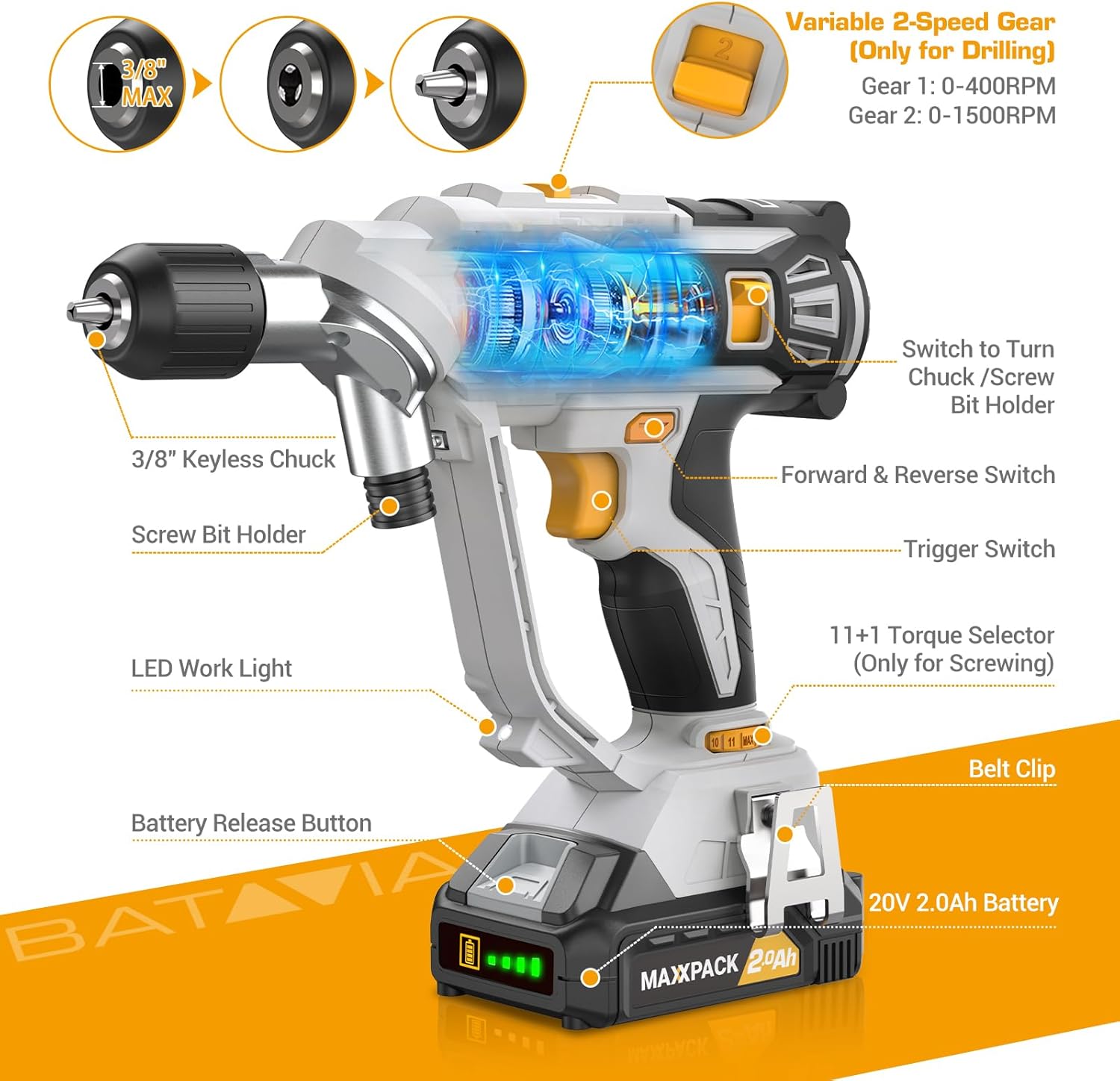
Image: A detailed diagram highlighting key components of the BATAVIA Cordless Drill, including the 3/8" Keyless Chuck, Screw Bit Holder, LED Work Light, Battery Release Button, 20V 2.0Ah Battery, Belt Clip, 11+1 Torque Selector, Trigger Switch, Forward & Reverse Switch, and Variable 2-Speed Gear switch.
- Dual Rotating Chucks: Features both a 3/8" keyless chuck for drilling and a 1/4" hex chuck for driving, allowing quick transitions between tasks.
- Awọn Eto Torque 11+1: Provides precise control for various applications and materials.
- 2 Awọn iyara oniyipada: Offers two speed ranges (0-400 RPM and 0-1500 RPM) for optimal performance in different drilling and driving scenarios.
- Automatic LED Work Light: Tan ìmọ́lẹ̀ sí ibi iṣẹ́ fún ìríran tó dára síi ní àwọn ipò ìmọ́lẹ̀ tí kò tó nǹkan.
- Agekuru igbanu: Conveniently attaches the drill to your belt for easy access.
4. Eto
4.1 Ngba agbara si Batiri naa
- Ensure the battery is securely inserted into the 2.4A battery charger.
- So ṣaja naa sinu ibudo ina AC 120V boṣewa kan.
- The indicator lights on the charger will show the charging status. A full charge typically takes less time due to the 2.4A charger.
- Nígbà tí o bá ti gba agbára tán pátápátá, yọ charger náà kúrò nínú ihò ìtajà náà kí o sì yọ batiri náà kúrò.
4.2 Fifi / Yọ Batiri naa kuro
- To install: Align the battery with the base of the drill handle and slide it in until it clicks securely into place.
- To remove: Press the battery release button located on the front of the battery pack and slide the battery out.
4.3 Using the Dual Rotating Chucks
This drill features a unique dual rotating chuck system for quick changes between drilling and driving tasks.

Image: The BATAVIA Cordless Drill demonstrating its dual rotating chuck feature, allowing users to switch between a drill bit and a screwdriver bit by rotating the chuck assembly.
- For Drilling (3/8" Keyless Chuck): Rotate the front section of the drill head to expose the 3/8" keyless chuck. Insert the drill bit and tighten the chuck by hand until the bit is secure.
- For Driving (1/4" Hex Chuck): Rotate the front section of the drill head to expose the 1/4" hex chuck. Insert the screwdriver bit directly into the hex opening until it locks into place.
5. Awọn ilana Iṣiṣẹ
5.1 Setting Torque (11+1 Settings)
The torque selector ring allows you to adjust the amount of rotational force the drill applies. This is crucial for preventing overtightening screws or damaging materials.

Image: The BATAVIA Cordless Drill highlighting its 11+1 torque settings, with recommendations for low settings for small screws/soft materials and high settings for large screws/hard materials.
- Rotate the torque selector ring to choose a setting from 1 to 11. Lower numbers are for smaller screws or softer materials, while higher numbers are for larger screws or harder materials.
- The 'Drill' symbol (often indicated as 'MAX' or a drill icon) bypasses the clutch for maximum torque, suitable for drilling applications.
5.2 Selecting Speed (2 Variable Speeds)
The drill features a 2-speed gearbox to match the speed to the application.

Image: The BATAVIA Cordless Drill showing its adjustable variable 2-speed gear selector. Gear 1 (0-400 RPM) is recommended for large diameter drilling, and Gear 2 (0-1500 RPM) for small diameter drilling.
- Gear 1 (0-400 RPM): Use for high-torque applications, such as driving large screws or drilling large holes in tough materials.
- Gear 2 (0-1500 RPM): Use for high-speed applications, such as drilling small holes or driving small screws quickly.
- The trigger switch provides variable speed control within the selected gear range. Pressing the trigger further increases the speed.
5.3 Siwaju / yiyipada
The forward/reverse switch is located above the trigger. It controls the direction of rotation.
- Push the switch to the left for forward rotation (for drilling and driving screws).
- Push the switch to the right for reverse rotation (for removing screws or backing out drill bits).
- When the switch is in the center position, the trigger is locked, preventing accidental starting.
5.4 Automatic LED Work Light
The built-in LED light automatically illuminates when the trigger is pressed, providing visibility in dimly lit work areas.
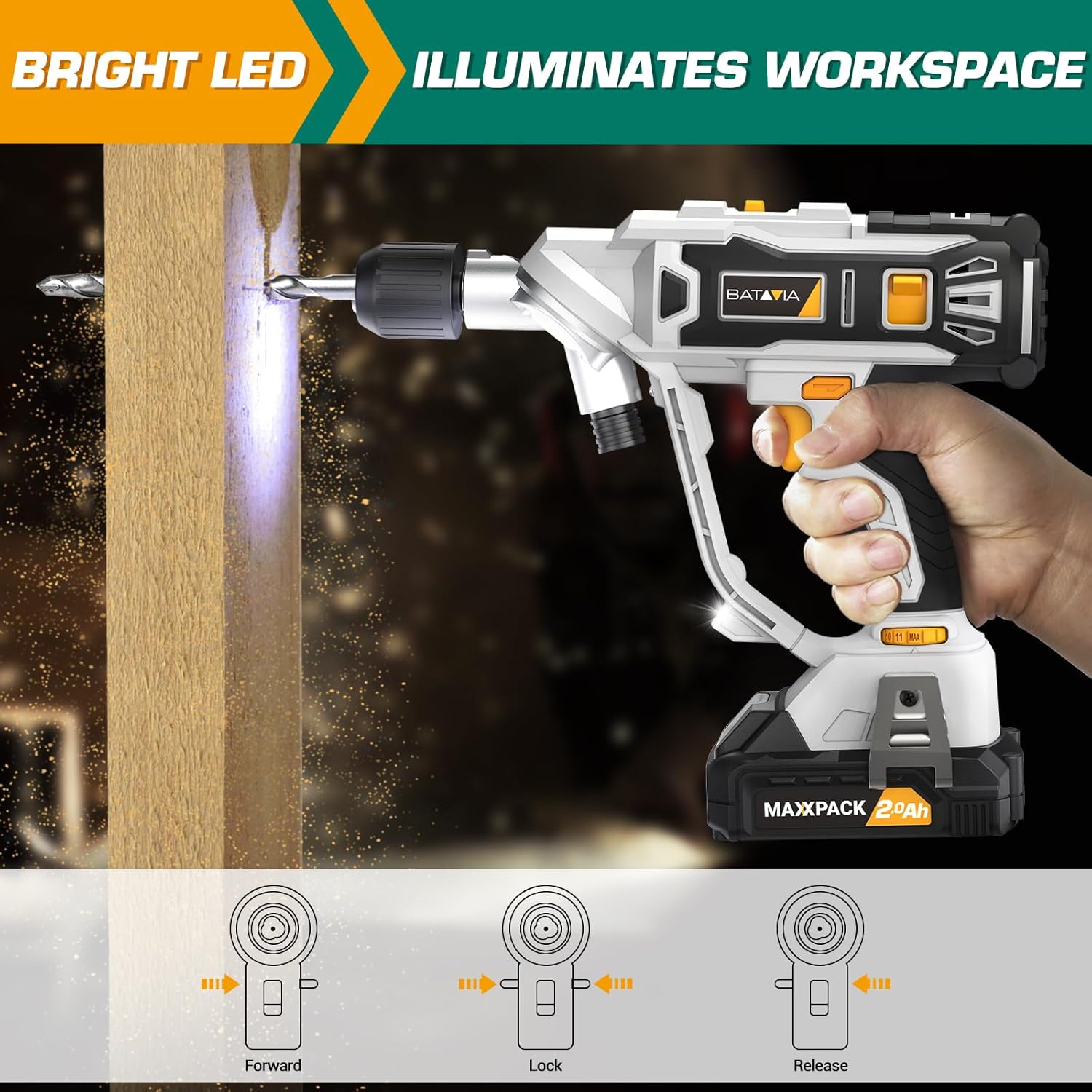
Image: The BATAVIA Cordless Drill in use, with its bright LED light illuminating the work surface, demonstrating its utility in dark or confined spaces.
6. Itọju
Itọju deede ṣe idaniloju igbesi aye gigun ati iṣẹ ti o dara julọ ti liluho rẹ.
- Ninu: Lẹ́yìn lílo kọ̀ọ̀kan, nu ohun èlò ìdáná náà pẹ̀lú ohun èlò mímọ́, damp cloth. Do not use harsh chemicals or abrasive cleaners. Keep the ventilation openings clear of dust and debris.
- Ibi ipamọ: Store the drill, battery, and charger in a cool, dry place, away from direct sunlight and extreme temperatures. Ensure the battery is removed from the drill before storage.
- Itọju Batiri: Do not store batteries in a discharged state. Recharge them periodically if not in use for extended periods.
7. Laasigbotitusita
If you encounter issues with your BATAVIA Cordless Drill, refer to the following common problems and solutions:
| Isoro | Owun to le Fa | Ojutu |
|---|---|---|
| Liluho ko bẹrẹ. | Battery not charged or not properly inserted. Forward/Reverse switch in locked (center) position. | Ensure battery is fully charged and securely inserted. Move Forward/Reverse switch to forward or reverse position. |
| Batiri ko ngba agbara. | Ṣaja ko ṣafọ sinu. Batiri tabi ṣaja ti ko tọ. | Check power outlet and charger connection. If problem persists, contact customer support. |
| Drill lacks power or stops during use. | Battery low on charge. Overload protection activated. | Recharge battery. Reduce pressure on the drill or use a lower speed setting for tough materials. |
| Chuck ko dani ni aabo. | Bit not inserted deep enough. Chuck not tightened properly. | Ensure bit shank is fully inserted into the chuck. Tighten the keyless chuck firmly by hand. |
8. Awọn pato
| Ẹya ara ẹrọ | Sipesifikesonu |
|---|---|
| Nọmba awoṣe | BT-CTD001 |
| Brand | Batavia |
| Orisun agbara | Agbara Batiri |
| Batiri Iru | 20V MAX 2.0Ah Lithium-Ion |
| Ṣaja Ampigba | 2.4 Amps |
| Iyara Yiyipo ti o pọju | 1500 RPM |
| No. ti Awọn iyara | 2 (0-400 RPM & 0-1500 RPM) |
| Torque Eto | 11+1 |
| O pọju Chuck Iwon | 3/8 Inches (Keyless Chuck) |
| Ohun elo | PA6-GF30 |
| Awọn iwọn Ọja (L x W x H) | 8.07" x 3.34" x 14.5" |
| Iwọn Nkan | 5.28 iwon |
| Pataki Awọn ẹya ara ẹrọ | Adjustable Torque, Built-In LED Working Light, Compact, Cordless, Variable Speed |
| Awọn iwe-ẹri | ETL Ifọwọsi |
9. Atilẹyin ọja ati Support
BATAVIA products are designed and manufactured to the highest quality standards. This product is ETL certified, ensuring product quality and safety.
For any questions, technical assistance, or warranty claims, please contact BATAVIA customer service:
- Foonu: (+1) 866-272-5789
- Operating Hours (EDT): 10am - 7pm
- Operating Hours (PDT): 7am - 4pm
Please have your model number (BT-CTD001) and purchase information ready when contacting support.


