1. Ifihan
The Taurus Foodie Multifunction Food Processor is designed to simplify your cooking experience with its extensive range of features. This appliance combines 31 cooking functions into a single unit, allowing you to prepare a wide variety of dishes efficiently. It includes an integrated scale for precise ingredient measurement and comes with a comprehensive recipe book to inspire your culinary creations.
This manual provides essential information for the safe and effective operation, maintenance, and troubleshooting of your Foodie food processor. Please read it thoroughly before first use and keep it for future reference.
2. Awọn ilana aabo
To ensure safe operation and prevent damage to the appliance or injury, please observe the following safety guidelines:
- Always ensure the appliance is placed on a stable, flat, and dry surface. The base is equipped with suction cups for enhanced stability.
- Ma ṣe rì ẹyọ akọkọ, okun agbara, tabi pulọọgi sinu omi tabi omiran miiran.
- Pa ọwọ, irun, aṣọ, ati awọn ohun elo kuro lati awọn ẹya gbigbe lakoko iṣẹ lati ṣe idiwọ ipalara.
- The appliance features an automatic safety stop and protection system. It will only activate when the bowl and all accessories are correctly placed and securely locked. Ensure all components are properly assembled before starting.
- Exercise caution when handling sharp blades. Always use the blade cover when removing or cleaning the blades.
- Yọọ ohun elo kuro ni iṣan agbara nigbati o ko ba wa ni lilo, ṣaaju iṣajọpọ tabi pipọ awọn ẹya, ati ṣaaju ṣiṣe mimọ.
- Ohun èlò yìí wà fún lílo ilé nìkan. Má ṣe lò ó níta tàbí fún iṣẹ́ ajé.
- All components, including the bowl and accessories, are BPA-free.
3. Ọja irinše
The Taurus Foodie Food Processor comes with several components designed for various cooking tasks:
- Ẹka akọkọ: The base of the appliance housing the motor and control panel.
- Ekan Irin Alagbara: 3.5-liter total capacity (2-liter cooking capacity) for processing ingredients.
- Ideri: Secures the bowl during operation.
- Awọn abẹfẹlẹ: High-performance stainless steel blades for chopping, crushing, and pulverizing.
- Steamer (2-level): For steaming ingredients, with a capacity of up to 3 liters.
- Agbọn: For cooking delicate ingredients or straining.
- Paddle Idapọ: Designed for stirring, emulsifying, and kneading soft doughs.
- Ideri abẹfẹlẹ: Used to protect ingredients from direct contact with blades, ideal for rice or delicate cooking.
- Idiwọn Cup: For precise liquid measurements.
- Spatula: For scraping and stirring.

Image 3.1: The Taurus Foodie Food Processor displayed with all its included accessories, including the main unit, stainless steel bowl, steamer, basket, mixing paddle, spatula, and recipe book.
4. Eto
Before using your Taurus Foodie Food Processor for the first time, follow these setup steps:
4.1 Unpacking ati Ni ibẹrẹ Cleaning
- Ni ifarabalẹ yọ gbogbo awọn paati kuro ninu apoti.
- Wash the stainless steel bowl, lid, blades, steamer, basket, mixing paddle, blade cover, measuring cup, and spatula with warm soapy water. Rinse thoroughly and dry. These parts are dishwasher safe.
- Mu ese akọkọ nu pẹlu ipolowoamp asọ. Ma ṣe fi ẹya akọkọ sinu omi.
4.2 Apejọ
- Place the main unit on a clean, stable, and dry surface. Ensure the suction cups on the base are firmly attached.
- Insert the blades into the bottom of the stainless steel bowl. Ensure they are securely seated.
- Place the stainless steel bowl onto the main unit, aligning it correctly until it clicks into place.
- Fi awọn eroja kun si ekan naa.
- Secure the lid onto the bowl. The appliance will not operate if the lid is not properly closed and locked.

Aworan 4.1: Iwaju view of the Taurus Foodie Food Processor, showcasing rẹ oni àpapọ ati iṣakoso nronu.
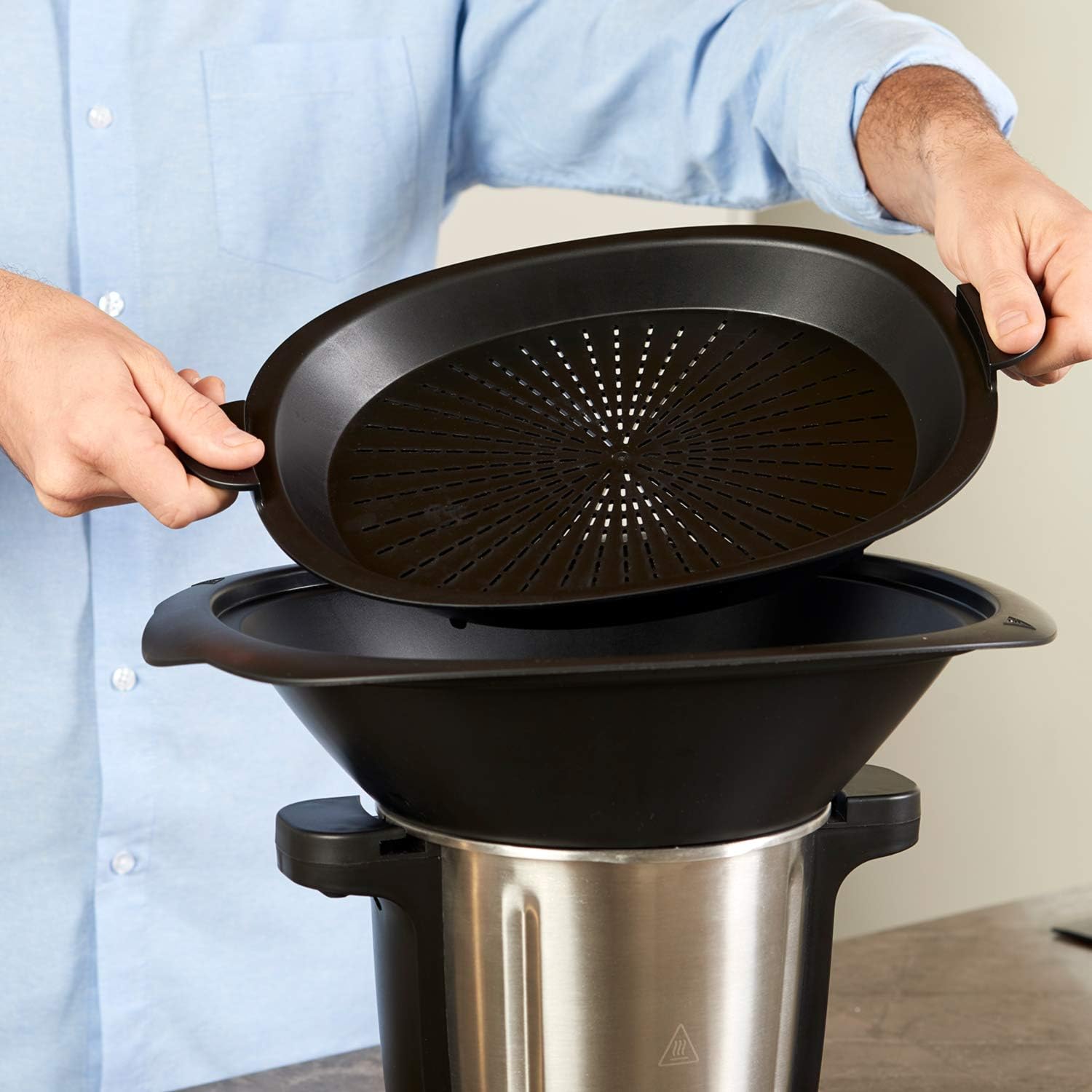
Image 4.2: A user carefully adding ingredients into the stainless steel bowl of the Foodie food processor using the measuring cup.
5. Awọn ilana Iṣiṣẹ
The Taurus Foodie Food Processor offers a digital display and intuitive controls for various cooking functions.
5.1 Control Panel and Digital Display
The digital display shows current settings for speed, temperature, and time. The control panel features dedicated buttons for various functions and a central dial for adjustment.

Aworan 5.1: alaye view of the Foodie food processor's control panel, highlighting the digital display for speed, temperature, and time, along with function buttons and the central adjustment dial.
5.2 Ipilẹ isẹ
- Pulọọgi ẹrọ naa sinu iṣan agbara ti o yẹ.
- Use the central dial to adjust settings for speed (12 levels), temperature (30°C to 120°C), and cooking time (up to 90 minutes).
- Press the corresponding function button or the start/pause button to begin operation. An end-of-function warning will sound upon completion.
5.3 Awọn iṣẹ bọtini
- Multifunction (31 functions): Includes pulverizing, crushing, grating, kneading, boiling, frying, steaming, liquefying, simmering, fermenting, weighing, and bain-marie cooking.
- Iwọn Apapo: Weigh ingredients directly in the bowl with 5g precision.
- Yogurt Maker Function: Specific setting for preparing homemade yogurt.
- Iṣẹ́ Ọwọ́: Provides short bursts of maximum power for quick chopping or mixing.
- Auto-cleaning Function: Simplifies the cleaning process (see Section 6).
- Butterfly Function: Utilizes the butterfly whisk accessory for whipping, emulsifying, and stirring delicate mixtures.
- Jeki Iṣiṣẹ Gbona: O tọju ounjẹ ni iwọn otutu gbona lẹhin sise.
- Iṣẹ DIY: Allows you to program and save your own custom cooking settings for quick access.

Image 5.2: The mixing paddle accessory, designed for gently stirring, emulsifying, and kneading soft doughs within the Foodie food processor.

Image 5.3: The steamer basket accessory, used for steaming vegetables, fish, or other delicate foods, fitting securely within the food processor's bowl.
5.4 Using the Recipe Book
The included recipe book contains 200 recipes, covering appetizers, main courses, and desserts. Follow the instructions in the book, adjusting settings on your Foodie food processor as indicated.
6. Itọju ati Cleaning
Regular cleaning and maintenance will prolong the life of your Taurus Foodie Food Processor.
6.1 Auto-cleaning Function
For quick and easy cleaning of the bowl, use the auto-cleaning function. Add a small amount of water and a drop of dish soap to the bowl, then activate the auto-cleaning program.
6.2 Afowoyi Cleaning
- Yọọ ohun elo nigbagbogbo ṣaaju ṣiṣe mimọ.
- The stainless steel bowl, lid, blades, steamer, basket, mixing paddle, blade cover, measuring cup, and spatula are dishwasher safe. Alternatively, wash them by hand with warm soapy water, rinse, and dry thoroughly.
- Mu ese akọkọ nu pẹlu asọ, damp asọ. Ma ṣe lo awọn afọmọ abrasive tabi fi ibọmi apakan akọkọ sinu omi.
- Handle blades with extreme care due to their sharpness.
7. Laasigbotitusita
If you encounter issues with your Foodie food processor, refer to the following common problems and solutions:
| Isoro | Owun to le Fa | Ojutu |
|---|---|---|
| Ohun elo ko bẹrẹ | Bowl or lid not correctly assembled/locked. | Ensure the bowl is securely placed on the main unit and the lid is properly closed and locked. |
| Error Code E3 displayed | The lid of the bowl is not properly engaged. | Check and re-secure the lid, ensuring it is fully closed and locked into position. |
| Motor runs but blades do not turn | Blades not correctly inserted or food blockage. | Unplug, remove the bowl, check blade assembly, and clear any obstructions. |
| Iwọn wiwọn ti ko pe | Appliance not on a flat surface or scale overloaded. | Ensure the appliance is on a stable, flat surface. Do not exceed maximum weighing capacity. |
Ti iṣoro naa ba wa lẹhin igbiyanju awọn iṣeduro wọnyi, jọwọ kan si atilẹyin alabara.
8. Awọn pato
Detailed technical specifications for the Taurus Foodie Multifunction Food Processor:
| Ẹya ara ẹrọ | Sipesifikesonu |
|---|---|
| Brand | Taurus |
| Nọmba awoṣe | 925013000 |
| Àwọ̀ | Black Inox |
| Awọn iwọn Ọja (L x W x H) | 41.8P x 30.8l x 50H cm |
| Lapapọ Agbara | 3.5 liters |
| Agbara Sise | 2 liters |
| Agbara | 1500 Wattis |
| Voltage | 240 Volt (AC) |
| Ohun elo | Irin ti ko njepata |
| Nọmba ti Awọn iyara | 12 |
| Ariwo Ipele | 44 Decibels |
| Pataki Awọn ẹya ara ẹrọ | 31 Functions, Integrated Scale, Multifunction, Recipes Included, BPA-Free |
| Iwọn Nkan | 7.2 kilo |
9. Atilẹyin ọja ati Support
9.1 atilẹyin ọja Alaye
The Taurus Foodie Multifunction Food Processor comes with a 2-odun atilẹyin ọja, which includes a 1-year retail warranty and an additional 1-year extended warranty. To activate your extended warranty, please register your product online at the manufacturer's webojula.

Image 9.1: A circular badge indicating a 2-year warranty for Taurus appliances, with text for online registration.
Awọn ẹya apoju fun awoṣe yii wa fun akoko ọdun 2 lati ọjọ rira.
9.2 Onibara Support
For technical assistance, warranty claims, or inquiries regarding spare parts, please refer to the contact information provided in your product packaging or visit the official Taurus website. When contacting support, please have your model number (925013000) and proof of purchase readily available.
10. Awọn fidio ọja osise
No official product videos from the seller were found in the provided data for embedding in this manual.


