הקדמה
This manual provides essential information for setting up, operating, and maintaining your HP 17.3" FHD Laptop. Designed for productivity and connectivity, this laptop features an Intel Core i3-N305 processor, a Full HD IPS anti-glare display, and runs on Windows 11 Pro. Please read this manual thoroughly to ensure proper use and to maximize your laptop's performance.
וואָס איז אין די קעסטל
באַשטעטיקן אַז אַלע זאכן זענען פאַראַן אין פּעקל:
- 1 x HP 17.3" FHD Laptop
- 1 x מאַכט אַדאַפּטער
- 1 x אינסטרוקציע מאַנואַל (דאָס דאָקומענט)
- 1 x Accessory Kit (includes 32GB USB Flash Drive, Bluetooth Earbuds, Electronic Cleaning Kit, USB-C Hub, 3-in-1 Charging Cable, USB-C Cable)
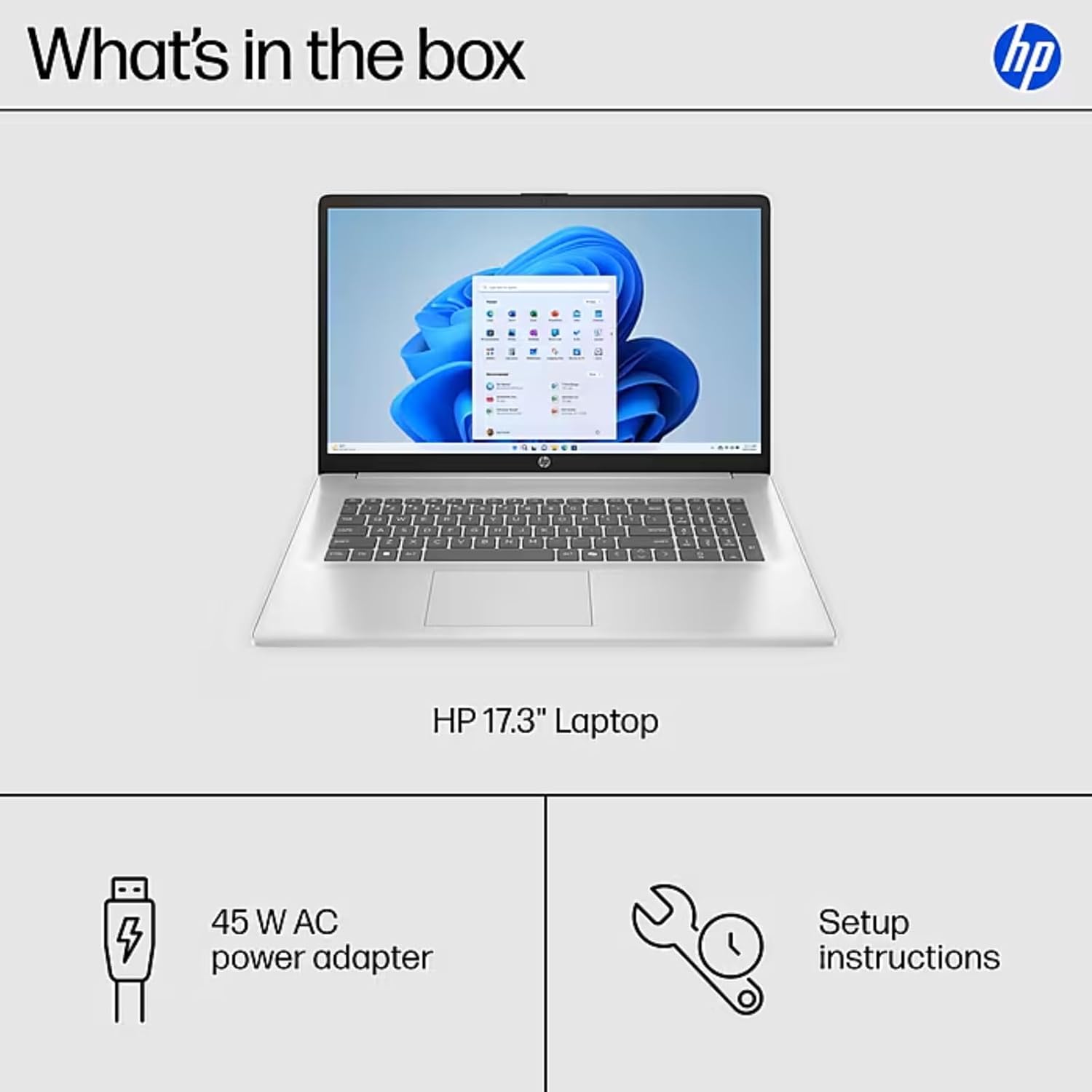
Image: The contents of the HP 17.3" Laptop box, including the laptop, power adapter, and a separate accessory kit.
סעטאַפּ
- אויספּאַקן דעם לאַפּטאָפּ: פֿאָרזיכטיק אַרויסנעמען דעם לאַפּטאָפּ און אַלע אַקסעסאָריעס פֿון דער פּאַקאַדזשינג.
- פאַרבינדן מאַכט: Plug the power adapter into the laptop's AC Smart Pin port and then into a power outlet. Allow the battery to charge for at least 30 minutes before initial use.
- ערשטע בוט: Open the laptop lid and press the power button. The laptop will guide you through the Windows 11 Pro setup process. Follow the on-screen instructions to configure your language, region, network, and user account.
- פאַרבינדן צו Wi-Fi: During the initial setup, you will be prompted to connect to a wireless network. Select your network and enter the password.
- ינסטאַלירן דערהייַנטיקונגען: After setup, it is recommended to check for and install any available Windows updates to ensure optimal performance and security.
אפערירן דיין לאַפּטאָפּ
ווייַז פֿעיִקייטן
The HP 17.3" laptop features a Full HD (1920 x 1080) IPS anti-glare display. This screen provides vibrant colors and wide 178° viewing angles, reducing reflections for comfortable viewing in various lighting conditions. The large screen size is ideal for multitasking, document review, and media consumption.
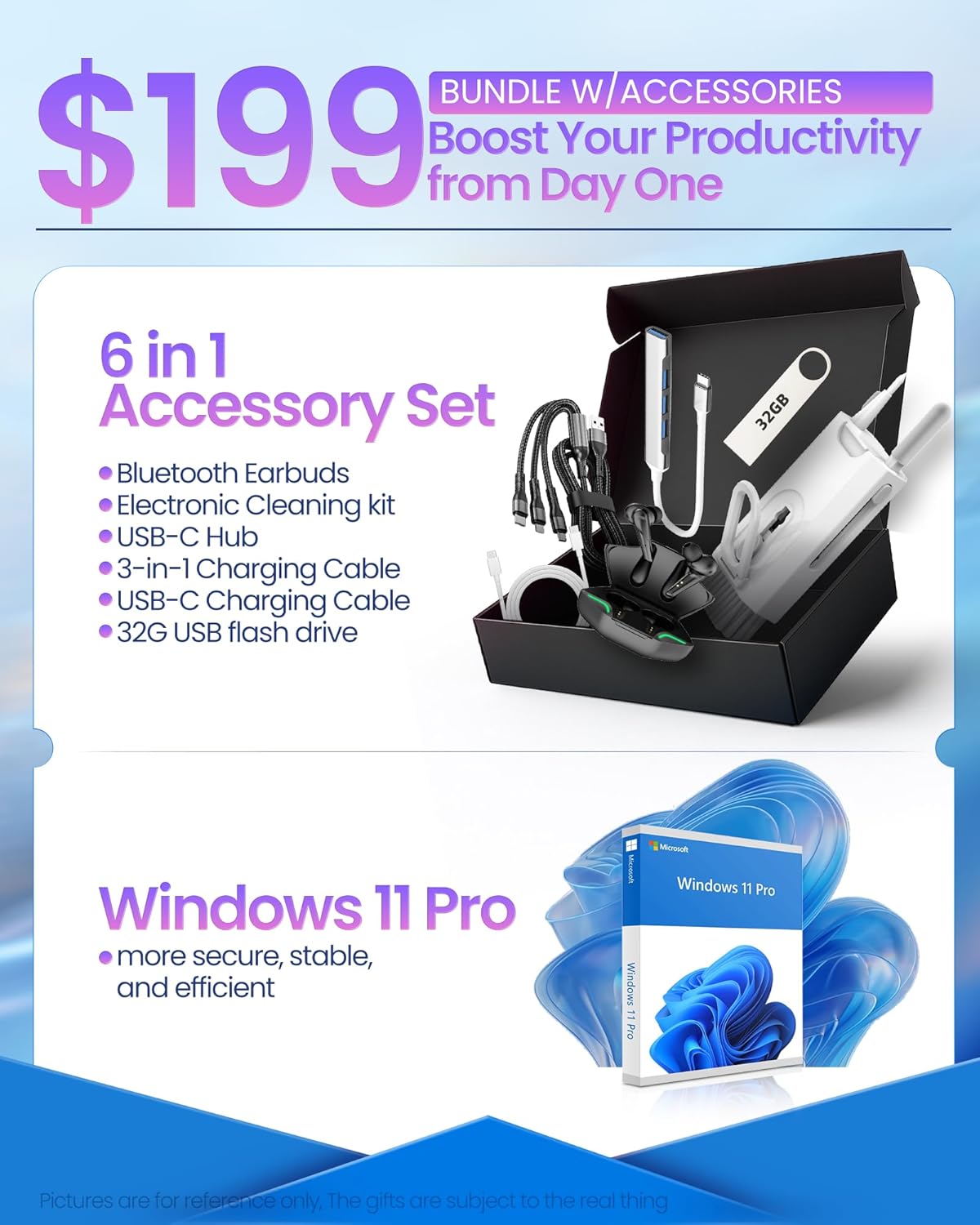
Image: The HP 17.3" laptop showcasinזײַן פֿול HD דיספּליי.
פּראַסעסער און פאָרשטעלונג
Equipped with an Intel Core i3-N305 processor (8 cores, up to 3.9 GHz turbo) and Intel UHD Graphics, this laptop delivers efficient performance for daily tasks, schoolwork, and business applications. The 32GB DDR4 RAM ensures smooth multitasking, while the 2TB NVMe SSD provides fast storage access and quick boot times.

Image: The HP laptop running multiple applications, illustrating its multitasking performance.
Copilot AI Key
The dedicated Copilot AI Key provides instant access to AI-powered productivity tools within Windows 11 Pro. Press this key to quickly get assistance with writing, brainstorming, or finding information, streamlining your workflow.

בילד: א נאָענטע בילד view of the Copilot key on the HP laptop keyboard.
פּאָרץ און קאַנעקטיוויטי
דער לאַפּטאָפּ אָפפערט אַ פאַרשיידנקייט פון פּאָרץ פֿאַר קאַנעקטינג פּעריפעריאַלס און פונדרויסנדיקע דיספּלייז:
- 1 רענטגענ וסב 2.0 טיפּ-א
- 1 רענטגענ וסב 3.2 גענ 1 טיפּ-א
- 1 x USB 3.2 Gen 1 Type-C (5 Gbps)
- 1 רענטגענ הדמי 1.4ב
- 1 x Headphone/Mic Combo Jack
- 1 x AC Smart Pin
For wireless connectivity, the laptop supports Wi-Fi 6 and Bluetooth 5.4.

בילד: דעטאַלירט view of the laptop's side ports.
פּראָדוקט איבערview ווידעא
ווידעא: אן אפיציעלע איבערview of the HP 17.3" HD Laptop for Student & Business with Windows 11 Pro, highlighting its features and benefits.
וישאַלט
- רייניקונג: ניצט אַ ווייכע, לינט-פֿרייע שטאָף צו רייניקן דעם עקראַן און די אויסערלעכע זייט. פֿאַר שווערע פֿלעקן, ווישט אַ ביסלampווישט דעם שטאָף מיט וואַסער אָדער אַ פאַרשטעלן-זיכער רייניגער. פֿאַרמייַדט שטרענגע כעמיקאַלן.
- באַטערי זאָרגן: כדי צו פארלענגערן די לעבן פון די באַטעריע, זאָל מען אויסמיידן עקסטרעמע טעמפּעראַטורן. עס איז רעקאָמענדירט צו מאַנchmal אויסלאָדן די באַטעריע אונטער 20% און דערנאָך זי גאָר אויפלאָדן.
- ווייכווארג דערהייַנטיקונגען: Regularly install operating system and driver updates to ensure security and optimal performance.
- סטאָרידזש פאַרוואַלטונג: פּעריִאָדיש אויסמעקן נישט-נייטיקע files and applications to maintain sufficient free storage space on your SSD.
- גשמיות שוץ: Transport your laptop in a protective sleeve or bag to prevent scratches and damage.
טראָובלעשאָאָטינג
If you encounter issues with your HP laptop, consider the following common solutions:
- לאַפּטאָפּ טוט זיך נישט אָן:
- זיכער מאַכן אַז דער מאַכט אַדאַפּטער איז זיכער פארבונדן צו ביידע דעם לאַפּטאַפּ און אַ אַרבעטנדיקן מאַכט ווענטיל.
- קאָנטראָלירט צי די עלעקטרישע אַוטלעט אַרבעט דורך אַרײַנשטעקן אַן אַנדער דעוויס.
- פרובירט צו האַלטן דעם פּאַוער קנעפּל פֿאַר 15-20 סעקונדעס צו דורכפירן אַ האַרד ריסעט.
- פּראָבלעמען מיטן עקראַן (קיין עקראַן, פליקעריי):
- Connect an external monitor to the HDMI port to check if the issue is with the laptop's display or graphics output.
- ריסטאַרט די לאַפּטאַפּ.
- Ensure display drivers are up to date via Windows Update or HP Support Assistant.
- Wi-Fi קאַנעקטיוויטי פּראָבלעמס:
- Toggle Wi-Fi off and on in Windows settings.
- ריסטאַרט דיין ראַוטער און מאָדעם.
- Ensure Wi-Fi drivers are updated.
- פארגעס דעם נעץ און פארבינד זיך ווידער
- פּאַמעלעך פאָרשטעלונג:
- שליסט אומנייטיקע אַפּליקאַציעס וואָס לויפן אין הינטערגרונט.
- קוק טאַסק מאַנאַדזשער פֿאַר פּראָצעסן וואָס קאָנסומירן אַ סך CPU אָדער RAM.
- זייט זיכער אז ווינדאָוס און דרייווערס זענען אַרויף צו דאַטע.
- Run a disk cleanup to free up storage space.
For more advanced troubleshooting or persistent issues, please refer to the HP support webפּלאַץ אָדער קאָנטאַקט קונה דינסט.
ספּעסאַפאַקיישאַנז
| סאָרט | HP |
| מאָדעל נאָמען | HP 17 inch Laptop (B5RH2UA#ABA) |
| אָפּערייטינג סיסטעם | Windows 11 פּראָ |
| פאַרשטעלן גרייס | 17.3 אינטשעס |
| פאַרשטעלן האַכלאָטע | 1920 x 1080 בילדצעלן (פול הד) |
| ווייַז טיפּ | IPS, Anti-glare, LED, 178° wide viewינג אַנגלעס |
| פּראַסעסער | Intel Core i3-N305 (8 cores, up to 3.9 GHz) |
| גראַפיקס | ינטעגראַטעד ינטעל UHD גראַפיקס |
| באַראַן | 32 גיגאבייט DDR4 (3200 מעגהערץ) |
| סטאָרידזש | 2TB NVMe SSD |
| ווירעלעסס קאַנעקטיוויטי | Wi-Fi 6, בלועטוט 5.4 |
| פּאָרץ | 1x USB 2.0 Type-A, 1x USB 3.2 Gen 1 Type-A, 1x USB 3.2 Gen 1 Type-C, 1x HDMI 1.4b, 1x Headphone/Mic Combo, 1x AC Smart Pin |
| באַטערי לעבן | Up to 9.5 hours (Average: 9 hours) |
| דימענסיעס (L X W X H) | 15.78" x 10.15" x 0.78" |
| וואָג | 4.6 לבס |
| קאָליר | זילבער |
וואָראַנטי און שטיצן
Your HP 17 FHD Laptop comes with a standard manufacturer's warranty. For detailed information regarding warranty terms, coverage, and duration, please refer to the warranty card included with your product or visit the official HP support webפּלאַץ.
For technical assistance, driver downloads, and frequently asked questions, please visit the HP Support webפּלאַץ: support.hp.com. You can also contact HP customer service directly for personalized support.