1. הקדמה
Welcome to the user manual for your new Trileek GPS Smart Watch. This device is designed to enhance your daily life with advanced features such as accurate GPS tracking, Bluetooth calling, Alexa voice assistant integration, comprehensive health monitoring, and support for over 100 sports modes. This manual provides detailed instructions on how to set up, operate, maintain, and troubleshoot your smartwatch to ensure optimal performance and longevity.

בילד 1.1: פראָנט view of the Trileek GPS Smart Watch, showcasing its robust design and clear display.
2. Product Features & Components
2.1 Accurate GPS Real-Time Movement Tracking
The Trileek GPS Smart Watch features GPS+BDS dual-satellite positioning, providing precise and real-time tracking of your movement trajectory. This functionality is ideal for outdoor activities, ensuring accurate data whether you are in urban environments or natural landscapes.

Image 2.1: The smartwatch interface showing real-time GPS tracking and route mapping, essential for outdoor navigation and activity logging.
2.2 Shockproof Design with Unwavering Durability
Engineered for resilience, the watch incorporates a tough anti-collision design. The watch body is embedded within a TPU soft rubber shell, creating a robust, shock-resistant protective structure. This design effectively absorbs external impacts, making the watch suitable for demanding environments and adventurous activities.

בילד 2.2: א דעטאלירטע view of the smartwatch's durable construction, emphasizing the protective TPU rubber shell designed to withstand impacts.
2.3 Alexa Built-in & AI Voice Assistant
The Trileek Smart Watch integrates Alexa, allowing you to use voice commands for various functions. You can ask questions, control music playback, check weather forecasts, set alarms, and manage timers. The AI voice assistant also facilitates voice calls, providing convenience in situations where holding a mobile phone is impractical, such as during exercise or driving.

Image 2.3: A user demonstrating interaction with the smartwatch's built-in Alexa voice assistant, showing the ease of hands-free operation.
2.4 IP68 וואַסערפּרוף שאַץ
With an IP68 waterproof rating, this smartwatch is designed to withstand various water exposures, including salt spray and rain. It maintains functionality even in challenging conditions, offering reliability for water-related activities or adverse weather.

Image 2.4: The smartwatch shown in a water environment, illustrating its IP68 waterproof design, suitable for use during swimming or in rainy conditions.
2.5 Health Monitoring & 100+ Exercise Modes
The Trileek Smart Watch provides real-time health data monitoring, including all-day sleep tracking, 24-hour heart rate, and real-time blood oxygen (SpO2) levels. It also functions as a pedometer, tracking calories burned. With support for over 100 sports modes, the fitness tracker accurately collects data for various workouts, ensuring comprehensive activity logging.

Image 2.5: The smartwatch interface showcasing a selection of its 100+ sports modes, along with real-time metrics like distance, calories, and heart rate during an activity.

Image 2.6: A visual representation of the smartwatch's sleep measurement capabilities, showing detailed sleep stages (deep, light, REM) and overall sleep score on a connected smartphone app.
2.6 Masterful Craftsmanship
The watch exhibits fine craftsmanship, combining precise metal parts with a dynamic color palette. Its sleek design and powerful aesthetic are evident in the detailed construction, ensuring both functionality and visual appeal.
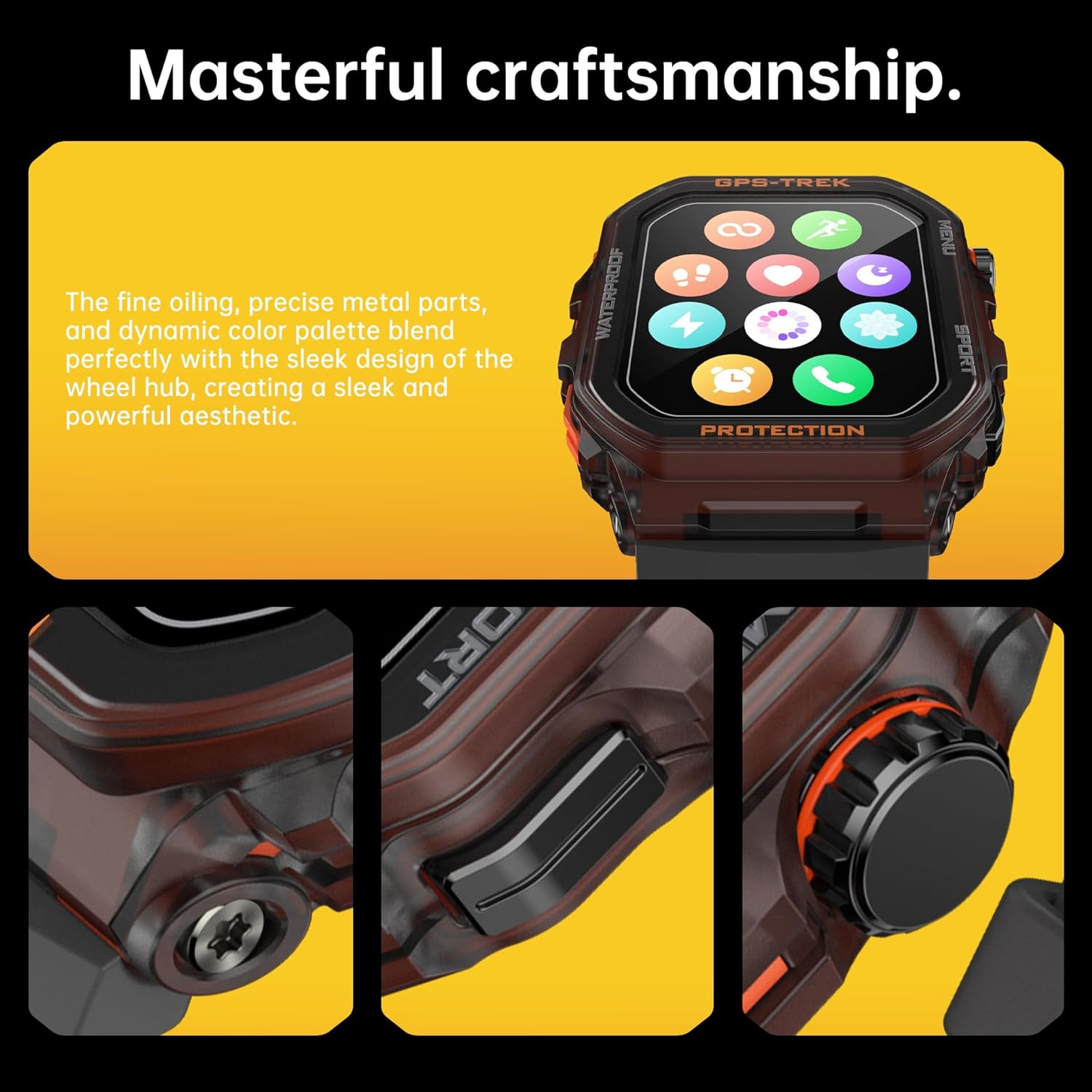
בילד 2.7: דעטאַלירט view of the smartwatch's side, highlighting the texture of the casing, the design of the buttons, and the overall build quality.
3. אָנהייבן (סעטאַפּ)
3.1 ערשט טשאַרדזשינג
Before first use, fully charge your Trileek GPS Smart Watch. Connect the magnetic charging cable to the charging points on the back of the watch and plug the USB end into a compatible power adapter (not included) or a computer USB port. A full charge typically takes approximately 2 hours.
3.2 אַפּ אראפקאפיע און ינסטאַלירונג
To unlock the full potential of your smartwatch, download the companion application. זוכן פֿאַר 'Fitbeing' in your smartphone's app store (Google Play Store for Android or Apple App Store for iOS). Install the application on your device.
3.3 פארבינדן מיט אייער סמאַרטפאָון
- מאַכן זיכער אַז בלועטאָאָטה איז ענייבאַלד אויף דיין סמאַרטפאָנע.
- Open the 'Fitbeing' app and follow the on-screen instructions to create an account or log in.
- Within the app, navigate to the device pairing section. The app will search for available devices.
- Select 'Trileek FT61' from the list of discovered devices.
- באַשטעטיקן די פּאָרינג בעטן אויף ביידע דיין זייגער און סמאַרטפאָון אויב געבעטן.
Once successfully paired, the watch will synchronize data with the app, and you will receive notifications and calls on your watch.
3.4 Initial Configuration (Alexa & Personal Settings)
After pairing, you may be prompted within the 'Fitbeing' app to connect your Amazon account for Alexa functionality. Follow the steps to link your account. Additionally, customize personal settings such as units of measurement, notification preferences, and watch faces through the app.
4. אַפּערייטינג ינסטרוקטיאָנס
4.1 יקערדיק נאַוויגאַציע
- טאָוטשסקרעען: Swipe left, right, up, or down to navigate through menus and screens. Tap to select an item.
- זייַט קנעפּלעך: The watch features physical buttons for quick access to functions like the main menu, sports modes, or power on/off. Refer to the watch's on-screen prompts for specific button assignments.
4.2 בלועטאָאָטה פאַך
Once connected to your phone via Bluetooth, you can make and receive calls directly from your watch. Access the call function from the watch menu. You can dial numbers or select contacts from your synced phonebook. The watch uses its built-in microphone and speaker for calls.
4.3 Using Alexa Voice Assistant
To activate Alexa, press and hold the designated button (refer to your watch's specific button layout) or swipe to the Alexa screen and tap the microphone icon. Speak your command clearly. Alexa can assist with setting reminders, checking information, controlling smart home devices, and more.
4.4 געזונט מאָניטאָרינג
- הארץ ראטע: די זייגער מאָניטאָרט קעסיידער דיין האַרץ טעמפּאָ. View real-time data on the watch face or in the 'Fitbeing' app for historical trends.
- בלוט זויערשטאָף (SpO2): Initiate a SpO2 measurement from the health menu on your watch. Ensure the watch is snug on your wrist for accurate readings.
- שלאָף טראַקינג: Wear the watch to bed for automatic sleep monitoring. The 'Fitbeing' app will provide detailed analysis of your sleep stages (deep, light, REM) and overall sleep quality.
4.5 ספּאָרט טראַקינג
Select your desired sport mode from the watch's menu (e.g., Running, Cycling, Walking). The watch will begin tracking relevant metrics such as distance, calories burned, heart rate, and pace. For outdoor activities, ensure GPS is active for accurate route mapping. End your workout session from the watch, and data will sync to the 'Fitbeing' app.
5. קער און וישאַלט
5.1 רייניקן אייער סמאַרט וואַך
Regularly clean your watch and strap to prevent skin irritation and maintain functionality. Use a soft, lint-free cloth. For stubborn dirt, slightly dampen the cloth with water. Avoid using harsh chemicals or abrasive materials. Ensure the watch is dry before charging.
5.2 Water Resistance Guidelines (IP68)
While the watch is IP68 waterproof, it is important to follow these guidelines:
- Do not expose the watch to hot water, steam, or high-pressure water jets.
- פֿאַרמײַדט צו ניצן די זייגער אין סאָנאַס אָדער הייסע בעדער.
- Rinse the watch with fresh water after exposure to saltwater or chlorinated water, then dry thoroughly.
- דו זאלסט נישט אַרבעטן די קנעפּלעך אונטער וואַסער.
5.3 באַטערי קער
צו מאַקסאַמיזירן באַטאַרייע לעבן:
- ויסמיידן עקסטרעם טעמפּעראַטורעס.
- לאָזט נישט די זייגער גאָר אויסגעלאָדן פֿאַר לענגערע פּעריאָדן.
- ניצן בלויז די צוגעשטעלט טשאַרדזשינג קאַבלע.
6. טראָובלעשאָאָטינג
6.1 קאָנעקטיוויטי פּראָבלעמען (בלוטוט)
- זייגער פֿאַרבינדט זיך נישט צום טעלעפֿאָן: Ensure Bluetooth is on for both devices. Restart both the watch and the phone. Try unpairing and re-pairing the device through the 'Fitbeing' app.
- אָפטע דיסקאַנעקשאַנז: Ensure the watch and phone are within Bluetooth range. Check for app updates for 'Fitbeing'. Disable power-saving modes on your phone that might restrict background app activity.
6.2 באַטעריע לעבן זאָרגן
- באַטעריע ווערט שנעל אויסגעשעפּט: High usage of GPS, continuous heart rate monitoring, frequent calls, and bright screen settings can consume more battery. Reduce screen brightness, disable unnecessary notifications, and limit continuous monitoring if not needed.
- זייגער לאָדט זיך נישט אויף: Ensure the charging cable is securely connected to both the watch and the power source. Check for any debris on the charging contacts. Try a different USB port or power adapter.
6.3 Display and Functionality Problems
- עקראַן רעאַגירט נישט: Restart the watch by pressing and holding the power button. If unresponsive, allow the battery to drain completely and then recharge.
- נישט פּינקטלעכע געזונט דאַטן: Ensure the watch is worn snugly on your wrist, about one finger's width above the wrist bone. Clean the sensor on the back of the watch.
7. טעכניש ספּעסאַפאַקיישאַנז
| שטריך | באַשרייַבונג |
|---|---|
| מאָדעל נאָמען | FT61 |
| סאָרט | טשילעאַף |
| פאַרשטעלן גרייס | 1.9 אינטשעס |
| אָפּערייטינג סיסטעם | אַנדרויד ווער 1.0 |
| קאַנעקטיוויטי טעכנאָלאָגיע | בלועטאָאָטה |
| גפּס | Built-in GPS (GPS+BDS dual-satellite positioning) |
| וואַסער קעגנשטעל | IP68 |
| באַטערי טיפּ | Lithium Polymer (1 P76 battery required) |
| פּונקט וואָג | 3.52 אונסעס |
| דימענשאַנז (פּאַקאַץ) | 5.91 X 3.54 X 0.79 אינטשעס |
| ערשטער דאַטע בנימצא | 25 נאוועמבער 2024 |
8. וואָראַנטי און שטיצן
For warranty information, please refer to the documentation included with your purchase or contact CHILEAF customer support. Standard warranty terms typically cover manufacturing defects for a specified period from the date of purchase.
8.1 קונה שטיצן
If you encounter any issues not covered in this manual or require further assistance, please contact CHILEAF customer support through their official website or the contact information provided on your product packaging. Please have your model number (FT61) and purchase details ready when contacting support.
Additionally, consider the available protection plans for extended coverage, such as the 2-Year or 3-Year Protection Plans, which can be purchased separately for added peace of mind.


