הקדמה
The HMD Pulse Pro is an advanced unlocked smartphone designed for global use, featuring a powerful 50 MP dual rear camera and an equally impressive 50 MP front camera. It runs on Android 14, offers extended battery life, and boasts a repair-at-home design for user convenience. This manual provides essential information for setting up, operating, maintaining, and troubleshooting your device.
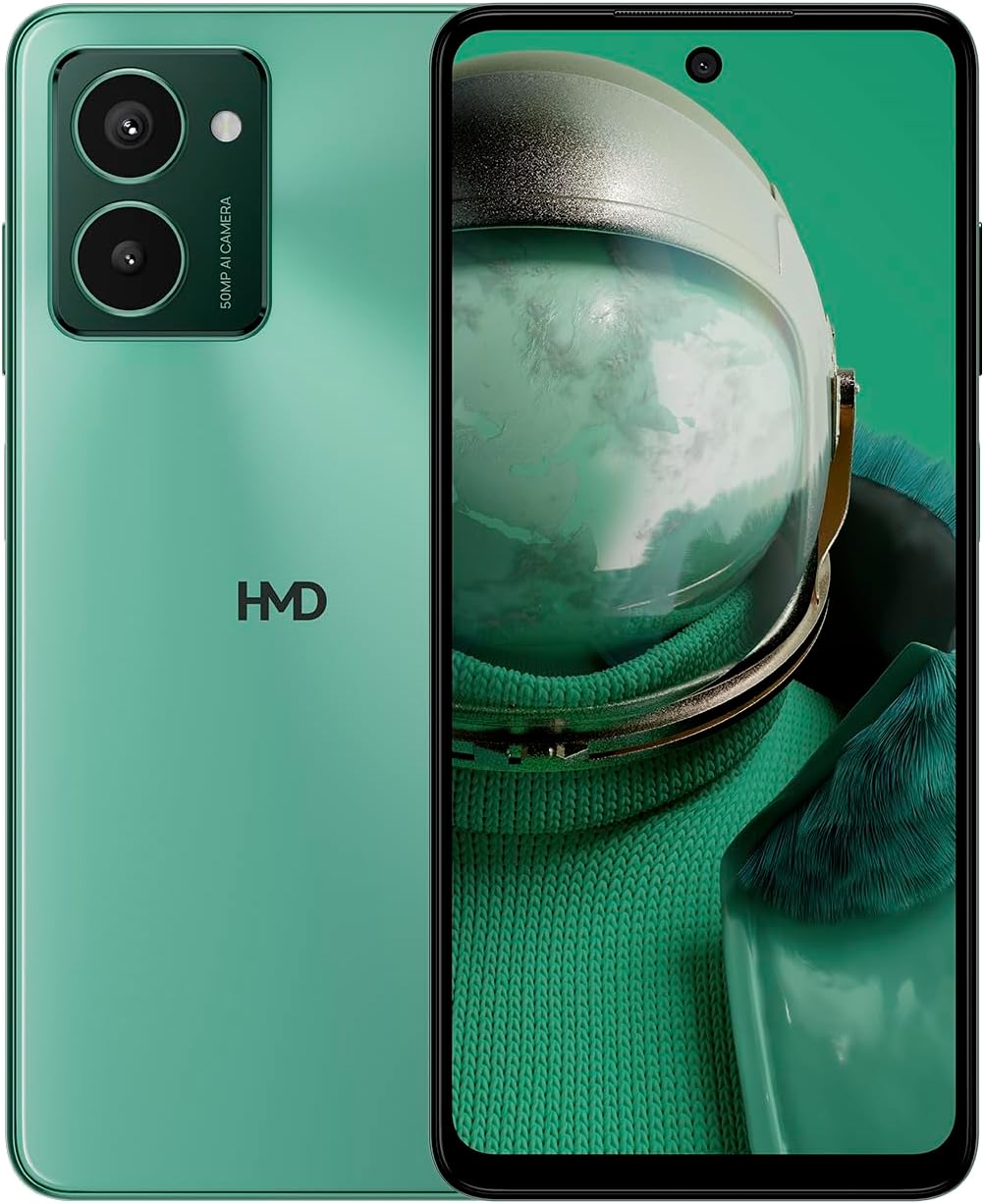
The HMD Pulse Pro smartphone in Glacier Green, showcasing its sleek design and dual camera system on the rear, alongside its vibrant display.
שליסל פֿעיִקייטן:
- Striking design with refined lines and a cutting-edge aesthetic.
- Equipped with 50 MP rear and 50 MP front cameras for balanced and high-quality photography.
- Innovative selfie gesture function for easier and more dynamic self-portraits.
- Extended battery life providing up to 59 hours of usage on a single charge.
- International version, unlocked for compatibility with various carriers worldwide.
וואָס איז אין די קעסטל
Upon unboxing your HMD Pulse Pro, please ensure all the following items are present:
- HMD Pulse Pro Smartphone
- וסב קאַבלע
- סים טאַץ אַרויסוואַרפער געצייַג
- שנעל אָנהייב גייד (קען זיין באַזונדער אָדער ינטעגרירט)
סעטאַפּ
1. ערשטע אויפלאָדונג
Before first use, it is recommended to fully charge your HMD Pulse Pro. Connect the provided USB cable to the phone's charging port and the other end to a compatible USB power adapter (not always included) or a computer USB port. The device supports fast charging.
2. אריינשטעלן סים קארטלעך און מיקראָסד קארטל
The HMD Pulse Pro supports dual SIM cards and expandable memory via a microSD card.
- געפינט די SIM טאַץ אויף דער זייט פון אייער טעלעפאָן.
- Insert the SIM tray ejector tool into the small hole next to the tray and gently push until the tray pops out.
- לייגט אריין אייערע נאַנאָ-סים קאַרטלעך אין די באַשטימטע סלאָץ. מאַכט זיכער אַז די גאָלדענע קאָנטאַקטן זענען געווענדט אַראָפּ.
- If using a microSD card for additional storage, place it into its dedicated slot on the tray.
- שטופּ פֿאָרזיכטיק צוריק דעם טאַץ אין טעלעפֿאָן ביז עס קליקט אַרײַן אין פּלאַץ.
3. אײַנצושאַלטן און ערשטע קאָנפיגוראַציע
Press and hold the Power button until the HMD logo appears. Follow the on-screen instructions to complete the initial setup, including language selection, Wi-Fi connection, Google account setup, and security settings.
אַפּערייטינג ינסטראַקשאַנז
יקערדיק נאַוויגאַציע
- טאָוטשסקרעען: Navigate by tapping, swiping, pinching, and spreading on the 6.65-inch display.
- מאַכט קנעפּל: דריקן צו וועקן/שלאָפן דעם עקראַן. דריקן און האַלטן צו אויסלעשן אָדער ריסטאַרטן.
- באַנד קנעפּלעך: אַדזשאַסטירן מעדיע וואָלומען, רוף וואָלומען, און אָנזאָג וואָלומען.
קאַמעראַ באַניץ
The HMD Pulse Pro features a 50 MP dual rear camera and a 50 MP front camera, enhanced with AI capabilities.

A user demonstrating the innovative selfie gesture feature of the HMD Pulse Pro, allowing for hands-free photo capture.

אַ נאָענט-אַרויף view of the HMD Pulse Pro's 50 MP front-facing camera, highlighting its AI-powered capabilities for enhanced selfies.
- לאָנטשינג קאַמעראַ: Tap the Camera app icon or use a quick gesture (if enabled in settings).
- גענומען פאָטאָס: Tap the shutter button. Use pinch-to-zoom for optical or digital zoom.
- Selfie Gestures: Utilize pre-defined hand gestures to trigger the front camera shutter without touching the screen. Refer to the in-app camera settings for available gestures.
- מאָדעס: Switch between various modes like Portrait, Night, Panorama, and Video.
באַטערי מאַנאַגעמענט
The HMD Pulse Pro is equipped with a 5000 mAh battery, offering up to 59 hours of usage.

Two HMD Pulse Pro smartphones standing upright, with text emphasizing the impressive battery life of up to 59 hours.
- טשאַרדזשינג: Use the provided USB cable. A full charge takes approximately 2.5 hours.
- באַטערי סאַווער: Enable Battery Saver mode in Settings > Battery to extend usage time.
- אָפּטימיזירן באַניץ: Reduce screen brightness, disable unused connectivity (Bluetooth, Wi-Fi, GPS), and close background apps to conserve battery.
וישאַלט
רייניקונג דיין מיטל
To keep your HMD Pulse Pro in optimal condition:
- ניצט אַ ווייכן, לינט-פֿרייע שטאָף צו ווישן דעם עקראַן און קערפּער.
- פֿאַרמײַדן ניצן שטרענגע כעמיקאַלן, אַברייסיוו רייניגער, אָדער אַעראָסאָל ספּרײַס.
- The device is water resistant; however, avoid submerging it in water.
ווייכווארג דערהייַנטיקונגען
קאָנטראָלירט און אינסטאַלירט רעגולער ווייכווארג דערהייַנטיקונגען צו זיכער מאַכן אַז אייער מיטל האט די לעצטע פֿעיִקייטן, זיכערהייט פּאַטשאַז און פאָרשטעלונג פֿאַרבעסערונגען. גייט צו סעטטינגס > סיסטעם > סיסטעם דערהייַנטיקונג.
סטאָרידזש מאַנאַגעמענט
With 256 GB of internal storage, you have ample space. However, regularly manage your files and apps to maintain performance. You can also expand storage using a microSD card.
טראָובלעשאָאָטינג
This section addresses common issues you might encounter with your HMD Pulse Pro.
| פּראָבלעם | מעגלעך לייזונג |
|---|---|
| די דעווייס וועט זיך נישט אנצינדן | Ensure the battery is charged. Connect to a charger for at least 30 minutes. Try holding the Power button for 10-15 seconds. |
| אַפּפּס קראַשן אָדער פרירן | Clear the app's cache (Settings > Apps > [App Name] > Storage > Clear cache). Restart the phone. Update the app or the phone's software. |
| נעבעך באַטאַרייע לעבן | Check background app usage (Settings > Battery). Reduce screen brightness. Disable unused connectivity features (Wi-Fi, Bluetooth, GPS, NFC). Enable Battery Saver mode. |
| קען נישט פאַרבינדן צו Wi-Fi/Bluetooth | Toggle Wi-Fi/Bluetooth off and on. Restart your phone and the router/device. Forget the network/device and reconnect. |
| סים קאָרט ניט דיטעקטאַד | Ensure the SIM card is correctly inserted in the tray. Restart the phone. Check with your carrier for network issues. |
פאַבריק באַשטעטיק
אויב עס פּאַסירן שטענדיקע פּראָבלעמען, קען אַ פֿאַבריק ריסעט זיין נייטיק. ווארענונג: דאָס וועט אויסמעקן אַלע דאַטן אויף דיין טעלעפאָן. מאַכט אַ באַקאַפּ פון וויכטיקע דאַטן איידער איר גייט ווייטער.
- גיי צו סעטטינגס > סיסטעם > צוריקשטעלן אָפּציעס.
- אויסקלייבן "אויסמעקן אלע דאטן (פאבריק צוריקשטעלן)".
- באַשטעטיקט אייער באַשלוס און אַרייַן אייער PIN/פּאַטערן/פּאַראָל אויב געבעטן.
- דער טעלעפאָן וועט ריסטאַרטן און אָנהייבן דעם ריסעט פּראָצעס.
ספּעסאַפאַקיישאַנז
Detailed technical specifications for the HMD Pulse Pro smartphone:

The HMD Pulse Pro highlighting its stylish and cutting-edge design, dual SIM support, and 6.56" HD+ HID display with a 90Hz refresh rate. Note: While the image mentions 8GB/128GB, this specific model features 8GB RAM and 256GB internal storage.
| שטריך | דעטאַל |
|---|---|
| מאָדעל נאָמען | Pulse Pro (TA-1606) |
| אָפּערייטינג סיסטעם | אַנדרויד 14 |
| ווייַז גרייס | 6.65 אינטשעס |
| האַכלאָטע | 720 X 1612 |
| דערפרישן קורס | 90 הז |
| באַראַן זכּרון | 8 גיגאבייט |
| סטאָרידזש קאַפּאַסיטי | 256 גיגאבייט (אויסברייטבאר) |
| דערציען אַפּאַראַט | 50 מעגאַפּיקסעל צווייענדיקע קאַמעראַ |
| פראָנט אַפּאַראַט | 50 מפּ |
| באַטאַרייע קאַפּאַציטעט | 5000 מאַה |
| טשאַרדזשינג צייט | בעערעך. 2.5 שעה |
| קפּו ספּיד | 1.6 גהז |
| קאַנעקטיוויטי | בלועטוט, וויי-פיי, יו-עס-בי, ען-עף-סי |
| ספּעציעלע פֿעיִקייטן | Fast Charging Support, Dual SIM, Expandable Memory, Built-In GPS, Water Resistant |
| דימענשאַנז | 6.43 X 2.95 X 0.34 אינטשעס |
| פּונקט וואָג | 0.249 אונסעס (7.06 גראַם) |
| אַודיאָ דזשאַק | 3.5 מם |
| קאָליר | Glacier Green |
וואָראַנטי און שטיצן
פאַבריקאַנט וואָראַנטי
Your HMD Pulse Pro smartphone is covered by a manufacturer's warranty against defects in materials and workmanship. The specific terms and duration of the warranty may vary by region. Please refer to the warranty card included with your product or visit the official HMD webפּלאַץ פֿאַר דיטיילד וואָראַנטי אינפֿאָרמאַציע.
קונה שטיצן
For technical assistance, troubleshooting beyond this manual, or warranty claims, please contact HMD customer support. You can typically find contact information (phone numbers, email, support portals) on the official HMD webזייטל אדער דורך די שטיצע סעקציע פון אייער דעווייס' סעטינגס.
אָנליין רעסורסן: For the latest FAQs, software downloads, and support articles, visit the official HMD support page. (Specific URL not provided in input, so a generic statement is used).


