1. הקדמה
This manual provides essential information for the safe and efficient operation of your Pretul DESI-36P2 3.6V Cordless Screwdriver. Please read it thoroughly before first use and keep it for future reference. This compact cordless screwdriver is designed for light-duty fastening tasks, featuring a two-position handle and an integrated LED work light.

פיגורע 1: Pretul DESI-36P2 Cordless Screwdriver. This image shows the screwdriver in its straight configuration, highlighting its compact design and yellow and black color scheme.
2. זיכערקייַט אינפֿאָרמאַציע
שטענדיק אָבסערווירן גרונטלעכע זיכערהייט מיטלען ווען איר ניצט עלעקטרישע מכשירים צו רעדוצירן דעם ריזיקאָ פון פייער, עלעקטרישן קלאַפּ און פערזענלעכע שאָדן.
- אַרבעט שטח זיכערקייַט: האַלטן דיין אַרבעט געגנט ריין און געזונט-ליט. קלאַטערד אָדער טונקל געביטן פאַרבעטן אַקסאַדאַנץ.
- עלעקטריקאַל זיכערקייַט: דו זאלסט נישט ויסשטעלן מאַכט מכשירים צו רעגן אָדער נאַס טנאָים. וואַסער קומט אין אַ מאַכט געצייַג וועט פאַרגרעסערן די ריזיקירן פון עלעקטריש קלאַפּ.
- פערזענליכע זיכערקייט: בלייבן פלינק, היטן וואָס איר טאָן און נוצן סייכל ווען אַפּערייטינג אַ מאַכט געצייַג. דו זאלסט נישט נוצן אַ מאַכט געצייַג בשעת איר זענט מיד אָדער אונטער דער השפּעה פון דרוגס, אַלקאָהאָל אָדער מעדאַקיישאַנז.
- מכשירים נוצן און זאָרגן: צי ניט צווינגען די מאַכט געצייַג. ניצן די ריכטיק מאַכט געצייַג פֿאַר דיין אַפּלאַקיישאַן. עס וועט טאָן די אַרבעט בעסער און סאַפער אין די קורס פֿאַר וואָס עס איז דיזיינד.
- באַטערי זאָרגן: ריטשאַרדזש בלויז מיט די טשאַרדזשער ספּעסיפיעד דורך דער פאַבריקאַנט. א טשאַרדזשער וואָס איז פּאַסיק פֿאַר איין טיפּ פון באַטאַרייע פּאַק קען מאַכן אַ ריזיקירן פון פייַער ווען געוויינט מיט אן אנדער באַטאַרייע פּאַק.
3. פּראָדוקט קאָמפּאָנענטן און פֿעיִקייטן
Familiarize yourself with the parts of your Pretul DESI-36P2 cordless screwdriver.
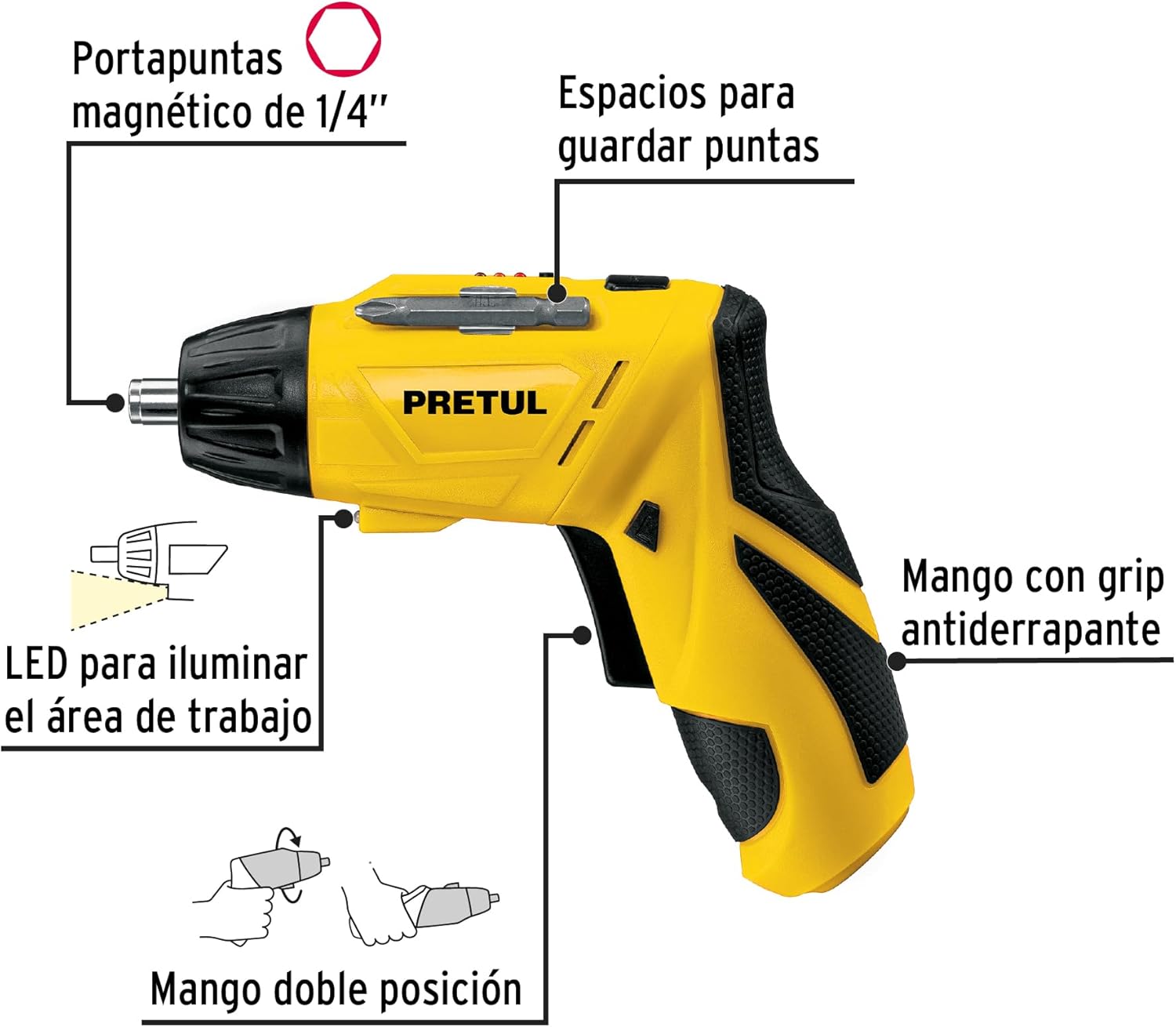
פיגורע 2: Key features of the Pretul DESI-36P2. This diagram illustrates the magnetic 1/4" bit holder, bit storage slots, anti-slip grip handle, LED work light, and the two-position handle mechanism.
- Magnetic 1/4" Hex Bit Holder: Securely holds screwdriver bits for quick changes.
- Bit Storage Slots: Conveniently located on the tool for storing extra bits.
- Anti-slip Grip Handle: גיט באַקוועמע און זיכערע האַנדלינג בעת אָפּעראַציע.
- געפירט אַרבעט ליכט: Illuminates the work area for improved visibility in dimly lit spaces.
- Two-Position Handle: Allows the screwdriver to be used in a straight or pistol-grip configuration for versatility and access in tight spaces.
- פאָרווערטס/צוריקקער סוויטש: Controls the direction of rotation for tightening and loosening screws.
- מאַכט קנעפּל: Activates the screwdriver.
4. סעטאַפּ
4.1 ערשט טשאַרדזשינג
Before first use, fully charge the screwdriver's internal battery. Connect the charger to a standard electrical outlet and then to the charging port on the screwdriver. The charging indicator (if present) will show the charging status. Disconnect the charger once the battery is fully charged.
4.2 Attaching Screwdriver Bits
- Select the appropriate 1/4" hex screwdriver bit for your task.
- Insert the bit firmly into the magnetic bit holder at the front of the screwdriver until it is securely seated.
- To remove a bit, simply pull it out from the holder.
4.3 אַדזשאַסטירן די האַנטל פּאָזיציע
The screwdriver features a two-position handle for enhanced versatility:
- פּיסטאָל גריפ: Standard configuration for most tasks.
- גלייכע גריפ: For reaching into confined spaces. To change the handle position, firmly grasp the handle and the body of the screwdriver, then pivot the handle until it locks into the desired position.
5. אַפּערייטינג ינסטרוקטיאָנס
5.1 פּאַוערינג אויף / אַוועק
Press and hold the power button to activate the screwdriver. Release the button to stop operation. The LED work light will activate when the power button is pressed.
5.2 Selecting Rotation Direction
Use the forward/reverse switch, typically located near the trigger, to select the desired rotation direction:
- Push the switch to the left for forward rotation (tightening screws).
- Push the switch to the right for reverse rotation (loosening screws).
- Ensure the switch is in the center position to lock the tool and prevent accidental activation.
5.3 באַפעסטיגונג שרויפן
- Ensure the correct bit is installed and the rotation direction is set to forward.
- Place the bit onto the screw head, applying gentle pressure.
- Press the power button to start driving the screw. Release the button once the screw is fully seated or the desired torque is reached.
5.4 לוסאַנינג סקרוז
- Ensure the correct bit is installed and the rotation direction is set to reverse.
- Place the bit onto the screw head, applying gentle pressure.
- Press the power button to start loosening the screw. Release the button once the screw is free.
6. וישאַלט
רעגולערע אויפהאלטונג גאראנטירט אפטימאלע פאָרשטעלונג און פארלענגערט די לעבן פון אייער געצייַג.
- רייניקונג: האַלט די ווענטילאַציע עפענונגען פון דעם געצייַג ריין און פריי פון שמוץ. ניצט אַ ווייכן, דamp טוך צו רייניקן די אויסערליכע זייט. ניצט נישט קיין שטרענגע כעמיקאלן אדער שרײַבנדיקע רייניגער.
- ביט האָלדער: Periodically inspect the bit holder for wear or damage. Clean any accumulated dust or metal shavings.
- באַטאַרייע סטאָרידזש: Store the screwdriver in a cool, dry place away from direct sunlight and extreme temperatures. For long-term storage, ensure the battery is partially charged (around 50%).
- דורכקוק: Regularly check for loose screws, damaged cords (if applicable), or any other conditions that may affect safe operation.
7. טראָובלעשאָאָטינג
If you encounter issues with your screwdriver, refer to the following common problems and solutions:
| פּראָבלעם | מעגלעך סיבה | לייזונג |
|---|---|---|
| שרויפנציהער טוט זיך נישט אן. | באַטערי איז דיסטשאַרדזשד. | באַשולדיקן די באַטאַרייע גאָר. |
| Screwdriver lacks power. | די באַטאַרייע איז נידעריק. | ריטשאַרדזש די באַטאַרייע. |
| ביט גליטשט ארויס פון שרויף קאפ. | אומרעכטע ביט גרייס אדער אפגענוצט ביט. | Use the correct bit size; replace worn bits. |
| Handle does not lock into position. | Not fully pivoted. | Ensure the handle is fully pivoted until it clicks into place. |
אויב די פראבלעם בלייבט נאך פרובירן די לייזונגען, קאנטאקטירט קאסטומער סופארט.
8. ספּעסאַפאַקיישאַנז
Technical specifications for the Pretul DESI-36P2 Cordless Screwdriver.

פיגורע 3: Dimensions of the Pretul DESI-36P2. This image shows the screwdriver with measurements indicating a length of 17.5 cm and a height of 13 cm.
| שטריך | באַשרייַבונג |
|---|---|
| מאָדעל נומער | DESI-36P2 (26402) |
| סאָרט | פּרעטול |
| מאַכט מקור | באַטערי |
| באַטערי וואָלtage | 3.6 וואלטס |
| ספּיד | 230 רפּם |
| טאָרק | 3E+1 Pound-inches (approximately 30 in-lbs) |
| ביט האָלדער | 1/4" Hex Magnetic |
| מאַטעריאַל | פּלאַסטיק, מעטאַל |
| דימענסיעס (ל × ה) | 17.5 ס״מ x 13 ס״מ (אומגעפער, באַזירט אויף בילד) |
| וואָג | 530 ג (0.53 ק"ג) |
| אַרייַנגערעכנט קאַמפּאָונאַנץ | 5 Phillips bits 1" (PH1, PH2, PH3), Charger, 2 Phillips bits 2" (PH1, PH2), 1/4" Magnetic extension |
9. וואָראַנטי און שטיצן
The Pretul DESI-36P2 Cordless Screwdriver comes with a 1 יאָר וואָראַנטי פֿון דעם קויף־דאַטום. ביטע באַהאַלטן אייער קויף־באַווייַז פֿאַר גאַראַנטיע־קליימז.

פיגורע 4: Product packaging showing the included components and a "1 year warranty" seal.
For technical support, service, or warranty inquiries, please contact Pretul customer service through their official channels or the retailer where the product was purchased.


