1. הקדמה
Thank you for choosing the EDIS 40W Speakers, Model EA014. This manual provides essential information for the safe and efficient use of your new speaker system. Please read this manual thoroughly before installation and operation, and retain it for future reference.
2. זיכערקייַט אינפֿאָרמאַציע
כדי צו זיכער מאַכן זיכערע אָפּעראַציע און פאַרמייַדן שאָדן, ביטע אָבסערווירן די פאלגענדע פאָרזיכטיגקייטן:
- שטעלט נישט אויס די רעדנערס צו וואַסער אָדער פייכטקייט.
- דו זאלסט נישט פאַרשפּאַרן ווענטאַליישאַן אָופּאַנינגז.
- Place the speakers on a stable surface to prevent falling.
- ניצן בלויז די מאַכט אַדאַפּטער סאַפּלייד מיט די אַפּאַראַט.
- האַלטן אויס פון דערגרייכן פון קינדער.
- אָפּשטעקן די עלעקטרע בעת בליץ-שטורעמס אדער ווען נישט גענוצט פאר לאנגע צייטן.
3. פּעקל אינהאַלט
ביטע קאָנטראָלירט אַז אַלע זאכן זענען פאַראַן אין אייער פּעקל:
- EDIS 40W Speakers (2 units)
- ינפראַרעד רימאָוט קאָנטראָל
- מאַכט קאַבלע
- אַודיאָ קאַנעקשאַן קאַבלעס
- באַניצער מאַנואַל (דעם דאָקומענט)
4. פּראָדוקט איבערview
The EDIS 40W Speakers are designed to deliver clear audio. They feature a robust design with a steel grille for protection and offer multiple input options.
4.1 Speaker Units

פיגורע 1: פראָנט view of the EDIS 40W Speakers. Each speaker unit features two drivers and a protective steel grille.
4.2 רימאָוט קאָנטראָל
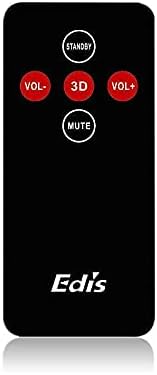
Figure 2: The infrared remote control for the EDIS 40W Speakers. It includes buttons for power, volume adjustment, 3D audio mode, and mute.
4.3 Media Player Panel

Figure 3: The integrated USB and SD Card Media Player panel. This panel allows direct playback from USB drives and SD/MMC memory cards.
5. סעטאַפּ
Follow these steps to set up your EDIS 40W Speakers:
- אָרט: Position the speakers on a flat, stable surface or mount them securely to a wall. Ensure adequate space for ventilation.
- פֿאַרבינדן אַודיאָ מקור: Connect your audio source (e.g., computer, TV, interactive whiteboard) to the speaker system using the appropriate audio cables.
- מאַכט קשר: Connect the power cable to the main speaker unit and then plug it into a standard electrical outlet.
- מאַכט אויף: Press the power button on the main speaker unit or the 'STANDBY' button on the remote control to turn on the speakers.
6. אַפּערייטינג ינסטרוקטיאָנס
Your EDIS 40W Speakers can be operated using the integrated controls or the infrared remote control.
6.1 ניצן די רימאָוט קאָנטראָל
- סטאַנדביי: Press to turn the speakers on or off (standby mode).
- VOL+: פאַרגרעסערן די באַנד.
- VOL-: פאַרמינערן די באַנד.
- שטיל: שטום אָדער ונמוט די אַודיאָ רעזולטאַט.
- 3 ד: Activate or deactivate the 3D audio effect.
6.2 Using the Media Player Panel
Insert a USB drive or SD/MMC card into the respective slot on the media player panel.
- DIRECTIONS: Press to switch between input sources (e.g., AUX, USB, SD Card).
- PREVIOUS (◀◀): האָפּקען צו די פריערדיקע שפּור.
- PLAY/PAUSE (►▌▌): שפּיל אָדער פּויזע דעם קראַנט שפּור.
- NEXT (►►): האָפּקען צו דער ווייַטער שפּור.
- LED: Indicates power status or playback activity.
7. וישאַלט
Proper maintenance ensures the longevity of your speakers:
- רייניקונג: ניצט אַ ווייכע, טרוקענע שטאָף צו רייניקן די רעדנער־פלאַכן. ניצט נישט קיין פליסיקע רייניגער אָדער שרײַבנדיקע מאַטעריאַלן.
- סטאָרידזש: אויב איר לייגט די רעדנערס אויף פאר א לענגערע צייט, שטעלט זיי אפ פון עלעקטריציטעט און לייגט זיי אויף אין א קילן, טרוקענעם ארט.
- ווענטילאַטיאָן: Ensure that the speaker's ventilation openings are not obstructed to prevent overheating.
8. טראָובלעשאָאָטינג
If you encounter issues with your EDIS 40W Speakers, refer to the following common problems and solutions:
| פּראָבלעם | מעגלעך סיבה | לייזונג |
|---|---|---|
| קיין מאַכט | Power cable not connected; power outlet not working | קאָנטראָלירט די פֿאַרבינדונג פֿון דער מאַכט קאַבל; פּרוּווט אַן אַנדער אַוטלעט. |
| קיין געזונט | Volume too low; incorrect input source; audio cable loose/faulty | Increase volume; press MODE to select correct input; check audio cable connections. |
| ווייַט קאָנטראָל נישט ארבעטן | Batteries depleted; obstruction between remote and speaker; remote not pointed correctly | Replace remote batteries; remove obstructions; point remote directly at the speaker's IR receiver. |
| USB/SD קאַרטל שפּילט נישט | אומרעכט file format; card/drive not inserted correctly; corrupted media | פאַרזיכערן files are compatible (e.g., MP3); reinsert media; try a different USB drive/SD card. |
9. ספּעסאַפאַקיישאַנז
| שטריך | באַשרייַבונג |
|---|---|
| סאָרט | EDIS |
| מאָדעל נומער | עאַ014 |
| מאַקסימום רעדנער אַרויסגאַנג מאַכט | 40 וואטס |
| קאָליר | גרוי |
| פּונקט וואָג | 8 קג |
| קאָנטראָל מעטאָד | ווייַט |
| קאַנעקטיוויטי טעכנאָלאָגיע | ווייערד |
| מאַכט מקור | קאָרדעד עלעקטריק |
| אַודיאָ רעזולטאַט מאָדע | אַרומרינגלען |
| מאַונטינג טיפּ | שטאָק שטייענדיק |
| מאַטעריאַל | האלץ |
| רעדנער טיפּ | דרויסנדיק |
| ספּעציעלע פֿעיִקייטן | Ampליפער |
| קאַמפּאַטאַבאַל דעוויסעס | אַלע דעוויסעס |
| אַרומרינגלען סאָונד קאַנאַל קאַנפיגיעריישאַן | 2 |
10. וואָראַנטי און שטיצן
פֿאַר וואָראַנטי אינפֿאָרמאַציע און קונה שטיצע, ביטע זען די דאָקומענטאַציע וואָס איז געווען צוגעשטעלט ביים קויפן אָדער קאָנטאַקט דיין הענדלער. האַלט דיין באַווייַז פון קויפן פֿאַר קיין וואָראַנטי קליימז.


