הקדמה
This user manual provides comprehensive instructions for the HW16 Smart Watch. It covers setup, operation, maintenance, and troubleshooting to help you maximize your device's potential. The HW16 Smart Watch features a 1.72-inch full screen, Bluetooth call functionality, music system, heart rate sensor, fitness tracking, and password lock screen, compatible with both iOS and Android devices.
סעטאַפּ
1. טשאַרדזשינג די מיטל
Before first use, fully charge your HW16 Smart Watch. Connect the magnetic charging cable to the charging points on the back of the watch and plug the USB end into a compatible power adapter (not included) or a computer USB port. The watch display will indicate charging status.
2. פּאָווערינג אויף / אויסגעלאשן
To power on, press and hold the side button until the screen illuminates. To power off, press and hold the side button, then select the power off option on the screen.
3. פארבינדן מיט אייער סמאַרטפאָון
The HW16 Smart Watch connects via Bluetooth. Download the recommended companion application (e.g., Wearfit Pro APP as mentioned in specifications) from your smartphone's app store. Ensure Bluetooth is enabled on your phone. Open the app, follow the on-screen instructions to search for and pair with your HW16 device. Confirm the pairing request on both your phone and the watch.
אַפּערייטינג ינסטראַקשאַנז
נאַוויגאַציע
The HW16 features a full touch screen. Swipe left/right, up/down to navigate through menus and features. Press the side button to return to the home screen or access the app list.
בלועטאָאָטה רופן פאַנגקשאַנאַליטי
Once paired with your phone, the watch supports HD-Dial calls. You can swipe to answer incoming calls, dial numbers directly from the watch, and synchronize your mobile phone call history and address book. This feature allows for hands-free communication.

Image: The HW16 Smart Watch showing its HD-Dial Call feature, including options to answer, dial, and access contacts. This image illustrates the watch's capability for direct phone calls.
מוזיק סיסטעם
Control music playback on your connected smartphone directly from your watch. Play, pause, skip tracks, and adjust volume without needing to take out your phone.
פיטנעסס טראַקינג
The watch tracks various fitness metrics including steps, distance, and calories burned. Utilize the multi-sport mode for specific activity tracking.
האַרץ קורס סענסאָר
Monitor your heart rate in real-time. Access the heart rate application on the watch to view your current heart rate and historical data.

בילד: די הינטערשטע view of the HW16 Smart Watch, highlighting the optical heart rate sensor. This sensor uses light to detect blood flow and measure heart rate.
פּאַראָל שלאָס פאַרשטעלן
Enhance your privacy and security by setting a password lock for your watch. This prevents unauthorized access to your data.

Image: The HW16 Smart Watch screen showing a numerical keypad for entering a password. This feature provides enhanced security for the device.
געזונט מאָניטאָרינג פֿעיִקייטן
The HW16 Smart Watch offers comprehensive health data detection, including:
- הארץ ראטע: קעסיידערדיק מאָניטאָרינג פון דיין האַרץ טעמפּאָ.
- בלוט זויערשטאָף: Measurement of blood oxygen saturation levels.
- בלוט דרוק: Estimation of blood pressure (for reference only, not medical device).
- שלאָף מאָניטאָרינג: טראַקט שלאָף פּאַטערנז, אַרייַנגערעכנט טיפער שלאָף, לייכטער שלאָף און וואַך צייטן.
- Stress Test: גיט איינבליקן אין סטרעס לעוועלס.
- ברידינג טריינינג: געפֿירטע אָטעמען־געניטונגען פֿאַר אָפּרו.
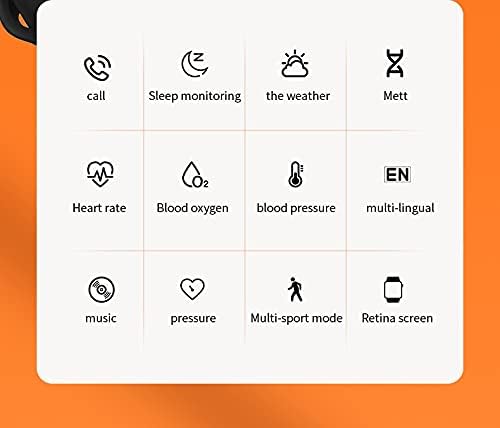
Image: A grid of icons illustrating the various functions of the HW16 Smart Watch, including call, sleep monitoring, weather, Mett, heart rate, blood oxygen, blood pressure, multi-lingual support, music, pressure, multi-sport mode, and Retina screen.
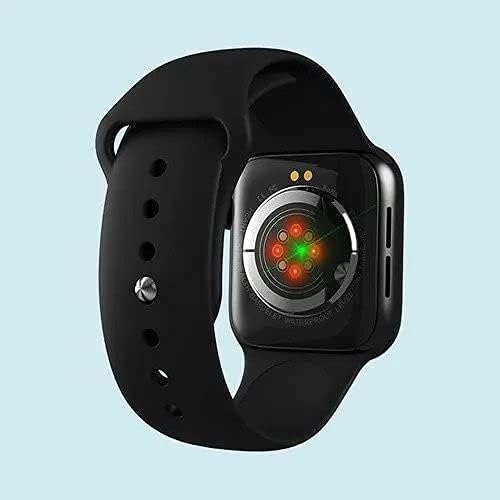
Image: This image showcases the health data detection capabilities of the HW16 Smart Watch, including a MET graph and a custom component display for personalized shortcuts.
ספּעסאַפאַקיישאַנז
| שטריך | דעטאַל |
|---|---|
| מאָדעל נאָמען | HW16 |
| ווייַז גרייס | 1.72 אינטשעס |
| האַכלאָטע | 320*385 |
| קאַנעקטיוויטי טעכנאָלאָגיע | בלועטאָאָטה 5.2 |
| גוף מאַטעריאַל | Zinc alloy + IML injection process |
| רימען מאַטעריאַל | פליסיק סיליקאָנע |
| באַטאַרייע קאַפּאַציטעט | 250 מאַה |
| קאַמפּאַטאַבאַל אַס | יאָס 10.0 און העכער / אַנדרויד 5.0 און העכער |
| דימענשאַנז | 43.4 מם * 38 מם * 11 מם |
| ווריסטבאַנד גרייס | 260 מם * 20 מם * 2.5 מם |
| ספּעציעלע פֿעיִקייטן | Camera (remote control), Heart Rate Sensor, Fitness Tracker, Password Lock Screen, Music System |
| וואָטערפּרוף | Yes (implied by "Waterproof" keyword, but no specific IP rating provided) |
| שטיצט שפּראַכן | Chinese, English, Arabic, French, German, Spanish, Portuguese, Russian, Thai, Polish, Italian, Japanese, Traditional, Czech, Turkish, Greek, Latin, Romanian, Vietnamese, Danish... |

Image: The HW16 Smart Watch, black casing with a blue strap, displayed on a watch stand. The screen shows time, steps, and various app icons.

Image: The HW16 Smart Watch worn on a wrist, displaying its main menu with various circular app icons for different functions.
וישאַלט
- רייניקונג: ווישט אָפּ די זייגער און רימען רעגולער מיט אַ ווייכן, טרוקענעם שטאָף.amp שטאָף. ויסמיידן ניצן האַרב קעמיקאַלז אָדער אַברייסיוו מאַטעריאַלס.
- וואַסער קעגנשטעל: While the watch is waterproof (as per keywords), avoid prolonged submersion or exposure to hot water/steam. Dry the watch thoroughly if it gets wet.
- טשאַרדזשינג: Use only the provided charging cable. Do not force the charger into the port.
- סטאָרידזש: האַלט די זייגער אין אַ קיל, טרוקן אָרט ווען נישט אין באַנוץ.
טראָובלעשאָאָטינג
זייגער טוט זיך נישט אן
Ensure the watch is fully charged. Connect it to the charger for at least 30 minutes before attempting to power on again.
Cannot Pair with Phone
- זיכער מאַכן אַז בלועטוט איז ענייבאַלד אויף דיין טעלעפאָן און די זייגער.
- זייט זיכער אז די זייגער איז אינעם בלוטוט ראַנגע פון אייער טעלעפאָן.
- ריסטאַרט ביידע דיין טעלעפאָן און די זייגער.
- Clear previous Bluetooth connections on your phone and try pairing again.
- זיכער מאַכן אַז די באַגלייטנדיק אַפּ איז אינסטאַלירט און אַרבעט.
אומגענויע געזונטהייט דאַטן
Ensure the watch is worn snugly on your wrist, not too loose or too tight. Clean the sensor on the back of the watch regularly. Note that health data is for reference only and not intended for medical diagnosis.
סקרין ונרעסאָניווע
Try restarting the watch. If the issue persists, ensure the screen is clean and dry. If the problem continues, contact customer support.
וואָראַנטי און שטיצן
For warranty information and customer support, please refer to the documentation included with your purchase or visit the official SmartWatch brand webזייטל. האַלט דיין קויפן באַווייַז פֿאַר וואָראַנטי קליימז.


