1. הקדמה
This manual provides essential information for setting up, operating, maintaining, and troubleshooting your HP EliteOne 800 G5 24-inch All-in-One Touchscreen PC. Please read this guide thoroughly before using your device to ensure proper functionality and longevity.

Figure 1: HP EliteOne 800 G5 All-in-One PC with included keyboard and mouse.
2. פּעקל אינהאַלט
באַשטעטיקן אַז אַלע זאכן זענען פאַראַן אין פּעקל:
- HP EliteOne 800 G5 All-in-One PC
- HP USB Keyboard
- HP USB Mouse
- מאַכט שנור
- דאָקומענטאַציע (דיזער מאַנואַל, זיכערהייט אינפֿאָרמאַציע)
3. פּראָדוקט איבערview
3.1 פראָנט View

פיגורע 2: פראָנט view of the HP EliteOne 800 G5, showing the 24-inch touchscreen display and integrated speakers.
- 23.8-inch FHD IPS WLED-backlit Touchscreen Display: Main interactive display area.
- 2 MP FHD Pop-up Webקאַם: Located at the top center, retracts when not in use.
- Integrated Dual Array Digital Microphone: For clear audio input during calls or recordings.
- Bang & Olufsen Speakers: Located below the screen for high-quality audio output.
3.2 זייַט View (רעכט)

פיגורע 3: רעכט זייַט view illustrating the optical disk drive and audio ports.
- Optical Disk Drive: For reading and writing CDs/DVDs.
- Disc drive eject button: To open the optical disk drive tray.
- Standard lock slot (10 mm): For security cables.
- Universal Audio Jack with CTIA headset support: For connecting headsets with a microphone.
- כעדפאָון קאַנעקטער: פֿאַר קאַנעקטינג כעדפאָונז.
3.3 דערציען View און פּאָרטן
פיגור 4: דעטאַלירטע הינטערשטע view showing all available ports and connections.
- USB 3.1 Gen 2 Type-A port: High-speed USB connection.
- USB 3.1 Gen 2 Type-A port (charge support up to 5V/1.5A): High-speed USB with charging capability.
- Audio line-out connector: For connecting external speakers or audio systems.
- USB 3.1 Gen 1 Type-A ports (2): Standard USB connections.
- RJ-45 (network) jack: פֿאַר אַ דראָטיקער עטהערנעט פֿאַרבינדונג.
- מאַכט קאַנעקטער: פֿאַר פֿאַרבינדן דעם עלעקטרישן שנור.
- USB 3.1 Gen 2 Type-A ports (2) wake capable: High-speed USB ports that can wake the system.
- Dual-Mode DisplayPort™ 1.2 (DP++): פֿאַר פֿאַרבינדן עקסטערנע דיספּלייז.
- HDMI 2.0a connector: פֿאַר פֿאַרבינדן עקסטערנע דיספּלייז.
- SD card reader 4.0 (NOT INCLUDED on all models): פֿאַר לייענען SD זכּרון קאַרטלעך.
- USB 3.1 Type-C™ Gen 2 port (charge support up to 5V/3A): Reversible USB-C port with charging capability.
- Dual-state power button: To power on/off or put the system to sleep.
- זיכער View Button (optional): Activates HP Sure View integrated privacy screen.

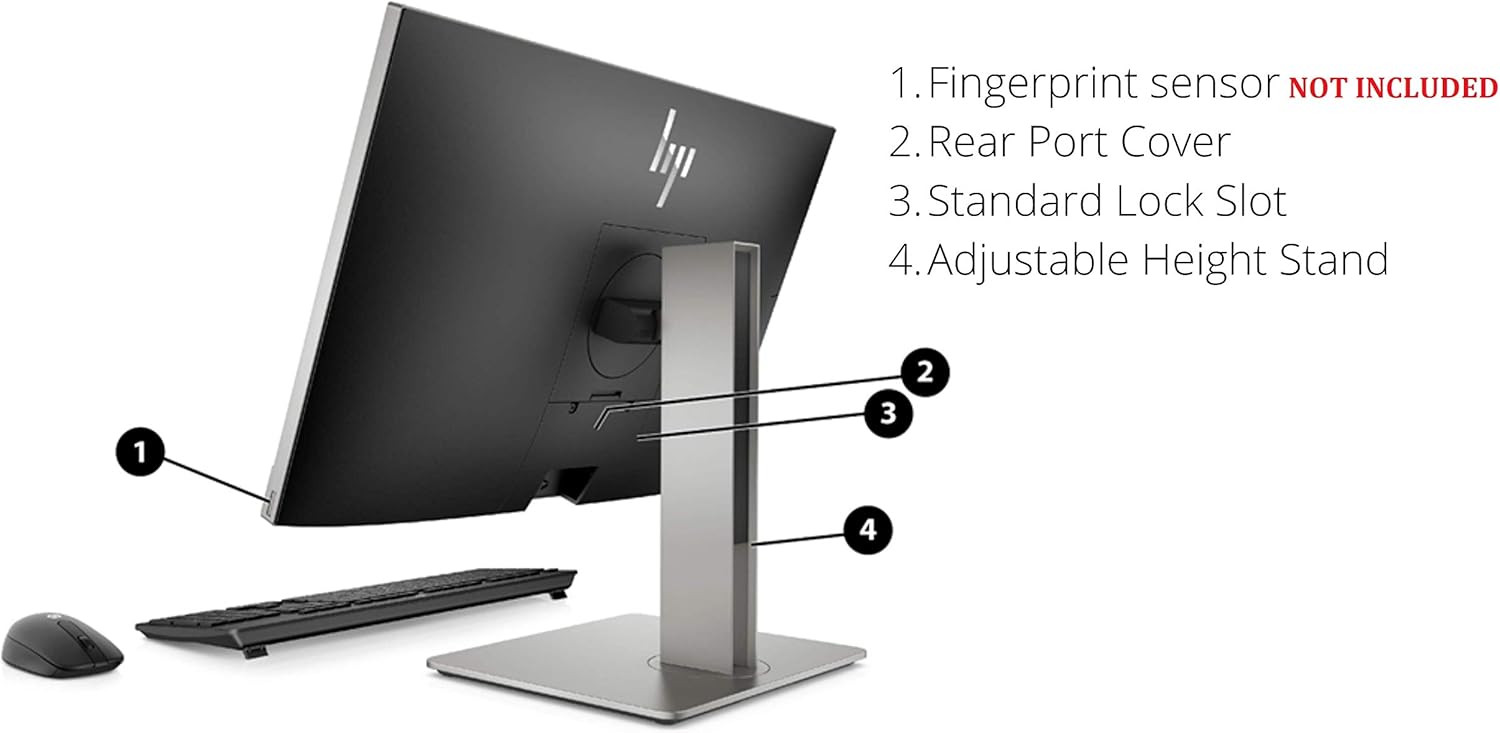
פיגורע 5: דערציען view highlighting the adjustable height stand and other features.
- Fingerprint sensor (NOT INCLUDED on all models): For biometric authentication.
- Rear Port Cover: Conceals and protects rear ports.
- Standard Lock Slot: For security cables.
- אַדזשאַסטאַבאַל הייך שטיין: Allows for ergonomic positioning of the display.
4. סעטאַפּ
Follow these steps to set up your HP EliteOne 800 G5 PC:
- Unpack the PC: קערפאַלי באַזייַטיקן אַלע קאַמפּאָונאַנץ פון די פּאַקקאַגינג.
- Position the PC: Place the All-in-One PC on a stable, flat surface. Ensure adequate ventilation around the device.
- פֿאַרבינדן קלאַוויאַטור און מויז: Plug the USB keyboard and mouse into any available USB Type-A ports on the rear of the PC.
- פאַרבינדן מאַכט: Connect the power cord to the power connector on the rear of the PC, then plug the other end into a grounded electrical outlet.
- פאַרבינדן צו נעץ (אפציאָנעל): For a wired internet connection, connect an Ethernet cable from your router or modem to the RJ-45 (network) jack on the rear of the PC.
- מאַכט אויף: Press the dual-state power button, located on the rear of the PC, to turn on the system.
- ערשט סעטאַפּ: Follow the on-screen instructions to complete the Windows 10 Pro setup, including language, region, network connection (if not wired), and user account creation.
5. אַפּערייטינג ינסטרוקטיאָנס
5.1 מאַכט מאַנאַגעמענט
- מאַכט אויף: Press the power button on the rear of the PC.
- שלאָפן מאָדע: Briefly press the power button or select 'Sleep' from the Windows Start menu.
- שאַט אַראָפּ: אויסקלייבן 'אויסשליסן' פון די ווינדאָוס סטאַרט מעניו.
- ריסטאַרט: אויסקלייבן 'ריסטאַרט' פֿון די ווינדאָוס סטאַרט מעניו.
5.2 ניצן די טאָוטשסקרעען
The 24-inch display supports multi-touch gestures. Common gestures include:
- צאַפּן: עקוויוואַלענט צו אַ מויז קליק.
- טאָפּל צאַפּן: עקוויוואַלענט צו אַ טאָפּל-קליק.
- דרוק און האלט: עקוויוואַלענט צו אַ רעכט-קליק.
- קניפּ/אויסשטרעקן: פארגרעסער אין אָדער אויס.
- לאַקכענען: Scroll through content or navigate.
5.3 Webקאַמעראַ און אַודיאָ
- Webקאַם: The 2 MP FHD pop-up webcam automatically extends when an application requires it (e.g., video calls). Gently push it down to retract when not in use for privacy.
- מיקראָפאָן: The integrated dual array digital microphone is active when the webcam is in use or when voice input is required.
- רעדנער: The Bang & Olufsen speakers provide audio output. Volume can be adjusted via Windows settings or keyboard shortcuts.
5.4 Optical Disk Drive
To use the DVD+/-RW SM DL 9.5mm slim tray:
- Press the eject button on the right side of the PC.
- Place a CD or DVD onto the tray, ensuring it is seated correctly.
- Gently push the tray back into the PC until it clicks shut.
6. וישאַלט
6.1 רייניקונג
- פאַרשטעלן: ניצן אַ ווייך, לינט-פֿרייַ שטאָף אַ ביסל דampגעוואשן מיט וואַסער אָדער אַ פאַרשטעלן-רייניקונג לייזונג. שפּריצט נישט פליסיקייט גלייך אויף דעם פאַרשטעלן.
- שאַסי: ווישט מיט אַ ווייכן, טרוקענעם שטאָף. פֿאַרמייַדט אַברייסיוו רייניגער.
- ווענטילאַטיאָן: זיכער מאַכן אַז די ווענטילאַציע עפענונגען זענען ריין פון שטויב און שטערונגען צו פאַרמייַדן איבערהיצונג.
6.2 ווייכווארג דערהייַנטיקונגען
רעגולער אַפּדייט אייער אָפּערייטינג סיסטעם און דרייווערס צו ענשור אָפּטימאַל פאָרשטעלונג און זיכערהייט:
- ווינדאָוס דערהייַנטיקונגען: גיין צו סעטטינגס > דערהייַנטיקונג און זיכערהייט > ווינדאָוז דערהייַנטיקונג צו קאָנטראָלירן און אינסטאַלירן דערהייַנטיקונגען.
- HP סופּפּאָרט אַססיסטאַנט: Use the pre-installed HP Support Assistant software to check for driver and firmware updates specific to your HP EliteOne PC.
7. טראָובלעשאָאָטינג
| פּראָבלעם | מעגלעך סיבה | לייזונג |
|---|---|---|
| פּיסי גייט נישט אָן | קיין מאַכט, פרייַ פֿאַרבינדונג | Check power cord connection to PC and outlet. Ensure outlet is functional. |
| ניט קיין אַרויסווייַזן אויף פאַרשטעלן | PC in sleep mode, display settings issue | Press any key or move mouse to wake. If connected to external display, check display input source. |
| טאָוטשסקרעען ניט ריספּאַנדאַבאַל | Software glitch, dirty screen | Restart the PC. Clean the screen with a soft, lint-free cloth. |
| קיין אַודיאָ פֿון רעדנערס | Volume muted, incorrect audio output device | Check volume levels in Windows. Ensure 'Speakers (Bang & Olufsen)' is selected as the default playback device. |
| Webקאַמעראַ אַרבעט נישט | Webcam retracted, privacy settings, driver issue | פאַרזיכערן webקאַם איז אויסגעברייטערט. קאָנטראָלירט די פּריוואַטקייט סעטטינגס פון די ווינדאָוס פֿאַר אַקסעס צו דער קאַמעראַ. דערהייַנטיקט webcam drivers via HP Support Assistant. |
8. ספּעסאַפאַקיישאַנז
Key technical specifications for the HP EliteOne 800 G5 24-inch All-in-One PC:
| שטריך | דעטאַל |
|---|---|
| מאָדעל נומער | 2D9S5UW#ABA |
| ווייַז | 23.8" diagonal FHD IPS widescreen WLED-backlit touch screen (1920 x 1080) |
| פּראַסעסער | Intel Core i5-9500 (9M Cache, up to 4.40 GHz) |
| גראַפיקס | אינטעל UHD גראַפיקס 630 (אינטעגרירט) |
| באַראַן | 8 GB DDR4-2666 SDRAM |
| סטאָרידזש | 256 GB M.2 2280 PCIe NVMe TLC SSD |
| אָפּערייטינג סיסטעם | Windows 10 פּראָ |
| Webקאַם | 2 MP FHD pop-up webקאַם |
| אַודיאָ | Bang & Olufsen Speakers, Integrated Dual Array Digital Microphone |
| אָפּטיש דרייוו | DVD+/-RW SM DL 9.5mm slim tray |
| פּאָרטן (הינטן) | USB 3.1 Gen 2 Type-A (x3), USB 3.1 Gen 1 Type-A (x2), USB 3.1 Type-C Gen 2 (x1), DisplayPort 1.2 (x1), HDMI 2.0a (x1), RJ-45 (x1), Audio line-out (x1), Power connector (x1) |
| Ports (Side) | Universal Audio Jack (x1), Headphone connector (x1) |
| דימענשאַנז (LxWxH) | 18.4 X 7.1 X 21.2 אינטשעס |
| וואָג | 19.24 פונט |
9. וואָראַנטי און שטיצן
Your HP EliteOne 800 G5 PC comes with a standard manufacturer's warranty. Please refer to the warranty card included in your package for specific terms and conditions, including coverage duration and service options.
For technical support, driver downloads, and additional product information, please visit the official HP support webפּלאַץ:
When contacting support, have your product model number (2D9S5UW#ABA) and serial number ready.