1. הקדמה און איבערview
The Avision AV 320D2+ is a high-performance A3 document scanner designed for efficient and reliable document digitization. Featuring a 600 dpi optical resolution and USB connectivity, it is capable of handling a wide range of document sizes up to A3, making it suitable for various professional environments. This manual provides essential information for setting up, operating, maintaining, and troubleshooting your scanner.
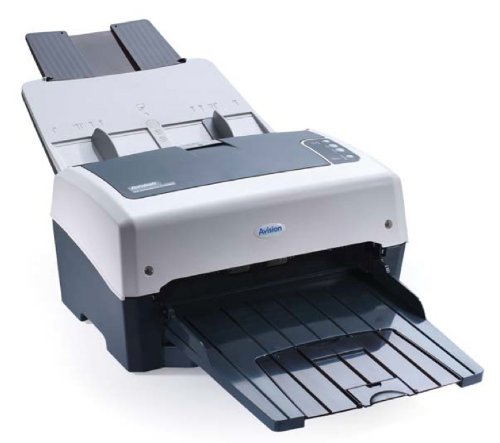
Figure 1: Avision AV 320D2+ A3 Document Scanner. This image displays the Avision AV 320D2+ A3 Document Scanner from a front-right perspective. The scanner is light grey and dark grey, featuring an automatic document feeder (ADF) at the top with paper guides visible, and an extended output tray at the front. The Avision logo is visible on the front panel.
2. סעטאַפּ
2.1 אַנפּאַקינג
- פֿאָרזיכטיק אַרויסנעמען דעם סקאַנער און אַלע אַקסעסאָריעס פֿון דער פּאַקאַדזשינג.
- באַשטעטיקן אַז אַלע קאָמפּאָנענטן וואָס זענען ליסטעד אין דער פּאַקינג ליסטע זענען פאַראַן.
- Remove all protective tapes and packing materials from the scanner, including any inside the document feeder and output tray.
2.2 פֿאַרבינדן דעם סקאַנער
- שטעלט דעם סקאַנער אויף אַ סטאַבילער, פלאַכער ייבערפלאַך לעבן אייער קאָמפּיוטער.
- Connect the power adapter to the scanner's power input and then plug it into an electrical outlet.
- Connect one end of the supplied USB cable to the USB port on the scanner and the other end to an available USB port on your computer.
- Power on the scanner using the power button, typically located on the side or rear panel.
2.3 ווייכווארג ינסטאַלירונג
Before using the scanner, you must install the necessary drivers and scanning software. Refer to the included software CD or visit the official Avision website for the latest drivers and utilities.
- Insert the software installation CD into your computer's CD/DVD drive, or download the software package from the Avision support webפּלאַץ.
- Follow the on-screen instructions to install the scanner drivers and bundled scanning applications. It is recommended to install all provided software for full functionality.
- ריסטאַרט אייער קאָמפּיוטער אויב געבעטן נאָך די ינסטאַלירונג איז געענדיקט.
3. אפערירן דעם סקענער
3.1 לאָדן דאָקומענטן
- אָטאַמאַטיק דאָקומענט פידער (ADF): Open the ADF input tray. Adjust the paper guides to fit the width of your documents. Place the documents face-down with the top edge first into the ADF. The standard sheet capacity is 50 sheets.
- Ensure documents are free of staples, paper clips, or any foreign objects that could damage the scanner.
- For mixed-size documents, ensure they are aligned properly to prevent skewing.
3.2 גרונטלעכע סקענירן פּראָצעדורן
- Load your documents into the ADF as described above.
- Open your preferred scanning application (e.g., Avision Button Manager, TWAIN/ISIS compatible software).
- Select the Avision AV 320D2+ as your scanner.
- Choose your desired scanning settings (e.g., color mode, resolution, destination folder).
- Initiate the scan from the software interface. The scanner will automatically feed and scan the documents.
- Review די סקאַנירטע בילדער און ראַטעווען זיי צו אייער געוואונטשענעם אָרט.
3.3 סקאַן סעטטינגס
The scanner supports various settings to optimize scan quality and file גרייס:
- רעזאלוציע: Adjustable up to 600 dpi. Higher resolution provides better image quality but results in larger file סיזעס.
- קאָליר מאָדע: Options typically include Color, Grayscale, and Black & White (Binary).
- דופּלעקס סקאַנינג: The AV 320D2+ supports duplex (two-sided) scanning, allowing you to capture both sides of a document in a single pass.
- רעזולטאַט פֿאָרמאַט: Common output formats include PDF, JPEG, TIFF, and searchable PDF.
4. וישאַלט
4.1 רייניקן דעם סקאַנער
רעגולערע רייניקונג גאַראַנטירט אָפּטימאַלע פאָרשטעלונג און פאַרלענגערט די לעבן פון דיין סקאַנער.
- עקסטעריע: ווישן די יקסטיריער סערפאַסיז מיט אַ ווייך, דamp, א לינט-פֿרײַער שטאָף. ניצט נישט קיין שרײַבנדיקע רייניגער אָדער סאָלווענטן.
- גלאז סורפאַסעס: ניצן אַ ווייך שטאָף דampened with a non-abrasive glass cleaner to clean the scanner's glass surfaces (if applicable).
- ראָללערס: Periodically clean the feed rollers with a lint-free cloth lightly dampבאפרייצט מיט איזאפראפיל אלקאהאל צו באזייטיגן פאפיר שטויב און רעשטלעך.
- שטענדיק אויסלעשן און ארויסנעמען דעם סקאַנער פון דער נעץ איידער איר רייניגט.
5. טראָובלעשאָאָטינג
This section addresses common issues you might encounter with your Avision AV 320D2+ scanner.
| פּראָבלעם | מעגלעך סיבה | לייזונג |
|---|---|---|
| סקאַנער נישט דעטעקטירט דורך קאָמפּיוטער | לויזער USB קאַבל, מאַכט אויס, דרייווער פּראָבלעם | קאָנטראָלירט די USB פֿאַרבינדונג, זיכערט זיך אַז דער סקאַנער איז אָנגעצונדן, און ריאינסטאַלירט די דרייווערס. |
| פּאַפּיר דזשאַמז | נישט-אויסגעשטעלטע דאקומענטן, פארנוצטע ראָולערס, פרעמדע אביעקטן | Remove jammed paper carefully, align documents properly, clean rollers. |
| שלעכטע סקען קוואַליטעט (שטריכן, פארשוואָמענע בילדער) | Dirty glass, incorrect settings, worn rollers | Clean scanner glass and rollers, adjust resolution/color settings. |
| Documents not feeding | Incorrectly loaded, worn feed rollers | Ensure documents are loaded correctly, clean or replace feed rollers if worn. |
6. ספּעסאַפאַקיישאַנז
Key technical specifications for the Avision AV 320D2+ scanner:
- פּראָדוקט טיפּ: דאָקומענט סקאַננער
- פאפיר פארמאט: A3
- רעזאלוציע: 600 dpi (אָפּטיש)
- קאַנעקטיוויטי: וסב
- קאָליר: שוואַרץ / ווייַס
- וואָג: בעערעך 26.46 פונט (12 קג)
- מאַכט קאַנסאַמשאַן: 38.4 וואטס
- Standard Sheet Capacity (ADF): 50 שיץ
- אָפּטיש סענסאָר טעכנאָלאָגיע: קמאָס
- מאָדעל נאָמען: AV320D2+
- נומער מאָדעל נומער: FT-0807H
7. וואָראַנטי און שטיצן
7.1 פאַבריקאַנט'ס גאַראַנטיע
The Avision AV 320D2+ scanner typically comes with a 2-יאָר פאַבריקאַנט ס וואָראַנטי. This warranty covers defects in materials and workmanship under normal use. Please retain your proof of purchase for warranty claims. For specific terms and conditions, refer to the warranty card included with your product or visit the official Avision webפּלאַץ.
7.2 טעכניש שטיצן
For technical assistance, driver updates, or further troubleshooting not covered in this manual, please contact Avision customer support. Support contact information can usually be found on the Avision official webוועבזייטל אדער אין דער דאקומענטאציע וואס איז צוגעשטעלט געווארן מיט אייער סקענער.
Note: Availability of spare parts and software updates may vary. Please check the manufacturer's official channels for the most current information.


