1. הקדמה
This manual provides detailed instructions for the safe and efficient operation of your Samsung Glyde U940 mobile phone. Please read this manual thoroughly before using your device to ensure proper functionality and to understand all features.
2. פּעקל אינהאַלט
באַשטעטיקט אַז אייער פּראָדוקט פּאַקעט כּולל די פאלגענדע זאכן:
- Samsung Glyde U940 Mobile Phone
- נאָרמאַל באַטערי
- Travel Adapter/Charger
- באַניצער מאַנואַל (דעם דאָקומענט)
- באַמערקונג: ספּעציפֿישע אַקסעסאָריעס קענען זיין אַנדערש לויט געגנט אָדער הענדלער.
3. דיווייס איבערview
The Samsung Glyde U940 features a large touch-sensitive display and a slide-out QWERTY keyboard for versatile input.
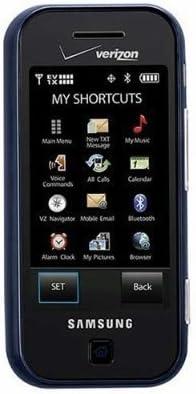
פיגורע 3.1: פראָנט view of the Samsung Glyde U940, showing the 2.8-inch display and navigation buttons. The screen displays "MY SHORTCUTS" with icons for various functions like Main Menu, New TXT Message, My Music, Voice Commands, All Calls, Calendar, Mobile Email, Bluetooth, Alarm Clock, My Pictures, and Browser. "SET" and "Back" buttons are visible below the screen.
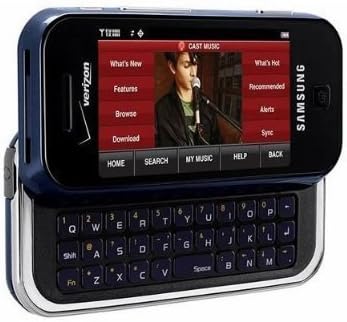
פיגורע 3.2: Samsung Glyde U940 with its full QWERTY keyboard extended. The phone is oriented horizontally, displaying a media interface on the screen with options like "What's New", "Features", "Browse", "Download", "What's Hot", "Recommended", "Alerts", and "Sync". Navigation buttons for "HOME", "SEARCH", "MY MUSIC", "HELP", and "BACK" are visible below the screen.
שליסל פֿעיִקייטן:
- Large 2.8" Display
- Slide-out QWERTY Keyboard
- ריר סקרין צובינד
- Full HTML Browser
- 2.0 MP Camera and Camcorder
4. סעטאַפּ
4.1. ינסטאָלינג די באַטאַרייע
- געפינט די באַטעריע דעקל אויף דער צוריק פון דעם טעלעפאָן.
- Gently remove the battery cover by sliding or lifting it.
- Align the battery's gold contacts with the contacts in the battery compartment.
- אַרײַנשטעלן די באַטאַרייע פֿעסט אין פּלאַץ.
- לייג צוריק דעם באַטעריע דעקל, און זאָרג אַז עס קליקט זיכער.
4.2. טשאַרדזשינג די באַטערי
- Connect the travel adapter to the charging port on your phone.
- Plug the other end of the travel adapter into a standard electrical outlet.
- לאָזט דעם טעלעפאָן זיך גאָר אויפלאָדן איידער איר ניצט עס צום ערשטן מאָל. דער באַטעריע אינדיקאַטאָר אויפן עקראַן וועט ווײַזן דעם אויפלאָדן סטאַטוס.
- דיסקאַנעקט די טשאַרדזשער אַמאָל די באַטאַרייע איז גאָר באפוילן.
4.3. פּאָווערינג אויף / אויסגעלאשן
- צו מאַכט אויף: Press and hold the Power/End key until the screen lights up.
- צו מאַכט אַוועק: Press and hold the Power/End key until the power-off options appear, then select "Power off".
5. אַפּערייטינג ינסטרוקטיאָנס
5.1. ניצן די ריר סקרין
The Samsung Glyde U940 features a resistive touch screen. Use your fingertip or a stylus (if provided) to interact with the display.
- צאַפּן: Lightly touch the screen once to select an item or open an application.
- שלעפּן: Touch and hold an item, then move your finger across the screen to reposition it.
- מעגילע: Slide your finger up or down on the screen to navigate through lists or web בלעטער.
5.2. Using the QWERTY Keyboard
Slide the screen horizontally to reveal the full QWERTY keyboard. This keyboard is ideal for typing messages, emails, and web ווענדט זיך.
- Press individual keys to input characters.
- ניצן די שיפט key for uppercase letters and symbols.
- די Fn key provides access to additional functions or symbols.
5.3. מאכן און ריסיווינג קאַללס
- מאַכן אַ רוף: From the home screen, tap the Phone icon or dial the number using the keypad and press the Call key.
- באַקומען אַ רוף: When a call comes in, tap the "Answer" button on the screen.
- ענדיקן אַ רוף: Tap the "End" button on the screen or press the Power/End key.
5.4. מעסעדזשינג (SMS/MMS)
To send a text or multimedia message:
- From the main menu, select "Messages" or "New TXT Message".
- אַרייַן די טעלעפאָן נומער פון דעם באַקומער אָדער סעלעקטירן פון דיין קאָנטאַקטן.
- Type your message using either the touch screen or the QWERTY keyboard.
- To add multimedia (pictures, videos, audio), select the attachment option.
- Tap "Send".
5.5. Camera and Camcorder Functions
The Glyde U940 is equipped with a 2.0 MP camera.
- גענומען פאָטאָס: Open the Camera application, frame your shot, and press the dedicated camera button or tap the capture icon on the screen.
- רעקאָרדינג ווידיאס: Switch to camcorder mode within the Camera application, press the record button to start, and press again to stop.
- Access your captured media in the "My Pictures" or "Gallery" application.
5.6 . Web בלעטערער
Utilize the full HTML browser to access the internet.
- From the main menu, select "Browser".
- אַרייַן די געוואלט web אַדרעס אין די URL באַר.
- Use the touch screen to navigate pages, zoom in/out, and click links.
6. וישאַלט
6.1. באַטערי קער
- ויסמיידן יקספּאָוזינג די באַטאַרייע צו עקסטרעם טעמפּעראַטורעס.
- נישט דורכשטעכן אדער באשעדיגן די באטעריע.
- For optimal battery life, avoid frequent partial discharges and charges.
- אויב דער טעלעפאָן וועט נישט געניצט ווערן פֿאַר אַ לענגערע צייט, לייגט עס אַוועק מיט אַ טיילווייז אויפגעלאָדעטער באַטאַרייע.
6.2. רייניקונג די מיטל
- ניצט אַ ווייכן, לינט-פֿרייע שטאָף צו רייניקן דעם עקראַן און די אויסערלעכע זייט פֿון טעלעפֿאָן.
- Do not use harsh chemicals, cleaning sprays, or abrasive materials.
- Ensure no moisture enters openings such as the charging port or headphone jack.
6.3. ווייכווארג דערהייַנטיקונגען
Periodically check for available software updates to improve performance and add new features. Consult your service provider or the Samsung webזייטל פֿאַר דערהייַנטיקונג פּראָצעדורן.
7. טראָובלעשאָאָטינג
This section addresses common issues you might encounter with your Samsung Glyde U940.
| פּראָבלעם | מעגלעך לייזונג |
|---|---|
| דער טעלעפאָן גייט נישט אָן. | Ensure the battery is correctly installed and fully charged. Connect the charger and attempt to power on. |
| Touch screen is unresponsive or erratic. |
|
| באַטאַרייע דריינז געשווינד. |
|
| קען נישט מאַכן אָדער באַקומען רופן. | Check network signal strength. Ensure "Airplane Mode" is not enabled. Contact your service provider if network issues persist. |
| QWERTY keyboard input is incorrect. | Ensure the keyboard is fully extended and locked into position. Restart the device if keys are unresponsive. |
8. ספּעסאַפאַקיישאַנז
| שטריך | דעטאַל |
|---|---|
| מאָדעל נומער | U940 |
| ווייַז | 2.8 Inches, Touch Screen |
| אַרייַנשרייַב אופֿן | Touch Screen, Slide-out QWERTY Keyboard |
| אַפּאַראַט | 2.0 MP (Camera and Camcorder) |
| בלעטערער | Full HTML Browser |
| פּונקט וואָג | 11.2 אונסעס |
| דימענשאַנז | 8.1 רענטגענ 5.4 X 2.2 אינטשעס (פּאַקע דימענשאַנז) |
| קאַנעקטיוויטי | Wireless, USB 2.0 |
| פאַבריקאַנט | סאַמסונג |
9. וואָראַנטי און שטיצן
פֿאַר וואָראַנטי אינפֿאָרמאַציע, ביטע זען די וואָראַנטי קאַרטל וואָס איז אַרייַנגערעכנט מיט דיין פּראָדוקט אָדער באַזוכן די באַאַמטער סאַמסונג וועבזייטל website. For technical support, contact your service provider or Samsung customer service.
סאַמסונג קונה סערוויס: www.samsung.com/us/support/


