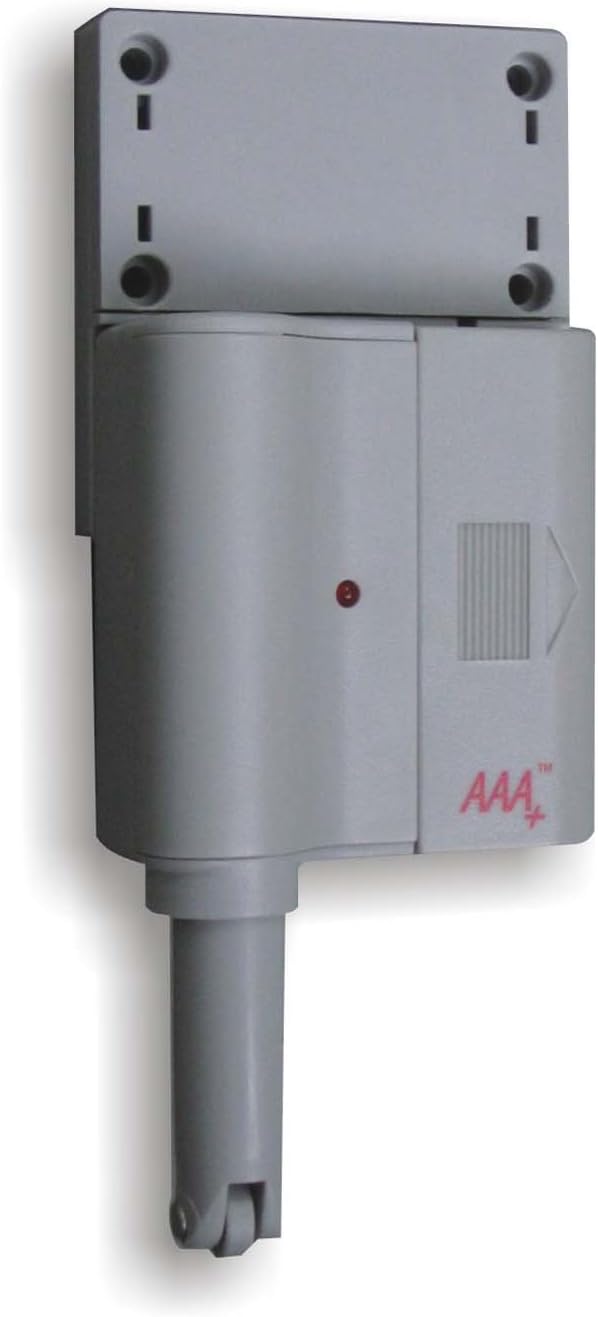
This manual provides comprehensive instructions for the installation, operation, maintenance, and troubleshooting of your Skylink GS-101 Garage Door Sensor. The GS-101 is designed to notify you when a garage door is open, enhancing home security. Please read this manual thoroughly before installation and use to ensure proper function and safety.
פּראָדוקט איבערview
פיגורע 1: Skylink GS-101 Garage Door Sensor Main Unit. The image displays the main unit of the Skylink GS-101 Garage Door Sensor. It is a grey, rectangular device with a cylindrical extension at the bottom, featuring a small wheel. A red indicator light is visible on the front, along with the 'AAA+' logo. The top section shows mounting holes for installation.
The Skylink GS-101 is a sensor designed to detect the position of a garage door. When installed correctly, it communicates with a compatible receiver (sold separately) to alert users to the door's status. It features a plunger mechanism that is activated when the garage door is closed, and deactivated when open.
סעטאַפּ און ינסטאַלירונג
1. אויספּאַקן און קאָמפּאָנענטן
Carefully remove all components from the packaging. Ensure you have the GS-101 sensor unit and any included mounting hardware.
2. באַטאַרייע ייַנמאָנטירונג
The GS-101 requires batteries for operation. Locate the battery compartment, typically on the back or side of the unit. Insert the required Lithium batteries, ensuring correct polarity (+/-). The unit includes batteries.
3. מאַונטינג אָרט
Select a suitable location on your garage door frame or wall. The sensor should be mounted where the plunger mechanism can be depressed when the garage door is closed and released when the door is open. Avoid direct exposure to extreme heat or sunlight, especially on metal garage doors, as this can affect performance and longevity.
4. מאָנטירן דעם סענסאָר
Position the sensor unit on the garage door frame or wall.
Mark the locations for the mounting screws using the holes on the sensor's mounting bracket.
בויער פּילאָט האָלעס אויב נייטיק.
Secure the sensor unit using the provided screws. Ensure the plunger mechanism is aligned to be activated by the garage door.
Test the plunger mechanism by manually opening and closing the garage door to confirm it moves freely and activates the sensor as intended.
5. צוזאַמענשטעלן מיט אַ ריסיווער
The GS-101 operates with a compatible Skylink receiver (e.g., GM-318R or similar models). Refer to your receiver's instruction manual for specific pairing procedures. Generally, this involves putting the receiver into a learning mode and then activating the GS-101 sensor (e.g., by opening/closing the garage door) to transmit its signal.
אַפּערייטינג ינסטראַקשאַנז
Once installed and paired, the Skylink GS-101 operates automatically. When the garage door is opened, the sensor's plunger is released, triggering a signal transmission to the paired receiver. When the garage door is closed, the plunger is depressed, indicating a closed state.
Open Door Detection: When the garage door opens, the sensor sends a signal to the receiver, which will then provide an alert (e.g., audible alarm, visual indicator).
Closed Door Indication: When the garage door closes, the sensor's plunger is pressed, and it typically sends a signal indicating the door is secure.
ינדיקאַטאָר ליכט: The red indicator light on the sensor may flash to confirm signal transmission or indicate low battery status.
וישאַלט
באַטערי פאַרבייַט
The GS-101 uses Lithium batteries. When the battery level is low, the sensor may exhibit a specific indicator (e.g., a rapid flash of the red LED or a notification from the receiver). To replace batteries:
קערפאַלי עפענען די באַטאַרייע אָפּטייל.
אַראָפּנעמען די אַלט באַטעריז.
Insert new Lithium batteries, ensuring correct polarity.
פאַרמאַכן די באַטאַרייע אָפּטייל סיקיורלי.
Test the sensor to ensure it is functioning correctly after battery replacement.
רייניקונג
Wipe the sensor unit with a soft, dry cloth. Do not use abrasive cleaners or solvents, as these can damage the plastic housing or electronic components.
טראָובלעשאָאָטינג
פּראָבלעם
מעגלעך סיבה
לייזונג
Sensor not responding or receiver not receiving signals.
נידעריק אָדער טויט באַטעריז.
Sensor not properly paired with receiver.
Sensor out of range from receiver.
Obstruction between sensor and receiver.
Plunger mechanism stuck or misaligned.
Replace batteries with new Lithium batteries.
Re-pair the sensor with the receiver according to the receiver's manual.
Relocate the sensor or receiver closer to each other.
Ensure no large metal objects or thick walls are blocking the signal path.
Check plunger for free movement; adjust mounting position if necessary.
False alarms or inconsistent readings.
Sensor mounting is loose.
Plunger not fully depressed when door is closed.
Environmental factors (e.g., extreme heat).
פאַרשטייַפן מאַונטינג סקרוז.
Adjust sensor position to ensure plunger is fully depressed when the door is closed.
Ensure sensor is not installed in direct sunlight or areas of extreme temperature fluctuation.
ספּעסאַפאַקיישאַנז
מאָדעל: גס-101
סאָרט: SKYLINK
מאַכט מקור: Batteries (Lithium, included)
מאַטעריאַל: פּלאַסטיק
מאַונטינג טיפּ: טיר בארג
נומער וואָג: 8 אונסעס
פּעקל דימענשאַנז: 6.8 X 5 X 1.4 אינטשעס
ספּעציפיש ניצט: Home Security (Garage Door Monitoring)
קאַמפּאַטאַבילאַטי: Works with compatible Skylink receivers (sold separately).
וואָראַנטי אינפֿאָרמאַציע
The Skylink GS-101 Garage Door Sensor comes with a 1 יאָר וואָראַנטי. This warranty covers repair or replacement of defective units. For warranty claims or further details, please contact Skylink customer support.
קונה שטיצן
For technical assistance, troubleshooting not covered in this manual, or general inquiries, please visit the official SKYLINK webזייטל אדער קאנטאקטירן זייער קאסטומער סערוויס דעפארטמענט. קאנטאקט אינפארמאציע קען געווענליך געפונען ווערן אויף דער פראדוקט פאקאדזש אדער דעם פאבריקאנט'ס webפּלאַץ.