


YESOUL R1 PLUST Rowing Machine
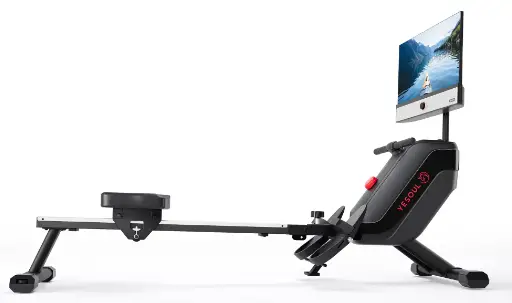
Scan the QR code to get the installation guide video to watch Product model:YS-R1PLUS Item NO.:R1PLUST

Product Specifications
| Screen size | 21.5 inch (1920*1080 pixels) |
| Supported software version | iOS 12.0 or above, Android 5.1 or above (inclusive) |
| Resistance system | Magnetron resistance system |
| Power supply input | 24V 2A |
| Wireless connection method | WiFi2.4Ghz/BT/BLE |
| Bluetooth | Rowing Machine: V4.2, Speaker: V5.3 |
| Applicable Height | 140 ~ 195cm |
| Rated maximum load | 120kg |
| Net weight | 27kg |
| Gross weight | 31kg |
| Overall dimensions | (Length) 1746mm × (Width) 550mm × (Height) 1035mm |
Routine Maintenance
- Keep the rowing machine on an arid, ventilated and flat floor. Cover the machine to keep the body clean if inactive for a long period.
- Wipe off sweat on the machine body with dry cleaning cloth after exercise. Do not use a wet cleaning cloth to avoid rusting.
- Regularly check the screws of various body parts for loosening or falling out, and tighten or replace them without delay if anything.
- Regularly check the resistance knob for looseness or dislodgement and reasonable resistance valles so that the resistance value can be calibrated in time.
- Regularly check if the seat cushion is loose. Tighten it promptly if necessary. Use a cotton cloth to wipe the seat cushion and keep it dry.
- Regularly inspect the power cord for any cracks or damage, and replace it promptly if needed.
- Regularly check the screw of the pedal, if loosens, tighten it promptly.
Monitor Specifications
| Panel type | VA |
| Curvature | Flat screen |
| Aspect ratio | 16:9 |
| Size | 21.5 inches |
| Backlight type | LED |
| Display size (H*V) | 476mm*268mm |
| Resolution | 1920*1080 |
| Refresh rate | Max:60HZ |
| Port version | 1*USB+Type-c+TTL+Audio out+DC-IN |
| Indicator mode (power on, standby) | Bisluoeff,liagnhdt ibnldinickasteevsepryow0.e5rsoenc,olnigdhstitnusrntasnodffbwy hmeondpeo. wer |
| Storage temperature | -20ºC~60ºC |
| Operating temperature | 0ºC~40ºC |
| Operating humidity | 10~90%RH |
| Storage humidity | 10~90%RH |
| Control method | Five-way joystick buttons |
Important Safety Instructions
Please read them carefully. Improper use may result in body injury or death
- This product is for household use (Class H) and not medical fitness equipment.
- This product must not be used for medical rehabilitation.
- Keep children and pets away from this product. This product is for those over 16 years old only.
- Do not place the equipment in damp or wet environments.
- Do not use this product while barefoot or wearing inappropriate footwear.
- Please wear cloth suitable for exercise when using our product, do not wear baggy cloth to prevent stuck.
- Use this product on a flat and clean ground.
- Lift the slidings in the back and front can move the product freely or be placed in a suitable position.
- To avoid hurting your back and guarantee your safety, please use the proper way or ask for help when lifting or moving this product.
- Do not use this product when malfunction happens.
- Please check whether the rowing machine is loose or damaged before each use.
- Never stretch any object or body part into the openings of the rowing machine.
- When using the screen holder, ensure the device on the holder is centered to prevent it from falling off.
- Never refit this machine or use non-original accessories without permission. The casing must be opened by professionals, to avoid damage.
- For the product’s emergency disengagement, passage, and simplicity of use, the product should have at least 0.6 meters of free space all around.
- Incorrect or excessive training may cause injury.
- Use this product according to the instructions . Warm up fully before exercise.
- Keep the body hydrated as needed during exercise.
- Without the preliminary determination of baseline fitness level and medical certificate signed by a doctor, never be engaged in high-intensity sports. Before attempting any intense sprints, be careful with the body state and posture, and adjust a comfortable speed.
- If you experience any discomfort while using the equipment, stop immediately and consult a doctor.
- Those pregnant or with high blood pressure, heart disease, lumbar spondylosis or disabled disabled must not use this product without the permission of doctors.
- The weight of the user must not exceed the maximum load.
- Carry out preventive maintenance regularly.
- Please use the equipped power adapter. Replacement of the power adapter without consultation may cause serious consequences.
Installation Guide – List of Parts
STEP1: Check of parts

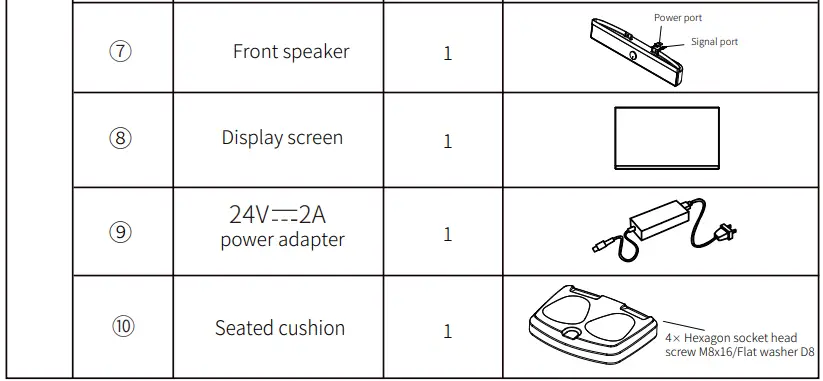


Installation Guide – List of Parts

*Some fixing screws are pre-locked on the corresponding parts at the factory. Please remove them before installing the corresponding parts during assembly. Spare parts are subject to actual conditions.
Installation Guide
STEP 2: Install the front foot tube
- Use L-shaped hexagonal wrench 5# (A) to remove the 2 hexagon socket head screws (M8×45) and flat washers D8 pre-locked on the front foot tube ②;
- Align the holes of the front foot tube ② with the holes at the bottom of the main frame ①, screw the removed hexagonal round head screws (M8×45) and flat washers D8 in sequence by hand, and then tighten them with L-shaped cross head hexagonal wrench 6# (B).

STEP 3: Install the rail assembly
- Use L-shaped hexagon wrenches 5# (A) and L-shaped cross head hexagon wrench 6# (B) to remove the hexagon socket flat round head screws (female screws) (10×90) and the hexagon socket flat round head screws (sub screws) (M8×12) pre-locked on the main frame ①;
- Install the slide rail ⑤ into the main frame ① in the direction of the arrow, and finally use L-shaped hexagon wrenches 5# (A) and L-shaped cross head hexagon wrench 6# (B) to tighten the hexagon socketflat round head screws (female screws) (10×90) and the hexagon socket flat round head screws (sub screws) (M8×12)

STEP 4: Install the seat cushion sliding assembly
- Use L-shaped hexagon wrench 5# (A) to remove the 4 hexagon socket head screws (M8×16) and flat washers D8 pre-locked on the seated cushion ⑩;
- Align the seat cushion ⑩ and the seat cushion sliding assembly ⑪ with the holes, and use L-shaped hexagon wrench 5# (A) to tighten the 2 hexagon socket head screws (M8×16) and flat washers D8.

- Use L-shaped hexagon wrench 5# (A) to remove the hexagon socket head screw (M8×16), flat washer D8, hexagon socket round screw (M8×16) and buffer block pre-locked on the slide rails ⑤;

- Install the seat cushion sliding assembly ⑪ into the slide rail ⑤ in the direction of the arrow, and then use the L-shaped hexagonal wrench 5# (A) to tighten the hexagon socket ruond screw (M8×16) and the buffer block.

STEP 5: Install the rear foot tube
- Align the rear foot tube ③ with the hole of the slide rail ⑤, and tighten the three hexagon socket head screws (M8×16) and flat washers D8 with an L-shaped hexagon wrench #5 (A)

STEP 6: Install the ball head elastic pin
Screw the ball-head elastic pin (M12×1.75) ⑰ into the round hole on the slide rail, following the direction of the arrow. If it gets stuck, shake it up and down to help the pin’s head enter the hole. Then, tighten it with a multi-function wrench (C).

STEP 7: Install the plum blossom knob
- First, hold the arrow with your left hand and screw the plum blossom knob (M12×1.75) ⑯ into the hole with your right hand. (Note: When you fold and use it again, you must repeat this installation step)

STEP 8: Install the pedals
- Use two multi-function wrenches (C) to remove the M12 cap nut pre-locked on the pedal rotating bar pole⑫. Only one side needs to be unscrewed.(Although both sides can be unscrewed if necessary)

- Insert the foot pedal rotating pole⑫ into the hole of the right pedal assembly, and then into the hole of the main frame ①. Insert the left pedal into the hole of the pedal rotating pole⑫.Finally, use two multi-function wrenches (C) to tighten the 2 M12 cap nuts.

STEP 9: Install the pedal limit rod
- Use an L-shaped cross head hexagon wrench 6# (B) to remove the cross pan head screw (M6×10) pre-locked on the main frame ①, insert the pedal limit lever⑬ into themain frame ① in the direction of the arrow, push the retaining ring into place, and then use an L-shaped cross head hexagon wrench (B) to tighten the cross pan head screw (M6×10).

STEP 10: Install the monitor stand
- First remove the upper decorative cover, use L-shaped hexagon wrench 5# (A) to remove the 4 hexagon socket head screws (M8×16) pre-locked on the main frame ①, Connect the wires and insert them into the sheet metal holes. Align the monitor holder⑥ with the holes on the main frame ① and use the L-shaped hexagon wrench 5# (A) to tighten the 4 hexagon socket head screws (M8×16). Finally, slightly open the notch of the upper decorative cover and snap it into place.

STEP 11: Installing screen and speakers
- Take out the monitor fixing piece ⑭(The side with the sticker is facing up), and use the L-type cross head hexagonwrench 6# (B) to lock the 4 cross pan head screw with washer(M4×10) ⑳ until they are tight (* Please placethe screen flat on the desk and avoid contact with hard objects to prevent damage to the screen)

- Align the speaker holder ⑮ with the slot of the front speaker ⑦, use a L-type cross head hexagon wrench 6# (B) to tighten the remaining 4 cross pan head screws with washers (M4×10) ⑳ until they are secure.

- Align the speaker assembly with the slot of the screen assembly and insert thebuckle connection;

- Loosen the hexagon socket head screw(M8×16) pre-installed on the monitor holder ⑥ with an L-type cross head hexagon wrench 6#(B), and then remove the upper connecting seat;
- Insert the screen and speaker components assembled in the previous step into the monitor holder ⑥.Next, place the upper connecting seat and secure it with the hexagon socket head screws (M8×16). Use a L-type cross head hexagon wrench 6# (B) to tighten the screws until they are secure

STEP 12: Installation of connection cable
- Insert the monitor’s power port (a)、signal port (b)、audio’s signal port (c) and power port (d) into the jacks at the bottom of the back of the monitor. Be sure to plug them in tightly (Pay attention to the colors and specifications of the sockets. Match plugs of the same color to the corresponding sockets. Ensure the power cord is properly inserted and securely tightened.);
- Select the appropriate full-featured C to C data cable (which supports DisplayPort (DP) signal output)and insert it intothe Type C jack under the monitor(Secure the excess wire with Velcro);
- Connect the power adapter ⑨ to the power jack at the rear under the frame ①. Make sure the indicator light is on continuously.(Use only the standard power adapter; using an unauthorized adapter may lead to serious consequences)

Note: Do not plug or unplug the monitor’s interface without cutting off the power supply. Please unplug the power when not in use
Safety tips:
Please check whether the screws in various parts of the machine are tightened before use.

Statement:
This manual contains the functional introduction and operating instructions as much as possible when printed. owever, due to ongoing improvements in hardware, software, and design, there may be differences between this manual and the product you purchased. In the event of any discrepancies in appearance, interface, or color, please refer to the actual product.
How to store
- Turn the plum blossom knob (M12×1.75)⑯ counterclockwise, pull up the ball-head elastic pin (M12×1.75)⑰ with your left hand and hold it, lift the slide rail assembly⑤ with your right hand, then release the ball-head elastic pin (M12×1.75)⑰, lift the slide rail assembly⑤ with your right hand, and hear a “tap” sound, indicating that it is in place; Note: When folding and storing, please hold the seat well to prevent it from slipping suddenly; please place it out of reach of children, and the tail of the fuselage can stand against the wall.

- After folding, turn the removed plum blossom knob(M12×1.75) ⑯ clockwise to prevent it from being lost. Note: When unfolding the rowing machine, please hold the handle of the slide rail firmly to prevent it from slipping suddenly and causing injury.

Precautions
Check screen
After installation, check whether the screen falls when turned upside down. If this happens, use the L-shaped hexagonal wrench 8# (D)and the multi-function wrench (C) to tighten it as shown in the figure. (If it is loose during use or the joint needs to be adjusted, follow these steps to make the necessary adjustments.)

How to adjust the screen
Screen Adjustment:
- Press and hold the “OK” key for 6 seconds to power off the phone, and for 1-2 seconds to power it on.
- When the monitor is powered on and a signal is detected, press the “OK” key press the “OK” key within 1 second to open the main menu.
- Use the “Directional” key to navigate the main menu and select the desired item for adjustment. After selecting the item, press the “OK” key to adjust it. Press the “OK” key again to save changes and return to the previous menu.
- Press and hold the left shortcut key for 10 seconds to display the version number.
- After confirming the adjustment, move the joystick to the left to exit the current option.
Operations to close the data window during screen projection:
- Connect the screen projector and start projecting.
- Press the “OK” key to access the main menu.
- Use the remote to scroll down and select settings, then scroll right to enter the settings menu.
- Scroll down using the remote to select “BikeOsd,” and then scroll right to enter the “BikeOsd” setting interface.
- Choose “OFF” and press the “Confirm” key to select this option.
- Scroll left three times continuously using the remote to exit the main menu

How to adjust the speakers
Audio function operation


Note:
When your phone is connected to the speaker via Bluetooth and connected to wired screen projection, please switch the speaker to AUX mode.
APP usage instructions
APP installation registration
- You can scan the QR code below to download the APP and register an APP account

- Scan the QR code and download the APP
- Enter the APP login page
- Register an APP account
Connect devices
When using for the first time, click the 「+」 in the upper right corner of the「Home」 or enter the course and connect the device according to the interface prompts. - Enter the APP homepage
- Search for devices
- Select the device to connect
- Select the corresponding Wi-Fi connection device

- For subsequent use, just pull the device and open the sports mode or course of the APP to automatically connect.
- The device does not support simultaneous connection of multiple mobile phones. Please confirm that no other users are connected to the device at this time before use.
- After shutting down, Bluetooth will be automatically disconnected.
- In addition to connecting with YESOUL FITNESS APP, Bluetooth can also be connected with Kinomap and software.
Device connected to Wi-Fi
- After connecting the device, follow the page prompts and select the corresponding Wi-Fi to complete the network connection to the device.
- The device only supports connecting to 2.4G networks.

Purchase APP membership
- For first time use, after completing the network configuration, the page will automatically jump to the membership purchase page, and follow the page prompts to complete the membership purchase.
- If you need to purchase a membership again in the future, please open the APP and find 「Homepage」 – 「Settings」 – 「Member Rights」, and follow the interface prompts to complete the membership purchase

- Follow the interface prompts to complete the membership purchase.
- The above illustrations are for reference only. Since the software is constantly updated and iterated, please refer to actual use.
About wired projection screen
Installation instructions for wired screen projection:
- Take out the data cable, Note: There are two data cables for Android and iOS included in the package. Please use the appropriate one according to your phone model;
- Connect the Type-C interface of the data cable to the screen;
- Connect the Type-C or Lightning interface of the data cable to the phone. Note: Android phones need to support DisplayPort (DP) signal output in order to use the wired screen projection function normally

Screen casting permissions (Membership):
- After registering on the app and becoming a member, connecting the equipment will activate screen casting permissions, allowing you to use the screen casting function.
- Once the equipment has activated screen casting function permissions, it can share the function with up to 4 other non-member accounts (a total of 5 shared accounts).
Note:
- Among the 5 most recently paired accounts with the equipment, at least 1 must be a member; otherwise, the screen casting function will be disabled.
- Member accounts can only activate the equipment they are initially paired with. For any changes, please contact customer service

About display interface
- Display interface description:

- Display interface description:

Correct usage
- Preparation stage Relax the shoulders, straighten the arms and back, and bend the knees until the calves are perpendicular to the slide rail

- Start stage Push the pedals with the soles, with the arms straightened.

- Operation stage Pull the handle to under the ribs and fully straighten the legs.

- Repetition stage When the body leans completely forward and the arms are relaxed and straightened, slowly bend the knees again and repeat the previous steps.
Wrong usage
Error 1: Rowing with the forces of arms only
Correct action analysis: 60% of the rowing force comes from the legs, utilizing the explosive power of the feet. Of the remaining 40%, 20% comes from the lower body, and only 20% comes from the arms.
Error 2: Simultaneous forces of both legs and arms and hip
Correct action analysis: In fact, rowing consists of three steps: both legs – hip – both arms. Apply forces first via the legs, and then slowly move the hip back. When the shoulders exceed the pelvis, pull the handle via both hands, keep the body a little backward, and straighten your legs slightly, until both ends are close to the chest. Return to the starting point and repeat the aforesaid steps.
Error 3: Curved back
This is particularly likely to occur to those who are prone to hunchback while standing. Correct action analysis: Keep the back straight, engage the abdominal muscles, and relax the shoulders to maintain a neutral spine position.
Error 4: Excessive stretching
For extreme stretching, the operator may keep the hip too close to heels, thus making the calves not perpendicular to the ground and the head and shoulders exceeding toes. Correct action analysis: Keep the calves perpendicular to the ground, straighten and relax both arms, and make the body a little forward.
Common faults and troubleshooting
Common Fault Solution
- Obstruction of slide rail Clean dust or foreign matters on the surface of the slide rail or the pulley in contact with the slide rail under the seat.
- Abnormal noise during use Check whether the screws of the body are loose.
How to adjust rowing machine
Body level adjustment
- There are two adjustable foot pads at the bottom of the rear foot tube. Rotate the foot pads to adjust the height the device is balanced and does not wobble.

Position adjustment
- Lift the rear foot tube and use the moving pulley of the front foot tube to move the product freely or place it in a suitable position.

Documents / Resources
 |
YESOUL R1 PLUST Rowing Machine [pdf] Instruction Manual YS-R1PLUS, R1PLUST, R1 PLUST Rowing Machine, R1 PLUST, Rowing Machine, Machine |