1. Giới thiệu
This manual provides essential information for the safe and efficient operation of your TCL 65P8K 65-inch 4K QLED Smart Google TV. Please read it thoroughly before using the product and retain it for future reference.
2. Thông tin an toàn
Always follow basic safety precautions to reduce the risk of fire, electric shock, and injury. Do not expose the TV to rain or moisture. Do not open the TV casing; refer all servicing to qualified personnel. Ensure proper ventilation and avoid placing the TV near heat sources. Use only the power cord and accessories supplied by the manufacturer.
3. Có gì trong hộp
Xác minh rằng tất cả các thành phần đều có trong bao bì:
- TCL 65P8K 65-inch 4K QLED Smart Google TV
- Điều khiển từ xa (có pin)
- Dây nguồn
- Kệ để tivi (nếu có)
- Vít cho chân đế TV
- Thẻ bảo hành
- Hướng dẫn sử dụng (tài liệu này)
4. Thiết lập
4.1 Cài đặt vật lý
Before installation, ensure the TV is placed on a stable, level surface or securely mounted to a wall using a compatible VESA mount (sold separately). When installing the stand, align the stand with the mounting holes on the TV and secure with the provided screws.
Đằng trước view of the TCL 65P8K 65-inch 4K QLED Smart Google TV. This image shows the slim bezel design and the overall aesthetic of the television.
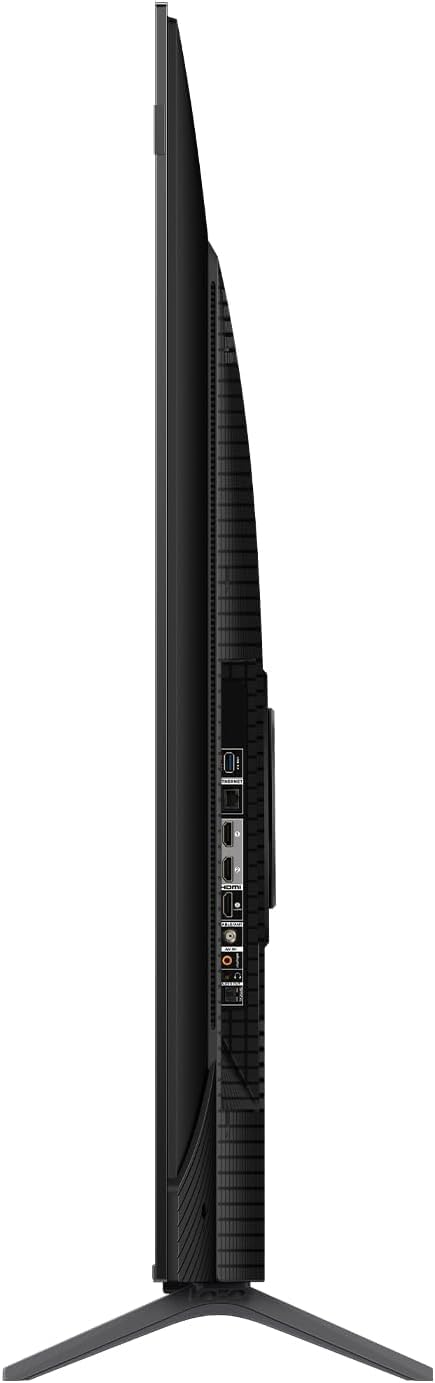
Bên view of the TCL 65P8K TV, highlighting the various input ports available on the side panel for easy access.
Ở phía sau view of the TCL 65P8K TV, showing the textured back panel and additional connection points.
4.2 Bật nguồn ban đầu
- Kết nối dây nguồn vào TV rồi cắm vào ổ điện.
- Nhấn nút nguồn trên TV hoặc trên điều khiển từ xa để bật TV.
- Hãy làm theo hướng dẫn trên màn hình để hoàn tất thiết lập ban đầu, bao gồm chọn ngôn ngữ, kết nối mạng và thiết lập tài khoản Google TV.
4.3 Kết nối mạng
Your TV supports both Wi-Fi (5G compatible) and wired LAN connections.
- Wi-Fi: Điều hướng đến Cài đặt> Mạng & InternetChọn mạng Wi-Fi của bạn và nhập mật khẩu.
- LAN: Connect an Ethernet cable from your router to the LAN port on the TV. The TV will automatically detect the connection.
4.4 Kết nối đầu vào
Connect external devices such as gaming consoles, Blu-ray players, or sound systems to the TV using the appropriate ports.
- HDMI (2.1): 4 ports available, supporting eARC/ARC for enhanced audio return.
- USB (3.0): 1 port for media playback (video, photos, music).
- Đầu vào RF: 1 digital input for antenna/cable connection.
- Đầu ra âm thanh quang học: 1 port for digital audio to external sound systems.
5. Vận hành TV
5.1 Điều khiển từ xa Quaview
The remote control allows you to navigate the Google TV interface, adjust settings, and access various features. Familiarize yourself with the buttons for power, volume, channel, input selection, and smart assistant activation.
5.2 Giao diện Google TV
Your TCL 65P8K operates on the Google TV platform, providing a personalized experience with access to a wide range of apps and content. Use the remote to browse recommendations, search for titles, and manage your installed applications from the Google Play Store.
5.3 Cài đặt Hình ảnh
Tối ưu hóa của bạn viewing experience by adjusting picture settings. Access these through the TV's settings menu.
- Chế độ hình ảnh: Standard, Sports, Movie, Game.
- Nhiệt độ màu: Normal, Cool, Warm.
- Hỗ trợ HDR: Dolby Vision, HDR10+, HDR10, HLG for enhanced contrast and color.
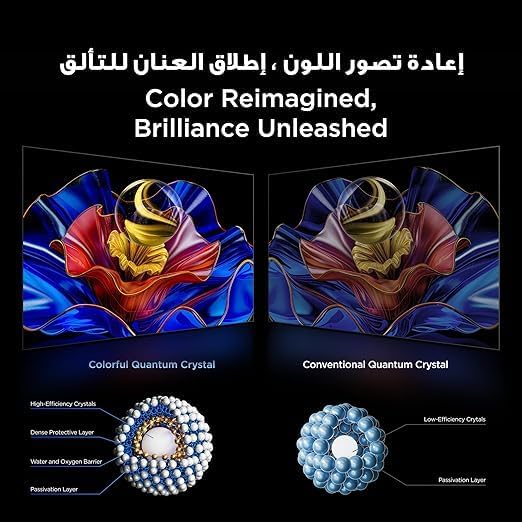
- Công nghệ QLED: Delivers 93% DCI-P3 color gamut for vibrant and accurate colors.

This image demonstrates the 'Color Reimagined, Brilliance Unleashed' feature, showcasing the superior color reproduction of Colorful Quantum Crystals compared to conventional ones.
5.4 Cài đặt âm thanh
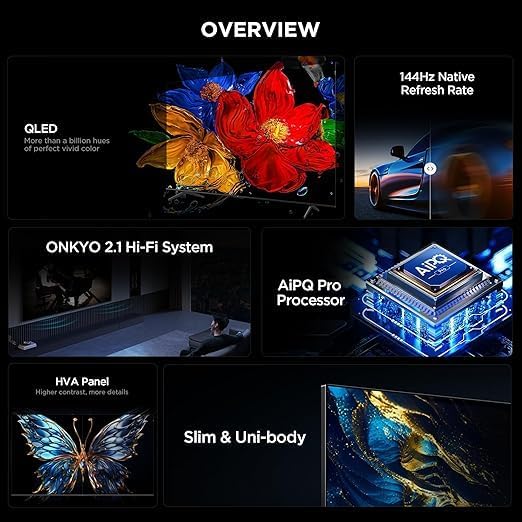
The TV features an Onkyo 2.1 Hi-Fi Sound System for rich audio. Adjust sound settings to your preference.
- Công suất đầu ra âm thanh: 10W x 2 speakers + 15W Onkyo subwoofer.
- Chế độ âm thanh: Dynamic, Standard, Sports, Movies, Music.
- Công nghệ âm thanh: Dolby Atmos, Dolby Digital, DTS Studio Sound, DTS Virtual: X for immersive surround sound.

An image depicting the Onkyo 2.1 Sound System, illustrating its role in defining the standard for home theater audio with immersive sound waves.
5.5 Tính năng chơi game
The TCL 65P8K is optimized for gaming with advanced features:
- Native 144Hz Refresh Rate: Provides ultra-smooth motion for fast-paced gaming and action scenes.
- Game Master Features: Includes FreeSync, VRR (Variable Refresh Rate), and ALLM (Auto Low Latency Mode) for a responsive gaming experience.

A visual comparison demonstrating the 'Smoother and clearer' motion provided by a 144Hz refresh rate versus a 60Hz refresh rate, ideal for gaming and fast-action content.
5.6 Tính năng thông minh
Leverage the smart capabilities of your Google TV:
- Trợ lý Google: Use voice commands for search, control smart home devices, and more.
- Chromecast tích hợp: Truyền nội dung từ điện thoại thông minh hoặc máy tính bảng trực tiếp lên TV.
- Phát sóng 2: Phát trực tuyến nội dung từ các thiết bị của Apple.
- Ứng dụng được cài đặt sẵn: Netflix, YouTube, Prime Video, Disney+, and access to the Google Play Store for more applications.
- AiPQ Pro Processor: AI-powered image processing enhances picture quality, ensuring realistic images with optimal contrast and color accuracy.

Một hình ảnh minh họaasing the AiPQ Pro Processor, highlighting its advanced capabilities in perceiving, thinking, and producing optimized visual content.

This image illustrates the smart way to control your TCL devices, showing the TV as a central hub for managing various smart home appliances.
6. Bảo trì
6.1 Vệ sinh
Để làm sạch màn hình, hãy lau nhẹ nhàng bằng vải mềm, không xơ. Đối với TV casing, use a soft, dry cloth. Avoid using abrasive cleaners, waxes, or solvents as they can damage the finish. Always unplug the TV before cleaning.
6.2 Cập nhật phần mềm
Your TV may receive software updates periodically to improve performance and add new features. Ensure your TV is connected to the internet to receive these updates. You can check for updates manually in Cài đặt > Hệ thống > Giới thiệu > Cập nhật hệ thống.
KHAI THÁC. Xử lý sự cố
Nếu bạn gặp sự cố với TV, hãy tham khảo các giải pháp phổ biến sau:
- Không có điện: Check if the power cord is securely connected and the power outlet is working.
- Không có hình ảnh/âm thanh: Kiểm tra xem nguồn đầu vào đã được chọn đúng chưa. Kiểm tra kết nối cáp với các thiết bị bên ngoài.
- Chất lượng hình ảnh kém: Adjust picture settings. Ensure the input source is providing a high-quality signal.
- Điều khiển từ xa không hoạt động: Thay pin. Đảm bảo không có vật cản nào giữa điều khiển từ xa và cảm biến hồng ngoại của TV.
- Sự cố kết nối mạng: Restart your router and TV. Re-enter Wi-Fi password or check LAN cable.
Đối với các vấn đề phức tạp hơn, vui lòng liên hệ bộ phận hỗ trợ của TCL. webtrang web hoặc liên hệ với dịch vụ khách hàng.
8. Thông số kỹ thuật
| Tính năng | Đặc điểm kỹ thuật |
|---|---|
| Thương hiệu | TCL |
| Số hiệu mẫu | 65P8K |
| Kích thước màn hình | 65 inch |
| Công nghệ hiển thị | Màn hình QLED |
| Nghị quyết | 3840 x 2160 (4K Ultra HD) |
| Tốc độ làm mới | 144Hz gốc |
| Tỷ lệ khung hình | 16:9 |
| Viewgóc ing | 178 độ |
| Bộ nhớ trong | 32GB |
| Hệ điều hành | GoogleTV |
| Bộ xử lý | Bộ xử lý AiPQ Pro |
| Hỗ trợ HDR | Dolby Vision, HDR10+, HDR10, HLG |
| Hệ thống âm thanh | Onkyo 2.1 Hi-Fi Sound System (10W x 2 + 15W Subwoofer) |
| Công nghệ âm thanh | Dolby Atmos, Dolby Digital, DTS Studio Sound, DTS Virtual: X |
| Cổng HDMI | 4 (HDMI 2.1, eARC/ARC compatible) |
| Cổng USB | 1 (USB 3.0) |
| Kết nối | Wi-Fi (5G), Bluetooth v5.4, LAN, RF Input, Optical Audio Output |
| Tiêu thụ điện năng | Công suất tiêu thụ: 180 Watts (khi hoạt động), <0.5 Watts (ở chế độ chờ) |
| Kích thước (Rộng x Cao x Sâu) không có chân đế | 1444 x 831 x 69.5mm |
| Kích thước (Rộng x Cao x Sâu) có chân đế | 1444 x 893 x 295mm |
| Trọng lượng tịnh | 17.4kg |
| Nước xuất xứ | Ai Cập |
9. Bảo hành và Hỗ trợ
Your TCL 65P8K TV comes with a full 2-year warranty from the date of purchase. Please retain your proof of purchase and the warranty card included in the box. For technical support, service requests, or warranty claims, please contact TCL customer service or visit the official TCL support webTrang web này không cho phép tự ý sửa chữa sản phẩm, vì điều này có thể làm mất hiệu lực bảo hành.