1. Giới thiệu
The Samsung Galaxy Z Flip7 FE is a compact and powerful foldable smartphone designed for convenience and performance. Its unique clamshell design allows for a large screen experience when unfolded and a pocket-friendly form factor when closed. This manual provides essential information for setting up, operating, maintaining, and troubleshooting your device.

The Samsung Galaxy Z Flip7 FE offers a compact design with a large display when unfolded.
Key features include a 50MP camera for high-quality photos, a long-lasting battery, and AI-powered insights accessible directly from the cover screen. The FlexMode allows for hands-free usage, enhancing video calls and photography.
2. Thiết lập
2.1 Có gì trong hộp
- Samsung Galaxy Z Flip7 FE Device
- Hướng dẫn bắt đầu nhanh
- Khay đẩy SIM
- Cáp USB (Type-C sang Type-C)
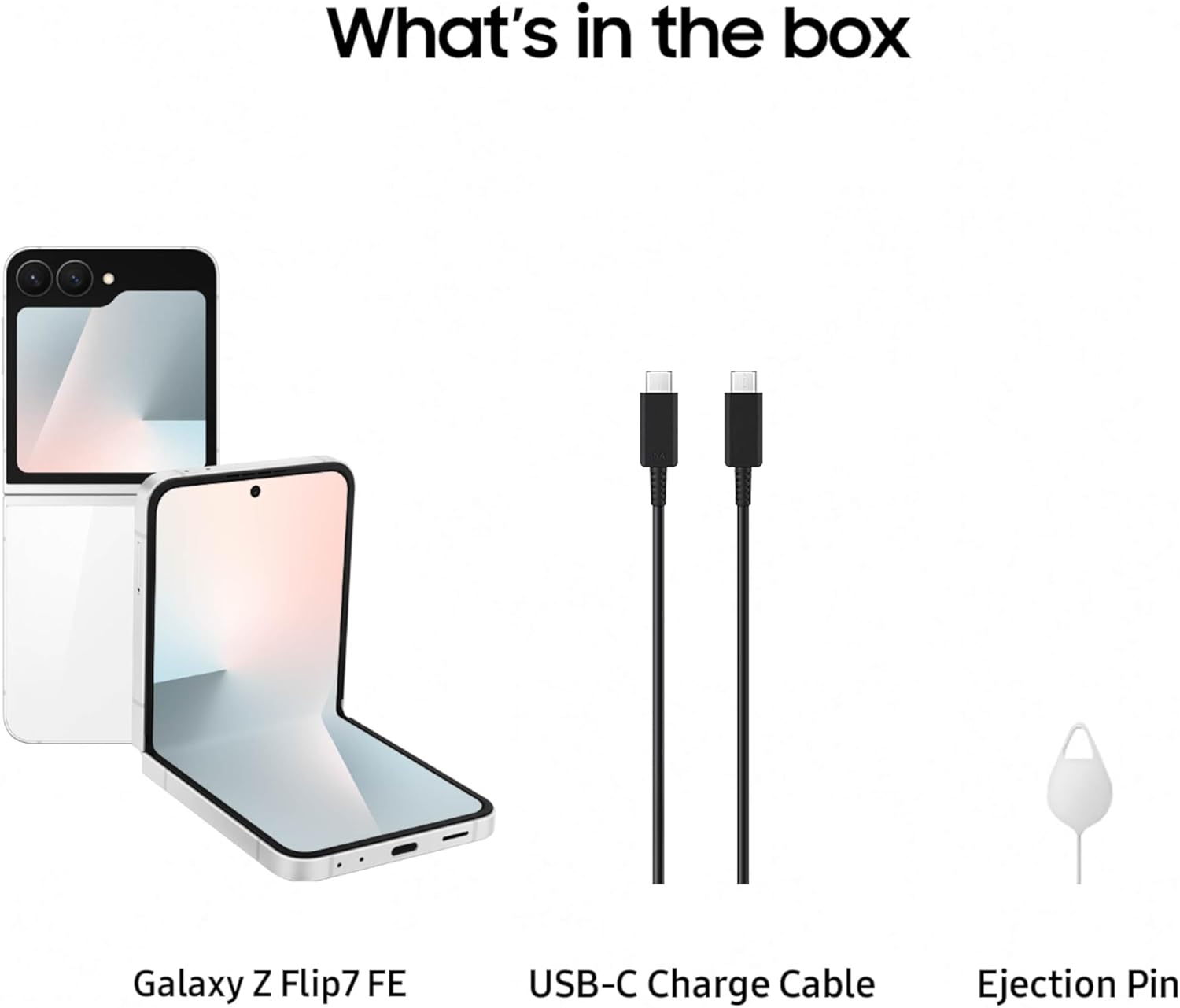
The package includes the Galaxy Z Flip7 FE, a USB-C charge cable, and a SIM tray ejector.
2.2 Thiết lập thiết bị ban đầu
- Lắp thẻ SIM: Use the provided SIM tray ejector to open the SIM card slot and insert your Nano-SIM card.
- Bật nguồn: Nhấn và giữ phím Nguồn/Phím bên cho đến khi logo Samsung xuất hiện.
- Làm theo lời nhắc trên màn hình: The device will guide you through initial setup, including language selection, Wi-Fi connection, Google account setup, and data transfer options.
Video này cung cấp một sản phẩm trênview of the Samsung Galaxy Z Flip7 FE, demonstrating its design and key features.
3. Vận hành thiết bị
3.1 FlexMode
FlexMode allows you to partially fold your Galaxy Z Flip7 FE, enabling hands-free operation. This is ideal for video calls, watching content, or taking photos and selfies without needing a tripod. Simply fold the device to your desired angle, and the interface will adapt.

Utilize FlexMode for hands-free photography and video calls.
3.2 FlexWindow (Màn hình che)
The FlexWindow on the exterior of your device provides quick access to essential information and controls without needing to open the phone. You can check notifications, control music playback, view the time, weather, and access AI-powered insights like the 'Now Brief' for daily updates.

The FlexWindow provides quick access to information and AI-powered insights.
3.3 Tính năng của máy ảnh
The Galaxy Z Flip7 FE features an impressive 50MP main camera, allowing you to capture clear and detailed photos. It also includes an ultra-wide lens for broader shots and supports 2x optical-quality zoom. The camera system is optimized for hands-free selfies and high-quality image capture in various conditions.

The 50MP camera system captures stunning details and hands-free selfies.
3.4 Pin và sạc
Equipped with a 4000 mAh battery, the Galaxy Z Flip7 FE is designed to provide long-lasting power for your daily tasks. The device supports fast charging and wireless charging, allowing for quick power-ups throughout your day.

The device features a 4000 mAh battery for extended usage.
3.5 Tính năng và kết nối AI
The Galaxy Z Flip7 FE integrates AI features such as Gemini Live and personalized wellness tips when paired with compatible Galaxy wearables like the Galaxy Ring. It also supports RCS Messaging for enhanced communication and Samsung Wallet for convenient digital payments and transfers.

Integrate with Galaxy wearables for comprehensive health tracking.

Utilize Samsung Wallet for secure and convenient digital transactions.

Enjoy enhanced messaging with RCS Messaging features.
4. Bảo trì
4.1 Chăm sóc màn hình
The foldable screen is a key feature of your device. To ensure its longevity, avoid pressing hard on the screen with sharp objects. Keep the screen free from dust and debris, especially in the hinge area. Use a soft, lint-free cloth to clean the screen.
4.2 Cập nhật phần mềm
Regularly check for and install software updates to ensure optimal performance, security, and access to the latest features. You can typically find update options in your device's Settings menu under 'Software update'.
4.3 Chăm sóc chung
Protect your device from extreme temperatures, direct sunlight, and liquids. While the phone is designed for durability, using a protective case can further safeguard it from accidental drops and scratches.
KHAI THÁC. Xử lý sự cố
5.1 Các vấn đề chung
- Thiết bị không phản hồi: If your device freezes, press and hold the Power/Side key and Volume Down key simultaneously for more than 7 seconds to restart it.
- Pin cạn kiệt nhanh chóng: Kiểm tra mức sử dụng ứng dụng nền trong Cài đặt > Pin và chăm sóc thiết bị. Giảm độ sáng màn hình và tắt các tính năng không cần thiết như Wi-Fi, Bluetooth hoặc GPS khi không sử dụng.
- Ứng dụng bị sập: Ensure all apps are updated to their latest versions. Clear the cache and data for problematic apps in Settings > Apps.
5.2 Android Auto Compatibility
Some users have reported compatibility issues with Android Auto. If you experience problems connecting your Galaxy Z Flip7 FE to Android Auto, ensure your phone's software and the Android Auto application are fully updated. Consult Samsung support or your vehicle manufacturer for specific compatibility information and potential solutions.
6. Thông số kỹ thuật
| Tính năng | Chi tiết |
|---|---|
| Tên mẫu | Galaxy Z Flip7 FE |
| Số hiệu mẫu sản phẩm | SM-F761UZWAXAA |
| Hệ điều hành | Android 16, OneUI 8 |
| Mô hình CPU | Exynos 2400 S5E9945 |
| Dung lượng lưu trữ bộ nhớ | 128GB |
| Kích thước bộ nhớ RAM đã cài đặt | 8GB |
| Kích thước màn hình đứng | 6.7 inch |
| Nghị quyết | 1080 x2400 |
| Tốc độ làm mới | 120Hz |
| Dung lượng pin | 4000 triệuamp Giờ |
| Kích thước sản phẩm | 6.5 x 2.83 x 0.27 inch |
| Trọng lượng sản phẩm | 11.7 ounce |
| Công nghệ kết nối | Bluetooth, NFC, USB, Wi-Fi |
| Tính năng đặc biệt | Always On Display, Built-In GPS, Fast Charging Support, Mobile Hotspot Capability, Wireless Charging |
7. Bảo hành và Hỗ trợ
7.1 Bảo hành của nhà sản xuất
Your Samsung Galaxy Z Flip7 FE comes with a 1-year manufacturer warranty in the US. Please refer to the warranty card included with your device or visit the official Samsung webtrang web để biết các điều khoản và điều kiện chi tiết.
7.2 Các gói bảo vệ tùy chọn
Additional protection plans, such as Samsung Care+ Device Protection, are available for purchase to extend coverage beyond the standard manufacturer warranty. Options include 2-year plans or monthly subscriptions.
- Samsung Care+ Device Protection 2 YR
- Samsung Care+ Device Protection Monthly
- Bảo vệ toàn diện (bao gồm các giao dịch mua hàng đủ điều kiện trong quá khứ và tương lai)
7.3 Hỗ trợ khách hàng
Để được hỗ trợ thêm, hỗ trợ kỹ thuật hoặc yêu cầu dịch vụ, vui lòng truy cập trang hỗ trợ chính thức của Samsung webtrang web hoặc liên hệ với bộ phận dịch vụ khách hàng của họ. Bạn có thể tìm thêm thông tin và tài nguyên hỗ trợ tại Cửa hàng Samsung.


