Giới thiệu
Welcome to the user manual for your Cleer ARC 3 Sports Pro Open Ear Headphones. These headphones are designed for comfort and high-quality audio, featuring an open-ear design, advanced sound technologies, and health tracking capabilities. This manual provides essential information for setup, operation, maintenance, and troubleshooting to ensure optimal performance and longevity of your device.
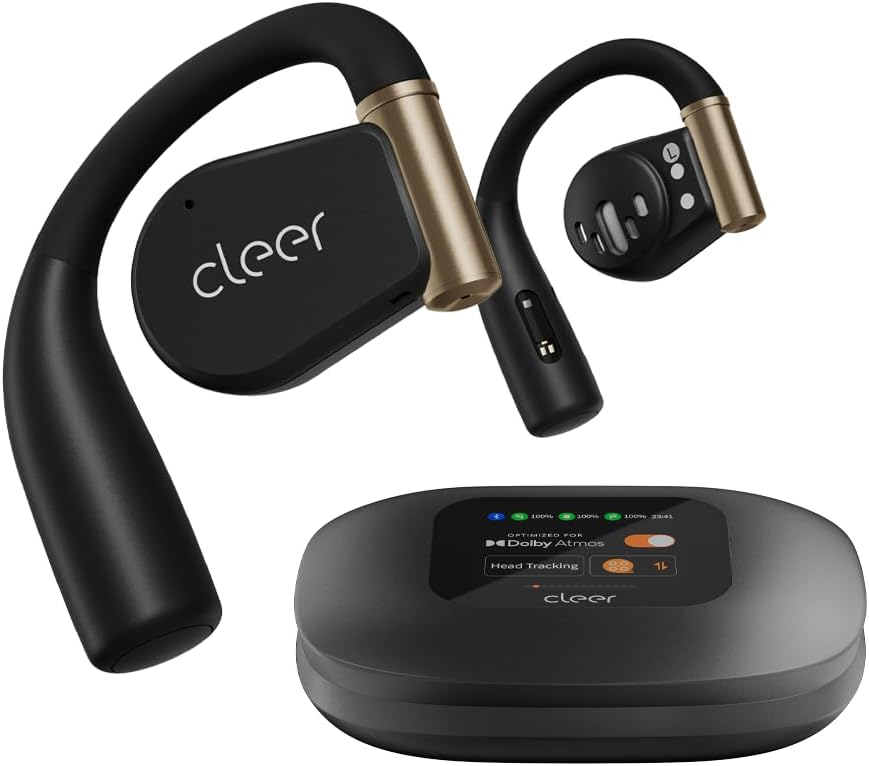
Image: Cleer ARC 3 Sports Pro headphones and their smart charging case.
Nội dung gói
Trước khi bắt đầu, vui lòng đảm bảo tất cả các mục đều có trong gói hàng:
- Cleer ARC 3 Sports Pro Open Ear Headphones
- Vỏ sạc
- Cáp sạc (USB-C sang USB-A)
- Hướng dẫn sử dụng
Cài đặt
1. Sạc tai nghe và hộp đựng
Before first use, fully charge your Cleer ARC 3 Sports Pro headphones and charging case. The charging case provides additional battery life for the headphones.
- Đặt tai nghe vào hộp sạc.
- Connect the USB-C end of the charging cable to the charging case and the USB-A end to a power adapter (not included) or a computer's USB port.
- The case's display will indicate charging status. A full charge takes approximately 2 hours.

Image: Visual representation of the 40-hour total battery life, including 8 hours from headphones and 32 hours from the charging case.
2. Ghép nối ban đầu với thiết bị
The Cleer ARC 3 Sports Pro headphones support Bluetooth 5.4 for stable connectivity and multi-point connection, allowing pairing with two devices simultaneously.
Option 1: First Pairing (Recommended)
- Remove the protective film from the headphones.
- Press and hold the Multi-Function Button (MFB) on both headphones for 2 seconds to enter pairing mode.
- On your device (smartphone, tablet, laptop), go to Bluetooth settings and select "Cleer ARC 3 Sports Pro" from the list of available devices.
Option 2: Touch Pad Pairing
- Tap the touch pad on either headphone 5 times.
- Wait for the LED indicators to blink red and white, indicating pairing mode.
- On your device, select "Cleer ARC 3 Sports Pro" from the Bluetooth device list.
Option 3: Charging Case Pairing
- Place both headphones into the charging case and close the lid.
- Open the charging case. On the case's display, navigate to the "Auxiliary" page and select "Pairing Mode."
- On your device, select "Cleer ARC 3 Sports Pro" from the Bluetooth device list.

Image: Step-by-step visual guide for three different pairing methods: first pairing, touch pad pairing, and charging case pairing.
3. Installing the Cleer+ App
For full functionality, including EQ settings, Dolby Sound Effects, and health tracking, download the Cleer+ app from your device's app store.
- Tìm kiếm "Cleer+" in your app store.
- Tải xuống và cài đặt ứng dụng.
- Open the app and follow the on-screen instructions to connect your ARC 3 Sports Pro headphones.

Image: A user interacting with the Cleer+ app on a smartphone, demonstrating personalized workout plan creation based on real-time data.
Hướng dẫn sử dụng
1. Đeo tai nghe
The ARC 3 Sports Pro features an adjustable, soft ear hook design for a secure and comfortable fit during various activities.
- Nhẹ nhàng đặt móc tai lên tai.
- Adjust the earbud speaker to rest comfortably near your ear canal without entering it.
- Ensure a snug fit for optimal sound and heart rate tracking.

Image: A woman wearing the Cleer ARC 3 Sports Pro headphones, illustrating the open-ear design and comfortable, flexible ear hooks.
2. Kiểm soát
The headphones offer multiple control methods for convenience.
Touch Controls (on headphones)
The touch pads on each earbud allow for various functions:
- Phát/Tạm dừng: Một lần nhấn.
- Bài hát tiếp theo: Chạm hai lần vào tai nghe bên phải.
- Bản nhạc trước: Nhấn đúp vào tai nghe bên trái.
- Trả lời/Kết thúc cuộc gọi: Chạm một lần khi có cuộc gọi đến.
- Từ chối cuộc gọi: Nhấn và giữ trong 2 giây khi có cuộc gọi đến.
- Kích hoạt Trợ lý giọng nói: Nhấn ba lần.

Image: A diagram showing a finger tapping the earbud's touch surface, indicating touch control functionality.
Kiểm soát âm lượng
Adjust volume using one of the following methods:
- Qua điện thoại: Adjust volume directly on your connected mobile device.
- Thông qua hộp sạc: Use the intuitive FHD display on the charging case to access volume controls.
- Via Touch Pad: Double tap and hold the second tap on the left earbud to decrease volume, or on the right earbud to increase volume.
- Thông qua điều khiển bằng giọng nói: Use voice commands like "Volume up" or "Volume down" when connected.

Image: Visual guide demonstrating four different methods for adjusting volume on the Cleer ARC 3 Sports Pro headphones.
Smart Motion Control (for Calls)
Enable motion controls via the Cleer+ App for hands-free call management.
- Open the Cleer+ App.
- Tap [Motion Control] on the ARC 3 main page.
- Toggle the button to turn on/off [Call Control].
- Nhận cuộc gọi: Nod head twice.
- Gác máy/Từ chối cuộc gọi: Shake head twice.

Image: Instructions for activating and using smart motion controls for answering and rejecting calls through head gestures.
3. Tính năng âm thanh
The ARC 3 Sports Pro headphones offer advanced audio technologies for an immersive listening experience.
- Dolby Atmos & Snapdragon Sound: Experience crystal clear spatial audio with 16.2mm drivers. Optimized for Dolby Atmos head tracking.
- Điều khiển âm lượng tự động: Automatically adjusts audio levels based on your surroundings for consistent listening.
- Chất lượng cuộc gọi rõ ràng: Features crystal clear voice capture and noise-cancelling microphones for calls.
Controlling Dolby Audio
You can enable or disable Dolby Audio through the following methods:
- Via Cleer+ App: Open the Cleer+ App and toggle the Dolby Audio setting on the main page.
- Thông qua hộp sạc: On the charging case's touch screen, locate the Dolby Audio interface and toggle the [OPTIMIZED FOR Dolby Atmos] button.
- Via Touch Pad: Tap and hold the touch pad of either headphone for more than 2 seconds.

Image: Visual instructions for enabling or disabling Dolby Audio using the Cleer+ app, the charging case display, or the headphone touch pads.
4. Theo dõi sức khỏe
The ARC 3 Sports Pro headphones include heart rate and blood oxygen detection, which can be tracked in real-time during workouts or daily activities via the Cleer+ App.
- Ensure the headphones are properly worn for accurate readings.
- Open the Cleer+ App to view your health metrics and create personalized workout plans.

Image: A man outdoors, demonstrating the use of the Cleer+ app for accurate workout heart rate tracking.
BẢO TRÌ
1. Vệ sinh
Vệ sinh thường xuyên giúp duy trì hiệu năng và độ sạch sẽ của tai nghe.
- Lau tai nghe và hộp sạc bằng vải mềm, khô và không xơ.
- Avoid using abrasive materials, solvents, or cleaning sprays.
- The charging case features UV-C light sterilization for the earbuds when placed inside. Ensure the case is closed for this function.

Image: A diagram illustrating the UV-C sterilization process within the charging case for the earbuds.
2. Khả năng chống nước (IPX7)
The ARC 3 Sports Pro headphones are IPX7 waterproof, meaning they can withstand immersion in up to 1 meter of water for 30 minutes. This makes them resistant to sweat, rain, and accidental splashes.
- Không nên cố ý nhúng hộp sạc vào nước vì nó không chống nước.
- After exposure to water, ensure the headphones are completely dry before placing them back in the charging case to prevent damage.

Image: A woman exercising, demonstrating the IPX7 sweat-resistant capability of the headphones for uninterrupted use during intense workouts.
Xử lý sự cố
If you encounter issues with your Cleer ARC 3 Sports Pro headphones, refer to the following common solutions:
| Vấn đề | Giải pháp khả thi |
|---|---|
| Tai nghe không ghép nối |
|
| Không có âm thanh hoặc âm lượng nhỏ |
|
| Chất lượng âm thanh kém |
|
| Tai nghe không sạc được |
|
| Heart rate tracking inaccurate |
|
Thông số kỹ thuật
| Tính năng | Chi tiết |
|---|---|
| Tên mẫu | Cleer Audio ARC 3 Sports Pro |
| Công nghệ kết nối | Bluetooth, Không dây |
| Phiên bản Bluetooth | 5.4 |
| Vị trí tai | Tai mở |
| Hình dạng ống nghe | Cái móc |
| Loại trình điều khiển âm thanh | Trình điều khiển động (16.2mm) |
| Dải tần số | 20 Hz - 20,000 Hz |
| Thời lượng pin (Tai nghe) | 8 giờ (một lần sạc) |
| Tuổi thọ pin (có vỏ) | Up to 40 Hours total (8 hrs + 32 hrs from case) |
| Thời gian sạc | 2 giờ |
| Mức độ chống nước | IPX7 (Chống nước) |
| Loại điều khiển | Touch Control, Volume Control, App Control, Voice Control |
| Theo dõi sức khỏe | Heart Rate, Blood Oxygen Detection |
| Item Weight (Headphones) | 12 gram (mỗi tai nghe) |
| Trọng lượng hộp sạc | 130 gam |
| Vật liệu | Kim loại, nhựa, silicon |
| Thiết bị tương thích | Điện thoại di động, máy tính để bàn, máy tính xách tay, máy tính bảng |
Bảo hành và Hỗ trợ
Thông tin bảo hành
Cleer products are designed and manufactured to the highest quality standards. For specific warranty details, including coverage period and terms, please refer to the warranty card included with your product or visit the official Cleer webtrang web. Giữ lại bằng chứng mua hàng để yêu cầu bảo hành.
Hỗ trợ khách hàng
If you require further assistance or have questions not covered in this manual, please contact Cleer customer support:
- Hỗ trợ trực tuyến: Visit the official Cleer webtrang web dành cho các câu hỏi thường gặp, bài viết hỗ trợ và biểu mẫu liên hệ.
- Hỗ trợ qua Email: Refer to your product packaging or the Cleer webtrang web để biết địa chỉ email hỗ trợ phù hợp.
- Hỗ trợ qua điện thoại: Check the Cleer webTrang web cung cấp số điện thoại hỗ trợ khu vực.
When contacting support, please have your product model number (ARC 3 Sports Pro) and proof of purchase readily available.


