Giới thiệu
This manual provides essential information for setting up, operating, maintaining, and troubleshooting your Tecno CAMON 30 5G smartphone. Please read this manual carefully to ensure proper use and to maximize the device's capabilities.
1. Thiết lập
1.1 Mở hộp và kiểm tra ban đầu
Khi mở gói hàng, hãy kiểm tra xem tất cả các thành phần có đầy đủ và không bị hư hỏng hay không. Nội dung gói hàng tiêu chuẩn bao gồm:
- Tecno CAMON 30 5G Smartphone
- 70W Flash Charger
- Cáp USB
- Khay đẩy SIM
- Vỏ bảo vệ (có thể khác nhau tùy khu vực)
- Hướng dẫn bắt đầu nhanh
- Thẻ bảo hành

Figure 1.1: Tecno CAMON 30 5G smartphone, showcasing màn hình phía trước và mô-đun camera phía sau.
1.2 Lắp thẻ SIM
To ensure network connectivity, insert your Nano-SIM card(s) into the device. The Tecno CAMON 30 5G supports dual SIM functionality.
- Xác định vị trí khay thẻ SIM ở bên cạnh thiết bị.
- Dùng dụng cụ tháo khay SIM được cung cấp, luồn vào lỗ nhỏ bên cạnh khay và ấn nhẹ cho đến khi khay bật ra.
- Cẩn thận kéo khay SIM ra.
- Place your Nano-SIM card(s) into the designated slots on the tray, ensuring the gold contacts face downwards and the cut corner aligns correctly.
- Nhẹ nhàng đẩy khay SIM trở lại thiết bị cho đến khi nghe thấy tiếng tách.

Figure 1.2: The SIM tray ejector tool, used for accessing the SIM card slot.
1.3 Sạc thiết bị
Before first use, it is recommended to fully charge your device. The Tecno CAMON 30 5G supports 70W Flash Charging.
- Connect the USB cable to the 70W Flash Charger.
- Cắm bộ sạc vào ổ cắm điện.
- Connect the other end of the USB cable to the USB-C port at the bottom of your phone.
- The charging indicator will appear on the screen. A full charge from 0-50% can be achieved in approximately 19 minutes.

Figure 1.3: The bottom of the Tecno CAMON 30 5G, featuring the USB-C port for charging and data transfer.
1.4 Bật nguồn và thiết lập ban đầu
Press and hold the Power button (located on the right side of the device) until the Tecno logo appears. Follow the on-screen instructions to complete the initial setup, which includes selecting your language, connecting to Wi-Fi, and setting up your Google account.
2. Vận hành thiết bị
2.1 Điều hướng cơ bản
The Tecno CAMON 30 5G operates on Android 14 with HiOS. Navigation is primarily touch-based:
- Vỗ nhẹ: Chọn một mục hoặc mở một ứng dụng.
- Vuốt: Cuộn qua màn hình, danh sách hoặc nội dung.
- Chụm để phóng to: Phóng to hoặc thu nhỏ nội dung trên màn hình.
- Nhấn và giữ: Truy cập menu ngữ cảnh hoặc di chuyển biểu tượng.
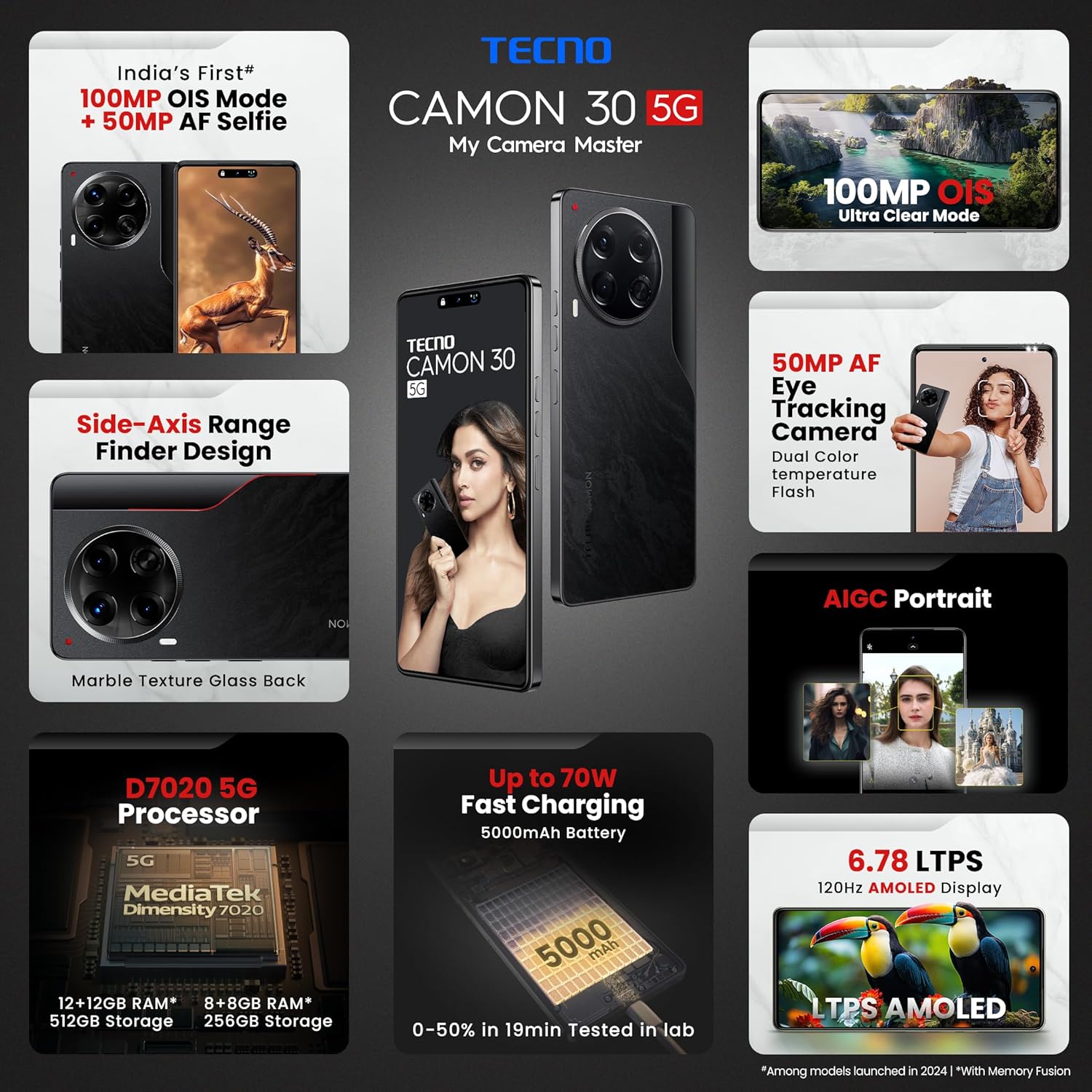
Figure 2.1: The Tecno CAMON 30 5G's vibrant LTPS AMOLED display.
2.2 Tính năng hiển thị
The device features a 6.78-inch FHD+ LTPS AMOLED Dot-in display with a resolution of 1080 x 2436 pixels. Key display features include:
- 1300 nits Peak Brightness: Đảm bảo tầm nhìn rõ ràng ngay cả trong điều kiện ánh sáng ngoài trời chói chang.
- Tốc độ làm mới thích ứng 120Hz: Automatically adjusts between 120Hz, 90Hz, and 60Hz for smooth scrolling and power efficiency.
- 2160Hz High-Frequency PWM Dimming: Reduces screen flicker for improved eye comfort.
- TÜV Rheinland Low Blue Light Emission Certified: Protects your eyes from harmful blue light.
- Wet Hand Touch Technology: Allows for smooth navigation even with wet hands.
Hệ thống 2.3 camera
The Tecno CAMON 30 5G is equipped with an advanced camera system for high-quality photography and videography.
- Camera sau: 100MP OIS (Optical Image Stabilization) main sensor with a 2MP Depth Sensor. Features include Ultra Steady videos (OIS + EIS), 10X Zoom, Twinkle Portrait Filter, Super Night Photography Mode, Sky Shop, and Slow Motion Videos.
- Camera trước: 50MP Auto Focus Selfie camera with Dual Color Temperature Front Flash. Supports DSLR-level portrait system and Video HDR.
- AIGC Portrait (OTA): AI Generative Content for enhanced portrait photography.

Figure 2.2: The distinctive rear camera module of the Tecno CAMON 30 5G.
2.4 Hiệu suất và lưu trữ
Powered by the MediaTek Dimensity 7020 chipset with a 6nm processor, the device offers robust performance for gaming and multitasking.
- Bộ xử lý: MediaTek Dimensity 7020 (6nm) for Ultra 5G Performance.
- ĐẬP: Up to 24GB* (12GB physical + 12GB Memory Fusion) LPDDR4x RAM.
- Bộ nhớ trong: 512GB UFS 3.1 Storage.
2.5 Audio and Smart Features
- Dolby Atmos: Mang đến trải nghiệm âm thanh sống động.
- Ella with ChatGPT: Integrated AI assistant for various tasks.
- AI Eraser (OTA): Allows for intelligent object removal from photos.
- Điều khiển từ xa hồng ngoại: Supports control of up to 15 types of home appliances.
- Dynamic Pet AOD: Customizable Always-On Display with dynamic pet animations.
3. Bảo trì
3.1 Vệ sinh thiết bị của bạn
Để duy trì vẻ ngoài và chức năng của thiết bị:
- Sử dụng vải mềm, không xơ để lau màn hình và thân máy.
- Tránh sử dụng hóa chất mạnh, chất tẩy rửa có tính mài mòn hoặc khí nén.
- Giữ cho cổng không có bụi và mảnh vụn.
3.2 Cập nhật phần mềm
Thường xuyên kiểm tra và cài đặt các bản cập nhật phần mềm để đảm bảo hiệu suất, bảo mật và khả năng truy cập các tính năng mới tối ưu. Truy cập Cài đặt > Hệ thống > Cập nhật hệ thống để kiểm tra bản cập nhật.
3.3 Chăm sóc pin
Thiết bị được trang bị pin 5000mAh. Để kéo dài thời lượng pin:
- Tránh nhiệt độ quá cao.
- Use only the official Tecno charger and cable.
- Tránh để pin cạn kiệt thường xuyên.
3.4 Quản lý lưu trữ
Regularly manage your device's storage to ensure smooth operation. Delete unnecessary files, clear app caches, and uninstall unused applications. You can check storage usage in Cài đặt > Lưu trữ.
KHAI THÁC. Xử lý sự cố
This section addresses common issues you might encounter with your Tecno CAMON 30 5G.
4.1 Thiết bị không bật
- Đảm bảo pin đã được sạc. Cắm bộ sạc và đợi vài phút trước khi bật nguồn.
- Nhấn và giữ nút Nguồn trong ít nhất 10-15 giây để buộc khởi động lại.
4.2 Vấn đề về sạc
- Verify that the charger and USB cable are securely connected to both the phone and the power outlet.
- Hãy thử sử dụng ổ cắm điện khác.
- Kiểm tra xem cổng sạc có mảnh vụn hoặc hư hỏng nào không.
4.3 Sự cố kết nối mạng
- Kiểm tra xem Chế độ máy bay có được bật hay không (vuốt xuống từ đầu màn hình để truy cập Cài đặt nhanh).
- Đảm bảo thẻ SIM của bạn được lắp đúng cách.
- Khởi động lại thiết bị.
- Đi đến Cài đặt> Mạng & internet> Mạng di động và đảm bảo dữ liệu di động đã được bật.
4.4 Ứng dụng bị sập hoặc đóng băng
- Đóng ứng dụng có vấn đề và mở lại.
- Xóa bộ nhớ đệm của ứng dụng (Cài đặt > Ứng dụng > [Tên ứng dụng] > Lưu trữ & bộ nhớ đệm > Xóa bộ nhớ đệm).
- Đảm bảo ứng dụng được cập nhật lên phiên bản mới nhất.
- Nếu sự cố vẫn tiếp diễn, hãy thử gỡ cài đặt và cài đặt lại ứng dụng.
4.5 Khôi phục cài đặt gốc
Nếu bạn gặp phải các sự cố phần mềm kéo dài, việc khôi phục cài đặt gốc có thể giải quyết được vấn đề. Cảnh báo: Thao tác này sẽ xóa toàn bộ dữ liệu trên điện thoại của bạn. Hãy sao lưu dữ liệu quan trọng trước khi thực hiện.
- Đi đến Cài đặt > Hệ thống > Tùy chọn đặt lại.
- Lựa chọn Xóa toàn bộ dữ liệu (khôi phục cài đặt gốc).
- Xác nhận quyết định của bạn và nhập mã PIN/hình vẽ/mật khẩu nếu được yêu cầu.
5. Thông số kỹ thuật
Below are the detailed technical specifications for the Tecno CAMON 30 5G (Model: CL7 512+12).
| Tính năng | Đặc điểm kỹ thuật |
|---|---|
| Hệ điều hành | Android 14 (HiOS) |
| Bộ xử lý | MediaTek Dimensity 7020 (6nm) |
| ĐẬP | 12GB (expandable up to 24GB with Memory Fusion) |
| Bộ nhớ trong | 512GB UFS 3.1 |
| Trưng bày | 6.78" FHD+ LTPS AMOLED Dot-in Display, 1080 x 2436 resolution, 120Hz Adaptive Refresh Rate, 1300 nits Peak Brightness, 2160Hz PWM Dimming |
| Camera sau | 100MP OIS Main Camera + 2MP Depth Sensor |
| Camera trước | 50MP Auto Focus Selfie Camera |
| Ắc quy | 5000mAh |
| Sạc | Sạc nhanh 70W, sạc ngược 10W |
| Kích thước | 16.54 x 0.76 x 0.78cm |
| Cân nặng | 199 gam |
| Kết nối | 5G, Wi-Fi, Bluetooth, USB Type-C |
| Cảm biến | In-display Fingerprint Sensor, Accelerometer, Gyroscope, Proximity, Compass |
| Có gì trong hộp | SIM Tray Ejector (other accessories like charger and cable are typically included but not explicitly listed in 'Whats in the box' field) |
6. Bảo hành và Hỗ trợ
6.1 Thông tin bảo hành
Your Tecno CAMON 30 5G comes with a limited manufacturer's warranty. Please refer to the warranty card included in your product package for specific terms, conditions, and duration of coverage. Keep your proof of purchase for warranty claims.
6.2 Hỗ trợ khách hàng
For technical assistance, service, or any inquiries regarding your device, please contact Tecno customer support:
- Số điện thoại miễn phí: 18004190525
- E-mail: Service.india@carlcare.com
- Nhà sản xuất: G mobiles, Ismartu India Private Limited, D-197 and 198, Sector 63, Noida, Gautam Buddha Nagar, Uttar Pradesh 201301, India.
Tecno provides a robust after-sales service network with over 1300 service centers across more than 1000 towns in India.


