1. Giới thiệu
Thank you for choosing the ZDK Native 1080P FHD 15000 Lumens Mini WiFi Bluetooth 4K Projector. This manual provides essential information for setting up, operating, maintaining, and troubleshooting your projector. Please read it thoroughly before use to ensure optimal performance and longevity of your device.
This projector features native 1920x1080P resolution, 15000 lumens brightness, 20000:1 dynamic contrast, and supports 4K decoding. It includes 5G+2.4G WiFi and Bluetooth 5.0 connectivity, a fully sealed optical engine, and a Hi-Fi stereo speaker. It is designed for a maximum display of 300 inches and offers wide compatibility with various devices.

Image 1.1: ZDK Mini Projector overview, highlighting key features and entertainment options.
2. Thiết lập
2.1 Giải nén và đặt
Carefully remove all components from the packaging. Ensure the projector is placed on a stable, flat surface. For optimal projection, position the projector perpendicular to the screen or projection surface. Maintain adequate ventilation around the projector to prevent overheating.
2.2 kết nối nguồn
- Kết nối cáp nguồn vào cổng nguồn điện của máy chiếu.
- Cắm đầu còn lại của dây nguồn vào ổ cắm điện phù hợp.
- Nhấn nút nguồn trên máy chiếu hoặc điều khiển từ xa để bật thiết bị.
2.3 Chỉnh sửa tiêu điểm và Keystone
After powering on, adjust the focus ring on the projector lens until the image appears sharp and clear. Use the keystone correction feature (typically a dial or digital setting) to correct any trapezoidal distortion, ensuring a rectangular image. The projector supports ±15° keystone correction.
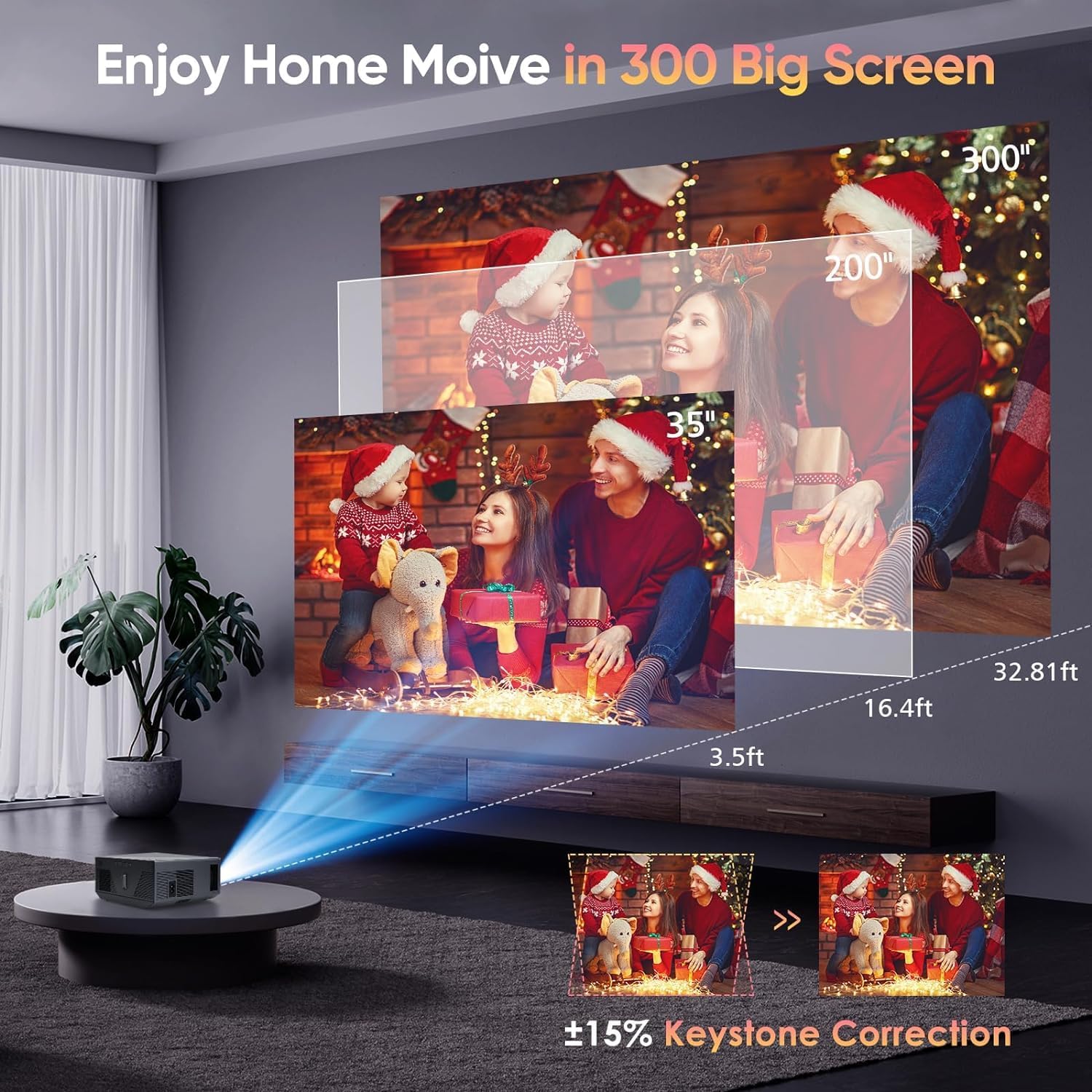
Image 2.1: Illustration of projection distance, screen size, and keystone correction.
2.4 Screen Installation (Optional)
A portable 100-inch screen is included for outdoor or temporary setups. Follow the screen's instructions for assembly and mounting. The projector supports rear, front, and ceiling installation methods.

Image 2.2: Various installation options for the projector: table, tripod, and ceiling.
2.5 Kết nối
The projector offers multiple connection options:
- HDMI: Connect to laptops, gaming consoles (PS5, Xbox), TV sticks, etc. (HDMI cable included).
- USB: For USB flash disks.
- CỦA: Dành cho các thiết bị đời cũ.
- TF: For TF cards.
- VGA: For computers.
- Giắc cắm tai nghe 3.5 mm: Dành cho đầu ra âm thanh ngoài.

Image 2.3: Wide multimedia compatibility of the ZDK projector.
2.5.1 WiFi Connection (5G+2.4G)
- Navigate to the projector's network settings.
- Select your desired 2.4G or 5G WiFi network.
- Nhập mật khẩu để kết nối.
2.5.2 Bluetooth Connection (5.0)
- Access the Bluetooth settings on the projector.
- Enable Bluetooth on your external speaker or headphones.
- Chọn thiết bị của bạn từ danh sách các thiết bị có thể ghép nối.

Image 2.4: Bluetooth 5.0 connectivity for external audio devices.
2.5.3 Phản chiếu màn hình (iOS/Android)
The projector supports wireless screen mirroring for iOS and Android devices using 5G+2.4G WiFi. Follow the on-screen instructions for your specific device to initiate screen mirroring.
Ghi chú:
- Due to copyright protections, streaming services like Netflix, Amazon Prime, and Hulu may require an HDMI cable connection to your laptop or TV stick for screen mirroring. Direct wireless mirroring of these apps from a phone may be restricted.

Image 2.5: 5G+2.4G WiFi wireless screen mirroring in action.
3. Hướng dẫn vận hành
3.1 Điều hướng cơ bản
Use the included remote control or the buttons on the projector to navigate the on-screen menu. Select input sources, adjust volume, and access settings.
3.2 Lựa chọn nguồn đầu vào
Press the 'Source' button on the remote control or projector to cycle through available input options (HDMI, USB, AV, TF, VGA, Screen Mirroring).
3.3 Cài đặt hình ảnh và âm thanh
Access the projector's menu to adjust image settings such as brightness, contrast, color, and aspect ratio (4:3/16:9). Adjust the volume for the built-in 5W stereo speaker or connected external audio devices.
3.4 Công nghệ MEMC
The projector is equipped with MEMC (Motion Estimation, Motion Compensation) technology, which reduces image latency and motion blur, providing a smoother viewing experience for fast-paced content like sports and action films.

Image 3.1: Clarity comparison with and without MEMC technology.
4. Bảo trì
4.1 Ngăn ngừa bụi
The projector features a fully sealed dust-proof optical engine design, which significantly reduces light leakage and the occurrence of black spots. This design minimizes the need for frequent internal cleaning.

Image 4.1: Illustration of the sealed dust-proof optical engine and cooling technology.
4.2 Vệ sinh
- Bên ngoài: Dùng khăn mềm, khô để lau sạch bề ngoài máy chiếu. Đối với những vết bẩn cứng đầu, hãy dùng khăn mềm chà nhẹ.ampnhúng miếng vải vào nước hoặc chất tẩy rửa nhẹ, không mài mòn.
- Ống kính: Nhẹ nhàng lau sạch ống kính máy chiếu bằng khăn lau ống kính hoặc giấy lau ống kính chuyên dụng. Tránh chạm vào ống kính bằng ngón tay.
- Thông gió: Ensure the ventilation ports are clear of dust and obstructions. Use a soft brush or compressed air to gently clean the vents.
4.3 lítamp Mạng sống
The projector utilizes an energy-saving LED light source designed for a lifespan of up to 50,000 hours, reducing the need for frequent lamp thay thế.
KHAI THÁC. Xử lý sự cố
If you encounter issues with your ZDK projector, refer to the following common problems and solutions:
| Vấn đề | Nguyên nhân có thể | Giải pháp |
|---|---|---|
| Không có hình ảnh hoặc hình ảnh bị mờ | Loose cable connection, incorrect input source, out of focus, keystone not adjusted. | Check all cable connections. Select the correct input source. Adjust the focus ring. Adjust keystone correction. |
| Không có âm thanh | Volume too low, incorrect audio output selected, external speaker not connected. | Increase volume. Ensure external speakers are properly connected via Bluetooth or 3.5mm jack. Check audio settings. |
| Sự cố kết nối WiFi/Bluetooth | Mật khẩu không đúng, ngoài phạm vi, nhiễu sóng. | Verify WiFi password. Ensure devices are within range. Restart projector and router/Bluetooth device. |
| Điều khiển từ xa không hoạt động | Hết pin, vật cản, cảm biến từ xa bị chặn. | Replace batteries. Ensure no obstructions between remote and projector. Point remote directly at the projector's IR sensor. |
| Streaming apps (Netflix, Hulu) not mirroring wirelessly | Copyright protection restrictions. | Connect your laptop or TV stick via an HDMI cable for these applications. |
| Máy chiếu bị nhiễu | Normal fan operation, obstructed vents. | Ensure vents are clear. The projector's cooling system generates some operational noise. |
6. Thông số kỹ thuật
Below are the technical specifications for the ZDK Native 1080P FHD 15000 Lumens Mini WiFi Bluetooth 4K Projector:
- Thương hiệu: ZDK
- Số hiệu mẫu: ZDK-1080P-4K-300
- Độ phân giải gốc: Độ phân giải Full HD 1920 x 1080p
- Hỗ trợ 4K: Đúng
- Độ sáng: 15000 Lumen
- Tỷ lệ tương phản động: 20000:1
- Kích thước hiển thị tối đa: 300 inch
- Sửa lỗi Keystone: ±15°
- Kết nối WiFi: Dual Band 5G + 2.4G
- Bluetooth: Phiên bản 5.0
- Động cơ quang học: Fully Sealed Dust-Proof
- Nguồn sáng Cuộc sống: Lên đến 50,000 giờ
- Loa tích hợp: Loa âm thanh nổi 5W
- Cổng đầu vào: HDMI, AV, USB, TF, VGA
- Cổng đầu ra: Giắc cắm tai nghe 3.5 mm
- Trọng lượng sản phẩm: 5.46 pound
- Kích thước gói hàng: 12.76 x 9.92 x 5.98 inch
- Phụ kiện đi kèm: HDMI Cable, Tripod Stand, 100" Portable Screen
7. Bảo hành và Hỗ trợ
ZDK is committed to providing excellent customer service and product reliability.
- Bảo hành: Your ZDK projector comes with a 2-year warranty from the date of purchase.
- Hỗ trợ khách hàng: ZDK offers 12/7 service and lifelong technical support.
For warranty claims, technical assistance, or any product-related inquiries, please contact ZDK customer support through the retailer's platform or the official ZDK website. Please have your model number (ZDK-1080P-4K-300) and purchase information ready when contacting support.