1. Sản phẩm hếtview
The BAOFENG Anysecu HB980 is a wireless handheld speaker microphone designed for two-way radios and compatible with Bluetooth-enabled devices. It offers clear audio transmission and reception, robust construction with IP66 waterproofing, and extended battery life for reliable communication in various environments. This manual provides detailed instructions for setup, operation, and maintenance.
2. Nội dung gói hàng
Upon opening your BAOFENG Anysecu HB980 package, please verify that all the following items are included:
- 1x HB980 Wireless Handheld Speaker Microphone
- 1x 2-Pin K1 Connector Bluetooth Adapter
- 1 cáp sạc USB (Type-C)
- 1x Hướng dẫn sử dụng (tài liệu này)

Figure 2.1: Standard package contents of the BAOFENG Anysecu HB980.
3. Tính năng và thành phần của sản phẩm
The BAOFENG Anysecu HB980 is engineered for convenience and durability. Key features include:
- Xếp hạng chống nước IP66: Resistant to water spray and splashes, suitable for outdoor use. Note: Not designed for partial or full submersion.
- Kết nối Bluetooth V4.0: Ensures stable wireless connection up to 10 meters (30 ft).
- Pin sử dụng lâu dài: Equipped with a 1000mAh Lithium Ion battery, providing approximately 10 hours of music time, 15 hours of talk time, and 300 hours of standby time on a 2-3 hour charge.
- Nút đa chức năng: Dedicated buttons for Power On/Off, Volume Up/Down, Push-to-Talk (PTT), and a programmable button (P1) for answering/hanging up calls or playing/pausing music.
- Rotatable Belt Clip: Allows for flexible attachment to clothing or gear.
- Cổng sạc Type-C: Giao diện sạc hiện đại và tiện lợi.
- 3.5mm Only Listen Jack: For connecting an external earpiece for private listening.

Figure 3.1: Labeled components of the HB980 Wireless Handheld Speaker Microphone and K1 Adapter.
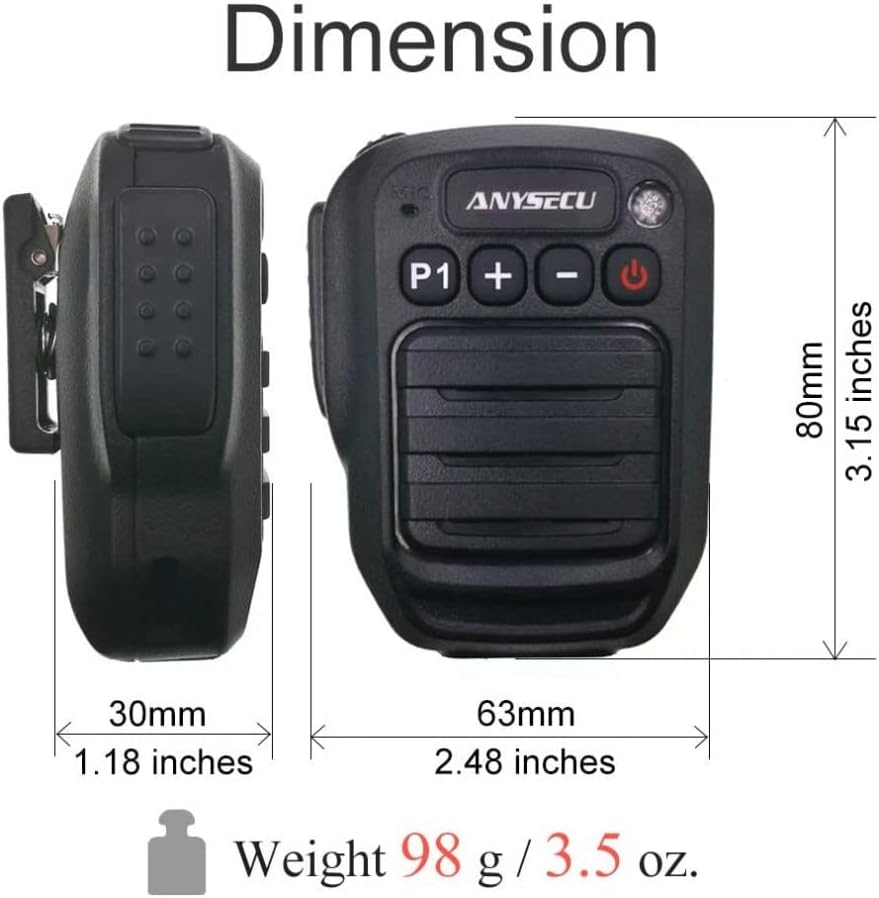
Figure 3.2: Dimensions and weight of the HB980 Wireless Handheld Speaker Microphone.
Figure 3.3: Important compatibility notice regarding Bluetooth protocols for various radio brands.
4. Thiết lập và Cài đặt
4.1 Kết nối với bộ đàm hai chiều
- Ensure both the HB980 microphone and the K1 Bluetooth adapter are fully charged.
- Long press the power button on the HB980 microphone until it powers on and enters pairing mode (indicator light will flash).
- Long press the power button on the K1 Bluetooth adapter until it powers on and enters pairing mode (indicator light will flash).
- Insert the K1 Bluetooth adapter into the 2-pin jack of your compatible two-way radio (e.g., Baofeng UV-5R, UV-82 series).
- The microphone and adapter should automatically pair. A voice prompt will confirm "Connected" once pairing is successful.

Figure 4.1: Wireless connection between the HB980 microphone and a two-way radio.
Video 4.1: Demonstration of connecting the HB980-M wireless microphone to a two-way radio.
Video 4.2: Unboxing and initial setup of the HB980 wireless microphone with a radio.
4.2 Connecting to a Smartphone (for Zello APP)
- Ensure the HB980 microphone is powered on and in pairing mode.
- Trên điện thoại thông minh của bạn, hãy vào cài đặt Bluetooth và bật Bluetooth.
- Tìm kiếm available devices and select "Herdt980D-Zello" or a similar name for the HB980.
- Once connected, open the Zello application. You may need to configure the PTT button within the Zello app settings to recognize the HB980.
Video 4.3: Guide on connecting the Wireless Walkie Talkie Speaker Mic to a smartphone for Zello application.
5. Hướng dẫn vận hành
5.1 Bật/Tắt nguồn
- Để bật nguồn: Nhấn và giữ Bật/Tắt nguồn button (red button) for approximately 3 seconds until you hear a voice prompt "Power On" and the indicator light illuminates.
- Để Tắt Nguồn: Nhấn và giữ Bật/Tắt nguồn button for approximately 3 seconds until you hear a voice prompt "Power Off" and the indicator light turns off.
5.2 Chức năng Nhấn để nói (PTT)
- Để truyền dữ liệu, hãy nhấn và giữ nút lớn. PTT button on the side of the microphone. Speak clearly into the microphone.
- Phát hành PTT nút để dừng truyền tín hiệu và chờ phản hồi.
5.3 Điều khiển âm lượng
- Sử dụng + nút để tăng âm lượng loa.
- Sử dụng - nút để giảm âm lượng loa.
5.4 Phone Call and Music Control (via P1 Button)
- Trả lời/Cúp cuộc gọi: When connected to a smartphone, press the P1 button to answer an incoming call. Press it again to hang up.
- Phát/Tạm dừng nhạc: When playing music from a connected smartphone, press the P1 button to pause playback. Press it again to resume.
6. Hướng dẫn Sạc
The BAOFENG Anysecu HB980 features a Type-C charging port for convenient recharging.
- Locate the Type-C charging port on the side of the microphone and the K1 adapter.
- Connect the provided USB charging cable to the device(s) and a compatible USB power source (e.g., wall adapter, computer USB port, power bank, car charger).
- Đèn báo thường sẽ hiển thị màu đỏ trong quá trình sạc và sẽ tắt hoặc đổi màu khi sạc đầy.
- Một lần sạc đầy mất khoảng 2-3 giờ.
Ghi chú: Low battery levels may affect transmission sensitivity and overall performance. Ensure your device is adequately charged for optimal operation.

Figure 6.1: Battery information and charging method for the HB980.
7. Thông số kỹ thuật
| Tính năng | Đặc điểm kỹ thuật |
|---|---|
| Số hiệu mẫu | HB980 |
| Yếu tố hình thức của micrô | Cầm tay |
| Công nghệ kết nối | Bluetooth V4.0 |
| Loại đầu nối | USB (Type-C để sạc) |
| Nguồn điện | Sử dụng pin (1 pin Lithium Ion, đã bao gồm) |
| Dung lượng pin | 1000mAh |
| Thời gian sạc | 2-3 giờ |
| Thời gian nói chuyện | Xấp xỉ 15 giờ |
| Thời gian âm nhạc | Xấp xỉ 10 giờ |
| Thời gian chờ | Xấp xỉ 300 giờ |
| Xếp hạng chống thấm nước | IP66 (Rainproof, splash-resistant) |
| Trọng lượng sản phẩm | 3.53 ounce (100 gram) |
| Kích thước gói hàng | 5.55 x 4.8 x 2.87 inch |
| Bộ đàm tương thích | Baofeng UV5R/Plus, UV5RA/Plus, UV5RB, UV5RC, UV5RE/Plus, UV-82, UV-B5, UV-B6, UV-82 GT-3, A52, BF-888S, etc. (with Standard 2Pin Connector) |
KHAI THÁC. Xử lý sự cố
If you encounter issues with your BAOFENG Anysecu HB980, please refer to the following common troubleshooting steps:
- Thiết bị không bật nguồn: Ensure the battery is charged. Connect the device to a power source using the USB Type-C cable and allow it to charge for at least 30 minutes before attempting to power on again.
- Thất bại ghép nối: Make sure both the microphone and adapter (if used) are in pairing mode (indicator light flashing). Ensure they are within close proximity (within 1 meter) during the initial pairing process. Turn off and restart both devices, then attempt pairing again. Verify that the radio is compatible with a standard 2-pin K1 connector.
- Không có âm thanh/Chất lượng âm thanh kém: Check the volume levels on both the microphone and the connected radio/smartphone. Ensure the devices are properly paired and within the effective Bluetooth range (up to 10 meters). Obstructions or interference can affect audio quality.
- Tuổi thọ pin ngắn: Ensure the device is fully charged before use. Battery life can vary based on usage patterns (e.g., continuous transmission, high volume). Extreme temperatures can also affect battery performance.
- Incompatible with Other Radio Brands: As noted in Figure 3.3, the Bluetooth protocol may differ for brands like ICOM, Kenwood, AnyTone, and Motorola. This device is primarily designed for Baofeng radios with a standard 2-pin K1 connector.
9. Thông tin an toàn
To ensure safe and optimal use of your BAOFENG Anysecu HB980, please observe the following safety guidelines:
- Do not attempt to disassemble, repair, or modify the device. Unauthorized modifications can void the warranty and pose safety risks.
- Tránh để thiết bị tiếp xúc với nhiệt độ quá cao, ánh nắng trực tiếp và ngọn lửa.
- While the device is IP66 waterproof, it is not designed for submersion. Avoid prolonged exposure to heavy rain or water jets.
- Use only the provided or approved charging cable. Using incompatible chargers may damage the device or cause fire.
- Vứt bỏ pin và linh kiện điện tử một cách có trách nhiệm theo quy định của địa phương.
- Avoid using the device at excessively high volumes for extended periods to prevent hearing damage.
10. Bảo hành và Hỗ trợ
For warranty information, technical support, or service inquiries regarding your BAOFENG Anysecu HB980 Wireless Handheld Speaker Microphone, please refer to the warranty card included in your package or contact BAOFENG customer service directly. Please have your product model number (HB980) and purchase details ready when contacting support.


