Giới thiệu
This manual provides essential instructions for the safe and effective use of your Technics EAH-A800 Wireless Noise Cancelling Over-Ear Headphones. Please read this manual thoroughly before using the product and retain it for future reference.

Image: Technics EAH-A800 Wireless Noise Cancelling Over-Ear Headphones in black, showcasing thiết kế đẹp mắt của họ.
The Technics EAH-A800 headphones are designed to deliver high-fidelity audio with advanced noise-cancelling technology and superior call clarity. They feature multi-point connectivity for seamless switching between devices and comfortable over-ear earpads for extended wear.
Có gì trong hộp
Xác minh rằng tất cả các mục đều có trong gói hàng:
- Technics EAH-A800 Over-Ear Headphones
- Cáp sạc USB
- Cáp âm thanh (giắc cắm 3.5 mm)
- Hộp đựng bảo vệ

Image: The complete package contents, including the headphones, charging cable, audio cable, and protective case.
Cài đặt
1. Sạc tai nghe
Before first use, fully charge the headphones. Connect the USB charging cable to the headphone's charging port and a USB power source. The charging indicator will show the charging status.
2. Ghép nối Bluetooth
- Đảm bảo tai nghe đã được tắt nguồn.
- Nhấn và giữ nút nguồn cho đến khi đèn LED nhấp nháy màu xanh và đỏ, cho biết chế độ ghép nối.
- Trên thiết bị của bạn (điện thoại thông minh, máy tính bảng, máy tính), hãy bật Bluetooth và tìm kiếm các thiết bị khả dụng.
- Select "Technics EAH-A800" from the list of found devices.
- Sau khi kết nối, đèn báo LED sẽ nhấp nháy màu xanh lam từ từ.
3. Technics Audio Connect App
For enhanced control and customization, download the Technics Audio Connect app from your device's app store. The app allows you to adjust sound settings, noise cancellation levels, and other features.

Image: Screenshots of the Technics Audio Connect app, illustrating its interface for sound and ambient control settings.
Hướng dẫn sử dụng
1. Bật/Tắt nguồn
- Để bật nguồn: Nhấn và giữ nút nguồn cho đến khi đèn LED báo hiệu sáng lên.
- Để tắt nguồn: Nhấn và giữ nút nguồn cho đến khi đèn LED tắt.
2. Noise Cancelling and Ambient Sound Modes
The EAH-A800 features active noise cancellation to reduce external distractions and an ambient sound mode to allow you to hear your surroundings.
- Chống ồn: Reduces environmental noise for an immersive listening experience.
- Chế độ môi trường xung quanh: Allows external sounds to be heard, useful for awareness in public spaces.
Switch between modes using the dedicated button on the headphones or through the Technics Audio Connect app.

Image: A visual representation of the noise cancelling technology in action, showing how external sounds are minimized.
3. Kết nối đa điểm
The headphones can connect to more than two Bluetooth devices simultaneously, allowing for seamless audio switching. For example, you can listen to music from your laptop and instantly answer a call from your smartphone without re-pairing.

Image: A user seamlessly switching audio between a smartphone and a laptop, highlighting the multi-point connectivity feature.
4. Gọi hàm
The EAH-A800 headphones are equipped with 8 microphones and advanced wind noise reduction for clear voice transmission during calls. Use the integrated controls to answer, end, or reject calls.
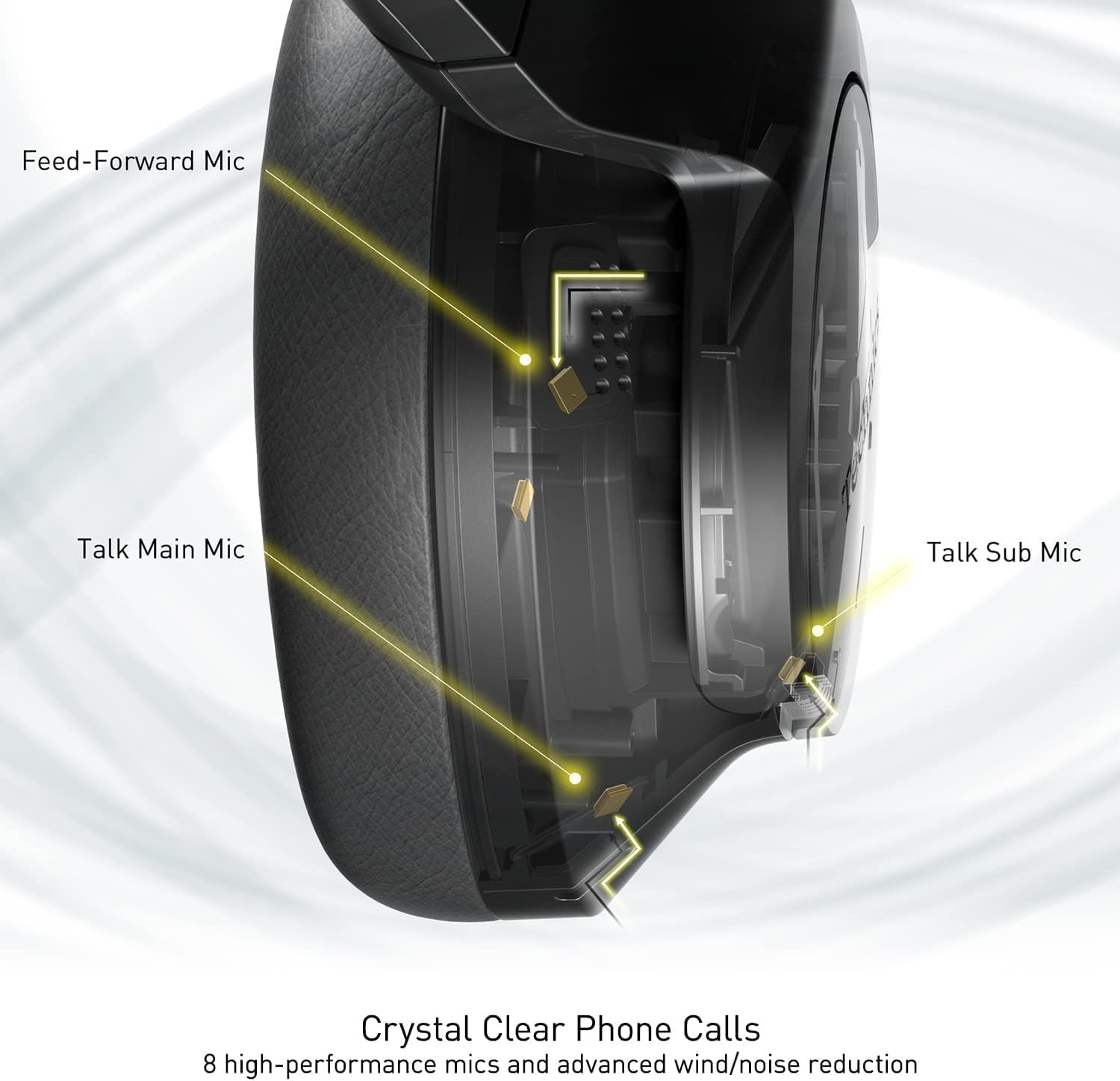
Image: An internal diagram illustrating the strategic placement of 8 microphones within the headphone for optimal call clarity.
5. Kiểm soát
The headphones feature physical buttons for power, volume, and mode switching, as well as a touch-sensitive panel on one earcup for additional functions. Refer to the quick start guide for a detailed layout of controls.
6. Tuổi thọ pin và sạc
The EAH-A800 offers up to 50 hours of playback with Active Noise Cancellation (ANC) enabled on a single charge. A quick 15-minute charge provides approximately 10 hours of playback.

Image: A graphic detailing the impressive battery life and quick charge capabilities of the headphones.
BẢO TRÌ
1. Vệ sinh
- Lau tai nghe bằng vải mềm, khô.
- Đối với phần đệm tai, hãy lau nhẹ nhàng bằng khăn ẩm.amp vải và để khô hoàn toàn trước khi sử dụng.
- Không sử dụng hóa chất mạnh, dung môi hoặc chất tẩy rửa có tính mài mòn.
2. Lưu trữ
When not in use, store the headphones in their protective carrying case to prevent damage from dust, scratches, and impacts. Avoid exposing the headphones to extreme temperatures or humidity.
Xử lý sự cố
| Vấn đề | Nguyên nhân có thể | Giải pháp |
|---|---|---|
| Tai nghe không bật được nguồn | Pin yếu | Sạc đầy tai nghe. |
| Không thể ghép nối qua Bluetooth | Tai nghe không ở chế độ ghép nối; Bluetooth của thiết bị đã tắt; Ngoài phạm vi kết nối | Ensure headphones are in pairing mode (flashing blue/red). Turn on Bluetooth on your device. Move device closer to headphones. |
| Không có âm thanh hoặc âm lượng nhỏ | Volume too low; Incorrect audio output selected; Device not connected | Increase headphone and device volume. Check device's audio output settings. Re-establish Bluetooth connection. |
| Chất lượng cuộc gọi kém | Microphone obstructed; Weak signal; Environmental noise | Ensure microphones are clear. Move to an area with better signal. Adjust noise cancelling settings via the app. |
| Multi-point connectivity issues | Connection conflict; Device not properly paired | Disconnect from one device and reconnect. Ensure both devices are paired correctly. |
If problems persist, consult the Technics Audio Connect app for further diagnostics or visit the official Technics support webđịa điểm.
Thông số kỹ thuật
| Tên mẫu | Technics EAH-A800 |
| Công nghệ kết nối | Bluetooth 5.2 |
| Đáp ứng tần số | 4 Hz - 40 kHz |
| Kiểm soát tiếng ồn | Chống ồn chủ động |
| Tuổi thọ pin | Up to 50 Hours (with ANC ON) |
| Thời gian sạc | Approximately 3 Hours (15 min quick charge for 10 hrs playback) |
| Trọng lượng sản phẩm | 10.5 Ounce (298 gam) |
| Vật liệu | Polyurethane (PU) |
| Jack cắm tai nghe | Giắc cắm 3.5 mm |
| Thiết bị tương thích | Cellphones, Desktops, Laptops, Tablets, Telephones |
| Tính năng đặc biệt | Fast Charging, Foldable, Microphone Included |
| Mã số UPC | 885170381162 |
Bảo hành và Hỗ trợ
Your Technics EAH-A800 headphones are covered by a manufacturer's warranty. For specific warranty terms, registration, and support inquiries, please refer to the official Technics webtrang web hoặc liên hệ với dịch vụ khách hàng của họ.
For additional information, FAQs, and software updates, please visit the official Technics brand store or support pages:


