1. Sản phẩm hếtview
The Intellitronix BG6004G is a direct-factory fit LED Digital Bargraph Gauge Panel designed specifically for 1973-1987 Chevy Trucks. This advanced gauge panel provides essential vehicle information with clear, bright green LED readouts, enhancing both functionality and the aesthetic of your vehicle's dashboard.
It integrates multiple critical gauges into a single unit, offering a modern and precise way to monitor your vehicle's performance. Please note that the housing/bezel is not included with this product.
2. Các thành phần đi kèm
Upon unboxing your Intellitronix BG6004G gauge panel, you should find the following components:
- LED Digital Bargraph Gauge Panel (integrating Tachometer, Speedometer, Water Temperature, Oil Pressure, Voltmeter, Fuel Level)
- S9013 Universal Speedometer Sending Unit
- S8434 Oil Pressure Sender
- S8013 Water Temperature Sender
- In-dash mounting hardware
- Hướng dẫn cài đặt
- Integrated turn signal and high beam indicators
Note: The dashboard housing or bezel is not included and must be sourced separately or reused from your existing setup.
3. Tính năng và chức năng
The BG6004G panel is equipped with several key gauges, each offering specific functionalities:
3.1. Máy đo tốc độ
- Reads up to 9,999 RPM.
- Microprocessor controlled with peak RPM memory recall.
- Features an RPM activated switch capable of handling up to 3 amps.
- Readout increments can be set to 100, 10, or 1 RPM.
- Compatible with 1, 2, 4, 6, 8, 10, and 12 cylinder engines.
3.2. Đồng hồ tốc độ
- Reads up to 255 MPH.
- Dimensions: 3-3/8 inches in diameter and 1-1/2 inches deep.
- Includes odometer and trip meter functions.
- One-button calibration, adaptable to any tire size, gear ratio, or transmission.
- Displays 0-60 time and high-speed recall with a push of a button.
- Compatible with electronic cruise control senders.
- Includes S9013 universal speedometer sending unit for vehicles without functional cruise control.
- Automatic night-dimming for improved visibility in low light conditions.
3.3. Vôn kế
- Reads from 12-16 volts.
- Automatic night-dimming.
- No external sending unit required.
3.4. Oil Pressure Gauge
- Reads from 0-80 PSI.
- Automatic night-dimming.
- Includes S8434 sender.
3.5. Water Temperature Gauge
- Reads from 160-240 degrees Fahrenheit.
- Automatic night-dimming.
- Includes S8013 sender.
3.6. Fuel Level Gauge
- Reads from empty to full in 1/4 increments.
- Compatible with most existing fuel level sending units (set at industry standard 0-90 ohms).
- Automatic night-dimming.
4. Thiết lập và Cài đặt
Installation of the Intellitronix BG6004G gauge panel requires basic automotive electrical and mechanical knowledge. It is recommended to have this product installed by a qualified professional if you are not familiar with vehicle wiring and dashboard component replacement.
- An toàn là trên hết: Disconnect the vehicle's battery before beginning any installation to prevent electrical shorts or damage.
- Tháo bỏ tấm ốp cũ: Carefully remove your existing dashboard gauge panel and any associated wiring. Refer to your vehicle's service manual for specific instructions on removing the dashboard components for a 1973-1987 Chevy Truck.
- Install Senders: Install the provided S9013 speedometer sending unit, S8434 oil pressure sender, and S8013 water temperature sender into their respective locations on your vehicle. Ensure proper sealing to prevent leaks.
- Kết nối dây: Connect the wiring harness from the new Intellitronix panel to your vehicle's electrical system. This typically involves connections for power (12V constant and switched), ground, illumination, turn signals, high beam, and inputs from the newly installed senders (speedometer, oil pressure, water temperature, and existing fuel level sender). Follow the detailed wiring diagram provided in the included installation instructions.
- Lắp đặt: Secure the new gauge panel into the dashboard opening using the provided in-dash mounting hardware. Ensure it is seated firmly and correctly.
- Kết nối lại pin: Once all connections are secure and the panel is mounted, reconnect the vehicle's battery.
- Kiểm tra ban đầu: Turn the ignition to the 'ON' position (do not start the engine yet) to verify that the panel powers on and the indicators illuminate correctly.
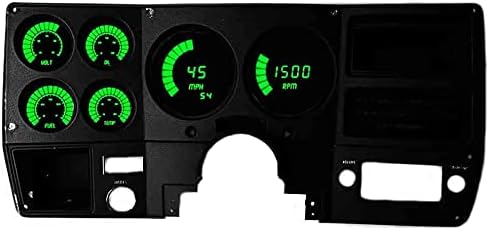
Figure 1: Intellitronix BG6004G LED Digital Bargraph Gauge Panel in a dashboard setting.

Figure 2: Internal circuit boards of the Intellitronix BG6004G gauge panel.
5. Hướng dẫn vận hành
Once installed, the Intellitronix BG6004G gauge panel operates automatically for most functions. However, some features require user interaction:
- Hiệu chỉnh đồng hồ tốc độ: The speedometer features a one-button calibration process. After installation, drive the vehicle a known distance (e.g., 1 mile) and follow the instructions in the included manual to calibrate the speedometer for accurate readings, regardless of tire size or gear ratio.
- Đồng hồ đo quãng đường/đồng hồ đo hành trình: Use the integrated button (refer to manual for exact location) to switch between odometer and trip meter displays. The trip meter can typically be reset by holding the button.
- 0-60 Time & High-Speed Recall: These functions are accessed via the integrated button. Consult the detailed instructions for the specific sequence to activate and view những bài đọc này.
- Tachometer RPM Activated Switch: This feature allows you to set a specific RPM threshold to activate an external device (e.g., a shift light). Refer to the installation manual for programming instructions and wiring details for this function.
- Night Dimming: The panel features automatic night-dimming, adjusting the brightness of the LED displays based on ambient light conditions for optimal visibility without glare.
6. Bảo trì
The Intellitronix BG6004G gauge panel is designed for long-term reliability with minimal maintenance. Follow these guidelines to ensure its longevity:
- Vệ sinh: Sử dụng chất liệu mềm, khô hoặc hơi damp cloth to clean the display surface. Avoid abrasive cleaners, solvents, or harsh chemicals, as these can damage the LED display or plastic components.
- Kết nối điện: Periodically check all electrical connections to ensure they remain secure and free from corrosion. Loose connections can lead to intermittent readings or malfunction.
- Sender Units: Ensure the temperature and pressure sender units are free from debris and their connections are tight.
- Bảo vệ môi trường: While designed for automotive use, avoid exposing the panel to extreme moisture or direct water spray.
KHAI THÁC. Xử lý sự cố
If you encounter issues with your Intellitronix BG6004G gauge panel, consider the following common troubleshooting steps:
| Vấn đề | Nguyên nhân có thể | Giải pháp |
|---|---|---|
| Màn hình không bật nguồn. | No power supply; Blown fuse; Loose ground connection. | Check vehicle's fuse box; Verify 12V power and ground connections to the panel; Ensure battery is connected. |
| Inaccurate Speedometer reading. | Incorrect calibration; Faulty speedometer sender (S9013); Loose wiring. | Perform speedometer one-button calibration; Check wiring to S9013; Inspect S9013 for damage. |
| Gauge (e.g., Oil, Temp, Fuel) not reading. | Faulty sender unit; Loose or incorrect wiring to sender; Incorrect sender type (for fuel). | Verify sender unit is correctly installed and functioning; Check wiring continuity from sender to panel; Ensure fuel sender is 0-90 ohms. |
| Intermittent readings or flickering display. | Poor electrical connection; Voltage dao động. | Inspect all wiring connections for tightness and corrosion; Check vehicle's charging system. |
If these steps do not resolve the issue, please contact Intellitronix customer support for further assistance.
8. Thông số kỹ thuật
| Thuộc tính | Chi tiết |
|---|---|
| Số hiệu mẫu | BG6004G |
| Khả năng tương thích | 1973-1987 Chevy Truck |
| Hiển thị màu sắc | Đèn LED xanh |
| Phạm vi đồng hồ đo tốc độ | 0-9,999 vòng/phút |
| Phạm vi đồng hồ tốc độ | 0-255 dặm/giờ |
| Phạm vi của vôn kế | 12-16 vôn |
| Phạm vi áp suất dầu | 0-80 PSI |
| Phạm vi nhiệt độ nước | 160-240°F |
| Fuel Level Compatibility | 0-90 Ohm senders (industry standard) |
| Kích thước sản phẩm | 15.5 x 10.6 x 5 inch |
| Trọng lượng sản phẩm | 4 pound |
| Số hiệu sản phẩm của nhà sản xuất | BG6004G |
| Mã số UPC | 099998679039 |
9. Bảo hành và Hỗ trợ
Intellitronix products are manufactured to the highest quality standards. For specific warranty information regarding your BG6004G gauge panel, please refer to the warranty card included with your product or visit the official Intellitronix website. Typically, Intellitronix offers a limited lifetime warranty on their digital gauges, covering defects in materials and workmanship.
For technical support, troubleshooting assistance, or warranty claims, please contact Intellitronix customer service directly. Contact information can usually be found on their official webtrang web hoặc trong bao bì sản phẩm.
Intellitronix Official Webđịa điểm: Visit the Intellitronix Store on Amazon