1. Giới thiệu
Welcome to your Garmin Approach S62 Premium GPS Golf Watch. This manual provides detailed instructions for setting up, operating, maintaining, and troubleshooting your device. Please read this manual thoroughly to ensure optimal performance and longevity of your watch.
2. Có gì trong hộp
- Garmin Approach S62 Premium GPS Golf Watch
- Cáp sạc/dữ liệu
- Tài liệu
- Wearable4U Power Bank (E-Bank)
- Wearable4U Wall Charger
- Wearable4U Car Charger

Image: Contents of the Wearable4U bundle, including the Garmin Approach S62 watch, power bank, wall charger, and car charger.
3. Hết thiết bịview
The Garmin Approach S62 is a premium GPS golf watch designed to provide essential golf course information and smart features directly on your wrist. It features a large, easy-to-read color touchscreen display.

Image: The Garmin Approach S62 watch displaying the time, steps count, and current date.

Image: The Garmin Approach S62 watch displaying detailed golf course information for a specific hole, including distances to the green.
4. Thiết lập
4.1. Sạc thiết bị
Before first use, fully charge your Approach S62. Connect the charging clip to the watch and plug the USB cable into a power source. A full charge typically takes approximately 2 hours.
4.2. Bật / Tắt nguồn
- Để bật nguồn: Nhấn và giữ nút nguồn (thường là nút phía trên bên phải) cho đến khi logo Garmin xuất hiện.
- Để Tắt Nguồn: Press and hold the power button until the power options menu appears, then select 'Power Off'.
4.3. Thiết lập ban đầu và ghép nối
Upon first power-on, the watch will guide you through initial setup steps, including language selection and personal data input. To unlock full smart features, pair your watch with the Garmin Golf app on your smartphone via Bluetooth. Follow the on-screen instructions on both the watch and the app.
5. Hướng dẫn vận hành
5.1. Golf Features
The Approach S62 is preloaded with over 41,000 golf courses worldwide. Once you start a round, the watch automatically detects your location and displays course information.
5.1.1. Virtual Caddie
The Virtual Caddie feature suggests a club based on your typical hitting distance for each club, considering wind speed and direction. It also indicates where to aim on the course map.

Image: The Garmin Approach S62 watch showing the Virtual Caddie feature, suggesting a club and aim point for a shot.
5.1.2. Hazard View
Quickly scroll through each hazard on the map to view distances to the front and back of bunkers, water hazards, and other obstacles.
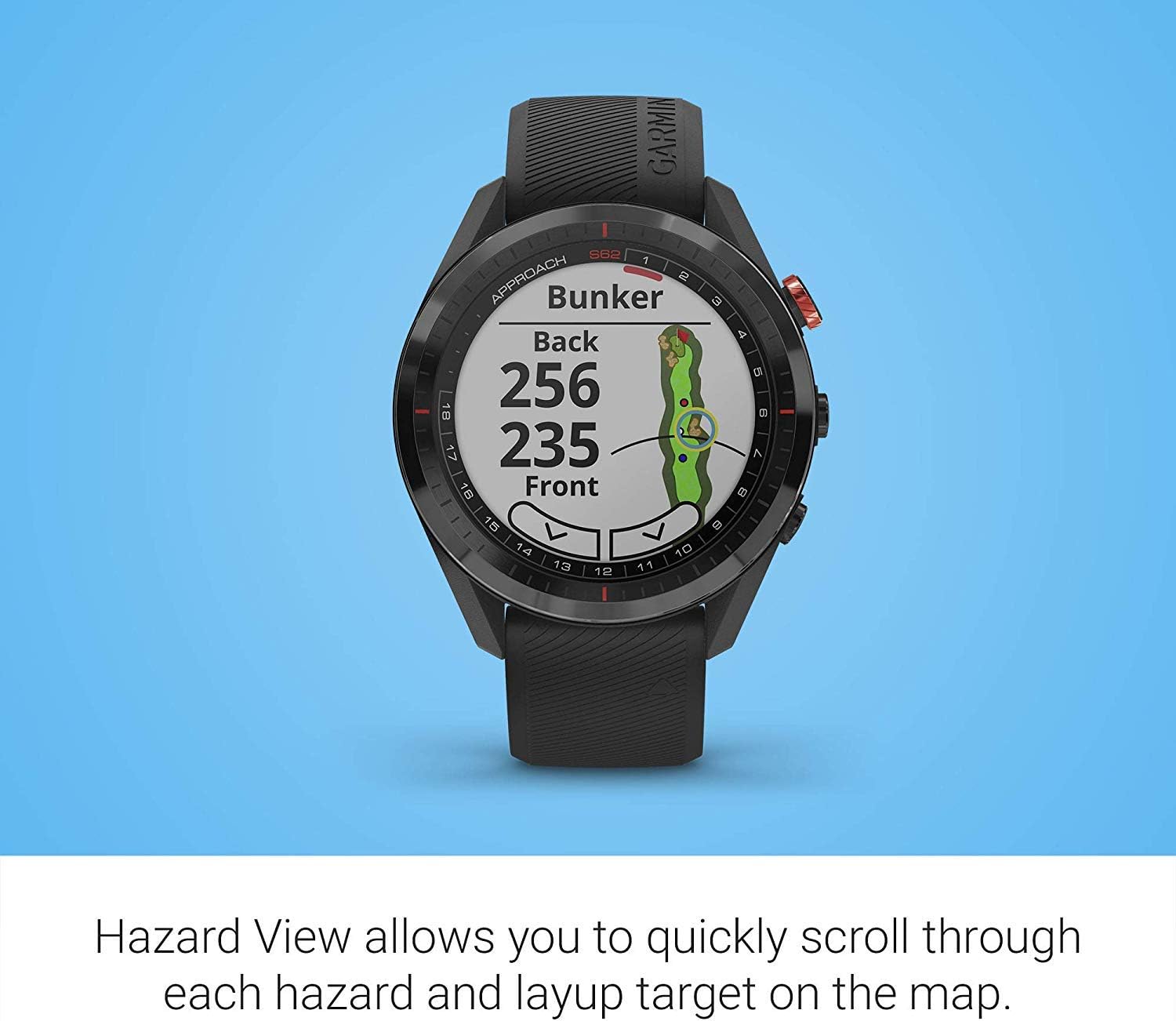
Image: The Garmin Approach S62 watch displaying the Hazard View, showing distances to the front and back of a bunker.
5.1.3. PlaysLike Distance
This feature adjusts yardage measurements to account for uphill and downhill shots, providing a more accurate distance to the target.
5.1.4. Màu xanh lá cây View
Màu xanh lá cây View feature allows you to manually position the pin for the day, providing precise distances to the front, middle, and back of the green, as well as to hazards and doglegs.

Image: The Garmin Approach S62 watch displaying the Green View, showing the green layout and allowing for manual pin positioning.
5.1.5. Course Selection and Scoring
The watch automatically detects nearby courses. Select your course and begin your round. The watch can track your score, shots, and other statistics, which can be reviewed on the watch or in the Garmin Golf app.
5.2. Tính năng thông minh
5.2.1. Garmin Pay
Garmin Pay is a contactless payment solution that allows you to make convenient payments directly from your watch. Set up your cards in the Garmin Connect app.
5.2.2. Thông báo
Receive smart notifications for calls, texts, and app alerts directly on your watch when paired with your smartphone.
5.3. Customizing Your Watch
You can customize watch faces, widgets, and settings through the watch menu or the Garmin Connect app to suit your preferences.
6. Bảo trì
6.1. Vệ sinh thiết bị
Thường xuyên lau chùi đồng hồ của bạn bằng một miếng vải mềm.amp vải. Tránh sử dụng hóa chất mạnh hoặc vật liệu mài mòn. Đảm bảo các điểm tiếp xúc sạc sạch và khô trước khi sạc.
6.2. Chăm sóc pin
To maximize battery life, avoid exposing the watch to extreme temperatures. Charge the device regularly, but avoid leaving it fully discharged for extended periods. The battery life is approximately 20 hours in GPS mode.
6.3. Cập nhật phần mềm
Keep your watch's software updated to ensure optimal performance and access to the latest features. Updates can be performed via the Garmin Connect app or Garmin Express on a computer.
KHAI THÁC. Xử lý sự cố
7.1. Các vấn đề chung
- Đồng hồ không bật nguồn: Ensure the watch is fully charged. Try connecting it to a power source.
- GPS không bắt được tín hiệu: Đảm bảo bạn đang ở một khu vực mở với tầm nhìn rõ ràng view of the sky. Allow several minutes for the watch to acquire satellites.
- Sự cố kết nối Bluetooth: Hãy đảm bảo Bluetooth đã được bật trên cả đồng hồ và điện thoại thông minh của bạn. Thử khởi động lại cả hai thiết bị và ghép nối lại chúng thông qua ứng dụng Garmin Connect.
- Inaccurate distances: Ensure the course map is up-to-date. Perform a software update if available.
- Màn hình cảm ứng không phản hồi: Try restarting the device. If the issue persists, contact Garmin support.
8. Thông số kỹ thuật
| Tính năng | Chi tiết |
|---|---|
| Trọng lượng sản phẩm | 1.25 pound |
| Kích thước sản phẩm | 1.85 x 0.58 x 1.85 inch |
| Số hiệu mẫu sản phẩm | wa001 |
| Pin | Cần có 2 pin Lithium Ion |
| Kích thước hiển thị | 3 inch |
| Thời lượng pin (Chế độ GPS) | 20 giờ |
| Lệnh bằng giọng nói | Màn hình cảm ứng |
| Công nghệ kết nối | Bluetooth Smart and ANT+ |
| Loại bản đồ | Bắc Mỹ |
| Kiểu lắp đặt | Gắn cổ tay |
| Kiểu hiển thị | Bộ nhớ trong pixel (MIP) có thể nhìn thấy được dưới ánh nắng mặt trời |
9. Bảo hành và Hỗ trợ
Để biết thông tin về bảo hành, vui lòng tham khảo tài liệu đi kèm sản phẩm hoặc truy cập trang web chính thức của Garmin. webĐể được hỗ trợ kỹ thuật, đăng ký sản phẩm và tìm hiểu thêm các tài nguyên khác, vui lòng truy cập trang web. garmin.com/support.
10. Video sản phẩm chính thức
Video: Official product video demonstrating key features and benefits of the Garmin Approach S62 Premium GPS Golf Watch.


