Chào mừng
Thank you for choosing the iTek GGC 30-inch Curved Monitor. This manual provides essential information for setting up, operating, and maintaining your new monitor. Please read it thoroughly before use to ensure optimal performance and safety.
Hướng dẫn an toàn quan trọng
To prevent damage and ensure safe operation, please observe the following precautions:
- Không để màn hình tiếp xúc với mưa, hơi ẩm hoặc nhiệt độ quá cao hoặc quá thấp.
- Đảm bảo thông gió tốt xung quanh màn hình. Không được chặn các lỗ thông gió.
- Chỉ sử dụng bộ chuyển đổi nguồn được cung cấp kèm theo màn hình.
- Tránh đặt vật nặng lên dây nguồn.
- Disconnect the power plug from the outlet if the monitor will not be used for a long period.
- Không nên tự ý sửa chữa màn hình. Hãy giao việc sửa chữa cho nhân viên kỹ thuật có chuyên môn.
- Lau sạch màn hình và casinLau sạch bằng khăn mềm, khô. Tránh sử dụng chất tẩy rửa có tính mài mòn hoặc dung môi.
Nội dung gói
Vui lòng kiểm tra gói hàng để biết các mục sau:
- iTek GGC 30-inch Curved Monitor
- Chân đế màn hình (Đế và Cổ)
- Bộ đổi nguồn và cáp
- Cáp DisplayPort
- Cáp HDMI
- Hướng dẫn sử dụng
- Vít lắp ráp chân đế
Sản phẩm trênview
The iTek GGC 30-inch Curved Monitor is designed for an immersive viewing experience, ideal for gaming and professional use. It features a WFHD (2560x1080) resolution, a high 200Hz refresh rate, and a rapid 1ms MPRT response time.

Key Performance Highlights
- 200Hz Refresh Rate & AMD FreeSync Technology: Experience ultra-smooth visuals and tear-free gaming with a high refresh rate and adaptive sync technology.

Figure 2: 200Hz Refresh Rate and AMD FreeSync Technology in action. - Flicker-Free & Low Blue Light: Designed to reduce eye strain during prolonged use, providing a more comfortable viewkinh nghiệm.

Figure 3: Flicker-Free and Low Blue Light features for eye comfort. - Thời gian phản hồi MPRT 1ms: Minimizes motion blur and ghosting, crucial for fast-paced games and action sequences.

Figure 4: Rapid Refresh Rate and Response Time for smooth visuals. - Màn hình cong 1800R: The immersive curvature brings the edges of the screen closer to your field of view, enhancing depth perception and reducing distortion.

Figure 5: 1800R Curved Display for an immersive experience.
Cài đặt
Lắp ráp chân đế
- Cẩn thận lấy màn hình và chân đế ra khỏi bao bì.
- Attach the stand neck to the monitor panel using the provided screws. Ensure it clicks securely into place or is fastened tightly.
- Attach the stand base to the stand neck, securing it with the thumb screw or screws from underneath.
- Đặt màn hình đã lắp ráp trên bề mặt phẳng, ổn định.
Kết nối màn hình của bạn
The iTek GGC monitor offers multiple connectivity options for various devices:
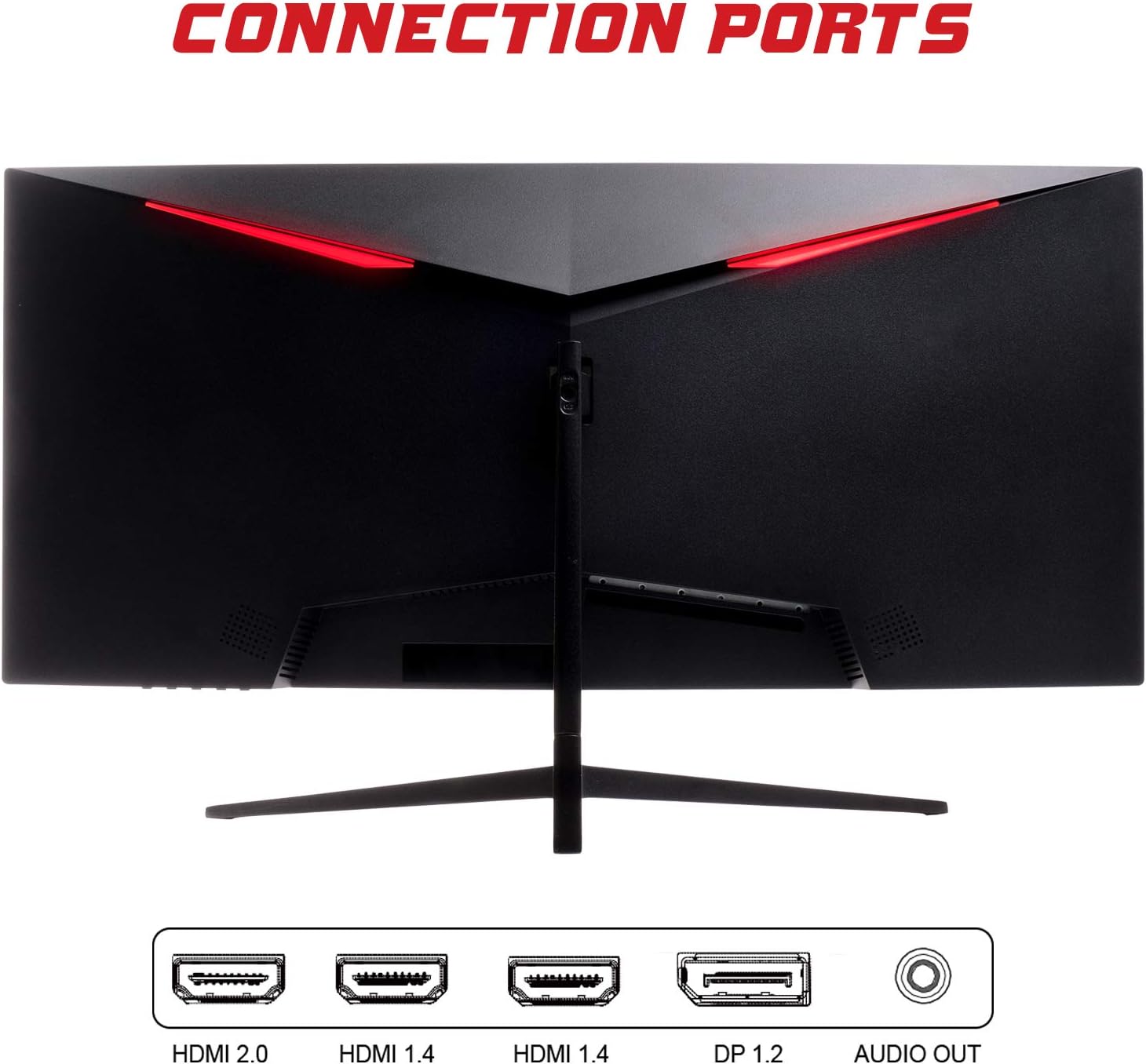
- DisplayPort (DP 1.2): For high-resolution and high-refresh-rate connections to your PC.
- HDMI (HDMI 2.0, HDMI 1.4 x2): Connect to PCs, gaming consoles, and other multimedia devices. HDMI 2.0 supports higher refresh rates at certain resolutions.
- Âm thanh ra: Kết nối loa ngoài hoặc tai nghe.
Sau khi kết nối cáp video, hãy kết nối bộ đổi nguồn với màn hình rồi kết nối với ổ cắm điện.
Vận hành màn hình
Bật/Tắt nguồn
Nhấn nút nguồn, thường nằm ở phía dưới hoặc phía sau màn hình, để bật hoặc tắt màn hình. Đèn báo nguồn sẽ sáng khi màn hình được bật.
Menu hiển thị trên màn hình (OSD)
The OSD menu allows you to adjust various monitor settings. Use the buttons on the monitor (typically on the back or bottom right) to navigate the menu.
- Cài đặt hình ảnh: Điều chỉnh độ sáng, độ tương phản, độ sắc nét và gamma.
- Cài đặt màu: Điều chỉnh nhiệt độ màu, sắc độ và độ bão hòa.
- Chọn đầu vào: Chuyển đổi thủ công giữa đầu vào DisplayPort và HDMI.
- Âm thanh: Adjust volume for the audio output.
- Cài đặt hệ thống: Access language, OSD timeout, and reset options.
- Tính năng chơi game: Enable/disable FreeSync, adjust response time overdrive, and activate crosshair overlays if available.
BẢO TRÌ
Bảo dưỡng đúng cách sẽ đảm bảo tuổi thọ của màn hình:
- Luôn tắt màn hình và rút dây nguồn trước khi vệ sinh.
- Dùng vải mềm, không xơ để lau nhẹ màn hình. Đối với các vết bẩn cứng đầu, hãy lau nhẹampLau vải bằng nước hoặc chất tẩy rửa màn hình nhẹ, không gây mài mòn.
- Lau sạch màn hình casinlau sạch bằng khăn mềm, khô.
- Avoid spraying liquids directly onto the screen or casing.
- Do not use benzene, thinner, ammonia-based cleaners, or abrasive materials.
Xử lý sự cố
Nếu bạn gặp sự cố với màn hình, vui lòng tham khảo bảng sau đây để biết các vấn đề và giải pháp thường gặp:
| Vấn đề | Giải pháp khả thi |
|---|---|
| Không có điện | Ensure the power cable is securely connected to the monitor and the power outlet. Check if the power outlet is working. |
| Không có tín hiệu / Màn hình trống | Verify the video cable (DisplayPort or HDMI) is firmly connected to both the monitor and your computer. Select the correct input source via the OSD menu. Ensure your computer is powered on and not in sleep mode. |
| Hình ảnh bị nhấp nháy hoặc không ổn định | Check the video cable connection. Try a different cable or port. Ensure your graphics card drivers are up to date. Adjust the refresh rate in your computer's display settings. |
| Chất lượng hình ảnh kém (mờ, màu sắc bị méo mó) | Adjust brightness, contrast, and color settings in the OSD menu. Ensure the display resolution on your computer matches the monitor's native resolution (2560x1080). |
| Không có âm thanh từ đầu ra âm thanh. | Check the audio cable connection to your speakers/headphones. Verify the volume setting in the OSD menu and on your computer. Ensure the correct audio output device is selected in your computer's sound settings. |
Thông số kỹ thuật
| Tính năng | Đặc điểm kỹ thuật |
|---|---|
| Thương hiệu | Lặp lại |
| Người mẫu | ITMC30V201FHD |
| Kích thước màn hình | 30 inch |
| Loại bảng điều khiển | VA |
| Độ cong | R1800 |
| Nghị quyết | 2560 x 1080 (WFHD) |
| Tỷ lệ khung hình | 21:9 |
| Tốc độ làm mới | 200Hz |
| Thời gian phản hồi | 1msMPRT |
| Độ sáng | 350 cd/m² |
| Tỷ lệ tương phản | 3000:1 |
| Viewgóc ing | 178° (Ngang/Dọc) |
| Kết nối | 1x DisplayPort 1.2, 1x HDMI 2.0, 2x HDMI 1.4, Audio Out |
| Tính năng đặc biệt | HDR Ready, FreeSync, Low Blue Light, Flicker Free, VESA Mountable |
| Kích thước sản phẩm (có chân đế) | 70.68 x 40.89 x 18.48cm |
| Cân nặng | 6.9kg |
Hiệu quả năng lượng

For detailed energy consumption information and product registration, please refer to the official EPREL database:
Bảo hành và Hỗ trợ
Your iTek GGC monitor is backed by a manufacturer's warranty. Please retain your proof of purchase for warranty claims.
- Guaranteed Product Support: This product is guaranteed to have support available until at least January 1, 2031.
- For technical support, warranty inquiries, or service requests, please contact iTek customer service through their official webtrang web hoặc thông tin liên hệ được cung cấp khi bạn mua hàng.


