1. Giới thiệu
This manual provides essential information for the safe and efficient operation of your InFocus IN112a SVGA DLP Projector. Please read it thoroughly before using the projector and retain it for future reference. The InFocus IN112a is designed to deliver clear and bright projections for various applications, featuring SVGA resolution, HDMI connectivity, and 3D support.
2. Thông tin an toàn
Tuân thủ các biện pháp phòng ngừa an toàn sau đây để tránh làm hỏng máy chiếu và đảm bảo an toàn cho người dùng:
- Do not look directly into the projector lens khi lamp đang bật. Ánh sáng mạnh có thể gây hại cho mắt.
- Đảm bảo thông gió thích hợp. Không chặn các lỗ thông gió.
- Only qualified service personnel should open the projector casing. Không có bộ phận nào bên trong mà người dùng có thể tự sửa chữa.
- Chỉ sử dụng dây nguồn được cung cấp kèm theo máy chiếu.
- Để máy chiếu tránh xa nước hoặc môi trường ẩm ướt.
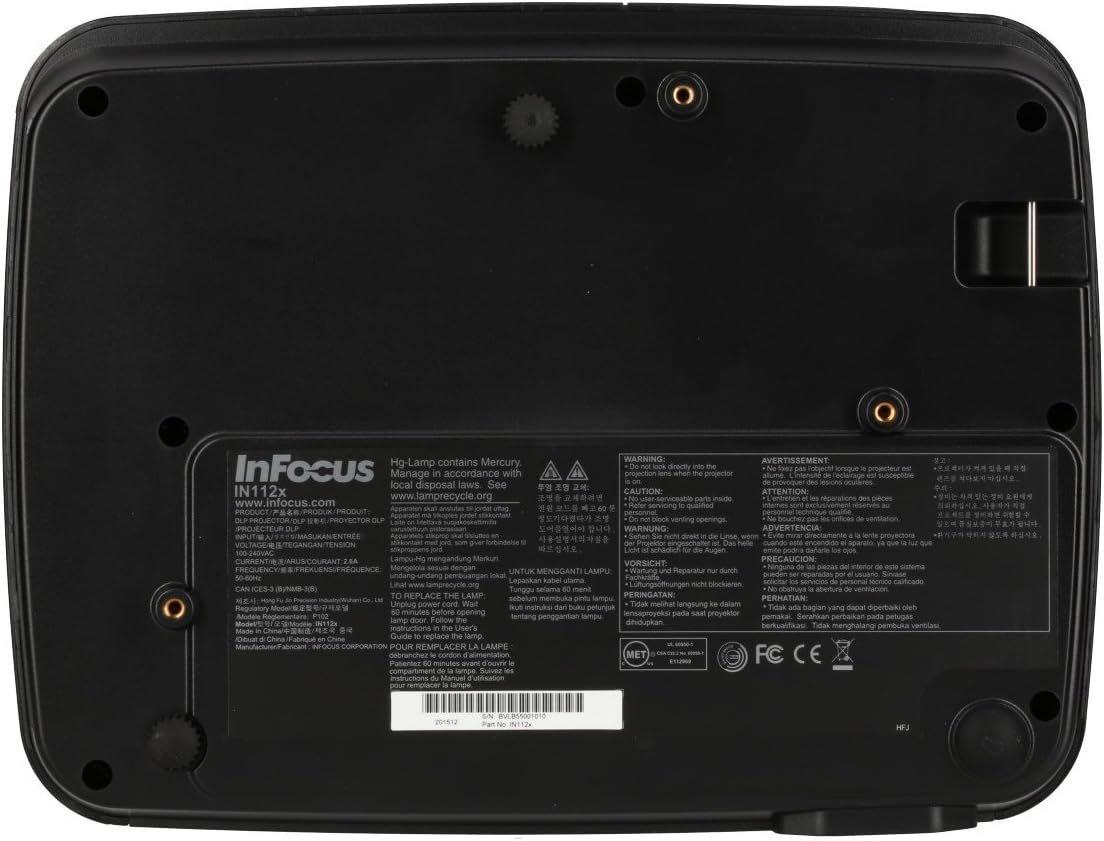
- Máy chiếu lamp Chứa thủy ngân. Vứt bỏ lamps according to local regulations. Visit www.lamptái chế.org để biết thêm thông tin.

Hình ảnh: Dưới cùng view of the InFocus IN112a projector, displaying various warning labels, regulatory compliance marks (like CE, FCC), and information regarding the mercury content in the lamp and recycling instructions.
3. Sản phẩm hếtview
3.1. Projector Dimensions

Hình ảnh: Mặt trước view of the InFocus IN112a projector, illustrating its physical dimensions. The projector measures approximately 292 mm in width, 220 mm in depth, and 108 mm in height.
3.2. Các nút điều khiển trên bảng điều khiển phía trên
Hình ảnh: Trên cùng view of the InFocus IN112a projector, highlighting the control panel. This panel includes buttons for power, menu access, source selection, and directional navigation for menu adjustments.
The top panel features buttons for power on/off, menu access, input source selection, and navigation arrows for adjusting settings within the on-screen display (OSD) menu. The focus and zoom rings are located near the lens.
3.3. Kết nối bảng điều khiển phía sau

Hình ảnh: Phía sau view of the InFocus IN112a projector, displaying its comprehensive array of connectivity ports. These include HDMI 1.4, two VGA inputs (Computer 1, Computer 2), a VGA monitor output, S-Video, Composite video, two 3.5mm stereo audio inputs, one 3.5mm stereo audio output, an RS232C control port, and a USB-B port.
The rear panel provides a variety of connection options:
- HDMI1.4: Dùng cho đầu vào video và âm thanh kỹ thuật số.
- VGA (Computer 1, Computer 2): Two inputs for analog computer signals.
- VGA Monitor Out: Để kết nối màn hình ngoài.
- Video tổng hợp: Dành cho đầu vào video có độ nét tiêu chuẩn.
- S-Video: For enhanced standard definition video input.
- Audio In (3.5mm x 2): For stereo audio input.
- Đầu ra âm thanh (3.5 mm): For stereo audio output to external speakers.
- RS232C: Để điều khiển máy chiếu thông qua máy tính hoặc hệ thống điều khiển.
- USB-B: Để cập nhật dịch vụ hoặc chương trình cơ sở.
4. Thiết lập
XUẤT KHẨU. Vị trí
Position the projector on a stable, flat surface or mount it securely to a ceiling. Ensure there is adequate space around the projector for ventilation. The distance from the screen will determine the image size. Refer to the specifications section for throw ratio details.
4.2. Kết nối nguồn
Connect the supplied power cord to the projector's power inlet and then to a grounded electrical outlet. The power LED will illuminate, indicating standby mode.
4.3. Kết nối các nguồn video
Connect your video source (e.g., computer, Blu-ray player, cable box) to the appropriate input port on the projector's rear panel using a compatible cable. For best quality, use the HDMI input.
- HDMI: Connect an HDMI cable from your source to the projector's HDMI port.
- VGA: Connect a VGA cable from your computer to either the Computer 1 or Computer 2 port.
- Composite/S-Video: Connect the respective cable for older video sources.
4.4. Kết nối âm thanh
If using VGA, Composite, or S-Video inputs, connect an audio cable from your source's audio output to one of the projector's 3.5mm Audio In ports. HDMI carries both video and audio, so a separate audio connection is not typically needed for HDMI sources.
4.5. Adjusting Focus and Zoom
After powering on the projector and displaying an image, rotate the Vòng lấy nét around the lens until the image is sharp and clear. Use the Vòng thu phóng to adjust the image size to fit your screen.
5. Hoạt động
5.1. Bật / Tắt nguồn
- Để bật nguồn: Press the Power button on the projector's top panel or the remote control. The power indicator will turn green.
- Để Tắt Nguồn: Press the Power button twice. The projector will enter a cooling cycle, and the power indicator will turn red (standby) once complete.
5.2. Chọn nguồn đầu vào
Press the "Source" button on the projector or remote control repeatedly to cycle through available input sources (HDMI, VGA1, VGA2, S-Video, Video). The projector will automatically detect an active signal if "Auto Source" is enabled in the menu.
5.3. Điều hướng menu
Press the "Menu" button to access the On-Screen Display (OSD) menu. Use the directional arrows to navigate through menu options and the "Enter" button to select. Press "Menu" again to exit.
5.4. 3D Content Playback
The IN112a supports 3D content from Blu-ray players, cable boxes, dish services (over HDMI), and PC-based 3D content at 120Hz. To view 3D content, you will need 144 Hz DLP Link 3D glasses (sold separately).
- Ensure your 3D source is connected via HDMI.
- Play 3D content from your source.
- Turn on your 144 Hz DLP Link 3D glasses. The projector should automatically detect the 3D signal.
6. Bảo trì
6.1. Cleaning the Projector Lens
Gently wipe the lens with a soft, lint-free cloth specifically designed for optical surfaces. Do not use abrasive cleaners or excessive force, as this can scratch the lens.
6.2. Tôiamp Thay thế
Máy chiếu lamp có tuổi thọ lên đến 10,000 giờ. Khi lamp Khi cuộc sống sắp kết thúc, một thông báo cảnh báo có thể xuất hiện, hoặc...amp indicator LED may illuminate. Refer to the full service manual for detailed lamp hướng dẫn thay thế. Cảnh báo: Các lamp chứa thủy ngân. Vứt bỏ l đã sử dụngamps according to local environmental regulations.
6.3. Vệ sinh bộ lọc không khí
Regularly clean the air filters to ensure proper ventilation and prevent overheating. Dust and debris can accumulate, reducing cooling efficiency. Gently remove the filter cover and clean the filter with a soft brush or vacuum cleaner. Replace the filter cover securely.
KHAI THÁC. Xử lý sự cố
| Vấn đề | Nguyên nhân có thể | Giải pháp |
|---|---|---|
| Không có hình ảnh nào được hiển thị |
|
|
| Hình ảnh bị mờ |
|
|
| Không có âm thanh |
|
|
| Máy chiếu quá nóng và tắt |
|
|
8. Thông số kỹ thuật
| Tính năng | Chi tiết |
|---|---|
| Số hiệu mẫu | IN112X |
| Công nghệ hiển thị | DLP |
| Độ phân giải gốc | SVGA (800 x 600) |
| Độ sáng | Lên đến 3200 Lumens |
| Tỷ lệ tương phản | 15,000:1 |
| Lamp Mạng sống | Lên đến 10,000 giờ |
| Kết nối | HDMI 1.4, VGA x 2, Composite video, S-Video, 3.5 mm stereo in x 2, 3.5mm stereo out, VGA monitor out, RS232C, USB-B |
| Hỗ trợ 3D | Yes (requires 144 Hz DLP Link 3D glasses) |
| Tỷ lệ ném | 1.9 - 2.09 |
| Kích thước sản phẩm | 14.25 x 12 x 7.75 inch (khoảng 36.2 x 30.5 x 19.7 cm) |
| Trọng lượng sản phẩm | 5.4 pound (khoảng 2.45 kg) |
| Sử dụng được khuyến nghị | Trong nhà/Ngoài trời |
| Tính năng đặc biệt | Loa tích hợp |
9. Bảo hành và Hỗ trợ
For warranty information and technical support, please refer to the documentation included with your purchase or visit the official InFocus webtrang web. Giữ lại bằng chứng mua hàng để yêu cầu bảo hành.


