
1. Sản phẩm hếtview
The Flywoo GOKU H743 PRO Mini 32bit 45A Stack is a high-performance flight controller (FC) and electronic speed controller (ESC) combo designed for FPV drones. This flagship stack combines powerful computing, stability, and ease of use for superior flight performance.
Các tính năng chính:
- Powerful Computing: Equipped with a 480MHz STM32H743 chip, enabling complex feature expansion and robust processing.
- Dual Gyro Stability: Features dual ICM42688P gyroscopes that reduce noise and latency, providing smoother and more precise flight control.
- Năng lượng hiệu quả: Dual 10V/5V 2A BECs ensure stable power delivery to all peripheral components.
- Giao diện I/O đa năng: Offers 7 UART ports and 8 motor outputs, supporting X8 multi-rotor configurations. Includes integrated dual-camera switching, VTX, GPS, receiver, and dual ESC interfaces.
- Multi-Firmware Compatibility: Fully compatible with popular open-source firmwares such as Betaflight, INAV, and Ardupilot.
- Dung lượng lưu trữ khổng lồ: A 512MB blackbox logs extensive flight data for detailed analysis and tuning.

Figure 1: Flywoo GOKU H743 PRO Mini Flight Controller (Top View)

Figure 2: Flywoo GOKU H743 PRO Mini Flight Controller Stack (Angled View)
2. Thông số kỹ thuật
2.1 GOKU H743 PRO Mini Flight Controller
| Tính năng | Đặc điểm kỹ thuật |
|---|---|
| BetaFlight Firmware | Flywoo H743PRO |
| INAV Firmware | Flywoo H743PRO |
| APM Firmware | Flywoo H743PRO |
| Đèn nháy | 512MB |
| Vũ trụ | STM32H743VIH6 |
| Con quay hồi chuyển | ICM42688P*2 |
| Hệ điều hành | AT7456E(LGA16) |
| áp kế | DPS310/SPL06 |
| Hộp đen | 512MB |
| UART | 1/2/3/4/6/7/8 |
| I2C | 1 |
| PWM | 12 |
| Đầu vào Voltage | 7.4V-26V / 2-6S LiPo/Lihv |
| BEC | 10V2A / 5V2A |
| Hỗ trợ máy ảnh | CAM1, CAM2 |
| Flight Controller Size | 32mm x 29mm x 8.4mm (Height including plug) |
| Lỗ gắn | M2 20x20mm |
| Cân nặng | 5.8g |

Figure 3: Flight Controller Dimensions (33mm x 30.4mm, 15.7mm height stacked)
2.2 GOKU G45M BL32 / AM32 4in1 ESC
| Tính năng | Đặc điểm kỹ thuật |
|---|---|
| Ủng hộ | BL32 / AM32 |
| Dshot Support | Dshot300, Dshot600, Dshot1200 |
| Tần số PWM | 24k-128k |
| Đầu vào Voltage | Lipo 3-6S |
| Dòng điện liên tục | 45A |
| Firmware (AM32) | AT32DEVF421 |
| Firmware (BL32) | GOKU_F4A32_PRO |
| Cân nặng | 6.4g |
3. Nội dung gói hàng
The following items are included in your GOKU H743 PRO Mini 32bit 45A Stack package:
- 1 x FC&ESC Connection Cable
- 1 x DJI O4/O4P Connection Cable
- 1 x Buzzer Connection Cable
- 1 x Receiver Connection Cable
- 1 x GPS Connection Cable
- 2 x Cáp kết nối máy ảnh
- 1 x XT30 Power Cable
- 5 x M3 Shock-Absorbing Ball
- 9 x M2 Shock-Absorbing Ball
- 1 x Capacitors
- 5 x Anti-Slip Nuts

Hình 4: Sơ đồ nội dung gói
4. Thiết lập và Cài đặt
4.1 Lắp đặt
The GOKU H743 PRO Mini Stack features M2 20x20mm mounting holes. Use the provided shock-absorbing balls and anti-slip nuts for secure and vibration-isolated mounting in your drone frame.
4.2 Sơ đồ đấu dây
Refer to the following diagrams for proper connection of your flight controller to various peripherals. Ensure all connections are secure and correctly oriented before powering on the device.

Figure 5: Flight Controller Wiring Diagram (USER1 PD10 Control-10V, USER2 PD11 Control-CAM)
- USER1 PD10 Control-10V: Connects to VTX for 10V power.
- USER2 PD11 Control-CAM: Connects to cameras for switching.
- RC: Receiver connection (TX2, RX2, 4.5V, GND).
- CAM1/CAM2: Camera inputs (GND, +5V, SCL1, SDA1, LED, BZ-).
- GPS: GPS module connection (TX4, RX4, 4.5V, GND).
- LED/BZ: LED and Buzzer connections (GND, +5V, LED, BZ-).
- Quyền lực: 3.3V, +5V, 10V, GND.

Figure 6: DJI O4 Air Unit Pro Connection Diagram
- Connect the DJI O4 Air Unit Pro to the designated port on the FC using the provided cable. Ensure correct pin alignment for BAT, GND, TX, RX, and SBUS.

Figure 7: General Peripheral Wiring Diagram
- This diagram illustrates connections for various peripherals including receiver, GPS, camera, VTX, and buzzer.
- Ensure power (5V, 10V, BAT) and ground (GND) connections are correct for each component.
- UART connections (TX/RX) should match the configured ports in your flight control software.
4.3 Nạp chương trình cơ sở
The GOKU H743 PRO Mini supports Betaflight, INAV, and Ardupilot firmwares. The dedicated firmware name for all platforms is Flywoo H743PRO. You can find and flash this firmware using the respective configurator software (e.g., Betaflight Configurator, INAV Configurator).

Figure 8: Multi-Firmware Compatibility
5. Hoạt động
5.1 Bộ điều khiển bay
Once the FC is correctly wired and flashed with your preferred firmware (Betaflight, INAV, or Ardupilot), connect it to your computer via USB. Use the corresponding configurator software to perform initial setup, calibrate sensors, configure modes, and tune PID settings for optimal flight performance.
5.2 Electronic Speed Controller (ESC)
The GOKU G45M 4in1 ESC supports BL32 and AM32 firmwares. Ensure your ESC firmware is compatible with your FC firmware and motor protocol (Dshot300, Dshot600, Dshot1200). Calibrate your ESCs if required by your chosen firmware.
5.3 10V Switchable BEC
The integrated 10V BEC can be activated or deactivated via user modes, which is crucial for preventing VTX overheating during drone debugging or specific flight conditions. Configure this setting within your flight control software.
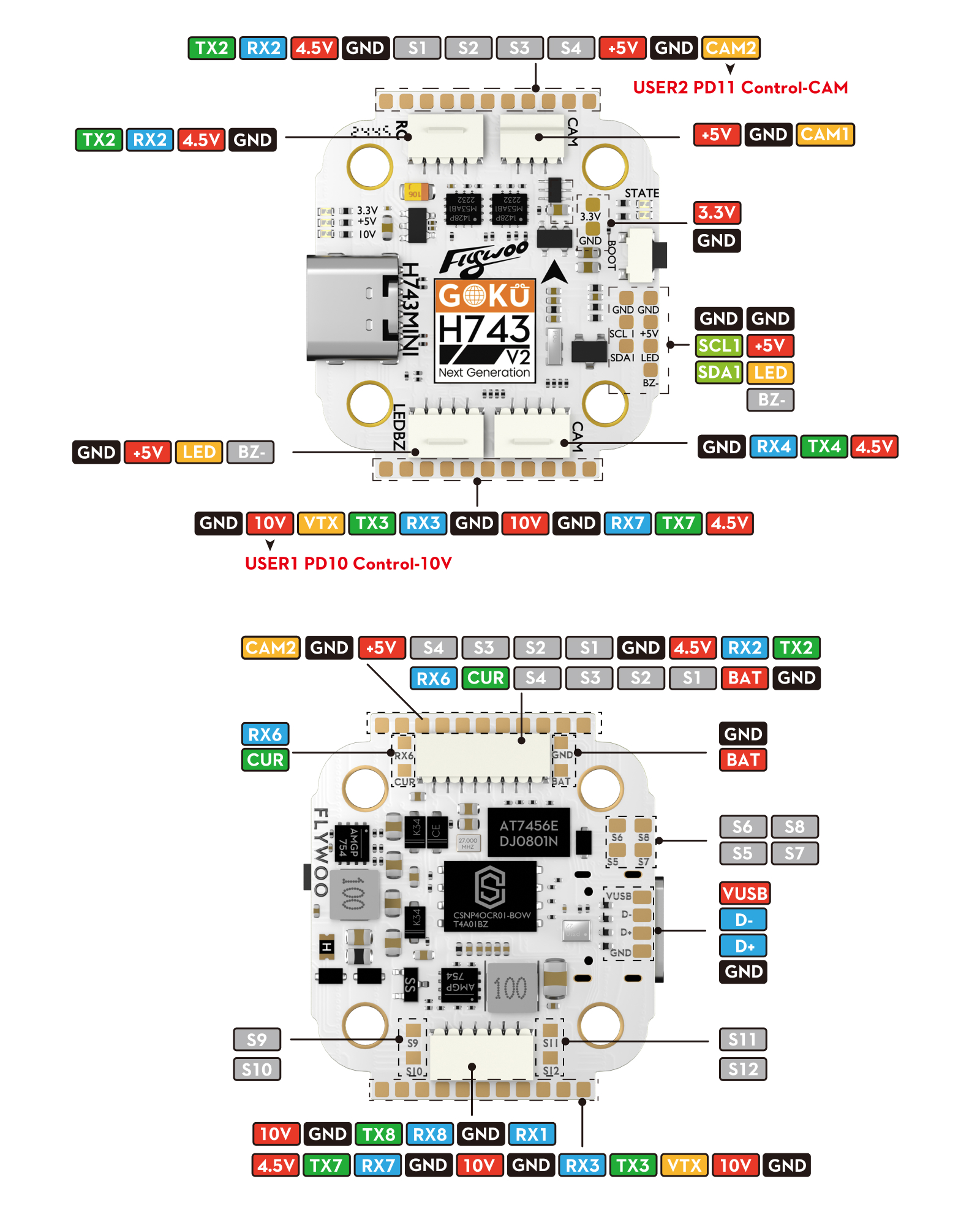
Figure 9: 10V Switchable BEC Configuration
5.4 Chuyển đổi giữa hai camera
The FC supports built-in electronic switching between two cameras (CAM1, CAM2). This function is primarily supported for analog VTX systems and is compatible with both PAL and NTSC formats. Configure camera switching via user modes in your flight control software.

Figure 10: Dual Camera Switching Configuration
6. Bảo trì
- Kiểm tra thường xuyên: Periodically check all solder joints and connections for any signs of damage or looseness.
- Độ sạch sẽ: Keep the FC and ESC free from dust, dirt, and moisture. Use compressed air or a soft brush for cleaning.
- Cập nhật chương trình cơ sở: Regularly check for and apply the latest firmware updates for both the FC and ESC to ensure optimal performance and access to new features.
- Bảo vệ vật lý: Ensure the stack is adequately protected from crashes and impacts within your drone frame.
KHAI THÁC. Xử lý sự cố
- No Power/Boot Issues: Double-check all power connections, including the XT30 power cable and battery. Ensure the input voltage is within the specified 2-6S LiPo/Lihv range.
- Connection Problems (USB): If the FC is not recognized by your computer, try a different USB cable or port. Ensure necessary drivers are installed.
- Chuyến bay không ổn định: Verify that the dual ICM42688P gyroscopes are properly calibrated in your flight control software. Review blackbox logs (512MB storage) for detailed flight data analysis to identify issues.
- Hiện tượng quá nhiệt VTX: Utilize the 10V switchable BEC feature to manage power to your VTX, especially during extended debugging sessions.
- Camera Switching Not Working: Confirm that your VTX is an analog type, as dual camera switching is primarily supported for analog VTX systems. Check camera connections and software configuration.
- Firmware Flashing Errors: Ensure you are using the correct firmware (Flywoo H743PRO) for your chosen platform (Betaflight, INAV, Ardupilot) and that the FC is in DFU mode if required.
- Các vấn đề về ESC/Động cơ: Check motor connections, ESC calibration, and ensure the correct Dshot protocol is selected in the FC firmware.
8. Câu hỏi thường gặp (FAQ)
- Q: Is there a dedicated FLYWOO BetaFlight / APM / INAV firmware?
- A: Yes. The firmware name is consistently 'Flywoo H743PRO' across all supported platforms. You can find and use this specific firmware name within the respective configurator software.
- Q: Is firmware compatibility limited?
- A: No, the GOKU H743 PRO Mini fully supports open-source firmwares like Betaflight, INAV, and Ardupilot (APM), offering full compatibility for PID tuning, OSD customization, and other features.
- Q: How do dual gyroscopes enhance stability?
- A: The dual ICM-42688P gyroscopes utilize a redundancy verification algorithm and dynamic temperature compensation technology. This reduces attitude drift to within ±0.03°/s, ensuring extremely high precision in both dynamic and static flight conditions.
- Q: How long does the black box storage support for recording?
- A: The 512MB storage space is capable of recording data for up to 200 flights, with each flight lasting 5 minutes or more.
- Q: Are the dual camera interfaces compatible with mainstream video transmitters?
- A: The dual camera switching function is primarily supported for analog VTX systems. Compatibility with specific digital VTX systems may vary and should be verified with the VTX manufacturer's documentation.
- Q: Can I swap out my F722 FC for this H743?
- A: While the H743 offers enhanced performance, direct swapping depends on the pinout and mounting compatibility with your existing stack or frame. Always verify wiring and mounting hole patterns before attempting a swap.
9. Mẹo sử dụng
- Leverage Blackbox Data: Utilize the 512MB blackbox storage to record flight data. This is invaluable for fine-tuning PID settings, diagnosing flight anomalies, and improving overall drone performance.
- Optimize BEC Usage: Tiến lên phía trướctage of the 10V switchable BEC. Configure it to activate only when necessary (e.g., during flight, not during prolonged bench testing) to prevent VTX overheating and conserve power.
- Firmware Consistency: For the best performance and fewest issues, ensure that both your Flight Controller and ESC are running compatible and up-to-date firmware versions.
- Kiểm tra cập nhật: Regularly visit the Flywoo official website or the respective firmware project pages (Betaflight, INAV, Ardupilot) for the latest firmware releases and documentation.
10. Bảo hành và Hỗ trợ
Flywoo products are manufactured to high standards. For warranty claims or technical support, please contact your retailer or Flywoo customer service directly. Keep your proof of purchase for any warranty-related inquiries.
Please note that damage caused by improper installation, misuse, or unauthorized modifications may void the product warranty.