1. Kirish
Thank you for choosing the TCL 32V4C 32-inch HD Smart QLED Android TV. This manual provides essential information for setting up, operating, and maintaining your new television. Please read it thoroughly before use and keep it for future reference.
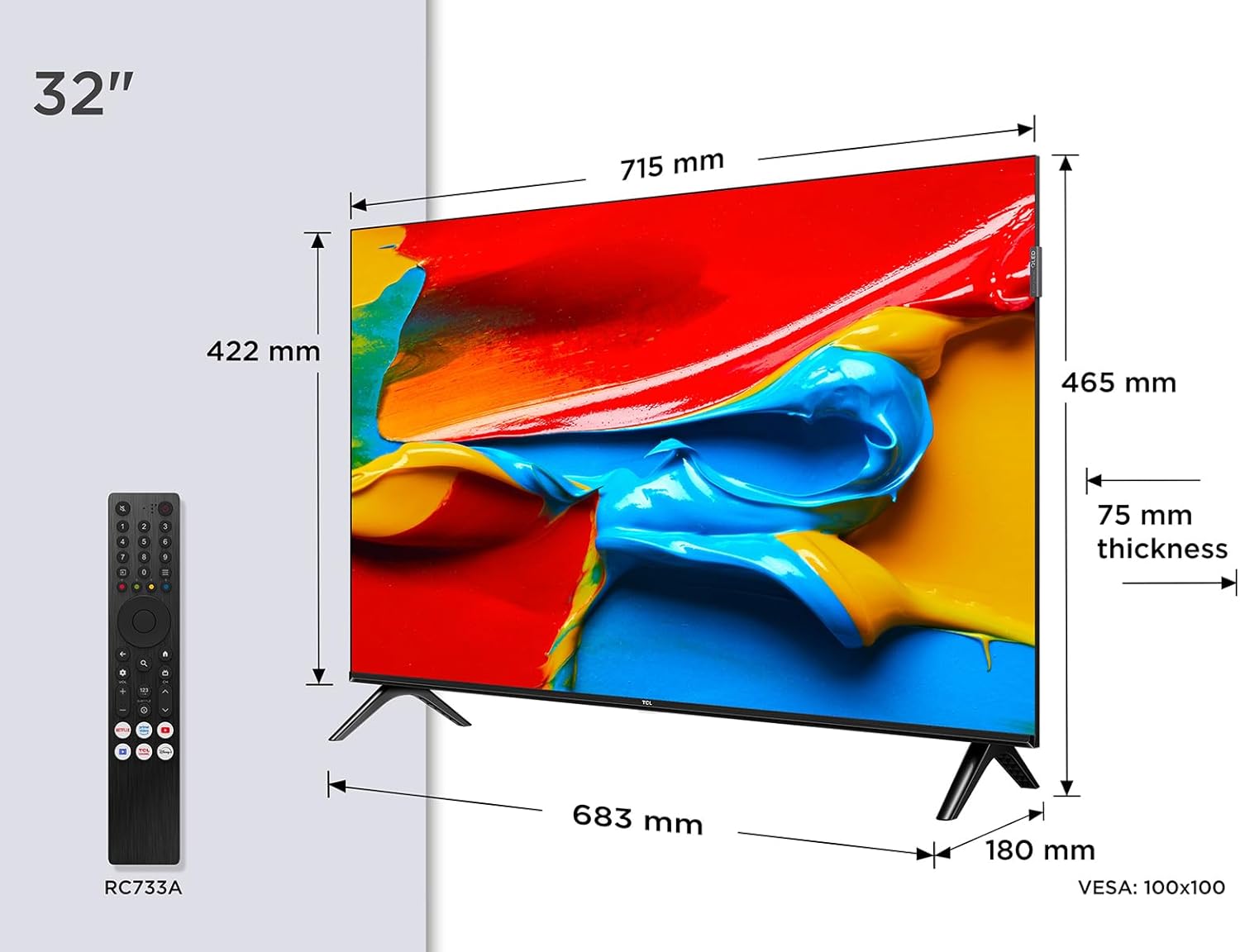
Rasm: old view of the TCL 32V4C 32-inch HD Smart QLED Android TV.
2. Xavfsizlik ma'lumotlari
Yong'in, elektr toki urishi va shikastlanish xavfini kamaytirish uchun ushbu mahsulotni ishlatishda doimo asosiy xavfsizlik choralariga rioya qiling.
- Televizorni yomg'ir yoki namlik ta'sirida qoldirmang.
- Shamollatish teshiklarini to'smang.
- Elektr shnuri uchun to'g'ri erga ulanganligiga ishonch hosil qiling.
- Televizorni to'g'ridan-to'g'ri quyosh nuri, issiqlik manbalari va ochiq olovdan uzoqroq tuting.
- Faqat ishlab chiqaruvchi tomonidan belgilangan qo'shimchalar/aksessuarlar foydalaning.
- Chaqmoqli bo'ron paytida yoki uzoq vaqt foydalanilmaganda televizorni elektr tarmog'idan uzing.
3. Qutida nima bor
Qadoqdan chiqarayotganda, quyidagi barcha narsalar mavjudligiga ishonch hosil qiling:
- TCL 32V4C 32-inch HD Smart QLED Android TV
- Masofadan boshqarish
- Quvvat kabeli
- Stand (with screws)
- Foydalanuvchi uchun qo'llanma (ushbu hujjat)
4. Sozlash
4.1. Stendni o'rnatish
Place the TV screen-down on a soft, flat surface. Attach the stand bases to the bottom of the TV using the provided screws. Ensure the stand is securely fastened.
4.2. Devorga o'rnatish (ixtiyoriy)
If you choose to wall-mount your TV, please refer to the instructions provided with your wall-mount bracket. The TV supports VESA 100x100mm mounting. Ensure the wall mount is installed by qualified personnel.

Image: TCL 32V4C TV placed on its stand.
4.3. Qurilmalarni ulash
Connect your external devices (e.g., cable box, Blu-ray player, gaming console) to the TV's ports. The TCL 32V4C features multiple connectivity options including HDMI, USB, Ethernet, and Wi-Fi.

Image: Close-up of the TCL 32V4C TV's connectivity ports, including HDMI, USB, Optical, Cable, Satellite, AV Input, Headphone, and CI Slot.
- HDMI: Yuqori aniqlikdagi qurilmalarni ulang.
- USB: USB drayverlardan media tinglash uchun.
- Ethernet/Wi-Fi: For internet connection and Smart TV features.
- Antenna/Sun'iy yo'ldosh: Connect your antenna or satellite dish for broadcast TV.
4.4. Dastlabki yoqish va sozlash
Plug the power cable into the TV and a power outlet. Press the power button on the remote control. Follow the on-screen instructions to select your language, connect to a network, and complete the initial setup of Android TV.
5. Foydalanish bo'yicha ko'rsatmalar
5.1. Android TV Features
Your TCL 32V4C TV comes with Android TV, providing access to a vast library of content. You can stream from popular services, use Google Cast to mirror content from your smart devices, and utilize Google Home compatibility for voice control.

Image: Screenshot of the Android TV interface displaying various streaming applications and content.
5.2. Picture Quality (QLED & HDR)
The QLED technology uses quantum dots to deliver intense, vibrant colors and exceptional visual perception. Combined with Direct LED backlighting, this ensures improved image quality and brightness. HDR (High Dynamic Range) further enhances contrast and detail, especially in bright and dark scenes.

Image: Visual explanation of TCL QLED technology, highlighting vibrant colors compared to traditional displays.

Image: Demonstrates the enhanced detail and contrast provided by HDR 10 technology.
5.3. Audio Quality (Dolby Audio)
Experience high-quality, immersive sound thanks to the integrated Dolby Audio processing. This technology ensures clear and detailed audio for all your entertainment, from movies to sports.

Image: Visual representation of immersive Dolby Audio technology.
5.4. Multiple Viewkirish usullari
The TV offers personalized viewing modes to optimize your experience for different content types:
- O'yin rejimi: O'yin tajribasini yanada moslashuvchan qilish uchun kirish kechikishini kamaytiradi.
- Sport rejimi: Enhances motion clarity and color for live sports.
- Film rejimi: Optimizes picture settings for cinematic viewing.

Image: Depiction of various viewing modes (Game, Sports, Movie) available on the TV.
5.5. Rasmiy mahsulot videosi
Video: An official TCL video showcasing features like QLED, HDR, Android TV, and Slim Design. This video provides a visual overview of the TV's capabilities and user experience.
6. Xizmat ko'rsatish
6.1. Ekranni tozalash
Ekranni yumshoq, tuklarsiz mato bilan sekin artib oling. O'jar belgilar uchun engil dampMatoni suv yoki maxsus ekran tozalagich bilan arting. Hech qachon suyuqlikni to'g'ridan-to'g'ri ekranga purkamang.
6.2. Shkafni tozalash
Wipe the TV cabinet with a soft, dry cloth. Avoid using abrasive cleaners or solvents that may damage the finish.
6.3. Kabellarni boshqarish
Ensure all cables are neatly organized and not tangled to prevent damage or accidental disconnections.
7. Muammolarni bartaraf qilish; nosozliklarni TUZATISH
Televizoringiz bilan bog'liq muammolarga duch kelsangiz, quyidagi umumiy muammolar va echimlarga murojaat qiling:
| Muammo | Mumkin yechim |
|---|---|
| Quvvat yo'q | Check if the power cable is securely connected and the power outlet is working. |
| Rasm/tovush yo'q | Verify input source, check cable connections, and ensure volume is not muted. |
| Masofadan boshqarish pulti ishlamayapti | Replace batteries, ensure no obstructions between remote and TV, and check remote sensor. |
| Rasm sifati past | Adjust picture settings (brightness, contrast, sharpness), check antenna/cable signal. |
| Wi-Fi tarmog‘iga ulanib bo‘lmadi | Restart your router, check Wi-Fi password, or try a wired Ethernet connection. |
8. Texnik shartlar
Detailed technical specifications for the TCL 32V4C TV:
| Xususiyat | Tavsif |
|---|---|
| Brend | TCL |
| Model raqami | 5901292526764 |
| Ekran o'lchami | 32 dyuym |
| Ekran texnologiyasi | QLED |
| Rezolyutsiya | 2K (HD) |
| Yangilanish tezligi | 60 Gts |
| Maxsus xususiyatlar | QLED, Android TV, HDR |
| Ulanish texnologiyasi | Bluetooth, Ethernet, HDMI, USB, Wi-Fi |
| Aspekt nisbati | 16:9 |
| Mahsulot o'lchamlari | 18 x 71.5 x 46.5 sm |
| Og'irligi | 5 kg |
| Energiya samaradorligi reytingi | F |
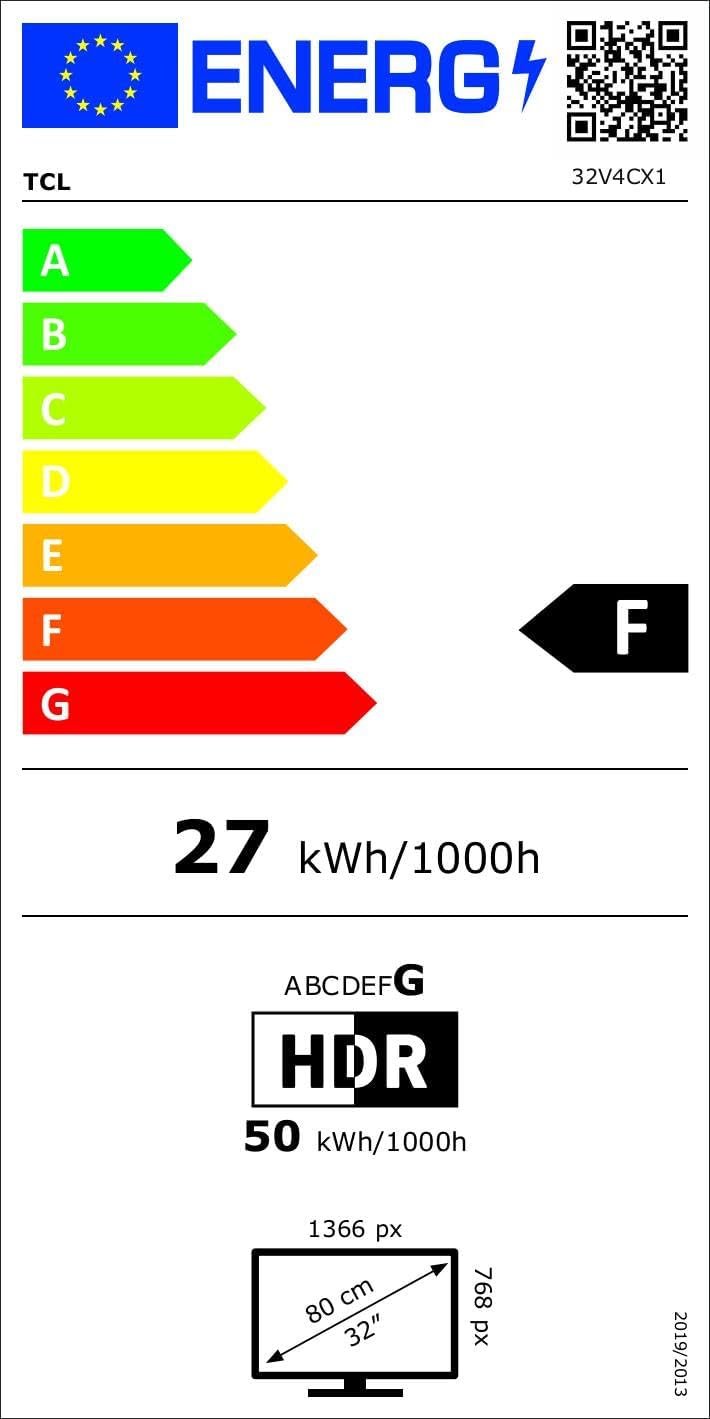
Image: Energy efficiency label for the TCL 32V4C TV, showing a rating of F and energy consumption details. For more details, visit the EPREL ma'lumotlar bazasi.
9. Kafolat va qo'llab-quvvatlash
Your TCL 32V4C TV comes with a 2-year general warranty from the manufacturer. For specific warranty terms, service, or technical support, please refer to the warranty card included with your product or visit the official TCL support websayt.
For spare parts and software/firmware updates, availability is guaranteed for 8 years from the date of market introduction.