1. Kirish
This manual provides essential information for the safe and efficient operation of your Philips Evnia 24M2N3200L 24-inch Gaming Monitor. Please read this manual thoroughly before using the product and retain it for future reference.
2. Xavfsizlik ma'lumotlari
Monitorga zarar yetkazmaslik va foydalanuvchi xavfsizligini ta'minlash uchun quyidagi xavfsizlik choralariga rioya qiling:
- Monitorni yomg'ir yoki namlik ta'sirida qoldirmang.
- Monitorni ochmang casing; barcha xizmatlarni malakali xodimlarga topshiring.
- Monitor atrofida to'g'ri shamollatilishini ta'minlang.
- Faqat monitor bilan birga kelgan quvvat adapteridan foydalaning.
- Elektr shnuri ustiga og'ir narsalarni qo'yishdan saqlaning.
- Ekranni yumshoq, tuksiz mato bilan tozalang. Suyuq tozalagichlarni to'g'ridan-to'g'ri ekranda ishlatmang.
3. Paket tarkibi
Paketda barcha elementlar mavjudligiga ishonch hosil qiling:
- Philips Evnia 24M2N3200L Monitor
- Monitor stend (taglik va bo'yin)
- Quvvat kabeli
- HDMI kabeli
- DisplayPort kabeli
- Foydalanuvchi uchun qo'llanma (ushbu hujjat)

Image: The retail packaging box for the Philips Evnia 24M2N3200L monitor, showing the product name and design awards.
4. Sozlash
4.1. Stendni yig'ish
- Chizmalarning oldini olish uchun monitorni yuzini pastga qaratib yumshoq va toza yuzaga qo'ying.
- Attach the stand neck to the monitor's VESA mounting area. Secure with screws if provided.
- Attach the stand base to the bottom of the stand neck. Tighten the thumb screw or screws until secure.

Rasm: orqa view of the monitor showing the attached stand and the VESA mounting area.
4.2. Kompyuterga ulanish
Monitor HDMI va DisplayPort ulanishlarini qo'llab-quvvatlaydi.
- Quvvat ulanishi: Quvvat kabelini monitorning quvvat manbaiga, so'ngra quvvat manbaiga ulang.
- Video ulanish:
- For HDMI: Connect one end of the HDMI cable to the monitor's HDMI port and the other end to your computer's HDMI output.
- For DisplayPort: Connect one end of the DisplayPort cable to the monitor's DisplayPort and the other end to your computer's DisplayPort output.
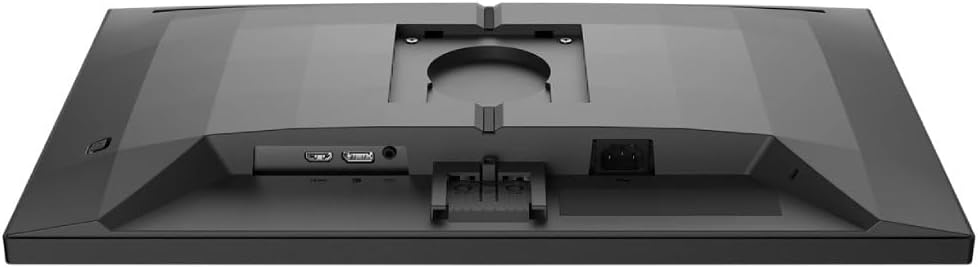
Rasm: batafsil view of the monitor's rear panel, showing the HDMI, DisplayPort, and power input ports.
5. Monitorni ishlatish
5.1. Quvvatni yoqish/o‘chirish
Press the power button, usually located on the bottom right or rear of the monitor, to turn it on or off. The power LED will indicate the monitor's status.
5.2. Ekrandagi displey (OSD) menyusi
The OSD menu allows you to adjust various monitor settings. Use the joystick or buttons (refer to your monitor's specific layout) to navigate and select options.
- Rasm: Yorqinlik, kontrast, aniqlik va gammani sozlang.
- Rang: Select color temperature, sRGB mode, or user-defined color settings.
- Audio: Agar monitorda o'rnatilgan karnaylar yoki audio chiqishi bo'lsa, ovoz balandligini boshqaring.
- Kirish: Manually select the input source (HDMI, DisplayPort).
- Oʻyin: Access specific gaming features like SmartImage Game, Low Input Lag, and Adaptive Sync settings.
- OSD sozlamalari: OSD tilini, shaffoflikni va kutish vaqtini sozlang.

Image: The Philips Evnia 24M2N3200L monitor showcasing a high-quality image from a video game, highlighting its display capabilities.
6. Xizmat ko'rsatish
6.1. Monitorni tozalash
- Tozalashdan oldin har doim monitorni elektr tarmog'idan uzing.
- Use a soft, clean, lint-free cloth to gently wipe the screen.
- O'jar belgilar uchun engil dampen the cloth with water or a mild, non-abrasive screen cleaner. Do not spray liquids directly onto the screen.
- Monitorni tozalang casing yumshoq, quruq mato bilan.
6.2. Saqlash
If storing the monitor for an extended period, disconnect all cables and pack it in its original packaging to protect it from dust and physical damage. Store in a cool, dry place.
7. Muammolarni bartaraf qilish; nosozliklarni TUZATISH
Agar siz monitor bilan bog'liq muammolarga duch kelsangiz, quyidagi umumiy muammolar va echimlarga murojaat qiling:
| Muammo | Mumkin sabab | Yechim |
|---|---|---|
| Ekranda rasm yo'q | Power cable disconnected, video cable loose, incorrect input source. | Check power and video cable connections. Select correct input source via OSD. |
| Tasvir miltillashi | Loose video cable, graphics card issue, refresh rate mismatch. | Ensure video cable is secure. Update graphics drivers. Adjust refresh rate in OS settings. |
| Ranglar noto'g'ri | Incorrect color settings, faulty cable. | Reset color settings in OSD. Try a different video cable. |
| Monitor yoqilmaydi | No power, faulty power adapter. | Check power outlet and cable. Ensure power adapter is functioning. |
8. Texnik shartlar
| Xususiyat | Tafsilot |
|---|---|
| Model raqami | 24M2N3200L |
| Ekran o'lchami | 24 dyuym |
| Panel turi | IPS |
| Rezolyutsiya | 1920 x 1080 (Full HD) |
| Aspekt nisbati | 16:9 |
| Yangilanish tezligi | 180Hz |
| Javob vaqti | 0.5 ms (MPRT) |
| Ulanish | 1x HDMI, 1x DisplayPort |
| Quvvat manbai | Elektr quvvati |
| Mahsulot o'lchamlari (stend bilan) | 19.5 x 54 x 43.3 sm (Chuqurlik x Kenglik x Balandlik) |
| Mahsulot og'irligi (stend bilan) | 4.96 kilogramm |
| Ishlab chiqaruvchi | Philips |
9. Kafolat va qo'llab-quvvatlash
Kafolat haqida ma'lumot va texnik yordam uchun, iltimos, paketingizga kiritilgan kafolat kartasiga murojaat qiling yoki rasmiy Philips qo'llab-quvvatlash xizmatiga tashrif buyuring. websayt. Kafolat da'volari uchun xarid kvitansiyasini xaridni tasdiqlovchi hujjat sifatida saqlang.
Onlayn qo'llab-quvvatlash: www.philips.com/support