1. Kirish
The EZVIZ C3W Pro is a high-performance wired outdoor smart Wi-Fi security camera designed to provide reliable surveillance for your property. Featuring 1080p Full HD video, advanced color night vision, and AI-powered human shape detection, this camera offers comprehensive monitoring day and night. Its IP67 weather-resistant design ensures durability in various outdoor conditions. The camera also supports two-way talk, local storage via MicroSD card, and seamless integration with smart home ecosystems like Amazon Alexa and Google Assistant.

Figure 1: EZVIZ C3W Pro Outdoor Smart Wi-Fi Security Camera.
2. Qutida nima bor
Upon unboxing your EZVIZ C3W Pro camera, verify that all the following items are included:
- EZVIZ C3W Pro Camera
- Quvvat adapteri
- O'rnatish bazasi
- O'rnatish vintlari va devor vilkalari
- Matkap shabloni
- Waterproof Kit for Network Cable
- Tez boshlash uchun qo'llanma

Figure 2: Included items in the EZVIZ C3W Pro package.
3. Sozlash
3.1. Jismoniy o'rnatish
- O'rnatish joyini tanlang: Shaffof havo bilan ochiq havoda joy tanlang view of the area you wish to monitor. Ensure the camera is within Wi-Fi range and has access to a power outlet. The camera is IP67 rated for dust and water resistance.
- Use the Drill Template: Place the provided drill template on the desired mounting surface and mark the screw holes.
- Burg'ilash teshiklari: Drill pilot holes at the marked positions. Insert the wall plugs if mounting on masonry or concrete.
- Baza o'rnatish: Kameraning o'rnatish asosini berilgan vintlar yordamida yuzaga mahkamlang.
- Kamerani ulang: Attach the camera to the mounting base and adjust its angle for optimal coverage.
Figure 3: EZVIZ C3W Pro camera mounted for outdoor use.
3.2. MicroSD karta o'rnatish (ixtiyoriy)
For local video storage, you can install a MicroSD card (up to 256GB). Locate the MicroSD card slot on the camera, typically protected by a cover secured with screws. Carefully open the cover, insert the MicroSD card, and then re-secure the cover to maintain the camera's weather resistance.
3.3. Yoqish
Connect the camera to the power adapter and plug it into a suitable outdoor power outlet. The camera will power on and its indicator light will begin to flash blue, indicating it's ready for network configuration.
3.4. EZVIZ App Configuration
- EZVIZ ilovasini yuklab oling: Download and install the EZVIZ app from the App Store (iOS) or Google Play Store (Android).
- Hisob ochish: Launch the app and register for a new EZVIZ account if you don't already have one.
- Qurilma qo'shish: Log in to your EZVIZ account. Tap the '+' icon in the upper right corner of the home screen to add a new device. Select 'Cameras'.
- QR kodini skanerlash: Scan the QR code located on the camera body or on the Quick Start Guide.
- Wi-Fi tarmog'iga ulanish: Follow the in-app prompts to connect your camera to your 2.4GHz Wi-Fi network. Ensure your phone is connected to the same 2.4GHz Wi-Fi network during this process.
- Toʻliq sozlash: Ulangandan so'ng, siz kamerangizga nom berishingiz va dastlabki sozlamalarni o'zgartirishingiz mumkin.
Video 1: EZVIZ C3W Pro Setup Guide. This video demonstrates the step-by-step setup process for the camera.
4. Kamerani ishlatish
4.1. Jonli View & Basic Controls
Access the live video feed from your camera through the EZVIZ app. From the live view interfeysi, siz:
- Suratga olish: Jonli tasmadan harakatsiz tasvirlarni oling.
- Video yozib olish: Manually record video clips.
- Raqamli kattalashtirish: Zoom in up to 8x to view tafsilotlar.
4.2. Ikki tomonlama suhbat
The C3W Pro features a built-in microphone and speaker, allowing for two-way communication. Tap the 'Talk' button in the app to speak through the camera and hear responses from the monitored area.
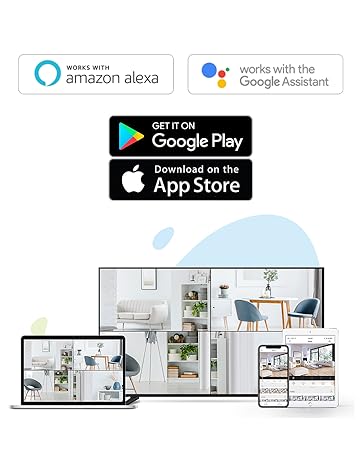
Figure 4: Using the two-way talk feature via the EZVIZ app.
4.3. Tungi ko'rish rejimlari
Kamera uchta tungi ko'rish rejimini taklif etadi:
- IR Mode (Black & White): Standard infrared night vision for clear black and white images in low light.
- Rang rejimi: Utilizes built-in spotlights to provide full-color night vision, even in complete darkness.
- Aqlli tungi ko'rish: By default, the camera operates in black and white mode. When motion is detected, it automatically switches to color night vision and activates the spotlights.

Figure 5: Night vision modes: Color Night Vision and Black & White Vision.
4.4. Harakatni aniqlash va ogohlantirishlar
The C3W Pro uses AI-powered human shape detection to minimize false alarms. You can customize detection settings:
- Human Shape Detection: Enable this feature to only receive alerts when a human shape is detected.
- Harakatni aniqlash maydoni: Kamera ichidagi aniq zonalarni aniqlang view where motion detection will be active. This helps to ignore irrelevant movements (e.g., trees swaying).
- Harakatni aniqlash sezuvchanligi: Adjust the sensitivity level to fine-tune how easily motion triggers an alert.
- Faol mudofaa: When motion is detected, the camera can trigger a loud siren and flash its spotlights to deter intruders.
Figure 6: AI-Powered Person Detection in action.
4.5. Smart Home integratsiyasi
The EZVIZ C3W Pro is compatible with popular smart home platforms:
- Amazon Alexa: Buning uchun ovozli buyruqlardan foydalaning view your camera feed on compatible Alexa devices.
- Google Assistant: Integrate with Google Assistant for voice control and viewing on Google Home devices.

Figure 7: EZVIZ C3W Pro working with Amazon Alexa.
2-video: Rasmiy yakunlandiview of the EZVIZ C3W Pro's key features, including color night vision, AI detection, and two-way talk.
5. Xizmat ko'rsatish
- Doimiy tozalash: Vaqti-vaqti bilan kamera linzalari va korpusini yumshoq, damp cloth to ensure clear image quality. Avoid harsh chemicals.
- Dasturiy ta'minotni yangilash: Keep your camera's firmware updated through the EZVIZ app to ensure optimal performance, security, and access to new features.
- Ulanishlarni tekshiring: Regularly inspect power and network cable connections for any signs of wear or damage, especially in outdoor environments.
6. Muammolarni bartaraf qilish; nosozliklarni TUZATISH
6.1. No Power / Offline
- Quvvat adapteri kameraga ham, ishlaydigan elektr rozetkasiga ham mahkam ulanganligiga ishonch hosil qiling.
- Elektr rozetkasining ishlashini boshqa qurilmaga ulash orqali tekshiring.
- Verify your Wi-Fi network is active and the camera is within range.
6.2. Tasvir sifati past
- Kamera linzalarini har qanday kir yoki dog'larni tozalash uchun tozalang.
- Ob'ektiv oldida hech qanday to'siq yo'qligiga ishonch hosil qiling.
- Check your Wi-Fi signal strength in the EZVIZ app; a weak signal can affect video quality.
- Adjust the video resolution settings in the app if your network bandwidth is limited.
6.3. Excessive False Alarms
- Enable AI-powered Human Shape Detection in the app settings.
- Adjust the Motion Detection Area to exclude areas with frequent irrelevant motion (e.g., trees, busy roads).
- Lower the Motion Detection Sensitivity in the app.
7. Texnik shartlar
| Model raqami | EZC3W3H2L28 |
| Video suratga olish ruxsati | 1080p |
| Ulanish texnologiyasi | Wireless (Wi-Fi 2.4GHz with Dual External Antennas) |
| Xalqaro himoya reytingi | IP67 (ob-havo va changga chidamli) |
| Kecha ko'rish diapazoni | 98 fut |
| Maxsus xususiyatlar | Motion Sensor, Night Vision (Color, Black & White, Smart), AI-Powered Human Detection, Two-Way Talk, Active Defense (Siren & Strobe Light) |
| Saqlash | MicroSD Slot (up to 256GB), Secure Cloud Storage (Optional) |
| Mos qurilmalar | iOS, Android, Amazon Alexa, Google Assistant |
| Quvvat manbai | Wired (Power Adapter Included) |
| Olchamlari (U x G x Y) | 9 x 4.1 x 3.7 dyuym |
| Element og'irligi | 1.28 funt |
8. Kafolat va qo'llab-quvvatlash
Kafolat haqida ma'lumot, texnik yordam yoki xizmat ko'rsatish bo'yicha so'rovlar uchun rasmiy EZVIZga murojaat qiling. website or contact their customer support directly. Details can typically be found in the Quick Start Guide or on the product packaging.


